
howtosimply.com/guides/how-to-change-at-a-glance-on-a-google-pixel/ · Checked October 2026 · build CP3A.260905.009 · Google Pixel 10a, Android 17
In this guide
Touch and hold the date and weather at the top of your home screen, tap Settings, and turn topics like Weather, Sports, Finance, Air quality, Alerts and Upcoming on or off.
3 of 3 steps with real screenshots · 1 official source below
- Device
- Android
- Shown on
- Google Pixel 10a, Android 17 (build CP3A.260905.009)
- App
- Settings
- Real screenshots
- 3 of 3 steps
- Checked
- October 2026
- Sources
- 1 official, linked below
Step by step
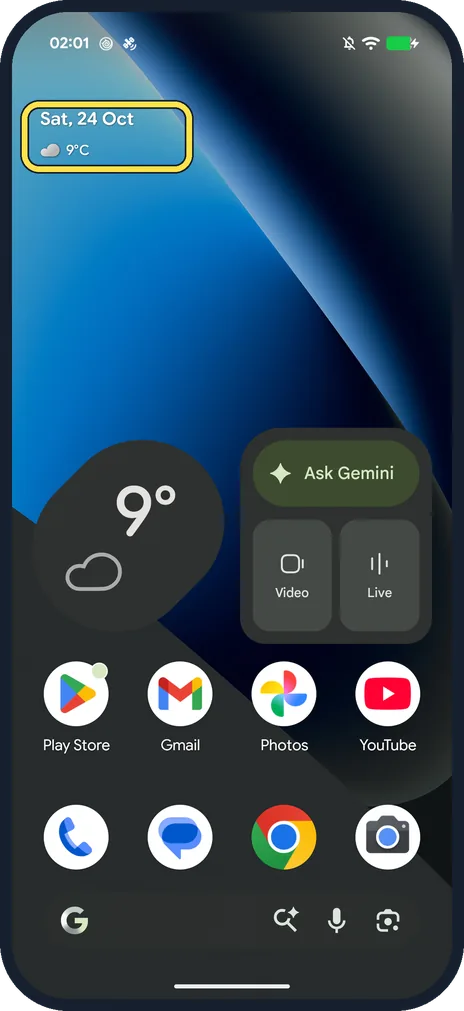
Touch and hold the date
On the home screen, touch and hold the date and weather at the top (Sat, 24 Oct and 9°C on ours).
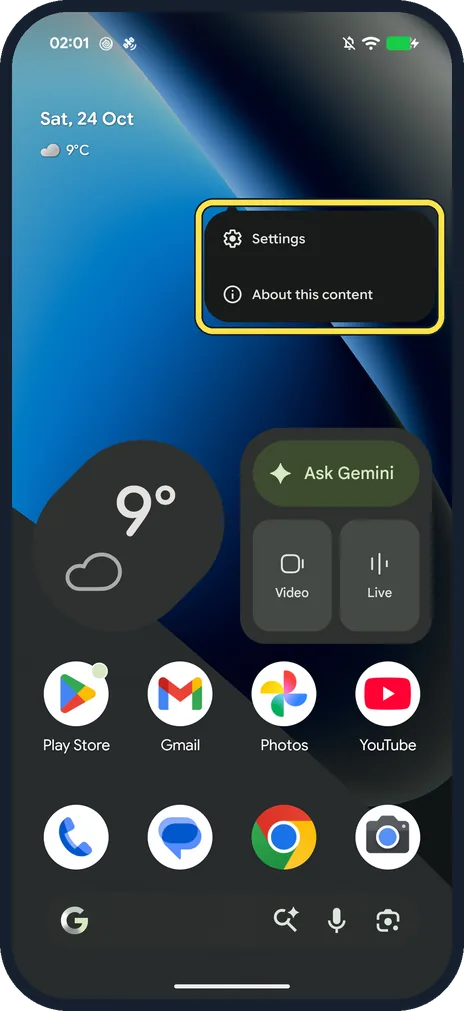
Tap Settings
A small menu opens with Settings and About this content. Tap Settings.
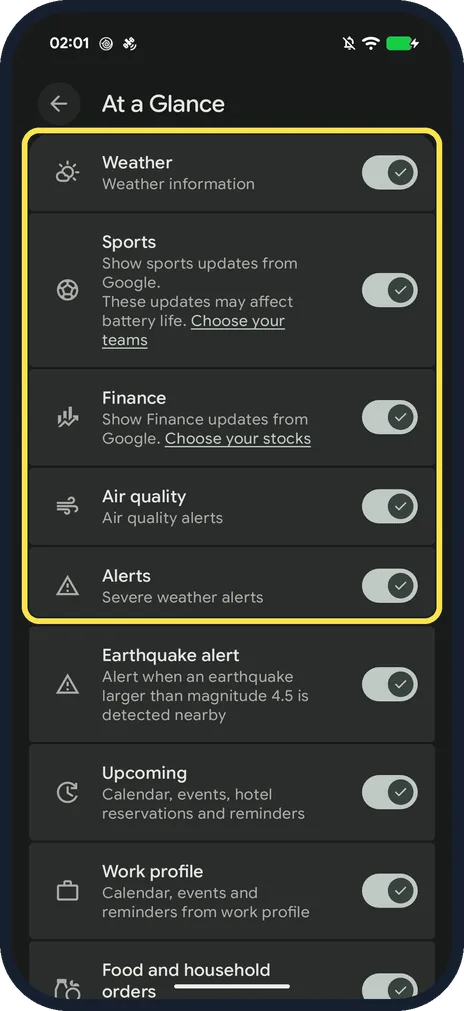
Turn topics on or off
Ours listed Weather, Sports, Finance, Air quality, Alerts, Earthquake alert, Upcoming, Work profile and Food and household orders. Sports and Finance have links to choose your teams and stocks.
If you do not see this option
- A topic isn't in your list? Google says some At a Glance features aren't available in all languages or countries. Ours, set to English, showed Earthquake alert, Work profile and Food and household orders (step 3); your list can be shorter. Source: Use At a Glance on your Pixel devices
- No date line at the top of your home screen? Google says Show on home screen controls whether At a Glance appears there; when it is off you still find it on the lock screen. If Use At a Glance is off, it won't show on the home screen at all. Both are in the same At a Glance settings. Source: Use At a Glance on your Pixel devices
- Want to turn it all off? Google says At a Glance is on by default and turning it off turns off all cards; the date still shows. Source: Use At a Glance on your Pixel devices
If this does not work
- No time-to-leave or earthquake alerts? Google says At a Glance needs your Web & App Activity for things like time-to-leave, and your location settings for alerts such as a nearby earthquake. Check both if those cards never appear. Source: Use At a Glance on your Pixel devices
- Sports updates draining the battery? The Sports row on ours warned these updates may affect battery life. Turn it off.
- Private events showing on the lock screen? See how to hide sensitive content on the lock screen.
About this guide
At a Glance is the date and weather line at the top of the Pixel home screen and lock screen. Its settings are hidden behind a long press.
The screenshots are from our Google Pixel 10a with Android 17, in Dark mode, taken on 24 October 2026. Every topic was on; we changed nothing.
Good to know
Add other widgets: how to add a widget to the home screen on a Google Pixel.
In short: Home screen, touch and hold the date, Settings, turn topics on or off.
Links checked in October 2026. Menus and features can change after software updates. These steps match the version named at the top.
Did this guide work for you?
Sorry about that. What happened?