GOOGLE PIXEL
How to change wireless emergency alert settings on a Google Pixel (Android 17)

In short
Open Settings, Notifications, Wireless emergency alerts. Allow alerts turns them on or off. Below are Extreme threats, Severe threats, AMBER alerts and Test alerts, then Vibration, Alert reminder and Always alert at full volume. Ours were on, except Test alerts and full volume.
3 of 3 steps show a real screenshot from our Pixel 10a. Each step was checked against the maker's own instructions, linked at the end.
Steps
- 1
Open Wireless emergency alerts
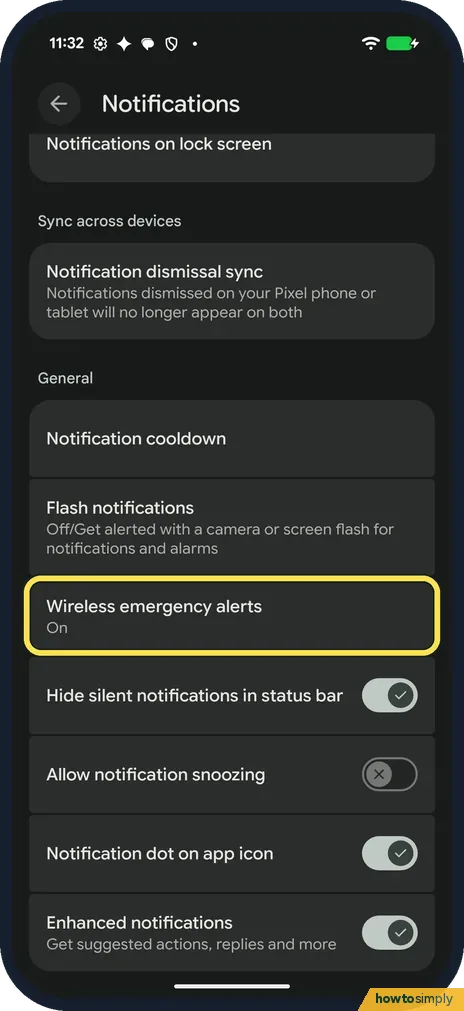
Open Settings and tap Notifications. Scroll to General: Wireless emergency alerts is below Flash notifications. Ours said On. Tap it.
- 2
Allow alerts and pick the alerts
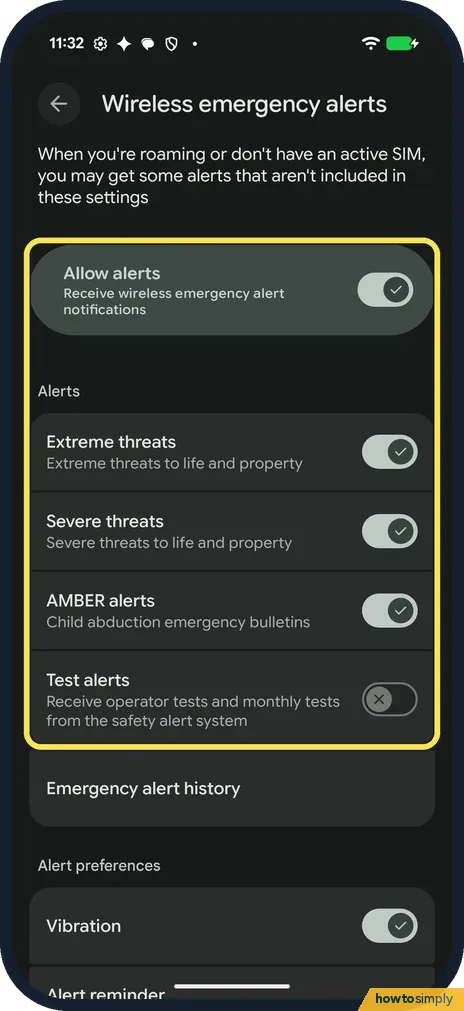
Allow alerts (Receive wireless emergency alert notifications) turns all of them on or off. Under Alerts, Extreme threats, Severe threats and AMBER alerts were on on ours, and Test alerts was off. Tap a switch to change it.
- 3
Set the alert preferences
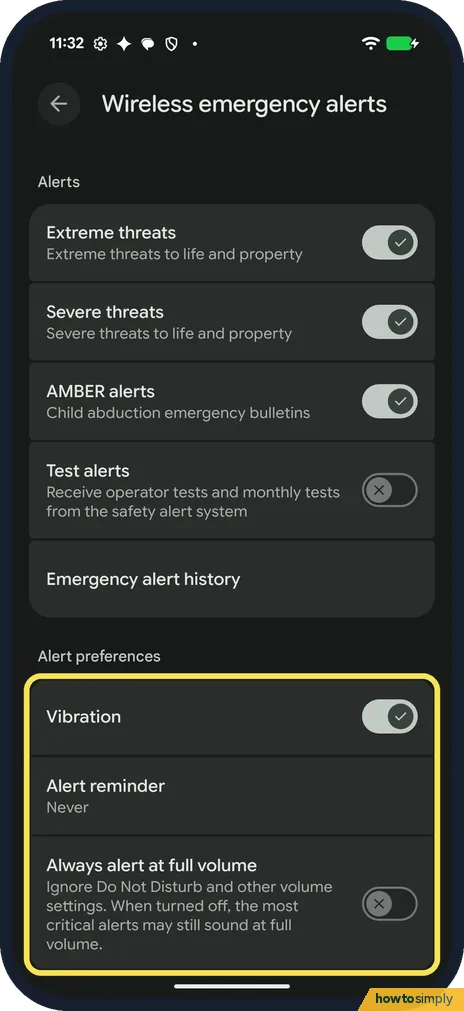
Scroll down past Emergency alert history. Under Alert preferences, Vibration was on, Alert reminder said Never and Always alert at full volume was off. That switch says it ignores Do Not Disturb and other volume settings.
If you do not see this option
- No Test alerts switch? Google's Android help says to turn on Developer options (tap Build number 7 times), then turn Test alerts on or off under Notifications, Wireless emergency alerts. Its Pixel help says some regions also have state and local tests. Sources: Get help in an emergency using your Android phone, Manage Wireless Emergency Alerts
- No Public safety messages? Google's Pixel help lists Extreme threats, Severe threats, AMBER Alerts and Public safety messages as common options. Our Pixel 10a with Android 17 showed only the first three and Test alerts. Source: Manage Wireless Emergency Alerts
- Alerts you didn't choose? The page on ours says that when you're roaming or don't have an active SIM, you may get some alerts that aren't included in these settings.
If this does not work
- Alert sounded in Do Not Disturb? Always alert at full volume was off on ours. Its line says that when turned off, the most critical alerts may still sound at full volume. See Do Not Disturb on a Pixel.
- Alert sound keeps repeating? Tap Alert reminder. Google says the reminder can sound once, every 2 minutes, every 15 minutes or not at all. Ours said Never.
- Can't turn an alert off? Google says that in some countries, like the United States, you can't turn off certain national alerts, such as presidential announcements.
- Missed an alert and want to reread it? Google says you can find past alerts on the same Wireless emergency alerts page. On ours, Emergency alert history sits just above Alert preferences.
Good to know
Google says wireless emergency alerts always show up on top of any other screen. For Emergency SOS, Car Crash Detection and the rest of the page: Emergency SOS and safety settings on a Pixel.
Developer options: how to turn them on. Other Android phones: Emergency SOS on Android. On a Xiaomi: emergency alerts on a Xiaomi phone.
Changing these switches only affects which alerts sound and how loudly; it does not change your other notifications, calls or Do Not Disturb. Google says these alerts appear on top of any other screen and take priority over earthquake alerts and app notifications, so expect them to interrupt whatever you are doing. To undo a change, switch the alert back on; nothing is lost in between.
About this guide
- Device
- Android
- Shown on
- Google Pixel 10a, Android 17 (build CP3A.261005.005)
- App
- Settings
- Path
- Settings › Notifications › Wireless emergency alerts: Allow alerts
- Real screenshots
- 3 of 3 steps
- What we did
- Observed: looked at each screen, changed nothing
- Checked
- October 2026
- Sources
- 2 official, linked below
Sources
Links checked October 2026. Menus and features can change with updates.Spotted a mistake? Menus change with updates, and we want every step to match your screen. Email us about this page or use the contact form. We read every report, and fixes are listed on What changed.
Liked this guide?
Follow us for new guides and short how-to videos.
Did this guide work for you?
Sorry about that. What happened?