GOOGLE PIXEL
How to change home screen and search settings on a Google Pixel (Android 17)
Press and hold an empty part of the home screen and tap Home settings. Here you set notification dots, At a Glance, new app icons and swipe to Google. Apps list settings, then Pixel search settings, controls what the search bar shows, such as Web search.

4 of 4 steps show a real screenshot from our Pixel 10a. Each step was checked against the maker's own instructions, linked at the end.
Steps
- 1
Open Home settings
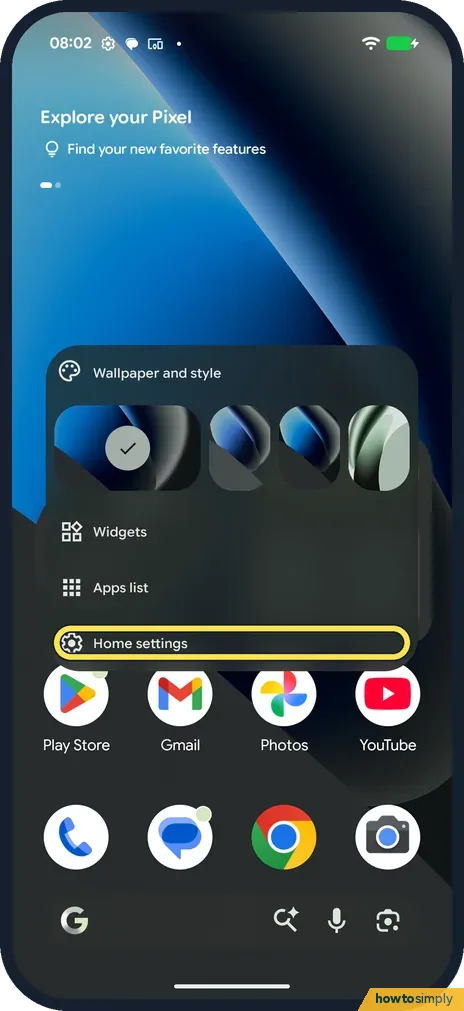
Press and hold an empty part of the home screen. The menu has Wallpaper and style, Widgets, Apps list and Home settings. Tap Home settings.
- 2
Change home screen options
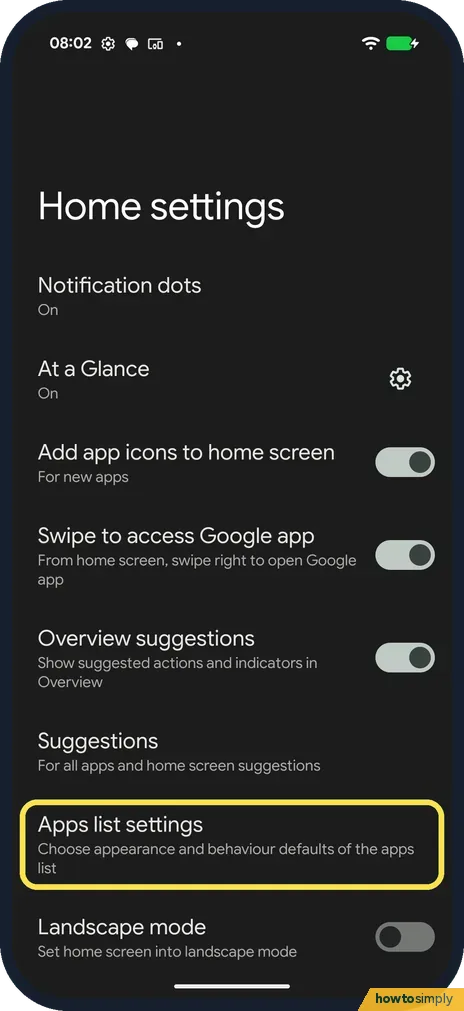
On ours Notification dots, At a Glance, Add app icons to home screen, Swipe to access Google app and Overview suggestions were on. Tap Apps list settings.
- 3
Open Pixel search settings
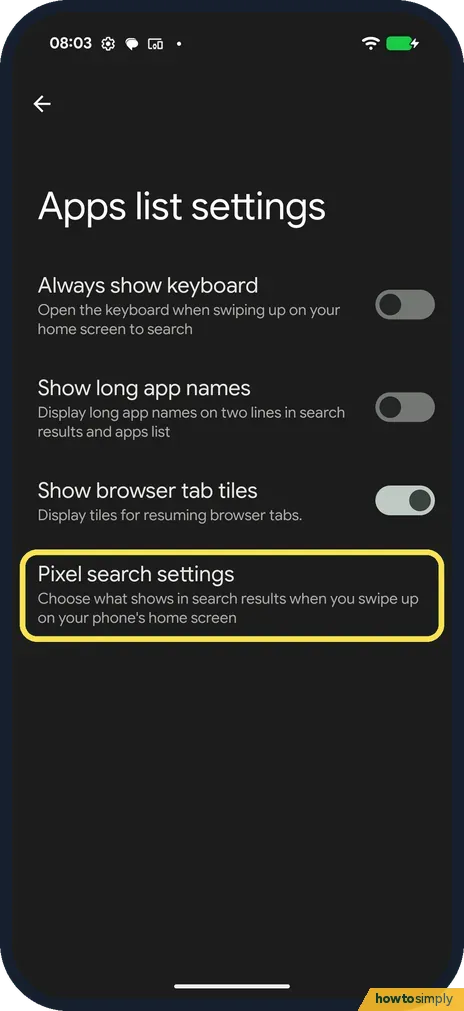
Apps list settings has Always show keyboard (off on ours), Show long app names and Show browser tab tiles. Tap Pixel search settings.
- 4
Change what search shows
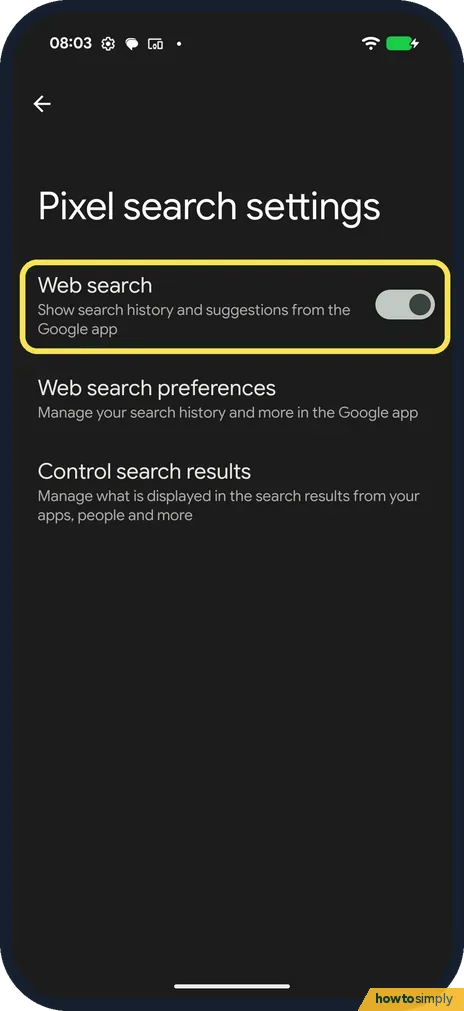
Web search was on: it shows search history and suggestions from the Google app. Control search results decides which apps, people and more appear.
If you do not see this option
- No Home settings in the menu? Press and hold an empty space, not an app icon.
- New apps not on the home screen? Add app icons to home screen must be on. Source: Add apps, shortcuts and widgets to your Home screens
- Want bigger or smaller icons? Google says the number of apps per row is set in Wallpaper and style: swipe to the Home screen, tap Layout, choose an icon size and tap Apply. It is not in Home settings. Source: Add apps, shortcuts & widgets to your Home screens
If this does not work
- Keyboard pops up when you swipe up? Turn off Always show keyboard in Apps list settings.
- Search shows web results you don't want? Turn off Web search in Pixel search settings.
- At a Glance shows the wrong things? Google says to touch and hold the At a Glance section, then pick the customize option to choose what appears. Google also says it can't be moved on Pixel phones.
- An unwanted app keeps being suggested? Google says to drag the suggested app to Don't suggest app. Suggestions have a coloured shadow around the icon, which tells them apart from apps you placed yourself.
- Search bar looks wrong? Google says to touch and hold the search bar and tap Widget settings to choose its theme and shortcuts.
Good to know
Change your home app: how to change default apps.
These settings only change how the launcher looks and searches. Your apps and their data stay as they are, and every switch can be turned back on from the same page. Turning off Add app icons to home screen means new apps only appear in the apps list, so you will need to drag them out yourself if you want them on a Home screen.
With Web search off, the search bar in the apps list stops showing history and suggestions from the Google app. It does not delete any search history saved in your Google Account.
To place apps where you want them, see how to move or remove an app from the Home screen.
About this guide
- Device
- Android
- Shown on
- Google Pixel 10a, Android 17 (build CP3A.260905.009)
- App
- Home screen
- Path
- Home screen › Home settings › Apps list settings › Pixel search settings
- Real screenshots
- 4 of 4 steps
- What we did
- Observed: looked at each screen, changed nothing
- Checked
- October 2026
- Sources
- 1 official, linked below
Sources
Links checked October 2026. Menus and features can change with updates.Spotted a mistake? Menus change with updates, and we want every step to match your screen. Email us about this page or use the contact form. We read every report, and fixes are listed on What changed.
Liked this guide?
Follow us for new guides and short how-to videos.
Did this guide work for you?
Sorry about that. What happened?