
howtosimply.com/guides/samsung-galaxy-mobile-data-not-working-7-fixes/ · Checked October 2026 · Samsung Galaxy A57 (One UI 9, Android 17 (build A576BXXU6BZIE)) and Samsung Galaxy A57 5G (One UI 8.5, Android 16)
In this guide
Swipe down from the top and check that Mobile data is on and Airplane mode is off. Then check Settings, Connections, Data usage, Mobile data, and Data roaming if you are abroad. Restart, then reset the mobile network settings under General management, Reset. Still failing? Ask your carrier.
7 of 7 steps with real screenshots · 1 official source below
- Device
- Android
- Shown on
- Samsung Galaxy A57 (SM-A576B), One UI 9, Android 17 (build A576BXXU6BZIE), Samsung Galaxy A57 5G (SM-A576B), One UI 8.5, Android 16
- Starts in
- Quick Settings
- Real screenshots
- 7 of 7 steps
- Our phone
- Shown on Galaxy A57, One UI 8.5
- Checked
- October 2026
- Sources
- 1 official, linked below
Step by step
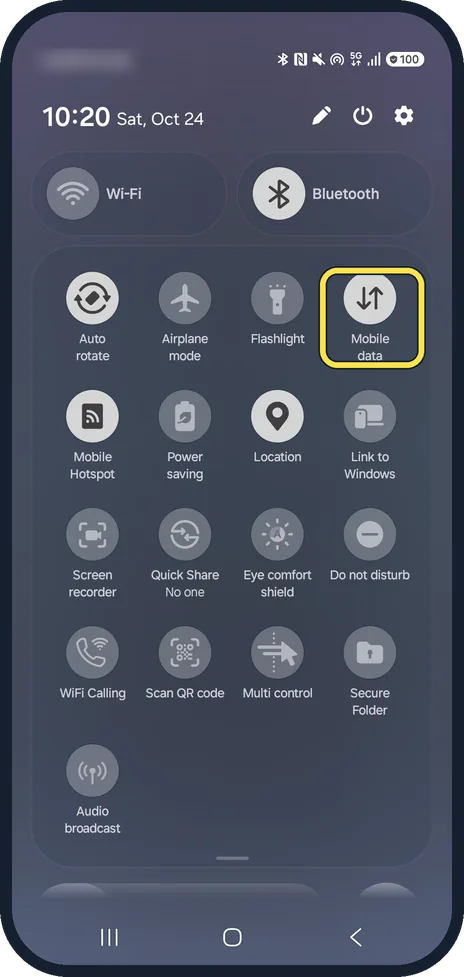
Check Mobile data in the quick panel
Swipe down from the top of the screen and check that Mobile data is on. While you are there, make sure Airplane mode is off.
In our quick panel Airplane mode and Mobile data are tiles in the same row.
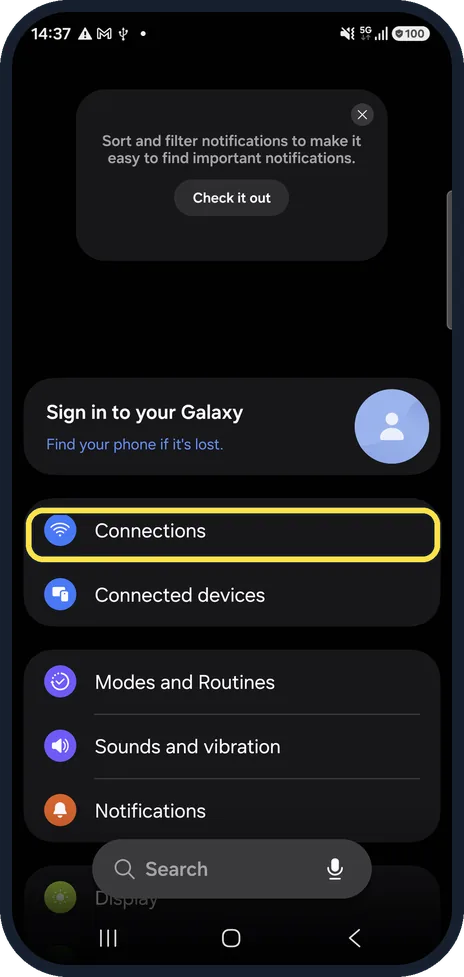
Open Connections
Open Settings and tap Connections.
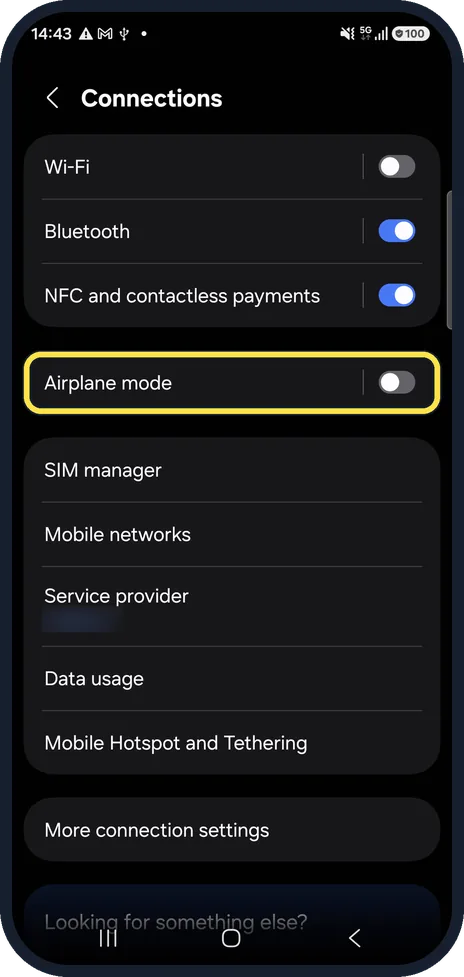
Check Airplane mode
Airplane mode must be off, or the phone has no mobile connection at all.
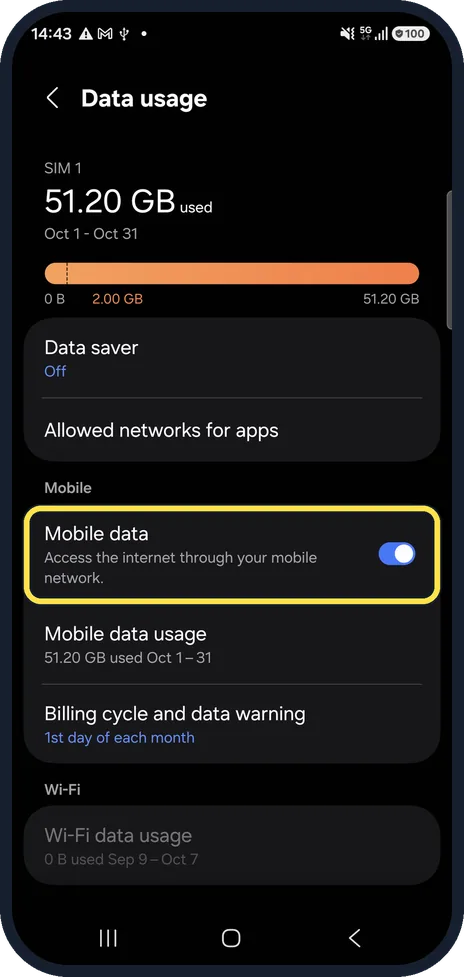
Check the Mobile data switch and limits
Tap Data usage. The Mobile data switch must be on. Data saver and Billing cycle and data warning, on the same page, show whether you have limited data use. Data saver read Off on our phone.
Abroad? Check Data roaming
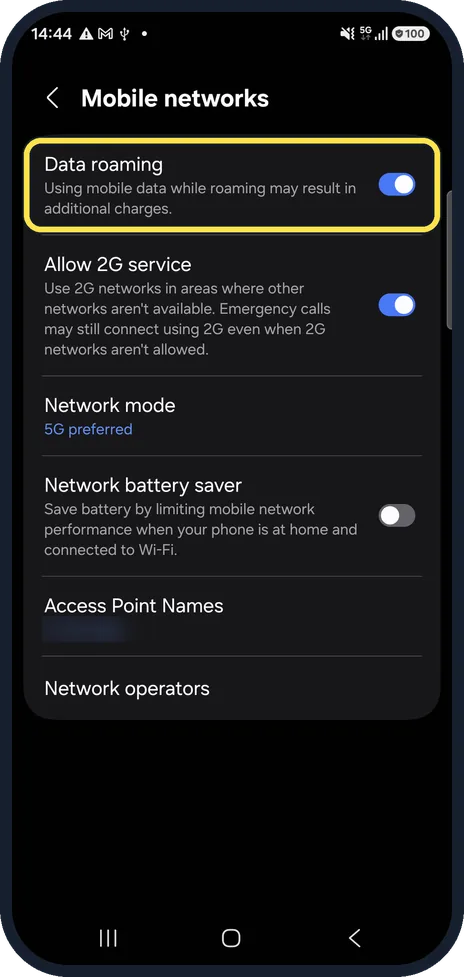
Back in Connections, tap Mobile networks. Outside your home country, mobile data only works with Data roaming switched on. Roaming can cost extra; check your tariff first.
Restart the phone
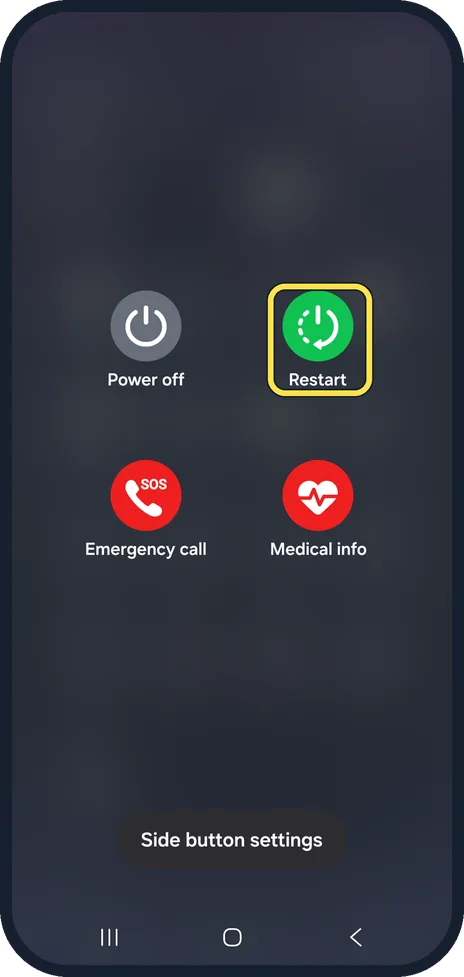
Hold the Side key and the Volume down key together. Ours showed Power off, Restart, Emergency call and Medical info: tap Restart. A restart re-registers the phone on the network.
Reset mobile network settings
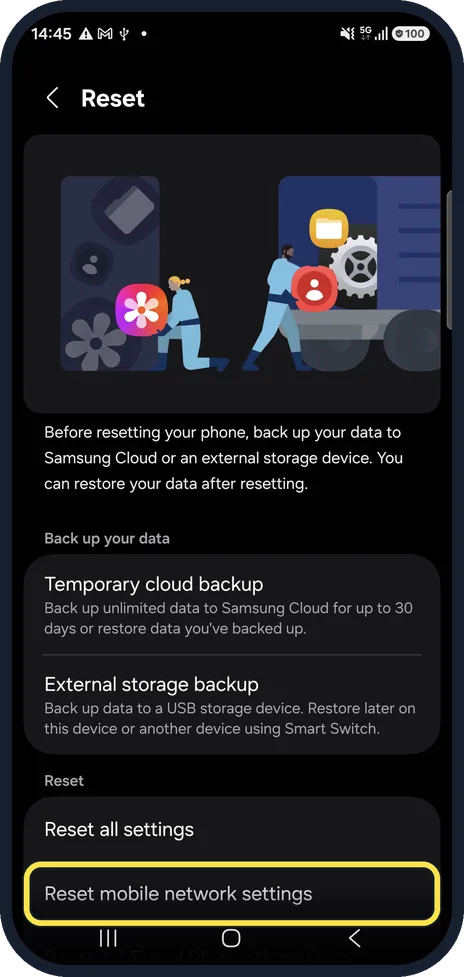
Open Settings, General management, Reset and tap Reset mobile network settings. It restores the mobile network options to their defaults; apps and files stay. On the confirmation screen tap Reset settings.
If this does not work
- You recently changed carrier Samsung says that if you kept the same phone, the new carrier may need to reset it for its network. Contact them. Source: Why is mobile data not working on my Samsung phone
- The phone is frozen or very slow to respond Samsung says to force restart: hold Volume down and the Side key together until the screen turns off, then hold them again until the Samsung logo appears. Your data stays. Source: Why is mobile data not working on my Samsung phone
About this guide
When Wi-Fi works but mobile data does not, the cause is usually a switch, a data limit or a network setting rather than a broken phone. Work through these in order.
Steps 1 and 6 are from the same phone after its One UI 9 update (Android 17).
Good to know
Older Samsung pages call this option Reset network settings. On One UI 8.5 it is split into Reset mobile network settings and Reset Wi-Fi and Bluetooth settings.
If none of this works, the problem may be coverage, your plan or the SIM: contact your carrier.
Battery worries after turning things off and on: Samsung Galaxy battery draining fast? 6 fixes.
In short: Quick panel: Mobile data on, Airplane mode off. Settings, Connections, Data usage and Mobile networks (roaming). Restart. General management, Reset, Reset mobile network settings. Then your carrier.
Links checked in October 2026. Menus and features can change after software updates. These steps match the version named at the top.
📷 See real photos from the Galaxy A57 in our Camera Lab, next to 10 other phones.
Did this guide work for you?
Sorry about that. What happened?