GOOGLE PIXEL
How to reset network settings on a Google Pixel (Android 17)

In short
Go to Settings, System, Reset options. Pick Reset mobile network settings for SIM and mobile data problems, or Reset Bluetooth and Wi-Fi for Wi-Fi and Bluetooth problems. They are two separate resets on Android 17. Neither erases your apps or photos.
4 of 4 steps show a real screenshot from our Pixel 10a. Each step was checked against the maker's own instructions, linked at the end.
Steps
- 1
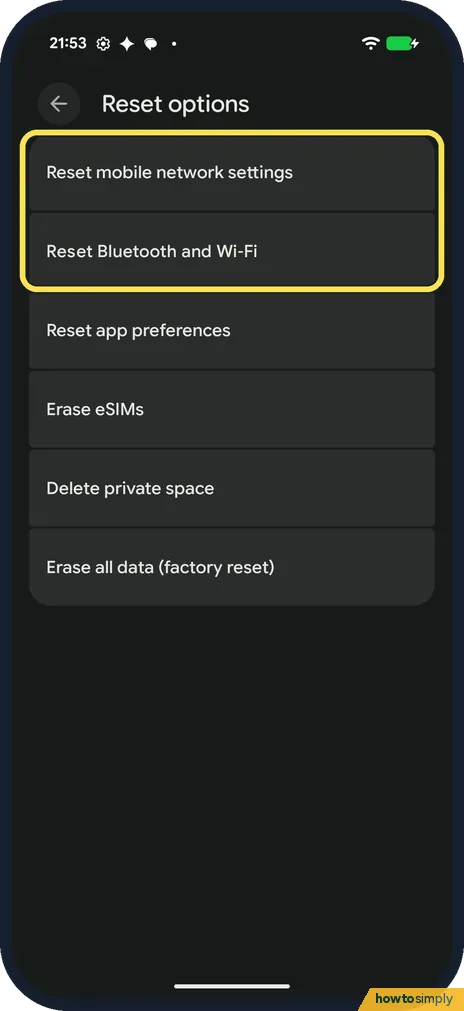
Open Reset options
Open Settings, tap System, then Reset options. The first two rows are the network resets.
- 2
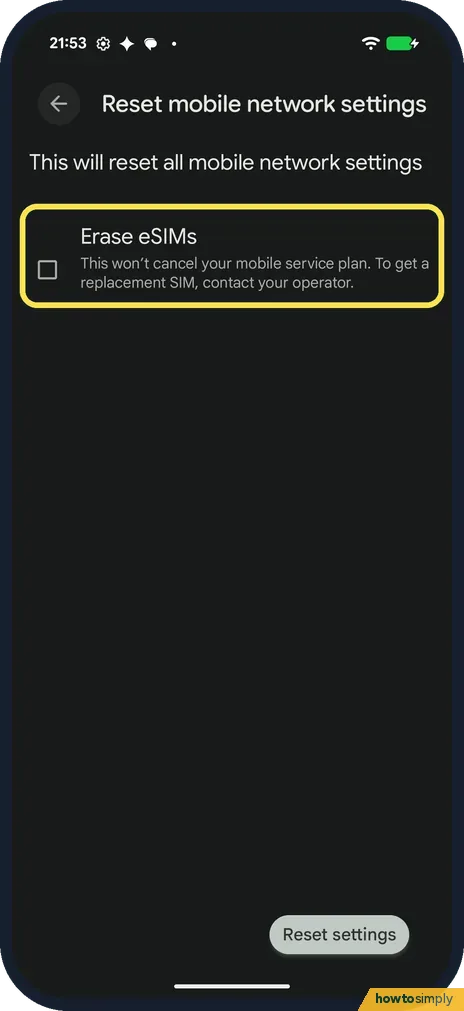
Mobile network: leave Erase eSIMs unticked
Tap Reset mobile network settings. Leave Erase eSIMs unticked unless you mean to remove your eSIM; the page says that won't cancel your plan, but you need your operator to get it back.
- 3
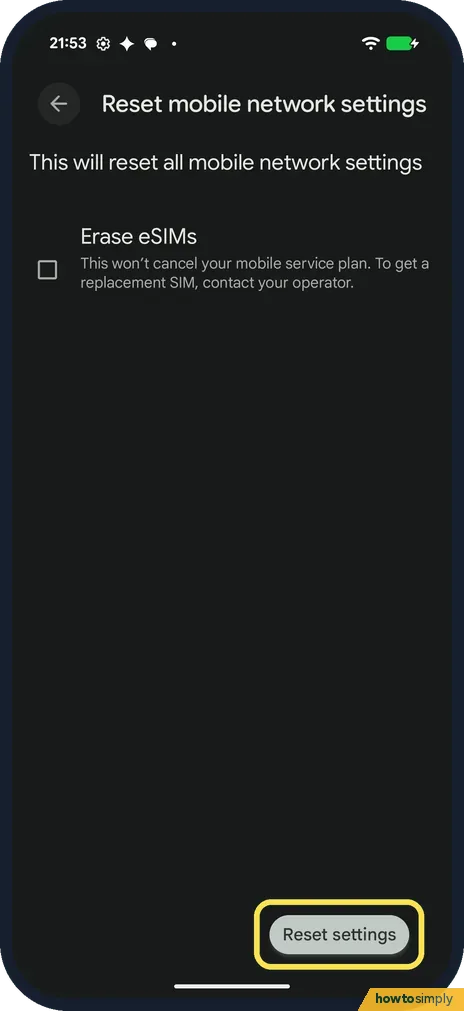
Tap Reset settings
Tap Reset settings at the bottom. We stopped here.
- 4
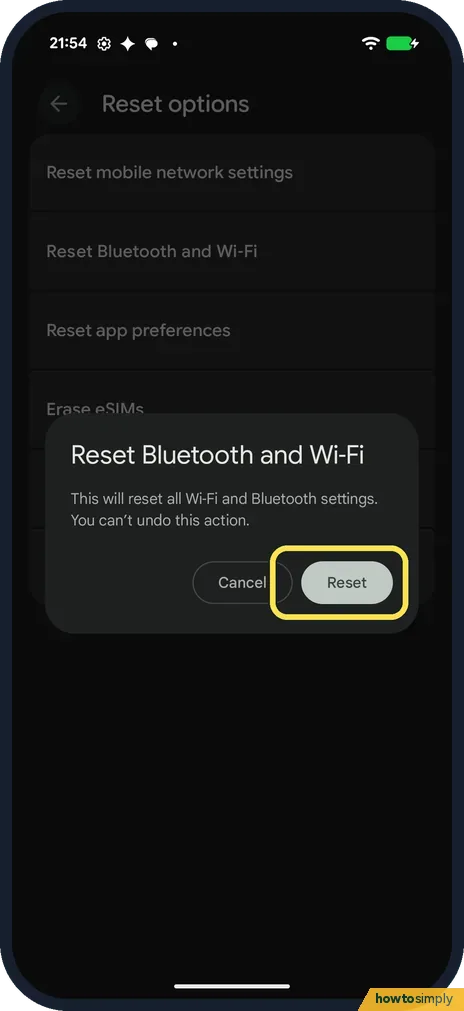
Bluetooth and Wi-Fi: tap Reset
Back in Reset options, tap Reset Bluetooth and Wi-Fi. The box says it resets all Wi-Fi and Bluetooth settings and can't be undone. Tap Reset; we tapped Cancel.
If you do not see this option
- Asked to tap Reset settings twice? EE's step-by-step for the Pixel 9 shows Reset settings on two screens in a row for the mobile network reset; the second one is the final confirmation. We stopped at the first. Source: Google Pixel 9 (Android 14) resetting network settings
- Set up an APN by hand? EE's guide for the Pixel 9 says Reset mobile network settings deletes any APN connections you created, so note them first. Wi-Fi passwords and Bluetooth pairings go with the other reset. Source: Google Pixel 9 (Android 14) resetting network settings
- Erase eSIMs and Delete private space? They are also in Reset options, but they remove things for good. They are not network resets.
If this does not work
- Wi-Fi asks for the password again? That is expected: EE says the reset deletes saved Wi-Fi connections and passwords. Join your network again. Still dropping? See Pixel Wi-Fi keeps disconnecting.
- No mobile data after the reset? If your operator gave you APN settings to type in, enter them again, since the reset deletes APNs you created. Then see Pixel mobile data not working.
- Bluetooth devices gone? That is expected. Pair them again in Bluetooth settings.
- Wi-Fi still fails after the reset? Google's Pixel Wi-Fi help suggests starting in safe mode. Google says aeroplane mode turns on by itself there, so turn it off and try the network again. If Wi-Fi works in safe mode, a downloaded app is the likely cause; restart to leave safe mode. See how to start a Pixel in safe mode.
- Only one Wi-Fi network fails? Then the router is the more likely problem than the phone. Google suggests unplugging the router, waiting 30 seconds with the lights off, then plugging it back in.
Good to know
Erase all data (factory reset) is the last row of the same page and wipes the phone: how to factory reset a Google Pixel.
Afterwards, the phone behaves as if it had never seen your networks or accessories. You rejoin each Wi-Fi network and pair each Bluetooth device again; there is no undo, because the confirmation box says the reset can't be undone. Apps, photos, messages and accounts are not touched. Another Android phone already on your network can give you the password quickly: sharing a Wi-Fi password.
About this guide
- Device
- Android
- Shown on
- Google Pixel 10a, Android 17 (build CP3A.261005.005)
- App
- Settings
- Path
- Settings › System
- Real screenshots
- 4 of 4 steps
- Checked
- October 2026
- Sources
- 3 official, linked below
Sources
Links checked October 2026. Menus and features can change with updates.Spotted a mistake? Menus change with updates, and we want every step to match your screen. Email us about this page or use the contact form. We read every report, and fixes are listed on What changed.
Liked this guide?
Follow us for new guides and short how-to videos.
Did this guide work for you?
Sorry about that. What happened?