
What changed: every step re-shot on our own Galaxy S26 (Korean model SM-S942N) on One UI 9, dark mode, with the steps rewritten for the One UI 9 screens.
howtosimply.com/guides/samsung-galaxy-battery-draining-fast-6-fixes/ · Checked October 2026 · SM-S942N, Korean model), One UI 9, Android 17 (build S942NKSS4BZIG · Samsung Galaxy S26
In this guide
- See what is using the battery
- Read Usage by apps and features
- Open Background usage limits
- Put unused apps to sleep
- Add apps to Sleeping or Deep sleeping
- Open Device care
- Clean memory
- Lower the brightness
- Shorten the screen timeout
- Turn on Power saving
- Uninstall the app that drains
- If it only shows Disable
- If you do not see this option
- If this does not work
- Good to know
- Video demo
- Sources
Open Settings, Battery and see which apps used the most. Then put unused apps to sleep under Background usage limits, clean memory in Device care, turn on Power saving, and uninstall an app that drains far more than the rest. One UI 9 has no Optimize now button.
12 of 12 steps with real screenshots · 2 official sources below
- Device
- Android
- Shown on
- Samsung Galaxy S26 (SM-S942N, Korean model), One UI 9, Android 17 (build S942NKSS4BZIG)
- App
- Settings
- Path
- Settings › Battery: check usage
- Real screenshots
- 12 of 12 steps
- Checked
- October 2026
- Sources
- 2 official, linked below
Step by step
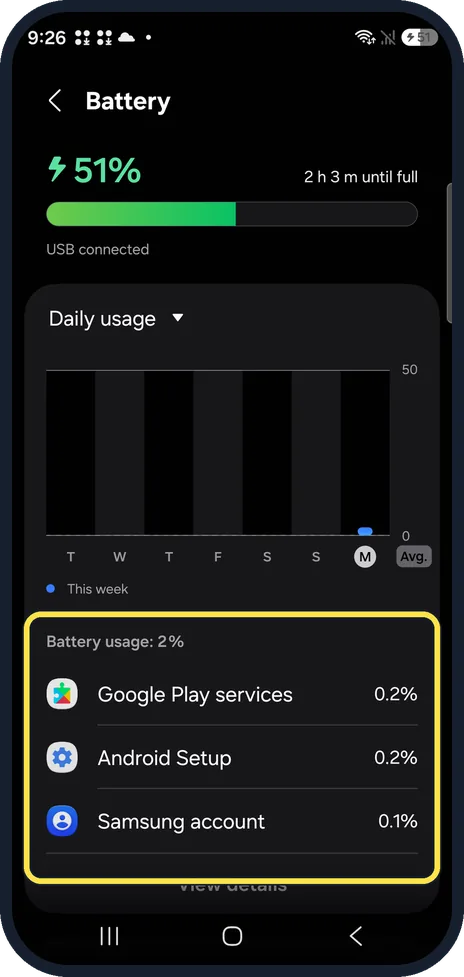
See what is using the battery
Open Settings, Battery. The graph shows daily use this week and the list below shows each app. Ours read Battery usage: 2%, with Google Play services at the top. Tap View details for more.
Watch these steps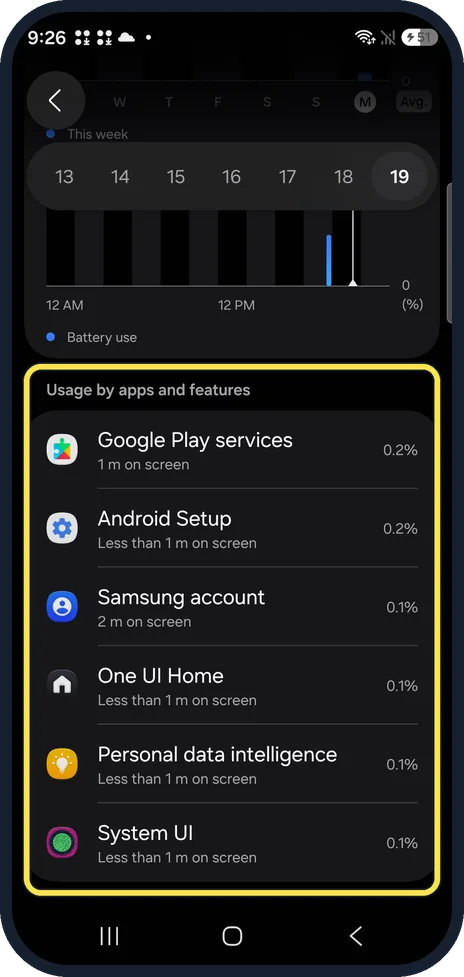
Read Usage by apps and features
View details opens Battery activity. Pick a day at the top; Usage by apps and features lists each app with its screen time.
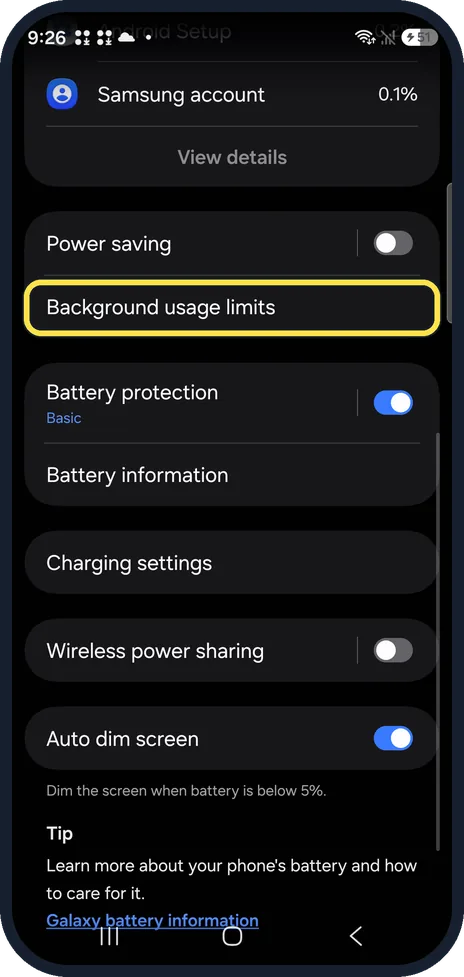
Open Background usage limits
Back on the Battery page, below Power saving, tap Background usage limits.
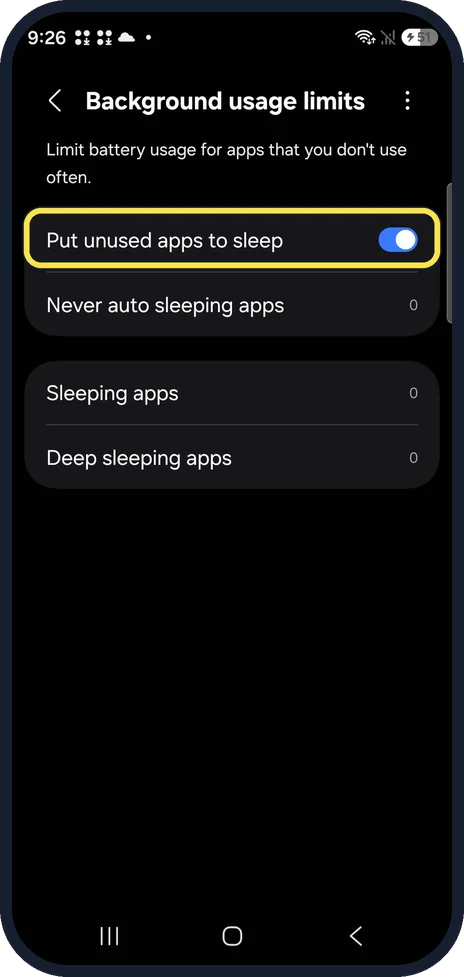
Put unused apps to sleep
Turn on Put unused apps to sleep. It was on on ours. Apps you have not used for a while are then limited in the background.
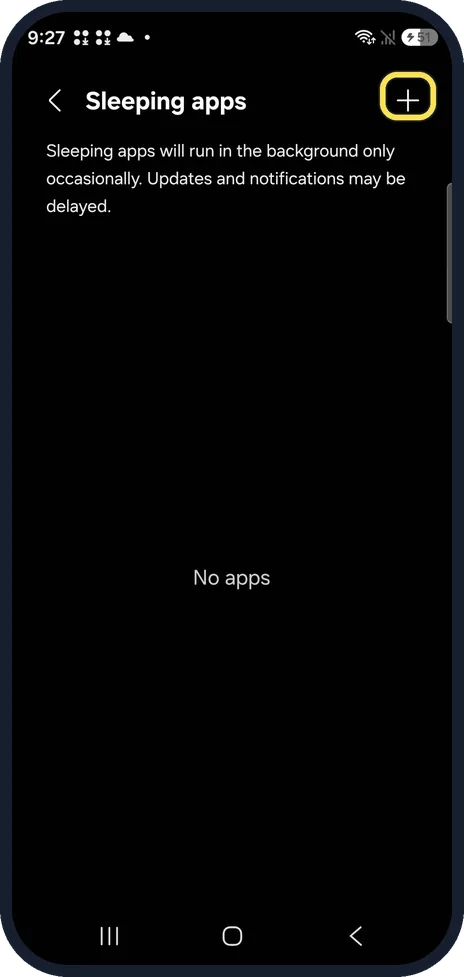
Add apps to Sleeping or Deep sleeping
Tap Sleeping apps or Deep sleeping apps, then + at the top right, and add apps you rarely open. Both lists were empty on ours. Never auto sleeping apps is for apps that must stay awake, such as a messenger.
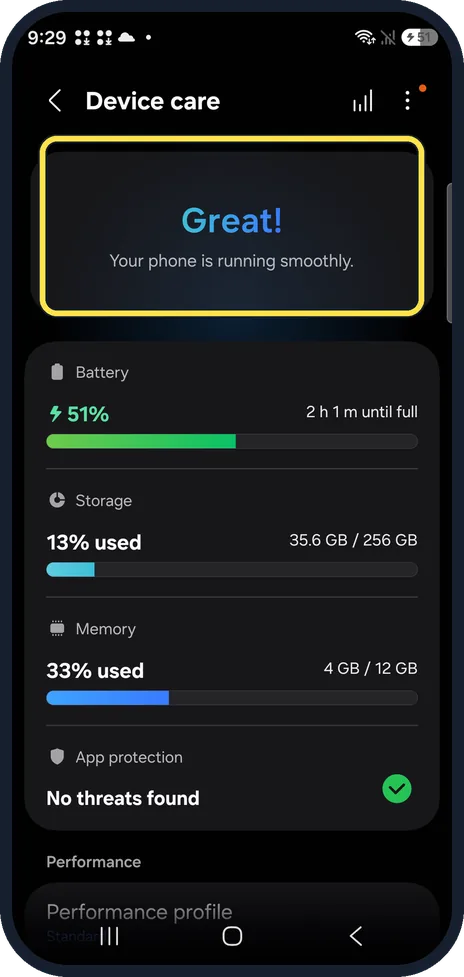
Open Device care
Open Settings, Device care. On One UI 9 the top card just says Great! Your phone is running smoothly; there is no Optimize now button.
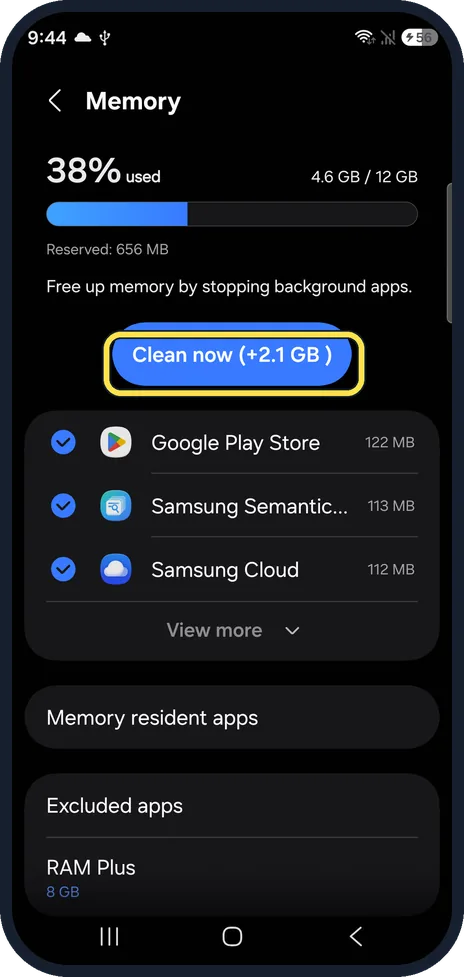
Clean memory
Tap Memory, then Clean now. On ours it offered +2.1 GB.
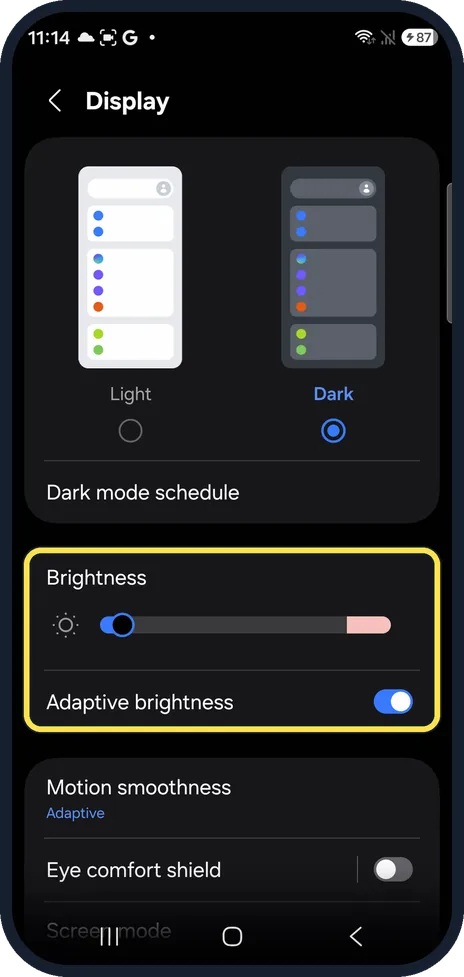
Lower the brightness
Open Settings, Display and drag the Brightness slider to the left. Adaptive brightness, just below, was on on ours; leave it on so the phone dims itself in the dark.
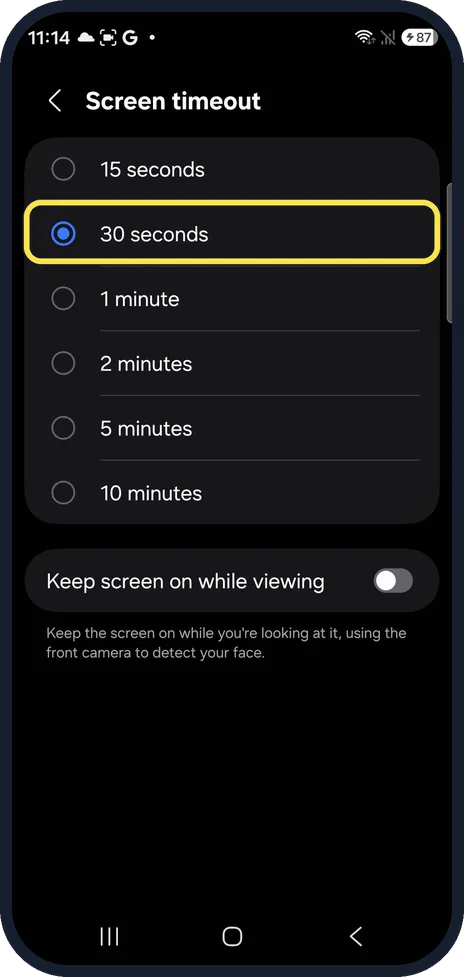
Shorten the screen timeout
Further down Display, tap Screen timeout. Ours was set to 30 seconds; Samsung suggests 1 minute or less to save battery.
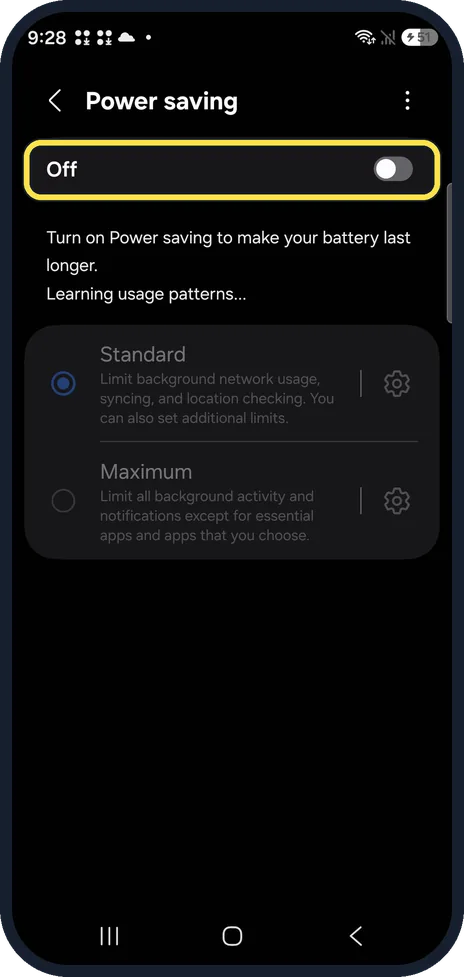
Turn on Power saving
Settings, Battery, Power saving, then the switch at the top; ours showed Off. Standard limits background network use, syncing and location checks; Maximum limits everything except the apps you choose.
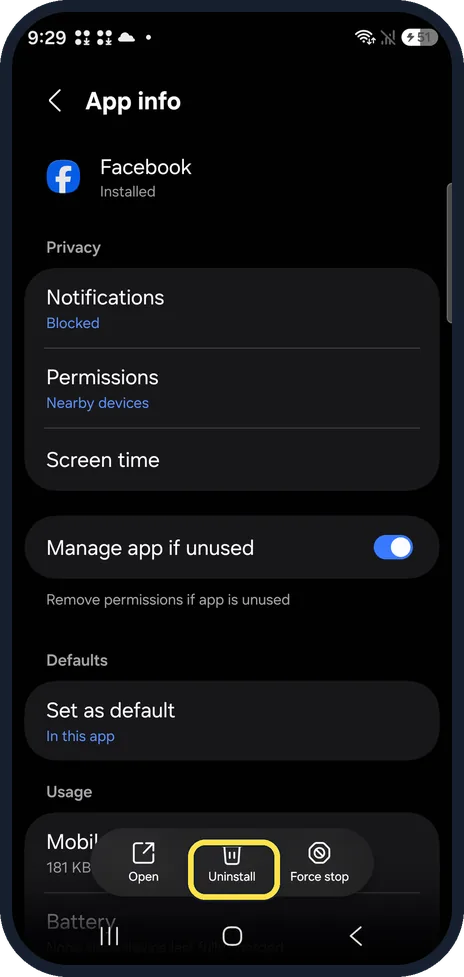
Uninstall the app that drains
If one app uses far more battery than the rest, open Settings, Apps, the app, and tap Uninstall at the bottom.
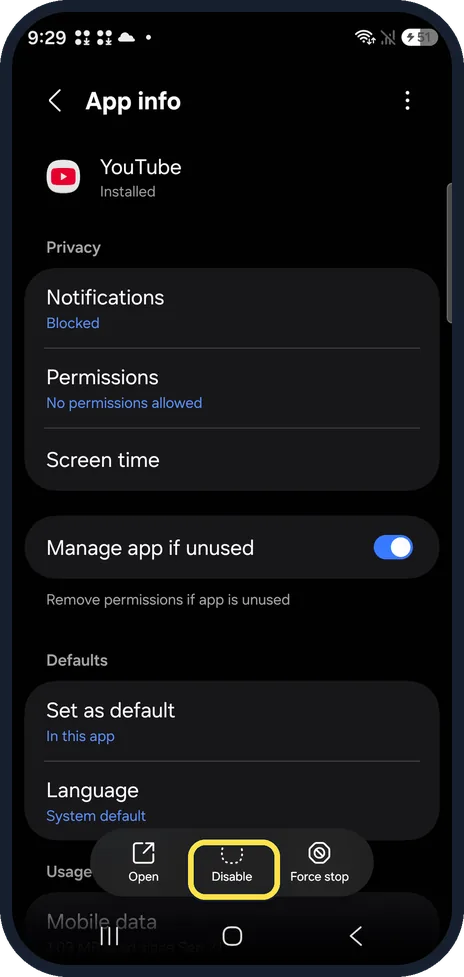
If it only shows Disable
Apps that came with the phone cannot be uninstalled. On ours, YouTube showed Open, Disable and Force stop; tap Disable to switch it off instead.
What changed: every step re-shot on our own Galaxy S26 (Korean model SM-S942N) on One UI 9, dark mode, with the steps rewritten for the One UI 9 screens.
Watch these steps
If you do not see this option
- No Device care in Settings? Tap Search in Settings and type Device care.
- Looking for Optimize now? One UI 9 has no Optimize now button on the Device care page (step 6). Use Memory, Clean now instead.
If this does not work
- Messages arrive late after you put apps to sleep Add the messaging app to Never auto sleeping apps under Background usage limits.
- The battery still drains fast Open Samsung Members, Support, Phone diagnostics and run the Battery status test. On ours it reported Normal, Life: Good.
About this guide
A Galaxy that used to last all day and now does not usually has one app working in the background, or a radio that searches all the time. These fixes follow the order of Samsung's own advice, quickest first.
The screenshots are from our Samsung Galaxy S26, the Korean model SM-S942N, with One UI 9 and Android 17 (build S942NKSS4BZIG), in Dark mode. Menus can differ on models sold in other regions. We cleaned memory once and changed no settings.
Good to know
Turn off Wi-Fi, Bluetooth or location in the quick panel when you are not using them.
To make the battery last longer over the years: how to limit charging to 80% on a Samsung Galaxy phone. Quick help for today: how to turn on Power saving on a Samsung Galaxy phone.
In short: Settings, Battery: check usage, Background usage limits (sleep unused apps), Power saving. Device care, Memory, Clean now. Uninstall the app that drains.
- Samsung HK: What to do when your Samsung Galaxy device battery drains faster
- Samsung CA: Use Power saving mode on your Samsung Galaxy
Links checked in October 2026. Menus and features can change after software updates. These steps match the version named at the top.
📷 See real photos from the Galaxy S26 in our Camera Lab, next to 10 other phones.
Did this guide work for you?
Sorry about that. What happened?