XIAOMI REDMI
How to stop an app using mobile data or Wi-Fi on a Xiaomi phone (HyperOS 3)

In short
Open Settings, Apps and tap the app. Tap Network access. Under Manage network connection, turn off Mobile data, Wi-Fi or Background data for that app only. All three were on on ours.
3 of 3 steps show a real screenshot from our Redmi Note 15 Pro 5G. Each step was checked against the maker's own instructions, linked at the end.
Steps
- 1
Find the app
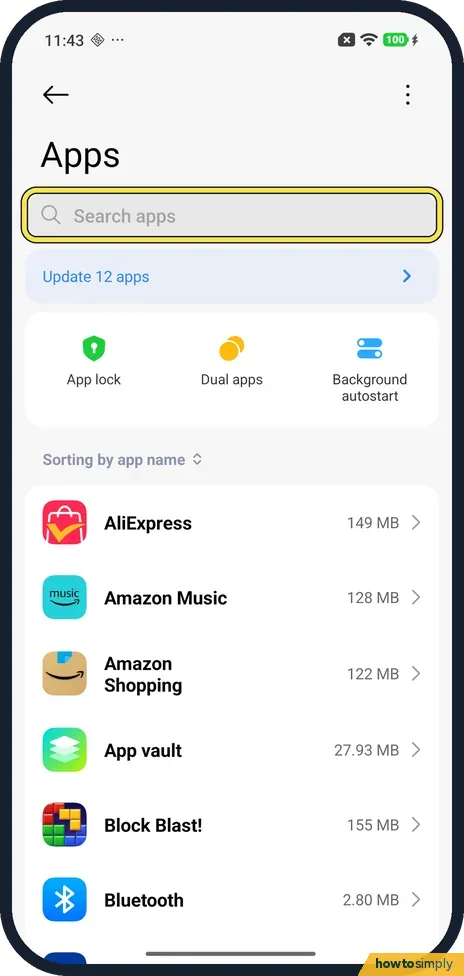
Open Settings and tap Apps. The app list is on the same page, below App lock, Dual apps and Background autostart. Type the app's name in Search apps, or scroll to it, and tap it.
- 2
Tap Network access
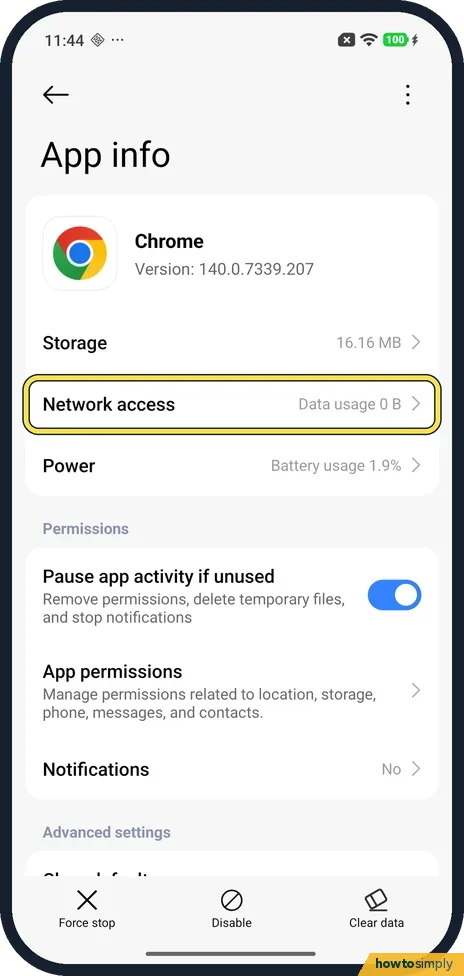
App info opens. Network access is the second row, between Storage and Power. Ours said Data usage 0 B. Tap it.
- 3
Turn off what you want to block
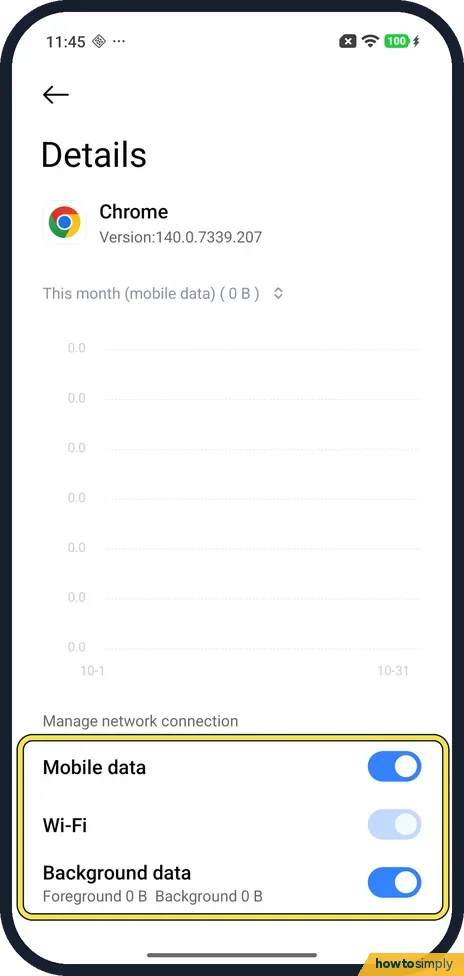
The Details page shows This month (mobile data) with a chart. Below, under Manage network connection, are three switches: Mobile data, Wi-Fi and Background data (Foreground 0 B, Background 0 B on ours). Turn off the one you want to block for this app.
If you do not see this option
- No Network access row? On our Redmi it is on the app's App info page, between Storage and Power. Xiaomi's guide gives Settings, Apps for managing apps but has no steps for this page. Source: Generic User Guide for HyperOS 3.0
- Expected a pop-up to choose from? Ours had none. The page has a switch for each of Mobile data, Wi-Fi and Background data, so there is nothing to confirm or cancel.
- Wi-Fi switch looks pale? On ours the Wi-Fi switch was on but drawn paler than the other two. We didn't tap it, so we can't say whether it can be turned off there.
If this does not work
- App says no connection? Check its Network access page: Mobile data or Wi-Fi may be off for that app alone. Turn the switch back on. For the whole phone: Xiaomi mobile data not working.
- App doesn't update until you open it? Background data may be off for it. Turn it back on, then check the app may run in the background: Xiaomi closing apps in the background.
- Chart shows 0 B? Ours did: the phone has no SIM, so This month (mobile data) read 0 B and the chart stayed flat. Network access on App info said Data usage 0 B too.
- Blocked app still uses data? Turning off Background data still lets the app use data while it is open, and turning off Mobile data still leaves Wi-Fi allowed.
Good to know
These switches act on one app only. To stop an app running right now, force stop it.
Xiaomi's guide lists Data usage among the Security app's tools, to manage your data plan.
A blocked app keeps its data and settings, and nothing is deleted. It simply cannot connect over the switch you turned off, so feeds stop refreshing, downloads stall and some apps show an offline message. With Background data off, the app may also send fewer notifications, because it can only check for new items while you have it open. To undo it, turn the switch back on; the change applies straight away. To limit all apps at once on mobile data, see how to turn on Data Saver.
About this guide
- Device
- Android
- Shown on
- Xiaomi Redmi Note 15 Pro 5G (25080RABDG), HyperOS 3.0.308.0, Android 16
- App
- Settings
- Path
- Settings › Apps › Network access
- Real screenshots
- 3 of 3 steps
- What we did
- Observed: looked at each screen, changed nothing
- Checked
- October 2026
- Sources
- 1 official, linked below
Sources
Links checked October 2026. Menus and features can change with updates.Spotted a mistake? Menus change with updates, and we want every step to match your screen. Email us about this page or use the contact form. We read every report, and fixes are listed on What changed.
Liked this guide?
Follow us for new guides and short how-to videos.
Did this guide work for you?
Sorry about that. What happened?