
howtosimply.com/guides/how-to-add-an-esim-on-a-samsung-galaxy/ · Checked October 2026 · Samsung Galaxy A57 5G (SM-A576B), One UI 8.5, Android 16
In this guide
Open Settings, Connections, SIM manager and tap Add eSIM. Choose Transfer SIM from Galaxy/Android phone, Transfer SIM from iPhone, or Scan QR code for a code from your carrier. The phone needs Wi-Fi or mobile data while it downloads the eSIM.
2 of 4 steps with real screenshots · 1 official source below
- Device
- Android
- Shown on
- Samsung Galaxy A57 5G (SM-A576B), One UI 8.5, Android 16
- App
- Settings
- Path
- Settings › Connections › SIM manager
- Real screenshots
- 2 of 4 steps
- What we did
- Observed: looked at each screen, changed nothing
- Our phone
- Shown on Galaxy A57, One UI 8.5
- Checked
- October 2026
- Sources
- 1 official, linked below
Step by step
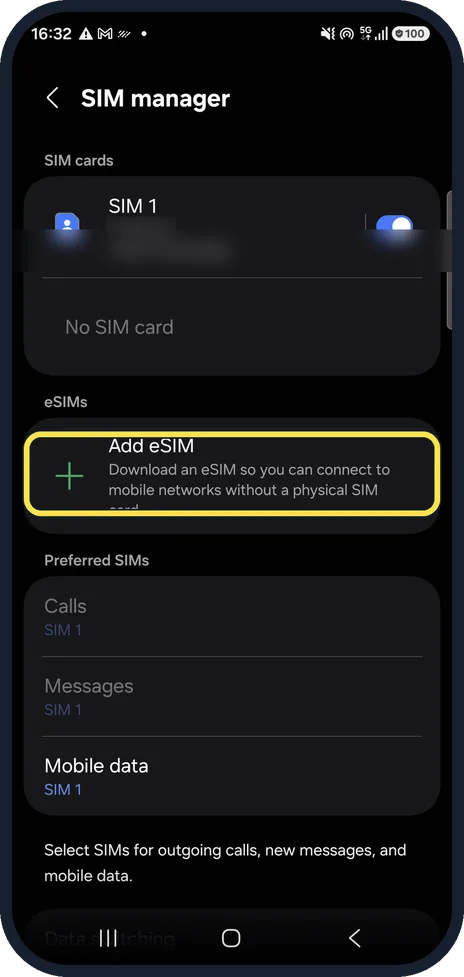
Open SIM manager
Open Settings, Connections, SIM manager. Under eSIMs, tap Add eSIM. We blurred our number.
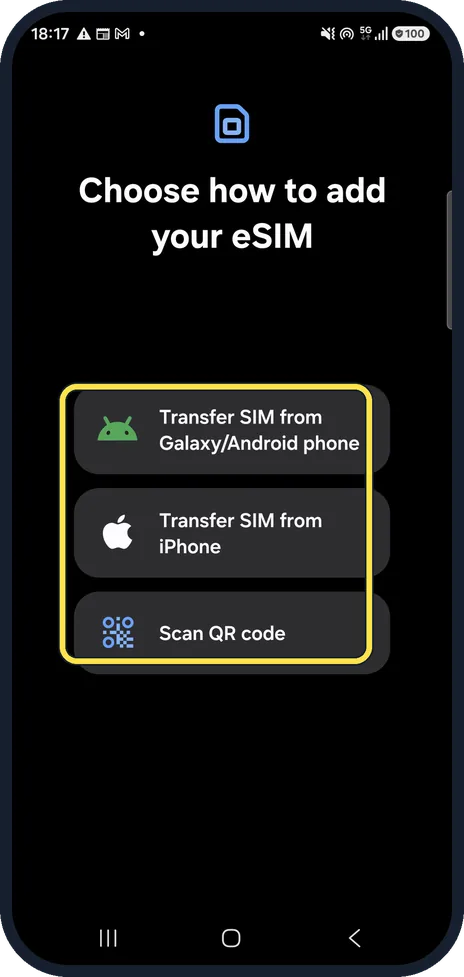
Choose how to add it
Transfer SIM from Galaxy/Android phone moves the number from your old phone, Transfer SIM from iPhone does the same from an iPhone, and Scan QR code uses the code from your carrier.
Scan the code or follow the transfer
Point the camera at the QR code, or follow the steps on both phones. Keep the phone on Wi-Fi or mobile data until it is done.
Choose the SIM for calls and data
Back in SIM manager, Preferred SIMs sets which SIM is used for calls, messages and mobile data.
If you do not see this option
- There is no Add eSIM button Samsung says some Galaxy phones come with an eSIM and some do not. Older One UI versions call the menu SIM card manager and the button Add mobile plan, with Add using QR code and Add using activation code. Source: How to use an eSIM with your Galaxy phone
- Your carrier gave you a code, not a QR code Samsung says some carriers provide an activation code to add by hand. On older versions it is Add mobile plan, Add using activation code. Source: How to use an eSIM with your Galaxy phone
If this does not work
- The download does not start Samsung says the phone must be connected to Wi-Fi or mobile data before you add the plan. If your carrier pre-assigned a plan, it downloads by itself after you tap the add button. Source: How to use an eSIM with your Galaxy phone
- Your carrier asks for the EID Samsung says the EID is on the phone box, or in Settings, About phone, Status. Source: How to use an eSIM with your Galaxy phone
About this guide
An eSIM is a SIM built into the phone that your carrier loads over the internet. Your carrier must support eSIM, and gives you a QR code or lets you move your number from your old phone.
Good to know
Samsung's help page also describes adding an eSIM with an activation code. Older One UI versions call the button Add mobile plan.
Some carriers need your phone's EID; Samsung says it is in Settings, About phone, Status.
In short: Settings, Connections, SIM manager, Add eSIM: transfer from your old phone or scan the carrier's QR code.
Links checked in October 2026. Menus and features can change after software updates. These steps match the version named at the top.
📷 See real photos from the Galaxy A57 in our Camera Lab, next to 10 other phones.
Did this guide work for you?
Sorry about that. What happened?