
howtosimply.com/guides/how-to-update-an-oppo-phone/ · Checked October 2026 · CPH2689, EEA), ColorOS 16.0.5, Android 16 (build CPH2689_16.0.5.1001(EX01) · OPPO Reno13 5G
In this guide
Open Settings, System & update, Software update. It checks automatically; ours said Version up to date, with software version CPH2689_16.0.5.1001. If an update is offered, download it on Wi-Fi with the battery above 40% or the charger in.
3 of 3 steps with real screenshots · 4 official sources below
- Device
- Android
- Shown on
- OPPO Reno13 5G (CPH2689, EEA), ColorOS 16.0.5, Android 16 (build CPH2689_16.0.5.1001(EX01))
- App
- Settings
- Path
- Settings › System & update › Software update
- Real screenshots
- 3 of 3 steps
- Checked
- October 2026
- Sources
- 4 official, linked below
Step by step
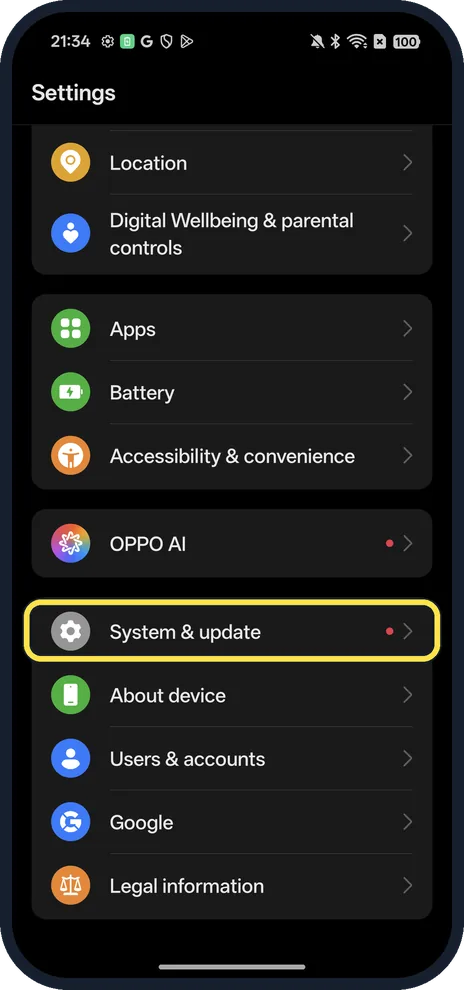
Open System & update
Open Settings and scroll near the bottom.
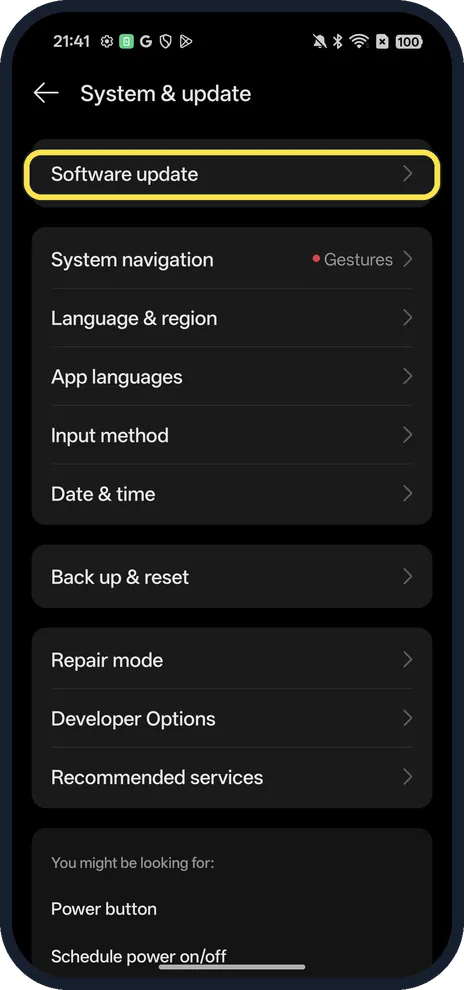
Tap Software update
The first row.
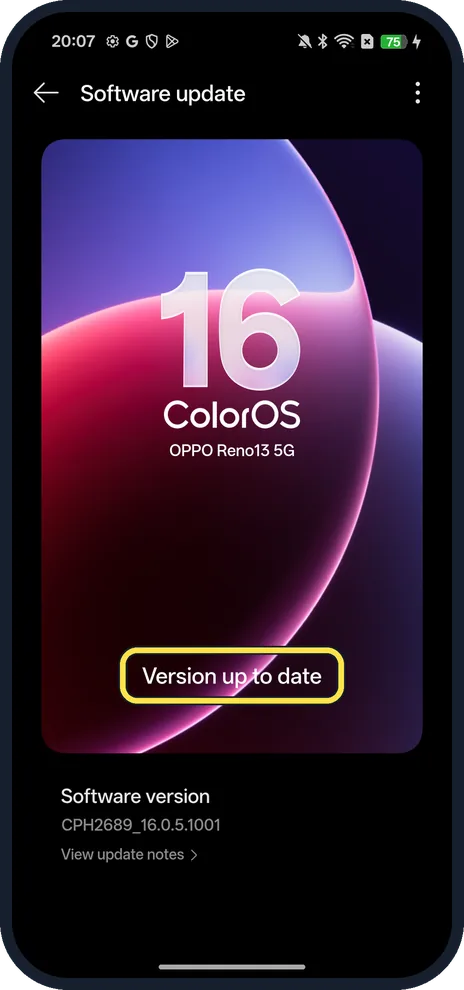
Check the result
Up to date, or download and install the update on Wi-Fi.
If you do not see this option
- No Software update row? OPPO gives other paths by version: ColorOS 13 and later, Settings, About device, tap the ColorOS card; ColorOS 12, About device; ColorOS 11 and below, Settings, Software Updates or System Update. Source: How to Know When Software Update is Available · Source: How to Update Software Using OTA (Over-the-Air)
- No update offered yet? OPPO releases ColorOS updates by country and model in batches, which can take two months or more, and some models get no more updates. Google says update schedules vary by device, maker and carrier. Source: How to Update Software Using OTA (Over-the-Air) · Source: Check and update your Android version
- Using a VPN? OPPO says you won't receive an update while using a VPN in a region where it hasn't been released. Source: OPPO Software Update: Fail to Receive, Download or Install OTA (Over-the-Air)
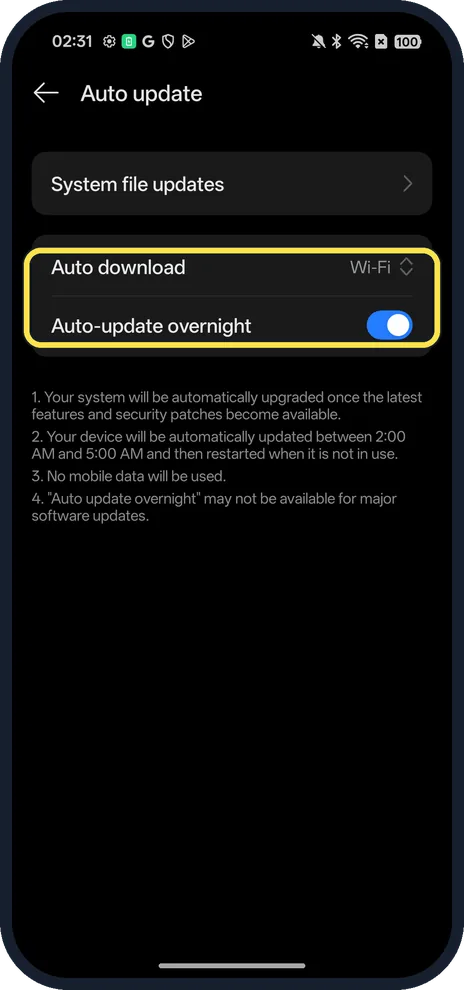
- Want it automatic? Tap the three dots on Software update, then Auto update. On ours Auto download was set to Wi-Fi and Auto-update overnight was on; the page says it installs between 2:00 and 5:00 AM when the phone isn't in use, without mobile data, and that overnight updates may not be available for major software updates.
If this does not work
- Download fails or stops? OPPO lists low battery, too little storage and a weak network. Charge the phone or keep it above 40%, clean up storage in Phone Manager, Clean Up Storage, and use stable Wi-Fi. Source: How to Update Software Using OTA (Over-the-Air) · Source: OPPO Software Update: Fail to Receive, Download or Install OTA (Over-the-Air)
- Screen frozen while installing? OPPO says to force restart with Power and Volume Up for at least eight seconds until the OPPO logo appears, then try the update again. Source: OPPO Software Update: Fail to Receive, Download or Install OTA (Over-the-Air)
- Warm during the update? OPPO says the phone may get slightly warm during a system upgrade and that this is normal. Source: How to Update Software Using OTA (Over-the-Air)
About this guide
The screenshots are from our OPPO Reno13 5G, the European model CPH2689, with ColorOS 16.0.5 and Android 16 (build CPH2689_16.0.5.1001(EX01)), in Dark mode.
Good to know
See what an update changes before you install: tap View update notes under Software version on the same page.
Check your exact build: find your OPPO model and ColorOS version.
In short: Settings, System & update, Software update.
- OPPO Support: How to Update Software Using OTA (Over-the-Air)
- OPPO Support: OPPO Software Update: Fail to Receive, Download or Install OTA (Over-the-Air)
- OPPO Support: How to Know When Software Update is Available
- Google Android Help: Check and update your Android version
Links checked in October 2026. Menus and features can change after software updates. These steps match the version named at the top.
Did this guide work for you?
Sorry about that. What happened?