
howtosimply.com/guides/how-to-update-an-honor-phone/ · Checked October 2026 · BRP-NX1M, EEA), MagicOS 10.0, Android 16 (build 10.0.0.169(C430E7R2P1) · HONOR Magic7 Lite
In this guide
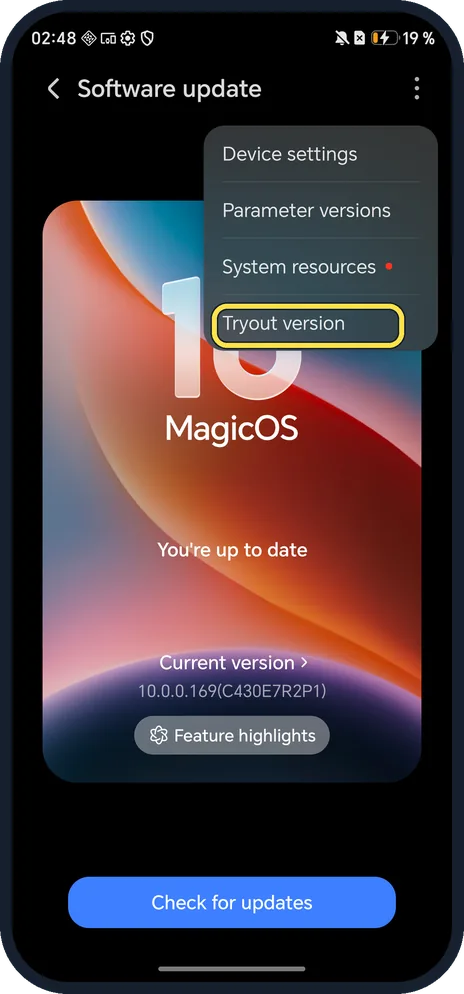
Open Settings, System & updates, Software update and tap Check for updates. Ours said You're up to date on 10.0.0.169(C430E7R2P1) on 21 Oct 2026.
4 of 4 steps with real screenshots · 2 official sources below
- Device
- Android
- Shown on
- HONOR Magic7 Lite (BRP-NX1M, EEA), MagicOS 10.0, Android 16 (build 10.0.0.169(C430E7R2P1))
- App
- Settings
- Path
- Settings › System & updates › Software update
- Real screenshots
- 4 of 4 steps
- Checked
- October 2026
- Sources
- 2 official, linked below
Step by step
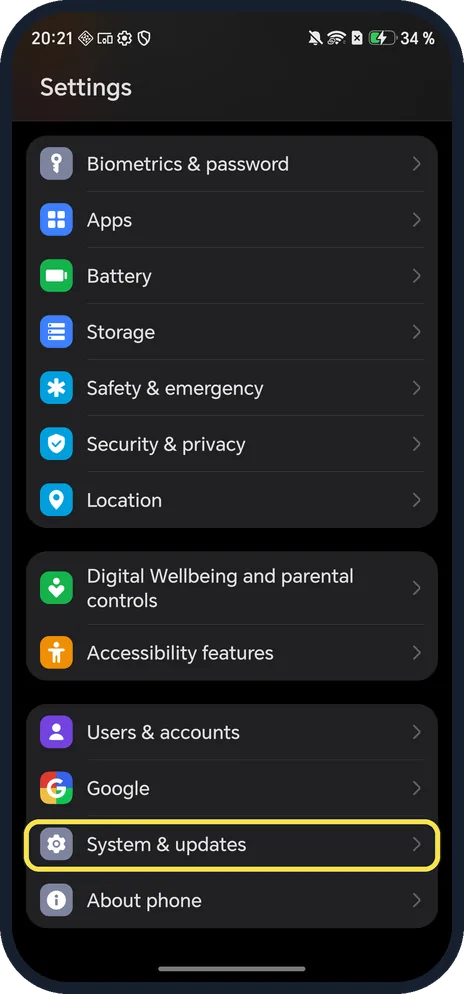
Open System & updates
Open Settings and scroll near the bottom.
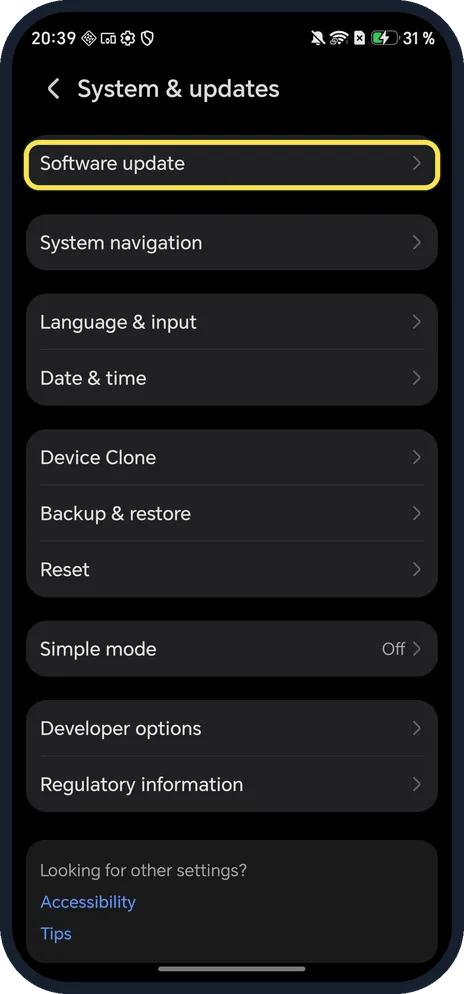
Tap Software update
It is the first row.
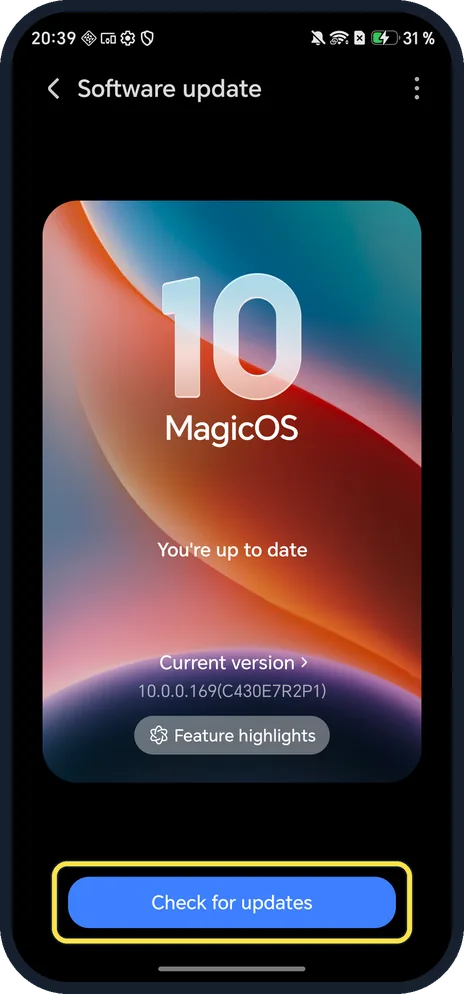
Tap Check for updates
If an update is waiting, download and install it on Wi-Fi with enough battery.
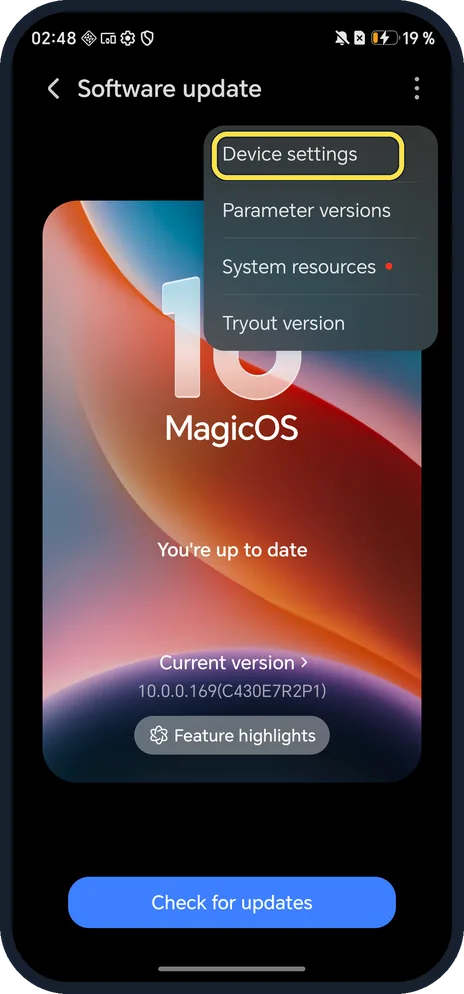
Set automatic updates (optional)
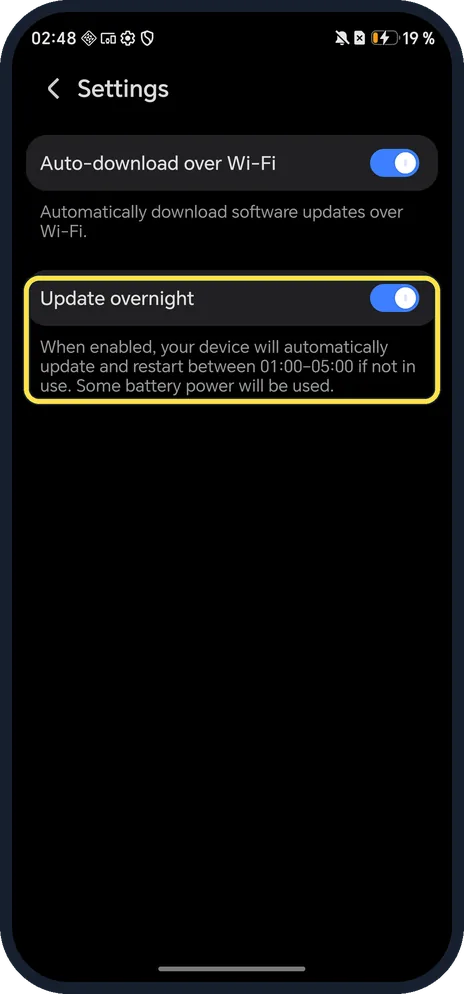
Tap the three dots at the top right, then Device settings. Ours had Auto-download over Wi-Fi on, and Update overnight on, which updates and restarts between 01:00 and 05:00 when the phone is not in use.
If you do not see this option
- No Software update under System & updates? HONOR says to search Settings for Software update and tap Check for updates. Source: Unable to receive system updates
- No Trial versions in the menu? HONOR says Magic UI 6.1 and later have Trial versions in the top-right menu of Software update. On our MagicOS 10 the same menu entry is called Tryout version. Source: Unable to receive system updates
- Updates install at night by themselves? That is Update overnight in Device settings. It was on in ours.
If this does not work
- Friends have the update and you don't? HONOR says updates are not pushed to all devices at once, so yours may arrive later. Source: Unable to receive system updates
- No update found? HONOR says to check the internet connection and, in some cases, insert a SIM card. Ours had no SIM and still checked over Wi-Fi. Source: Unable to receive system updates
- Update check keeps failing? HONOR says to search Settings for Manage apps, open Software update, Storage, Clear data, then check again. Source: Unable to receive system updates
- Not enough space for the update? HONOR says to clear up storage as prompted to make room. Source: Phone indicated to not have sufficient storage space
About this guide
The screenshots are from our HONOR Magic7 Lite, the European model BRP-NX1M, with MagicOS 10.0 and Android 16 (build 10.0.0.169(C430E7R2P1)), in Dark mode.
Good to know
To see which version you have, find your HONOR model and MagicOS version.
To make room for an update, free up storage on an HONOR phone.
In short: Settings, System & updates, Software update, Check for updates.
- HONOR Support (UK): Unable to receive system updates
- HONOR Support (MEA): Phone indicated to not have sufficient storage space
Links checked in October 2026. Menus and features can change after software updates. These steps match the version named at the top.
Did this guide work for you?
Sorry about that. What happened?