Troubleshooting
Xiaomi mobile data not working? What to check (HyperOS 3)
7 fixes, 7 with a real screenshot from our Redmi Note 15 Pro 5G on HyperOS 3.0.308.0. Try them in order.
 Illustration
Quick answer
Check the Mobile data tile in Control Centre, then Settings, Mobile networks, Mobile data. Open the SIM and check Access point names, and check Data roaming if you are abroad. Settings search, Data usage, shows which apps used data.
Step-by-step guide
Follow these steps in order. After each step, check if it works.
- 1
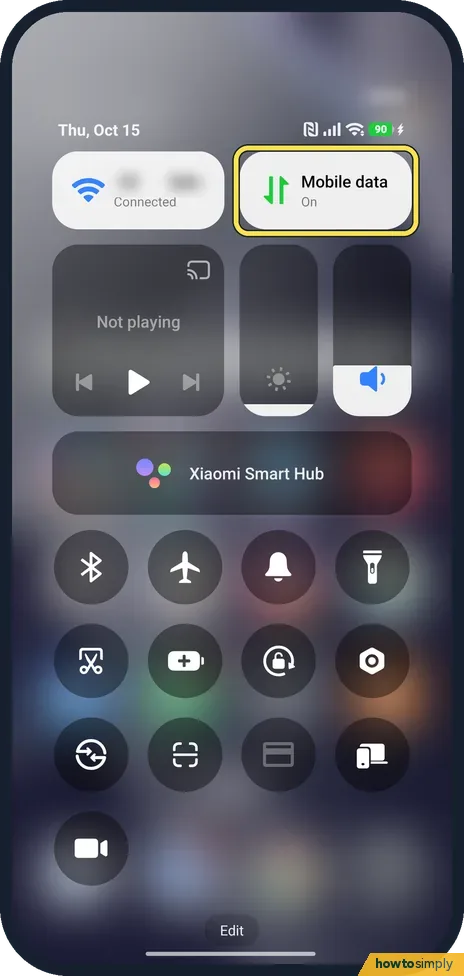
Check Control Centre
Swipe down from the top right. The Mobile data tile should say On.
- 2
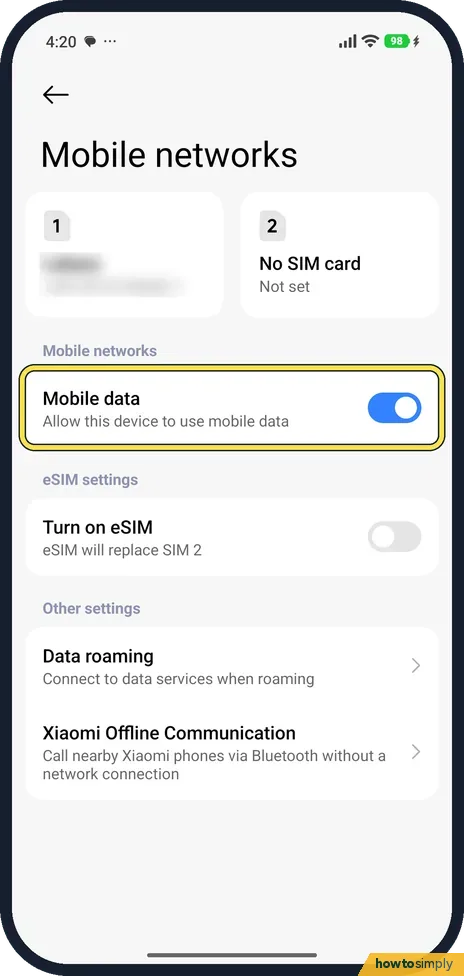
Check Mobile networks
Go to Settings, Mobile networks. Mobile data should be on. Our SIM is in slot 1.
- 3
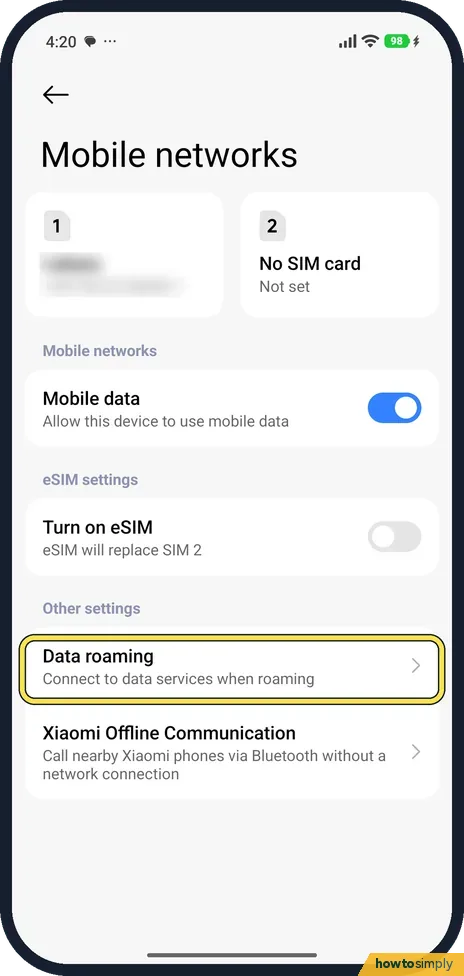
Check Data roaming abroad
Data roaming, on the same page, connects to data services when roaming. It needs to be on abroad.
- 4
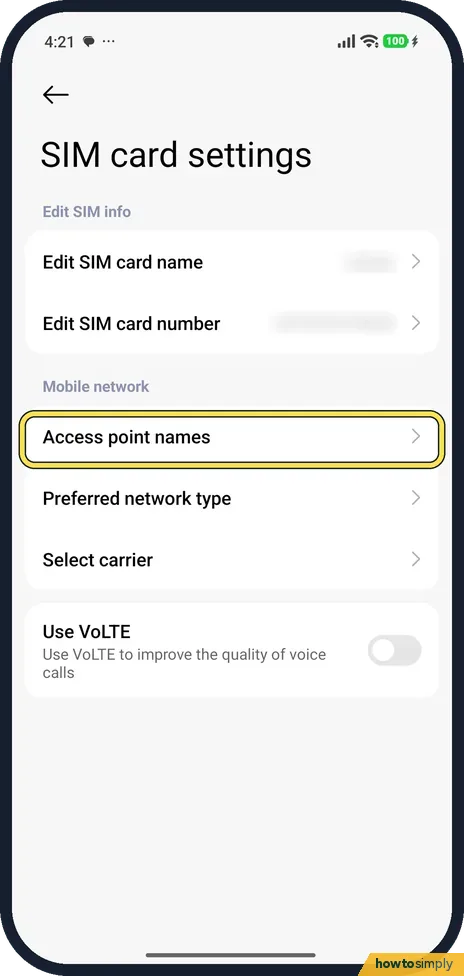
Open the SIM's settings
Tap the SIM at the top. Tap Access point names.
- 5
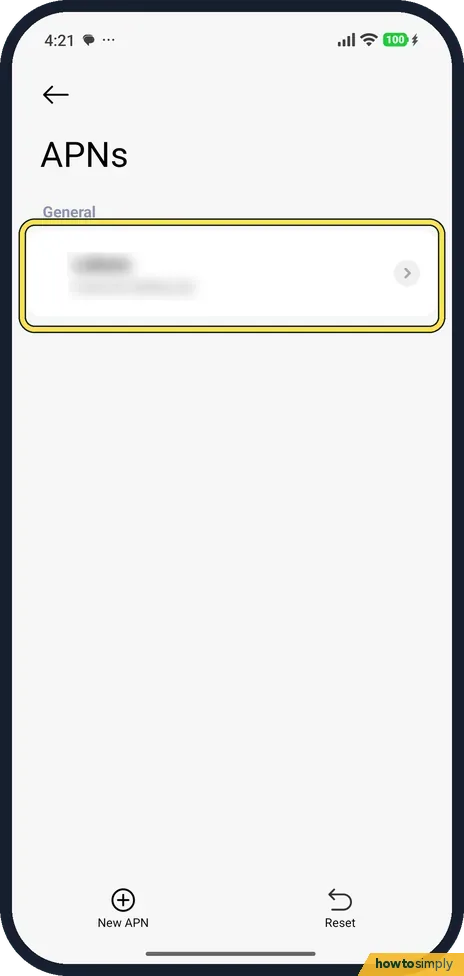
Check the APN
The APN list should show your carrier's entry; ours had one under General. New APN and Reset are at the bottom; we did not change anything here.
- 6
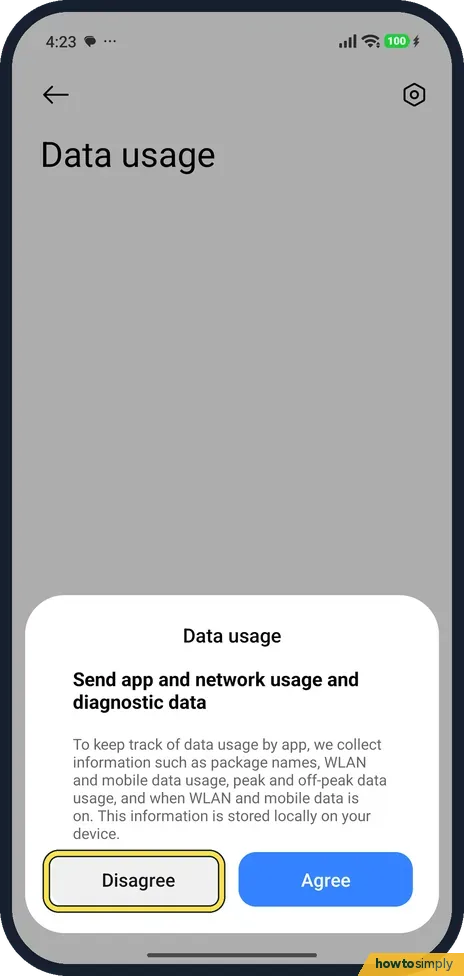
Open Data usage
Search Settings for Data usage. Ours first asked to Send app and network usage and diagnostic data. You can tap Disagree; we did.
- 7
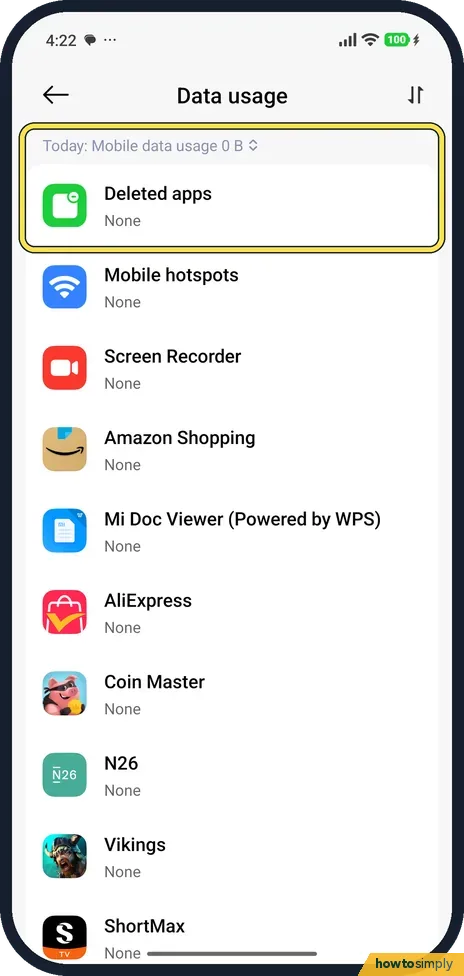
See which apps use data
The list shows each app's mobile data for today. Ours read 0 B, as we were on Wi-Fi.
If you do not see this option
- Only one SIM slot listed as No SIM card? That is slot 2 when you have one SIM. Turn on eSIM, on the same page, says eSIM will replace SIM 2.
- Two SIMs? Xiaomi says to choose the data SIM in Mobile networks. Source: Generic User Guide for HyperOS 3.0
If this does not work
- Data off after a restart? Check both switches again: the Control Centre tile and Mobile data in Settings.
- Still no data? Reset Wi-Fi, mobile networks and Bluetooth resets network settings: Wi-Fi keeps disconnecting.
- No 4G or 5G letters by the signal bars? Google says the data indicator may not show while Wi-Fi is connected, so turn Wi-Fi off and look again. If there is still no indicator, you may have no coverage there; move or go outside and check again.
- Data stuck after travel or a tunnel? Turn Aeroplane mode on, wait 10 seconds and turn it off. Google suggests this before contacting your carrier.
- Only one app has no data? Xiaomi's guide says Data usage in the Security app can restrict mobile data, background data or Wi-Fi for individual apps. Check that app has not been blocked. See stop an app using mobile data or Wi-Fi.
Good to know
4G calls and 5G: how to turn on VoLTE and 5G on a Xiaomi phone.
Turning Mobile data and Aeroplane mode off and on, and checking the APN or roaming, are all reversible. Resetting network settings is different: saved Wi-Fi networks and Bluetooth pairings may need setting up again.
When data works again, keep an eye on Data usage for a day. A sudden jump from one app can point to a background update or video autoplay. If problems keep coming back in the same place, Google's advice is to contact your mobile service provider, who can check coverage and your line.
About this guide
- Device
- Android
- Shown on
- Xiaomi Redmi Note 15 Pro 5G (25080RABDG), HyperOS 3.0.308.0, Android 16
- Starts in
- Quick Settings
- Real screenshots
- 7 of 7 steps
- Checked
- October 2026
- Sources
- 2 official, linked below
Sources
Links checked October 2026. Menus and features can change with updates.Related guides
How to stop an app using mobile data or Wi-Fi on a Xiaomi phone (HyperOS 3)How to reset network settings on a Xiaomi phone (HyperOS 3)How to turn on NFC and tap to pay on a Xiaomi phone (HyperOS 3)How to pair a Bluetooth device with a Xiaomi phone (HyperOS 3)How to turn on Data Saver on a Xiaomi phone (HyperOS 3)How to set up a hotspot on a Xiaomi phone (HyperOS 3)Spotted a mistake? Menus change with updates, and we want every step to match your screen. Email us about this page or use the contact form. We read every report, and fixes are listed on What changed.
Liked this guide?
Follow us for new guides and short how-to videos.
Did this guide work for you?
Sorry about that. What happened?