
What changed: added Data saver to the checks: turning it on switched our Galaxy A57 hotspot off (tested 7 Oct 2026, One UI 8.5).
howtosimply.com/guides/samsung-galaxy-hotspot-not-working-6-fixes/ · Checked October 2026 · Samsung Galaxy A57 5G (SM-A576B), One UI 8.5, Android 16
In this guide
Check that mobile data is on, Data saver is off and no VPN is running, then open Settings, Connections, Mobile Hotspot and Tethering, Mobile Hotspot. Check the network name and password, switch the Band between 2.4 GHz and 5 GHz, and restart both devices. Your plan must include hotspot use.
5 of 6 steps with real screenshots · 1 official source below
- Device
- Android
- Shown on
- Samsung Galaxy A57 5G (SM-A576B), One UI 8.5, Android 16
- App
- Settings
- Real screenshots
- 5 of 6 steps
- Our phone
- Shown on Galaxy A57, One UI 8.5
- Checked
- October 2026
- Sources
- 1 official, linked below
Step by step
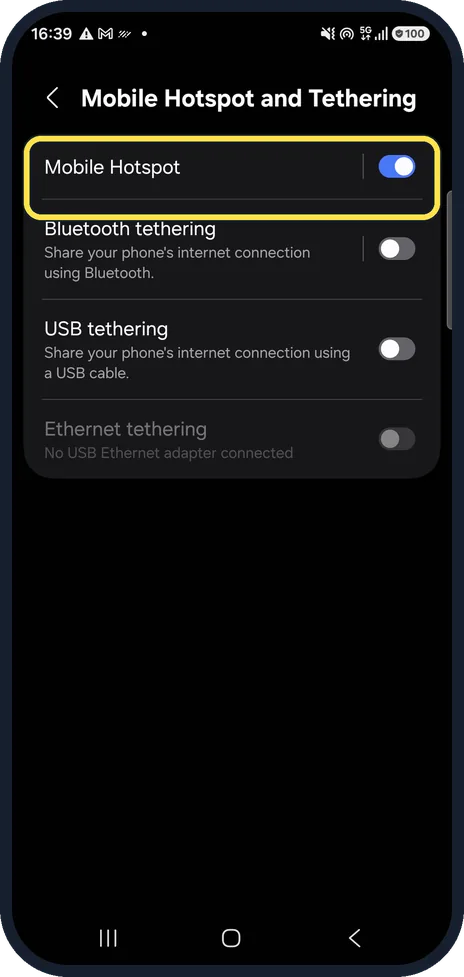
Open Mobile Hotspot
Settings, Connections, Mobile Hotspot and Tethering. Tap the words Mobile Hotspot, not the switch, to see its settings.
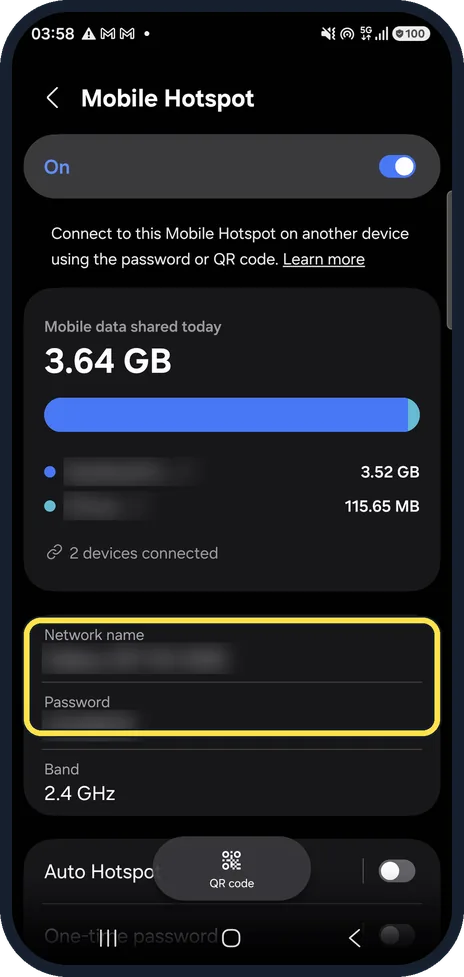
Check the name and password
Settings, Connections, Mobile Hotspot and Tethering, Mobile Hotspot. On its page, Network name is what the other device must pick, and Password is what it must type, exactly as shown.
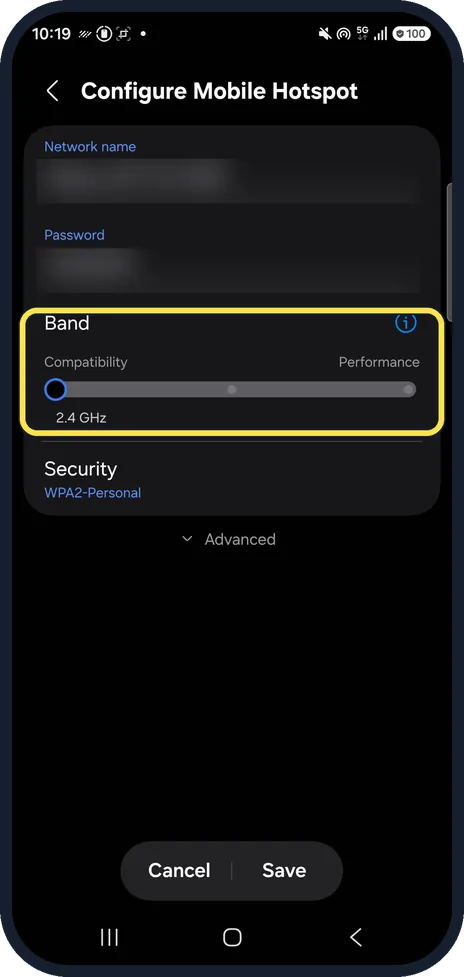
Switch the band
Band decides the Wi-Fi frequency. If a laptop or car cannot see the hotspot, try the other band. Ours was on 2.4 GHz.
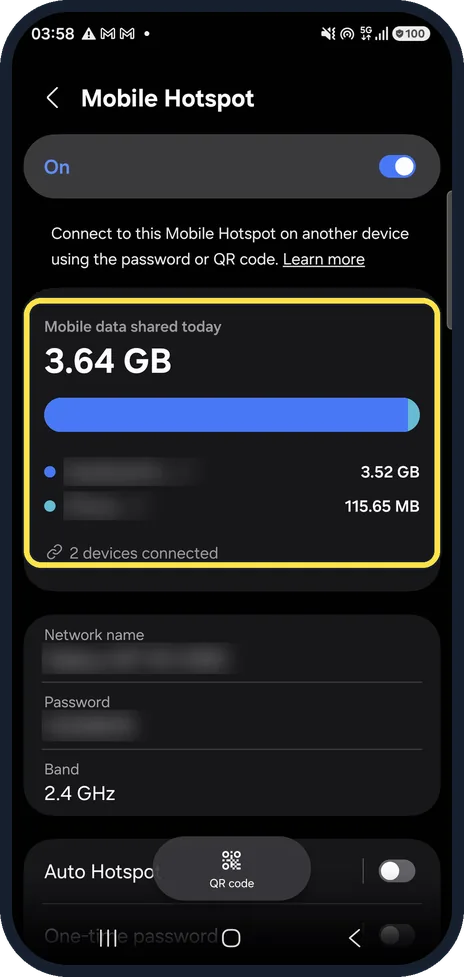
See which devices used it
Mobile data shared today lists the devices that used the hotspot and how much data each one took.
Check mobile data, Data saver and VPN
The hotspot shares your mobile data, so Mobile data must be on in the quick panel. Turning on Data saver switched our hotspot off, so keep Data saver off while you share. A VPN on the phone can stop shared devices from getting online; turn it off for a test.
Restart both devices
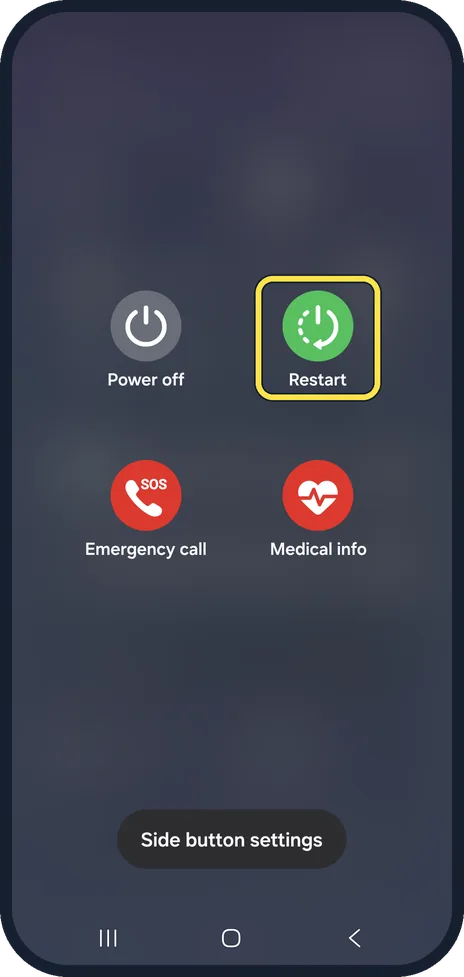
Restart the phone and the device that will join, then switch the hotspot on again.
What changed: added Data saver to the checks: turning it on switched our Galaxy A57 hotspot off (tested 7 Oct 2026, One UI 8.5).
If you do not see this option
- There is no Mobile Hotspot option Samsung says hotspot and tethering may not be offered by some carriers, and most need an extra hotspot plan on your account. Source: Mobile hotspot issues with a Samsung phone
- A laptop cannot join even with the right password Samsung says to check that the hotspot security is set to WPA2, under Settings, Connections, Mobile Hotspot and Tethering. Source: Mobile hotspot issues with a Samsung phone
If this does not work
- Your plan or carrier blocks it Samsung US says most carriers need an extra hotspot plan, even on unlimited data, and some do not allow tethering at all. After switching carrier it may not work. Source: Mobile hotspot issues with a Samsung phone
- Devices cannot see the hotspot Samsung US says to check the hotspot Advanced menu and turn off Hidden network, and to try the 2.4 GHz or 5 GHz band. Source: Mobile hotspot issues with a Samsung phone
About this guide
A Galaxy hotspot fails in two ways: other devices cannot find or join it, or they join but get no internet. The first is usually the name, password or band; the second is mobile data, a VPN or your plan.
The hotspot name, password and the devices that used it are blurred. Apart from switching Data saver on once to test it, and straight back off, we only looked at these screens.
Good to know
Mobile data itself not working? Samsung Galaxy mobile data not working? 7 fixes.
Some plans block or limit hotspot use. If everything above is right and joined devices still get no internet, ask your carrier.
In short: Mobile data on, VPN off, correct name and password, try the other band, restart both devices, check your plan.
Links checked in October 2026. Menus and features can change after software updates. These steps match the version named at the top.
📷 See real photos from the Galaxy A57 in our Camera Lab, next to 10 other phones.
Did this guide work for you?
Sorry about that. What happened?