
howtosimply.com/guides/how-to-check-the-security-patch-level-on-a-google-pixel/ · Checked October 2026 · build CP3A.261005.005 · Google Pixel 10a, Android 17
In this guide
Open Settings, search for security update and tap Android security update. The Android version page shows the patch date: 5 October 2026 on our Pixel 10a in late October. Security update, under System and updates, checks for a newer one.
4 of 4 steps with real screenshots · 2 official sources below
- Device
- Android
- Shown on
- Google Pixel 10a, Android 17 (build CP3A.261005.005)
- App
- Settings
- Real screenshots
- 4 of 4 steps
- Checked
- October 2026
- Sources
- 2 official, linked below
Step by step
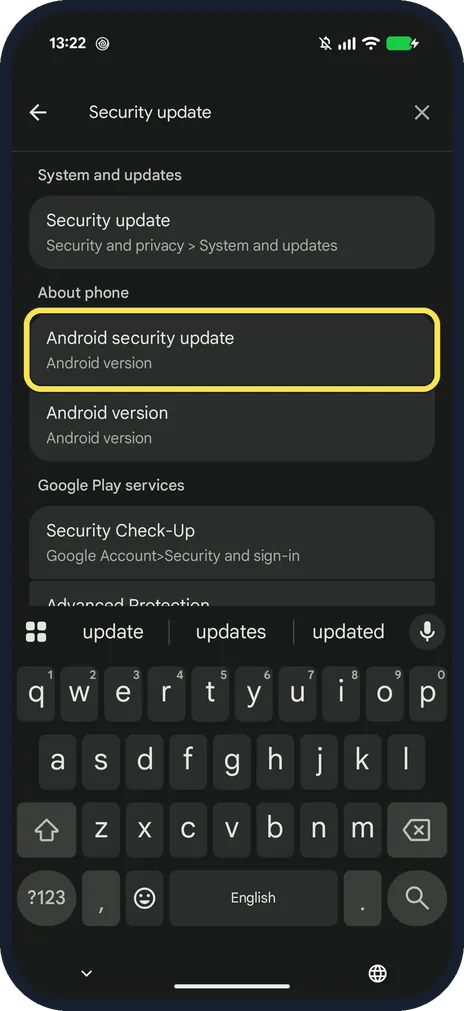
Search Settings for "security update"
Open Settings and tap the search bar. Under About phone, tap Android security update.
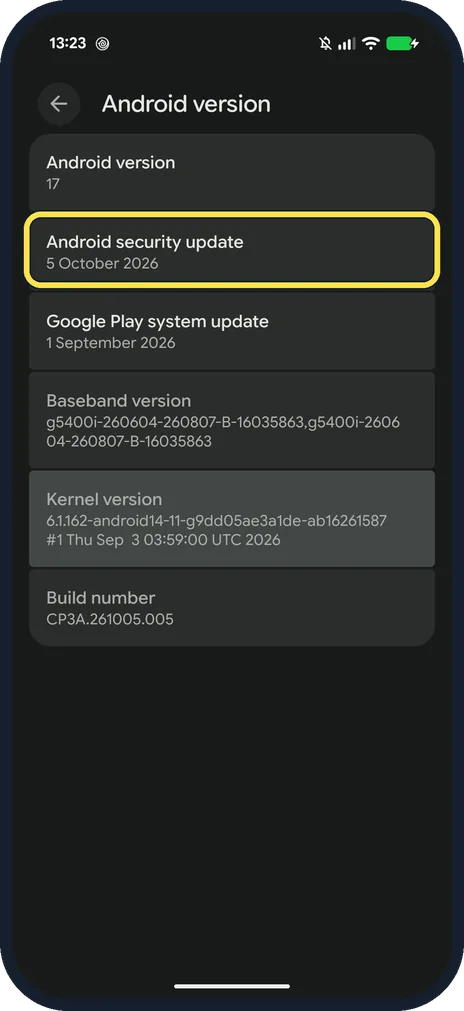
Read Android security update
Ours: Android version 17, Android security update 5 October 2026, Google Play system update 1 September 2026.
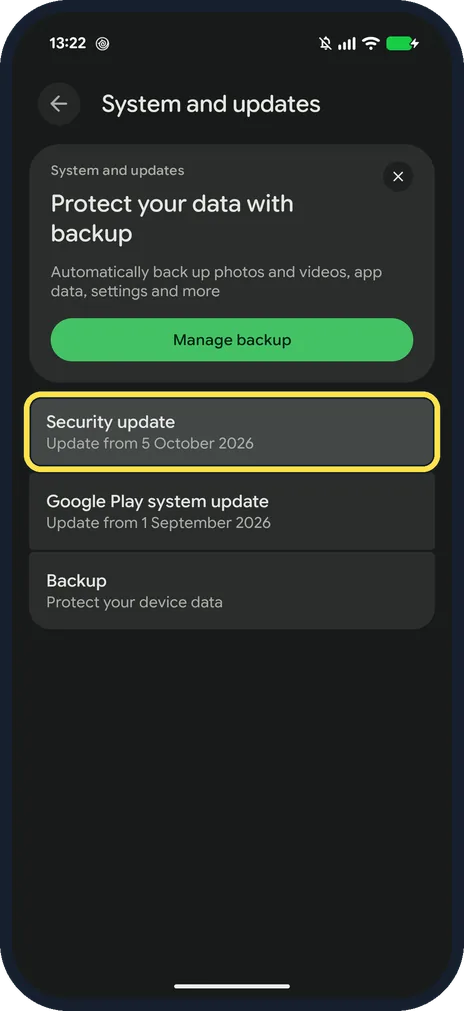
Open Security update to look for a newer one
It is under Security and privacy, System and updates. Ours said Update from 5 October 2026.
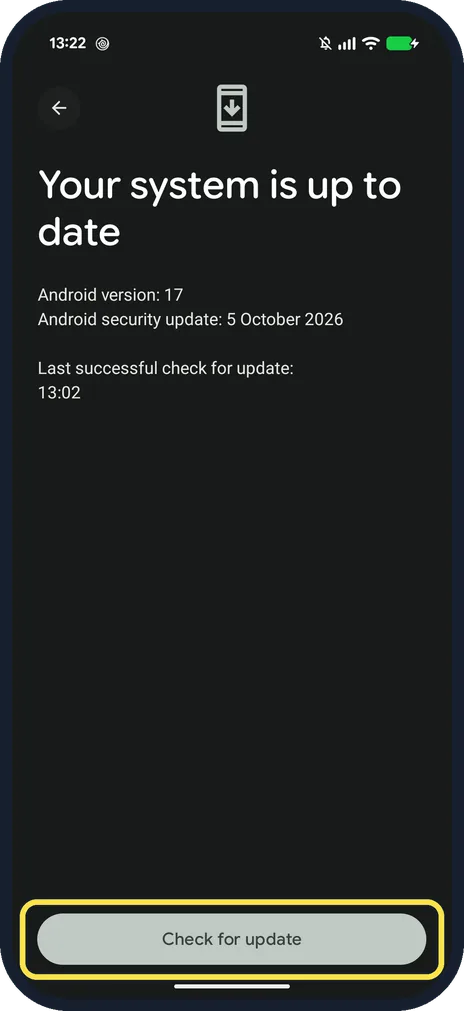
Check the result
Ours said Your system is up to date, with the patch date and the last check time. Check for update is at the bottom.
If you do not see this option
- Following Google's steps? Google gives Settings, About phone, Android version, then Android security update: the same page as step 2. Source: Check and update your Android version
- How long will a Pixel 10a get patches? Google lists the Pixel 10a among the phones with 7 years of OS and security updates, counted from when it first went on sale on the US Google Store. Source: Learn when you'll get software updates on Google Pixel phones
- Looking for Software update? Google's Pixel page says Settings, System, Software update. On our Pixel the search found Security update under Security and privacy, System and updates. Source: Learn when you'll get software updates on Google Pixel phones
If this does not work
- Patch is months old? Open Security update and tap Check for update. Google says Pixel updates roll out gradually, depend on carrier and device, and may take a few weeks to arrive. Source: Learn when you'll get software updates on Google Pixel phones
- Two dates that do not match? Google Play system update is a separate update with its own date; ours was 1 September 2026. Source: Check and update your Android version
About this guide
Pixel calls it Android security update. The date sits on the Android version page under About phone.
The screenshots are from our Google Pixel 10a with Android 17, in Dark mode, taken on 25 October 2026.
Good to know
To install an update, see update a Google Pixel and its apps.
On a Galaxy, see check the security patch on a Samsung Galaxy.
In short: Settings, search security update, Android security update.
- Google Android Help: Check and update your Android version
- Pixel Phone Help: Learn when you'll get software updates on Google Pixel phones
Links checked in October 2026. Menus and features can change after software updates. These steps match the version named at the top.
📷 See real photos from the Pixel 10a in our Camera Lab, next to 10 other phones.
Did this guide work for you?
Sorry about that. What happened?