
howtosimply.com/guides/samsung-emergency-sos-calling-by-accident-what-to-check/ · Checked October 2026 · Samsung Galaxy A57 5G (SM-A576B), One UI 8.5, Android 16
In this guide
Open Settings, Safety and emergency, Emergency SOS and make sure Require swipe to call is on, so pressing the Side button 5 times only shows a Call button you must swipe. Also check the emergency number and whether SOS messages go to your contacts.
5 of 6 steps with real screenshots · 2 official sources below
- Device
- Android
- Shown on
- Samsung Galaxy A57 5G (SM-A576B), One UI 8.5, Android 16
- App
- Settings
- Real screenshots
- 5 of 6 steps
- What we did
- Observed: looked at each screen, changed nothing
- Our phone
- Shown on Galaxy A57, One UI 8.5
- Checked
- October 2026
- Sources
- 2 official, linked below
Step by step
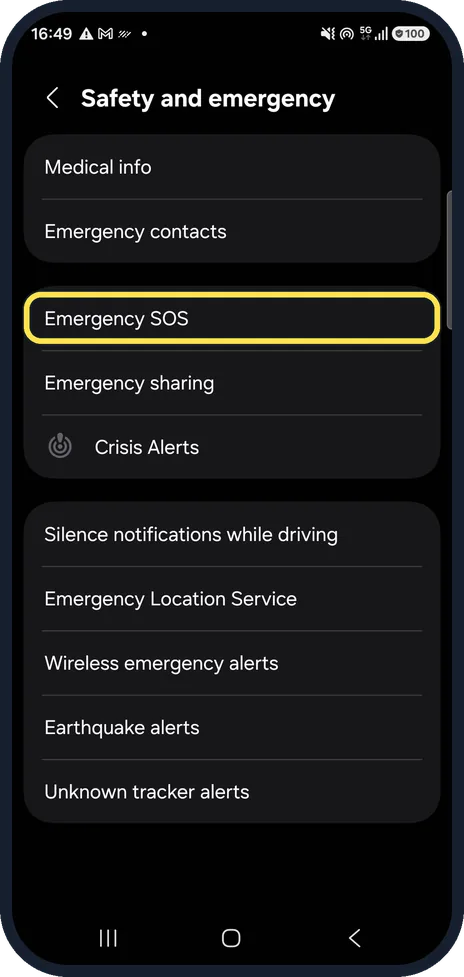
Open Emergency SOS
Settings, Safety and emergency, Emergency SOS.
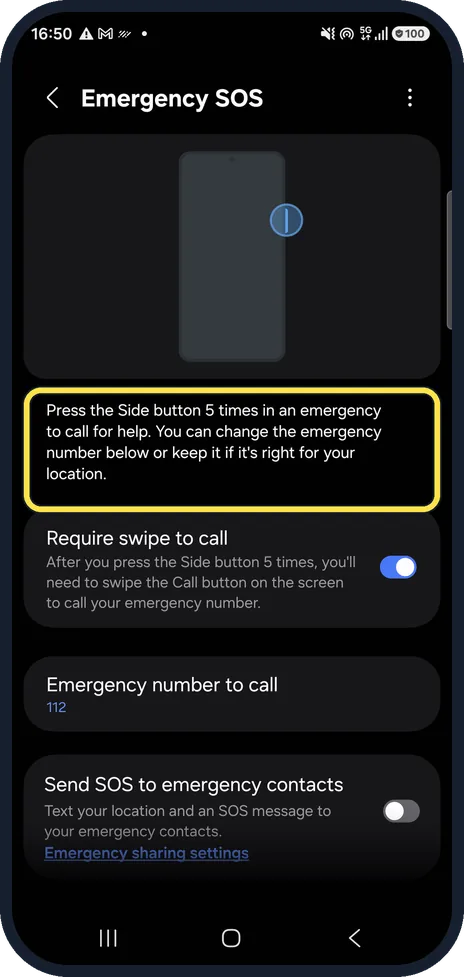
Know what triggers it
The page explains it: pressing the Side button 5 times calls for help. On our One UI 8.5 phone there was no on/off switch at the top of this page; Samsung's guide for other versions shows one.
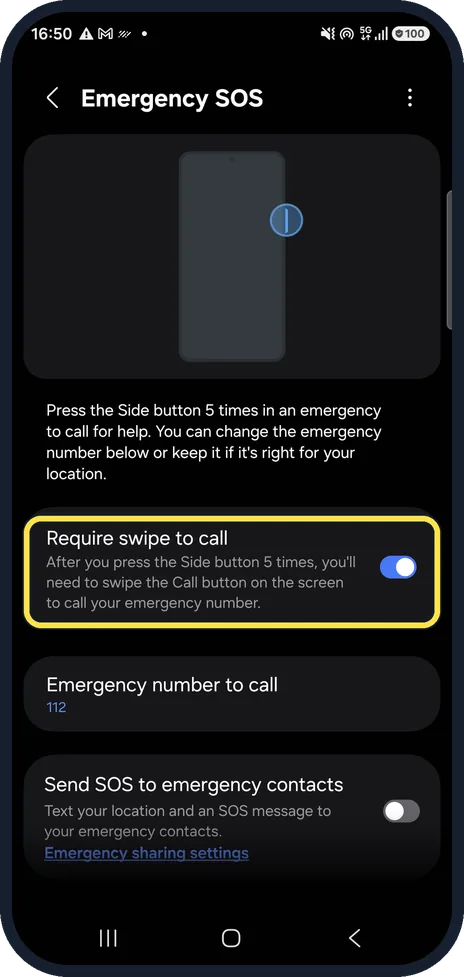
Keep Require swipe to call on
With this on, 5 presses only show a Call button that you have to swipe, so a pocket press does not dial at once. It was on on ours.
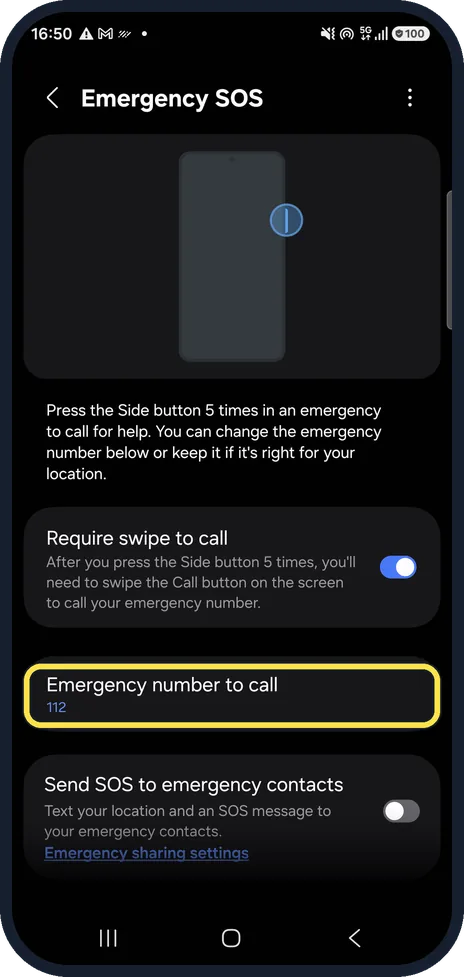
Check the emergency number
Emergency number to call shows which number is dialled. Ours was 112. Keep it right for the country you are in.
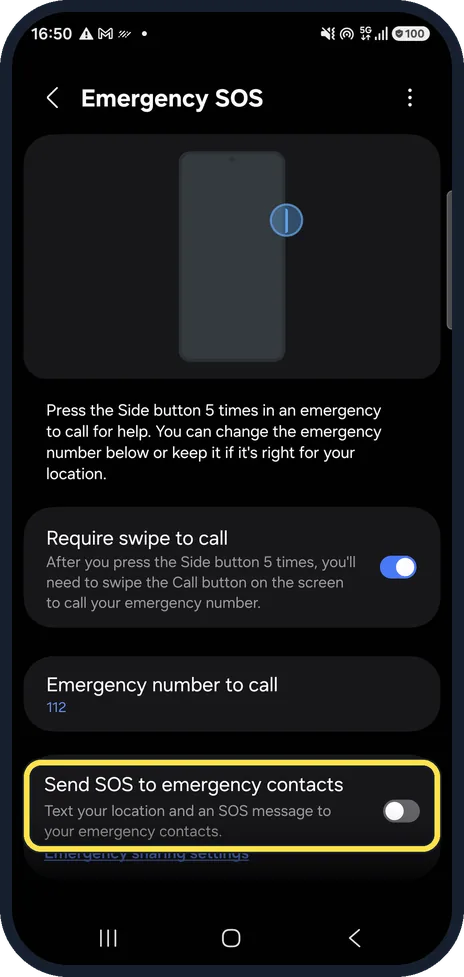
Check SOS messages
Send SOS to emergency contacts texts your location to your emergency contacts when SOS starts. Ours was off.
If you called by mistake
Stay on the line and tell the operator it was an accident. Hanging up can make them call back or send help to check.
If you do not see this option
- Your Emergency SOS page has an on/off switch Samsung's guides show a switch at the top of Emergency SOS on other One UI versions. Turning it off stops 5 presses from calling at all; turn it back on the same way. Source: How to turn off Emergency SOS function?
- There is no Emergency SOS Samsung says Emergency SOS, with 5 presses of the Side button, is on Galaxy phones with One UI 5.0 or later. Source: How to turn off Emergency SOS function?
If this does not work
- It keeps starting in a bag or pocket Keep Require swipe to call on so a press alone does not dial. If accidental presses keep happening and your phone has the on/off switch, Samsung's fix is to turn Emergency SOS off. Source: How to turn off Emergency SOS function?
About this guide
Emergency SOS calls your emergency number when the Side button is pressed 5 times in a row. In a pocket or bag that can happen by accident.
Good to know
The Side button can also open Bixby or the camera: how to change what the Side button does on a Samsung Galaxy.
In short: Safety and emergency, Emergency SOS: Require swipe to call on, right emergency number, SOS messages as you want them.
- Samsung Latin: How to turn off Emergency SOS function?
- Samsung UK: How to turn off Emergency SOS on your Galaxy phone
Links checked in October 2026. Menus and features can change after software updates. These steps match the version named at the top.
📷 See real photos from the Galaxy A57 in our Camera Lab, next to 10 other phones.
Did this guide work for you?
Sorry about that. What happened?