
howtosimply.com/guides/how-to-check-the-security-patch-level-on-an-honor-phone/ · Checked October 2026 · BRP-NX1M, EEA), MagicOS 10.0, Android 16 (build 10.0.0.169(C430E7R2P1) · HONOR Magic7 Lite
In this guide
Open Settings and tap About phone, then scroll down. Android security patch level shows the date (1 September 2026 on our Magic7 Lite in late October), just under Google Play system update.
3 of 3 steps with real screenshots · 3 official sources below
- Device
- Android
- Shown on
- HONOR Magic7 Lite (BRP-NX1M, EEA), MagicOS 10.0, Android 16 (build 10.0.0.169(C430E7R2P1))
- App
- Settings
- Path
- Settings › About phone
- Real screenshots
- 3 of 3 steps
- Checked
- October 2026
- Sources
- 3 official, linked below
Step by step
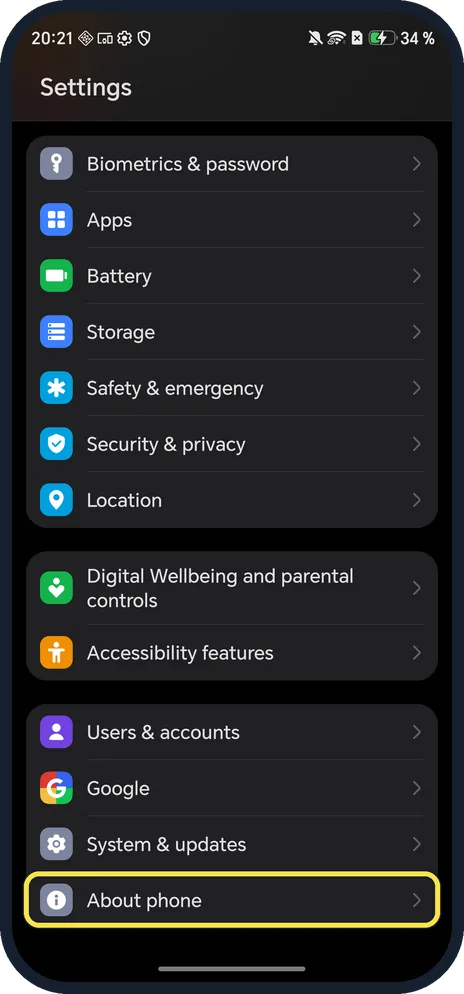
Open About phone
Open Settings and scroll to the bottom.
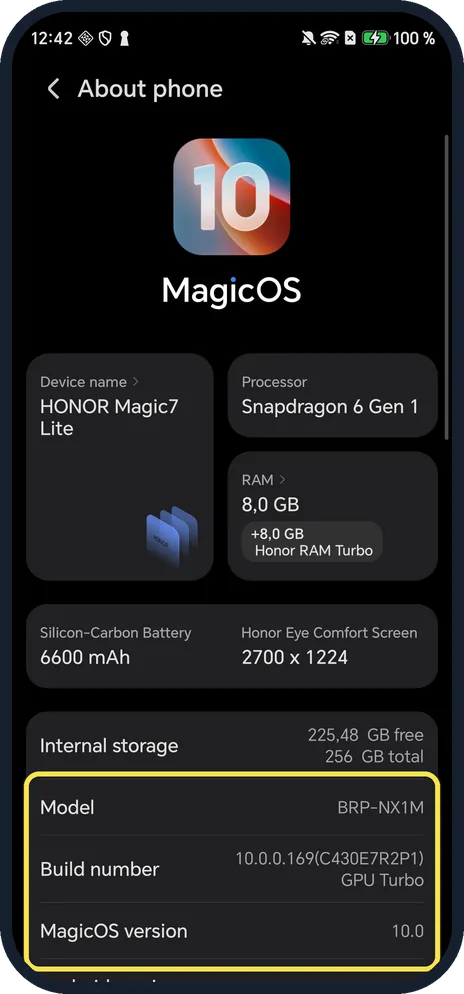
Scroll past the MagicOS card
The top shows the MagicOS logo, Device name, Processor and RAM, then Model, Build number and MagicOS version.
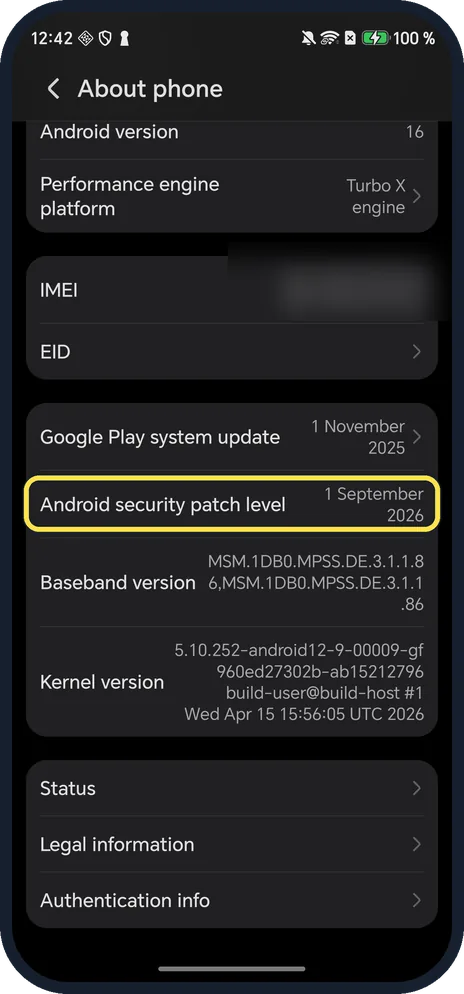
Read Android security patch level
Ours: Google Play system update 1 November 2025 and Android security patch level 1 September 2026, below Android version 16.
If you do not see this option
- Following Google's steps? Google gives About phone, Android version, Android security update. On MagicOS the row is called Android security patch level and is on About phone itself. Source: Check and update your Android version
- What did a patch fix? HONOR publishes a monthly MagicOS security bulletin for its main models, listing the Android fixes in each patch. Source: MagicOS/Magic UI Security Update, March 2026
If this does not work
- Patch is months old? Check System & updates, Software update, Check for updates. HONOR says updates are not pushed to all devices at once, so yours may arrive later. Sources: Check and update your Android version, Unable to receive system updates
- Two dates? Google Play system update and Android security patch level are different updates; HONOR's bulletin covers the monthly security patch. Source: MagicOS/Magic UI Security Update, March 2026
About this guide
Unlike most phones, MagicOS shows the patch date straight on About phone, not under Android version.
The screenshots are from our HONOR Magic7 Lite, the European model BRP-NX1M, with MagicOS 10.0 and Android 16 (build 10.0.0.169(C430E7R2P1)), in Dark mode.
Good to know
To install an update, see update an HONOR phone.
For the model and MagicOS version, see find your HONOR model and MagicOS version.
In short: Settings, About phone, scroll to Android security patch level.
- Google Android Help: Check and update your Android version
- HONOR: MagicOS/Magic UI Security Update, March 2026
- HONOR Support (UK): Unable to receive system updates
Links checked in October 2026. Menus and features can change after software updates. These steps match the version named at the top.
📷 See real photos from the HONOR Magic7 Lite in our Camera Lab, next to 10 other phones.
Did this guide work for you?
Sorry about that. What happened?