
howtosimply.com/guides/why-there-is-no-call-recording-on-an-oppo-reno13/ · Checked October 2026 · CPH2689, EEA), ColorOS 16.0.5, Android 16 (build CPH2689_16.0.5.1001(EX01) · OPPO Reno13 5G
In this guide
Our European OPPO Reno13 5G uses Google's Phone app, not an OPPO dialler, and its settings have no Call recording row. Searching Settings for call recording found nothing. Google says recording depends on the country, device and carrier.
3 of 3 steps with real screenshots · 3 official sources below
- Device
- Android
- Shown on
- OPPO Reno13 5G (CPH2689, EEA), ColorOS 16.0.5, Android 16 (build CPH2689_16.0.5.1001(EX01))
- App
- Settings
- Real screenshots
- 3 of 3 steps
- Checked
- October 2026
- Sources
- 3 official, linked below
Step by step
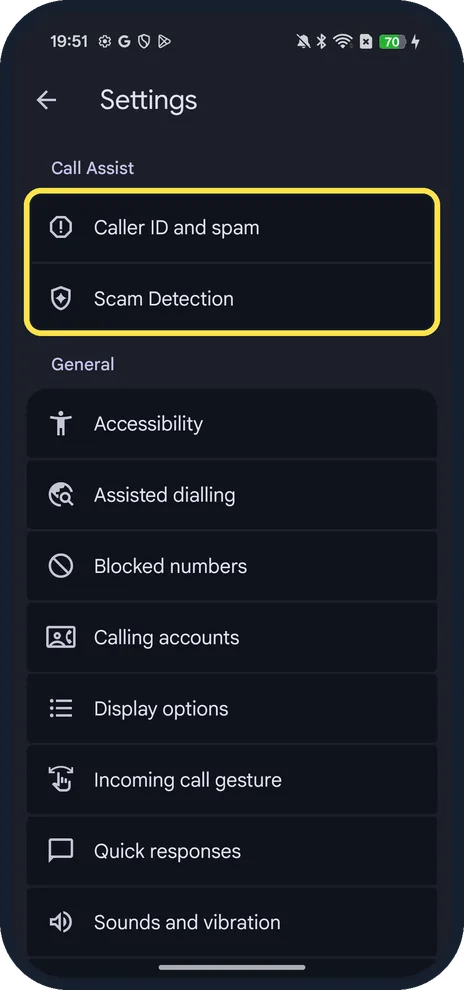
Open the Phone app settings
Open Phone, tap the three dots at the top right and tap Settings. The page starts with Call Assist: Caller ID and spam and Scam Detection.
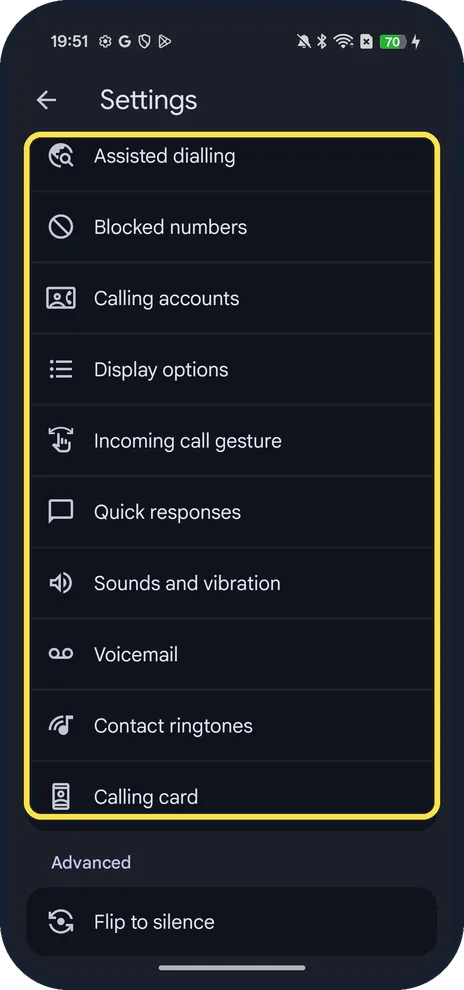
Look for Call recording
Scroll down. On ours the list went Blocked numbers, Calling accounts, Display options, Incoming call gesture, Quick responses, Sounds and vibration, Voicemail, Contact ringtones, Calling card and Advanced, with no Call recording.
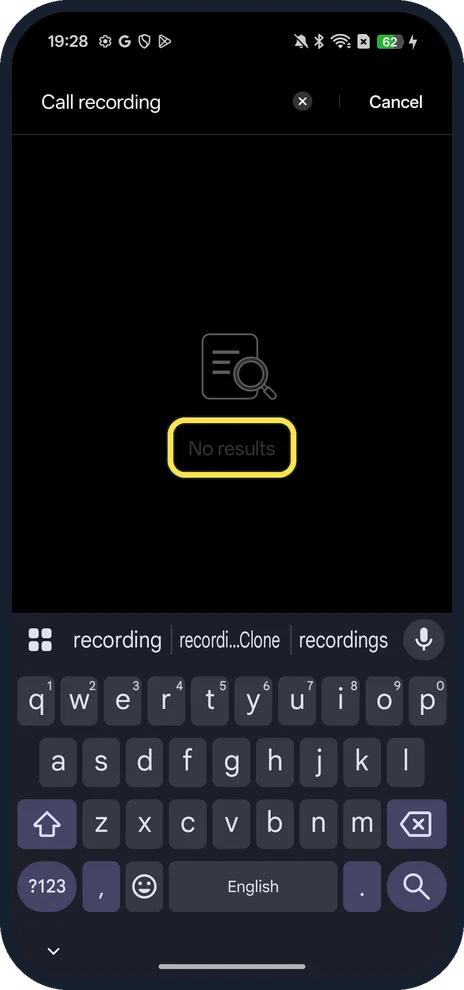
Search the phone's settings
In the Settings app, search for Call recording. Ours said No results.
If you do not see this option
- Which dialler do you have? OPPO says to check first: the Google Phone app has a blue icon, OPPO's own dialler a green one. Only the OPPO dialler has Settings, Call recording, Record all calls (ColorOS 12 to 16). Ours is the Google app. Source: How to Enable Call Recording on OPPO Phones
- Your country OPPO says call recording may not be available in Australia and some European countries (it names Spain, France, the Netherlands, Italy, Portugal, Belgium, New Zealand and Russia). Google says it depends on the country or region, the device and the carrier. Source: How to Enable Call Recording on OPPO Phones · Source: Record a phone call
- Gone after an update? OPPO says it has temporarily closed call recording on some phones after ColorOS updates to follow local rules, and suggests a third-party recorder in the meantime. Source: Call Recording Function Unavailable After ColorOS Update
If this does not work
- Record button missing during a call? OPPO notes that with the Google Phone app you can't record until the call is answered, while it is on hold or muted, or in a conference call. Source: How to Enable Call Recording on OPPO Phones
- Want every call recorded? OPPO says Record all calls and automatic recording are not available in the Google Phone app; both parties also hear a notice when recording starts and stops. Source: How to Enable Call Recording on OPPO Phones
- Phone app out of date? Google says you need the latest version of the Phone app. Update it in the Play Store, then look again. Source: Record a phone call
About this guide
Older OPPO phones had their own dialler with a call recorder. Our Reno13 5G (CPH2689, EEA) came with the Google Phone app, so call recording follows Google's rules.
The screenshots are from our OPPO Reno13 5G, the European model CPH2689, with ColorOS 16.0.5 and Android 16 (build CPH2689_16.0.5.1001(EX01)), in Dark mode. The phone had no SIM, so we could not see the in-call screen; this guide covers only what the settings show.
Good to know
Blocked numbers sits in the same Phone settings list; it works the same way on a OnePlus: block a number on a OnePlus.
More on this phone: screen record on an OPPO phone.
In short: Google Phone, three dots, Settings: no Call recording on our EEA Reno13; Settings search finds nothing.
- OPPO Support: How to Enable Call Recording on OPPO Phones
- OPPO Support: Call Recording Function Unavailable After ColorOS Update
- Phone app Help: Record a phone call
Links checked in October 2026. Menus and features can change after software updates. These steps match the version named at the top.
Did this guide work for you?
Sorry about that. What happened?