ONEPLUS
How to block a number on a OnePlus (OxygenOS 16)

In short
Open the Phone app, tap the menu (three lines) at the top left, then Settings, Blocked numbers. Tap Add a Phone Number, type the number and tap Block. Calls and texts from it stop.
6 of 6 steps show a real screenshot from our Nord 5. Each step was checked against the maker's own instructions, linked at the end.
Steps
- 1
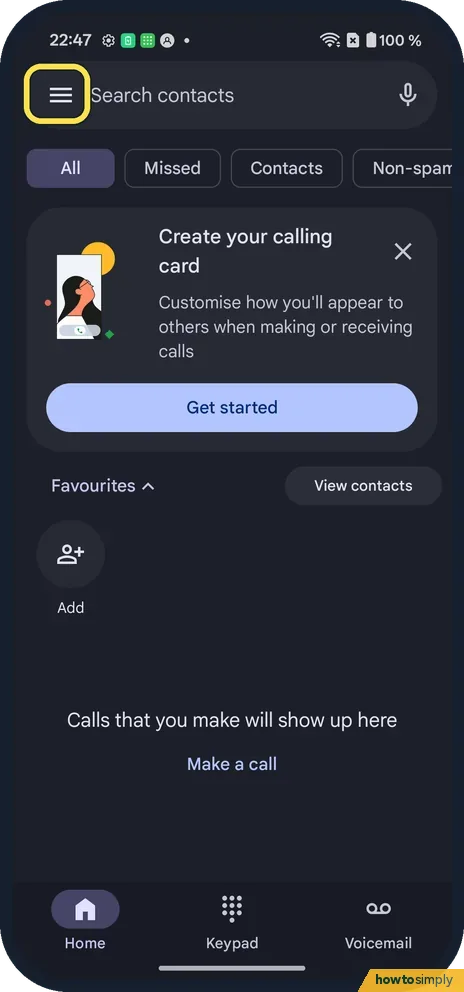
Open the menu
Open the Phone app and tap the three lines at the top left.
- 2
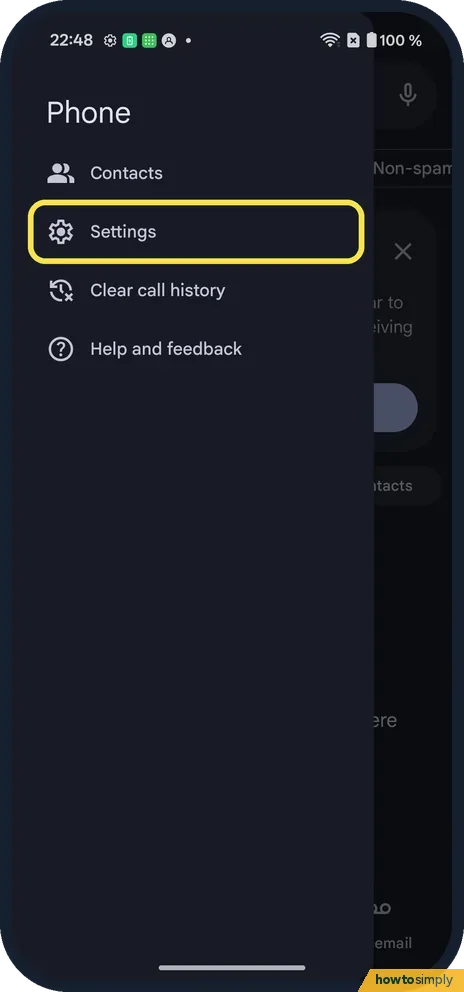
Tap Settings
It is in the menu.
- 3
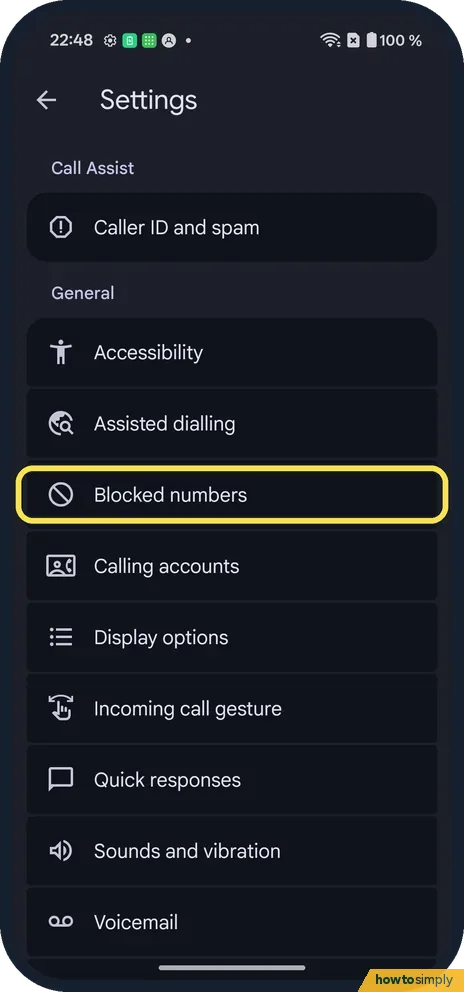
Tap Blocked numbers
It is under General.
- 4
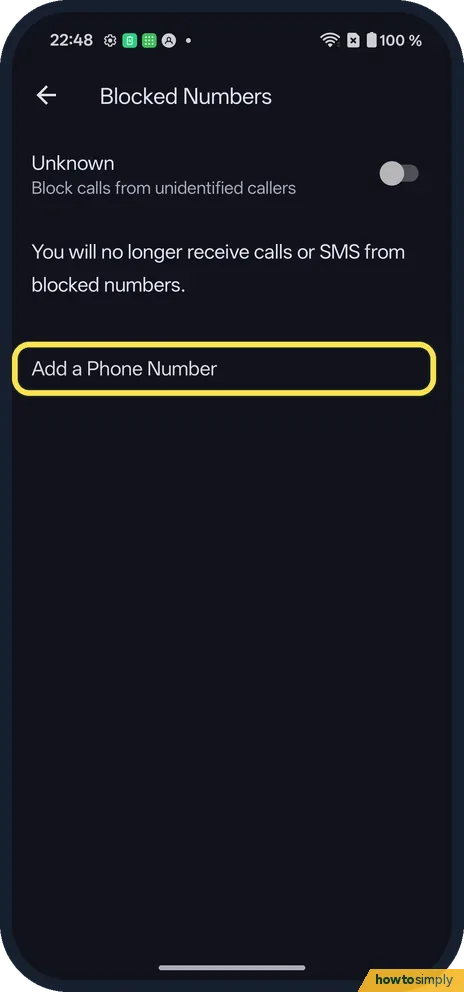
Tap Add a Phone Number
The page says you will no longer receive calls or SMS from blocked numbers.
- 5
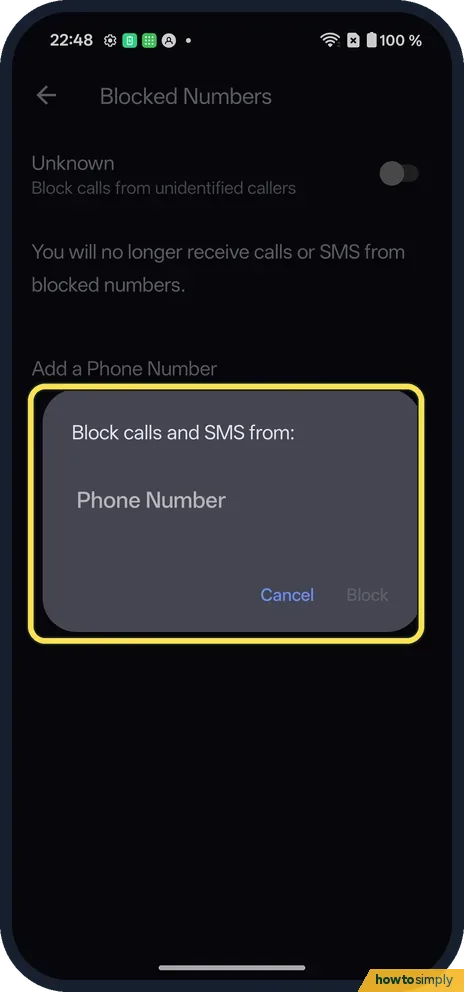
Type the number and tap Block
The box says Block calls and SMS from:. Tap Cancel to back out.
- 6
Block unknown callers too
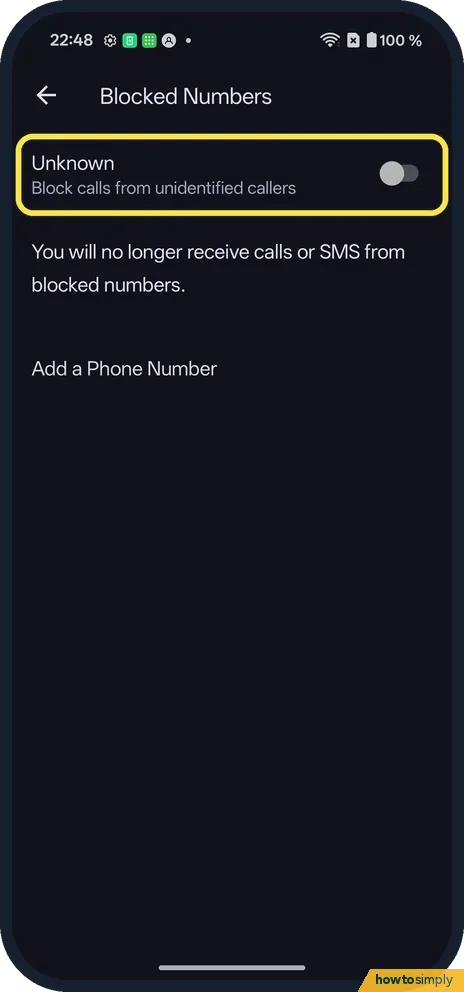
The Unknown switch at the top blocks calls from unidentified callers. Ours was off.
If you do not see this option
- From the call list? Touch and hold a call in the list on the Home tab and pick Block/report spam. Source: Block or unblock a phone number
- Another phone app? These steps are for Google's Phone app, which our Nord 5 uses. Another phone app has its own block list in its settings. Source: Block or unblock a phone number
- Calls with no number? Turn on Unknown at the top of Blocked numbers. It was off on ours.
If this does not work
- Still getting their texts? Google says you stop getting calls and texts from a blocked number. If another texting app is your default, block them there as well.
- Blocked the wrong number? Open Blocked numbers again and remove it there.
- Caller still leaves voicemails? Google says blocked callers cannot leave voicemails if visual voicemail is on. If your carrier's voicemail is not visual, messages may still reach the carrier's voicemail box, so ask your carrier about blocking there too.
- Too many spam calls from different numbers? Blocking one number at a time cannot keep up with spam that changes number. In the Phone app's Settings, Caller ID and spam can warn you about suspected spam, and Google describes an optional Filter spam calls switch that stops them ringing.
- Unknown is on but a stranger still gets through? Google says Unknown blocks private or unidentified numbers only. A caller whose number shows but is not in your contacts still rings.
Good to know
Next: put a OnePlus on silent or vibrate.
When a blocked number calls, Google says your phone declines the call automatically, and you do not see or hear anything. The caller is not told they are blocked, though a call that never rings and ends quickly can give a hint. Blocking does not affect your other calls, battery or data, and the person stays in your contacts if you saved them.
To unblock, Google says to open Blocked numbers, tap Clear next to the number, then Unblock. Filtered spam calls, by contrast, do not raise a missed call or voicemail notification but still appear in your call history. If the problem is noise rather than one caller, quieter options may suit you better: see silent or vibrate.
About this guide
- Device
- Android
- Shown on
- OnePlus Nord 5 (CPH2709), OxygenOS 16.0.5.1201, Android 16
- App
- Phone
- Path
- Phone › Menu › Settings › Blocked numbers
- Real screenshots
- 6 of 6 steps
- Checked
- October 2026
- Sources
- 2 official, linked below
Sources
Links checked October 2026. Menus and features can change with updates.Spotted a mistake? Menus change with updates, and we want every step to match your screen. Email us about this page or use the contact form. We read every report, and fixes are listed on What changed.
Liked this guide?
Follow us for new guides and short how-to videos.
Did this guide work for you?
Sorry about that. What happened?