XIAOMI REDMI
How to turn on raise to wake and double tap to wake on a Xiaomi phone (HyperOS 3)

In short
Go to Settings, Lock screen and turn on Raise to wake to light up the screen when you pick the phone up. Double tap to wake or turn off screen when device is locked, just below, wakes it with two taps. Both were off on ours.
4 of 4 steps show a real screenshot from our Redmi Note 15 Pro 5G. Each step was checked against the maker's own instructions, linked at the end.
Steps
- 1
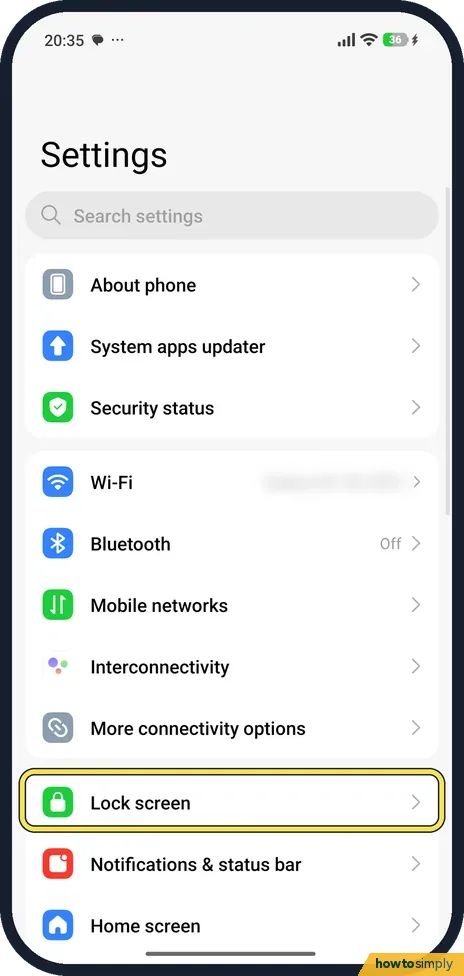
Open Lock screen
Open Settings and tap Lock screen, below More connectivity options.
- 2
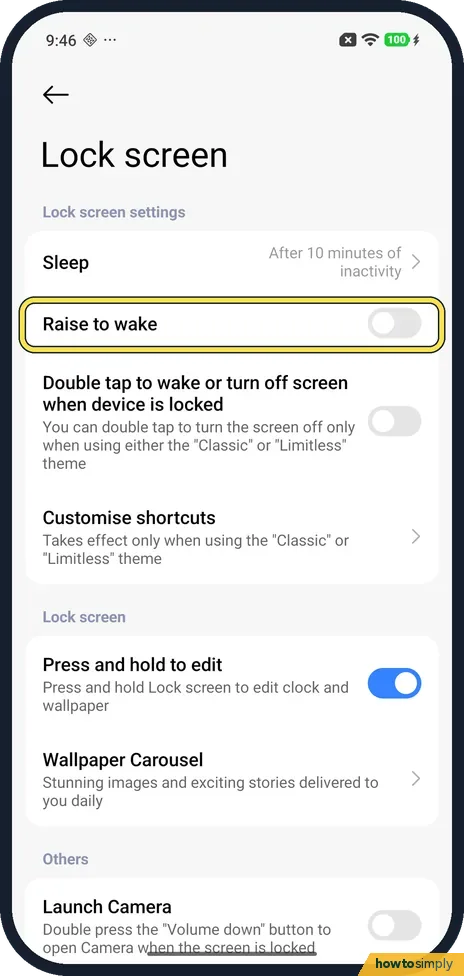
Find Raise to wake
Raise to wake is under Lock screen settings, just below Sleep. It was off on ours.
- 3
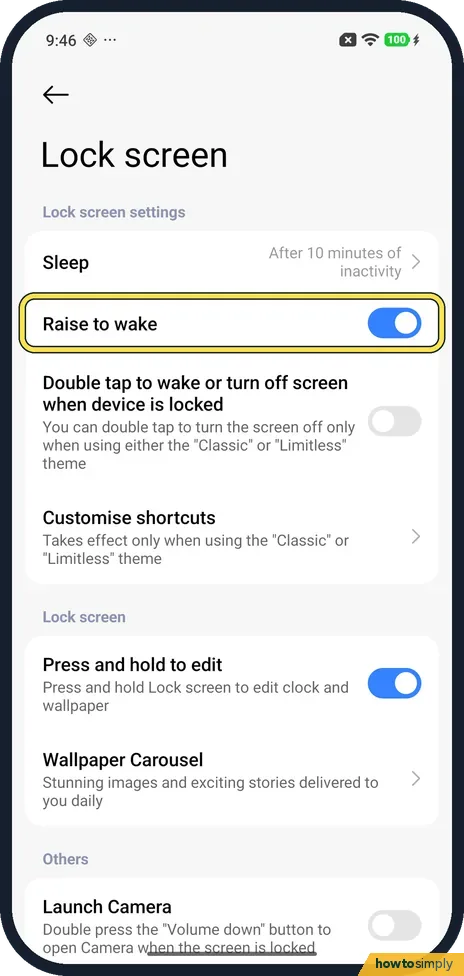
Turn on Raise to wake
Tap the switch; it turns blue. Xiaomi says the screen then wakes when you pick up or raise the phone, and shows the lock screen, notifications or the time.
- 4
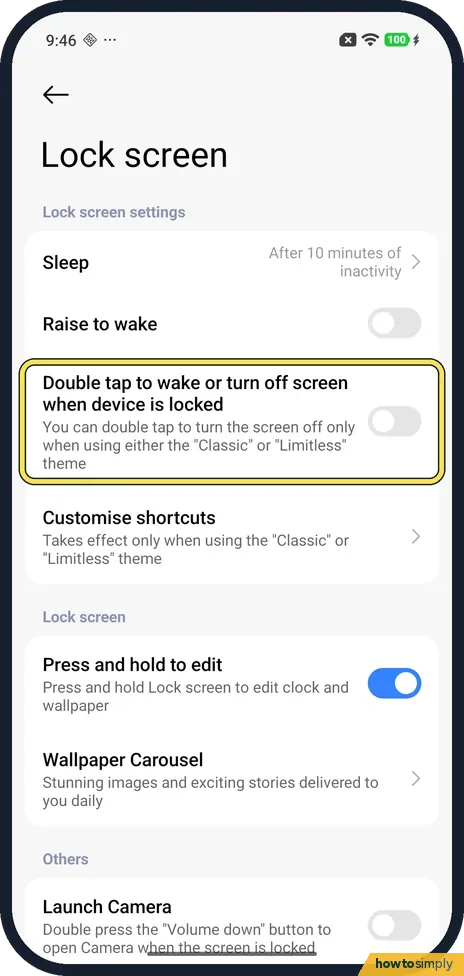
Double tap to wake
Below it is Double tap to wake or turn off screen when device is locked. It was off on ours; tap the switch to turn it on. The note says double tap turns the screen off only with the Classic or Limitless theme.
If you do not see this option
- Always-on display & Lock screen? On some older models the route is different. For the REDMI Note 9 Pro, Xiaomi gives Settings, Always-on display & Lock screen, Raise to wake. Source: The Raise to wake feature doesn't work on the REDMI Note 9 Pro
- Which themes count? Our phone's note names the Classic and Limitless lock screen themes. Xiaomi's HyperOS 3 guide says double tap turns the screen off only when pre-installed themes are applied. Source: Generic User Guide for HyperOS 3.0
- Want to test it? Xiaomi suggests turning the screen off, then raising the phone to check that it wakes. Source: Does the screen of the REDMI Note 14 Pro+ 5G support the Raise to wake function?
If this does not work
- Raise to wake doesn't work? Xiaomi suggests checking the switch is on, updating the software and restarting. It also says the motion sensor can be checked in the hardware test: dial *#*#6484#*#* in the Phone app.
- Double tap wakes but won't turn the screen off? Check your lock screen theme. The note says turning off by double tap works only with the Classic or Limitless theme.
- Battery drains a little faster? Xiaomi says Raise to wake can increase power use, although only slightly. Turn it off to save battery.
- Screen wakes in your pocket or bag? Xiaomi's HyperOS 3 guide describes Pocket mode, on the same Lock screen page, which locks touch gestures when the phone is in a pocket. Turn it on, or turn off Raise to wake if the screen still lights up too often.
Good to know
Sleep, the row above, sets when the screen turns off: how to change the screen timeout.
The same page has the lock screen shortcuts: how to change the lock screen shortcuts.
Neither switch changes your screen lock, notifications or Always-on display. You simply have two more ways to see the lock screen without pressing the power button. Both can be undone with the same switches. If you like seeing the time without waking the phone at all, Always-on display is the related option.
About this guide
- Device
- Android
- Shown on
- Xiaomi Redmi Note 15 Pro 5G (25080RABDG), HyperOS 3.0.308.0, Android 16
- App
- Settings
- Real screenshots
- 4 of 4 steps
- Checked
- October 2026
- Sources
- 4 official, linked below
Sources
Links checked October 2026. Menus and features can change with updates.Spotted a mistake? Menus change with updates, and we want every step to match your screen. Email us about this page or use the contact form. We read every report, and fixes are listed on What changed.
Liked this guide?
Follow us for new guides and short how-to videos.
Did this guide work for you?
Sorry about that. What happened?