
howtosimply.com/guides/how-to-block-a-number-on-an-oppo-phone/ · Checked October 2026 · CPH2689, EEA), ColorOS 16.0.5, Android 16 (build CPH2689_16.0.5.1001(EX01) · OPPO Reno13 5G
In this guide
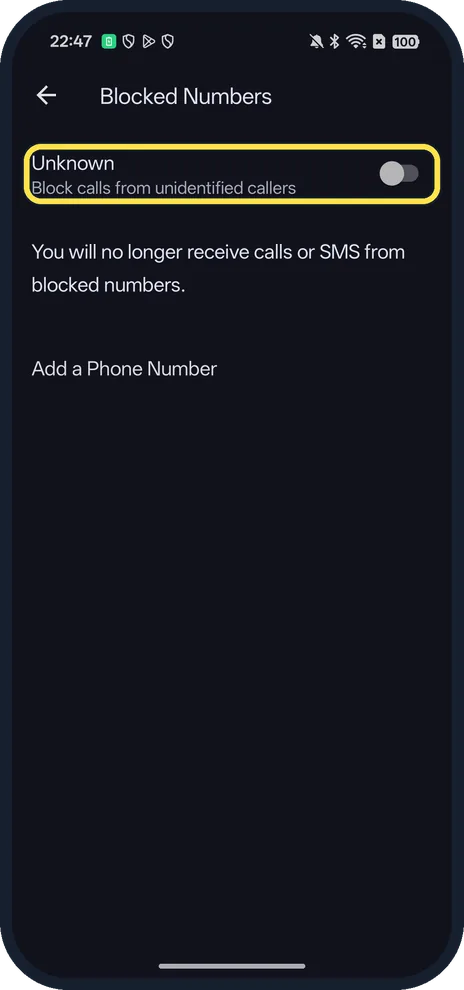
Open the Phone app, open its menu and tap Settings, Blocked numbers. Tap Add a Phone Number, type the number and tap Block. Turn on Unknown to block calls from unidentified callers. Blocked numbers can't call or text you.
4 of 4 steps with real screenshots · 2 official sources below
- Device
- Android
- Shown on
- OPPO Reno13 5G (CPH2689, EEA), ColorOS 16.0.5, Android 16 (build CPH2689_16.0.5.1001(EX01))
- App
- Phone
- Real screenshots
- 4 of 4 steps
- Checked
- October 2026
- Sources
- 2 official, linked below
Step by step
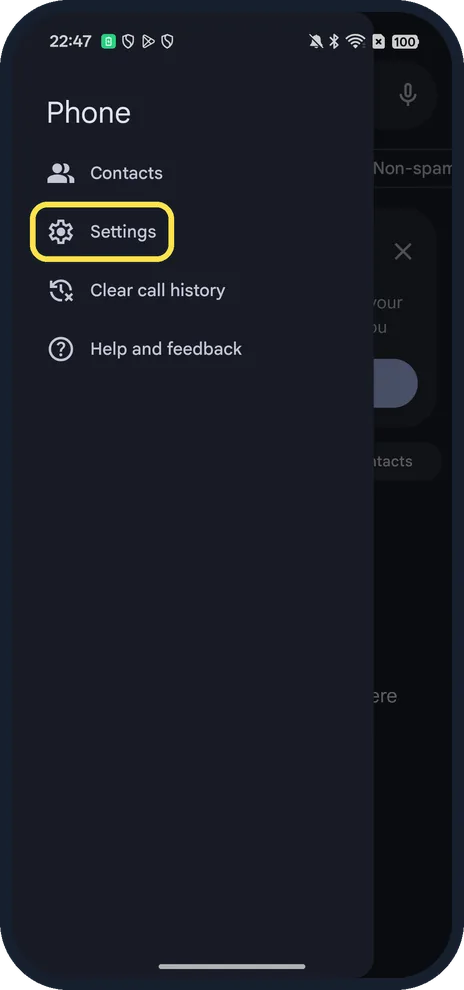
Open the Phone app's Settings
Open Phone and tap the menu at the top left. Tap Settings, below Contacts.
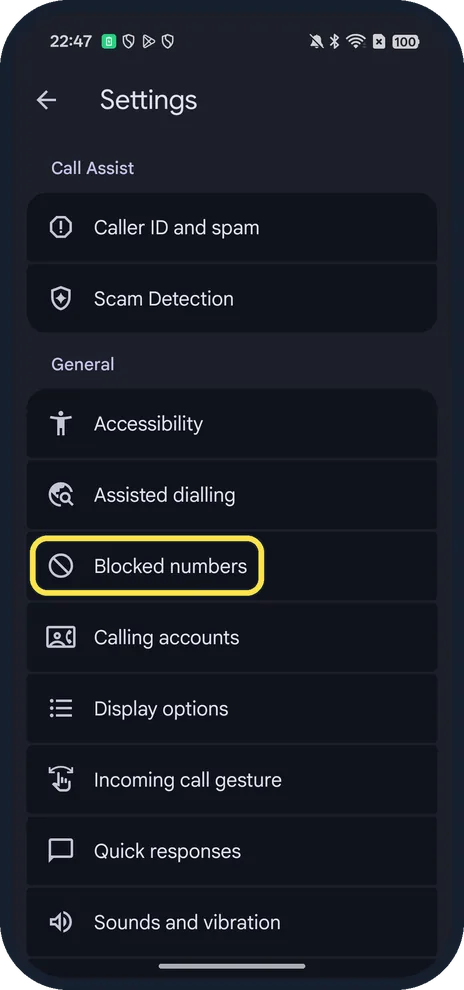
Tap Blocked numbers
Under General, after Assisted dialling.
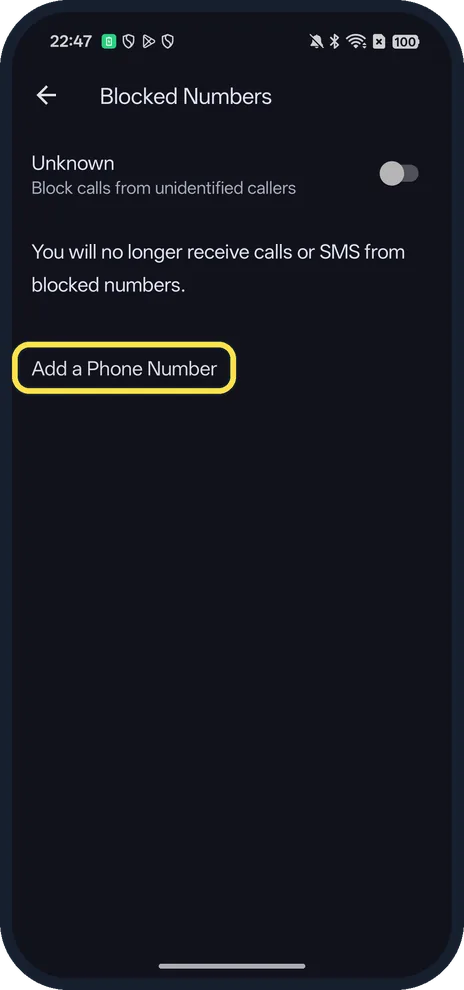
Tap Add a Phone Number
The page says you will no longer receive calls or SMS from blocked numbers.
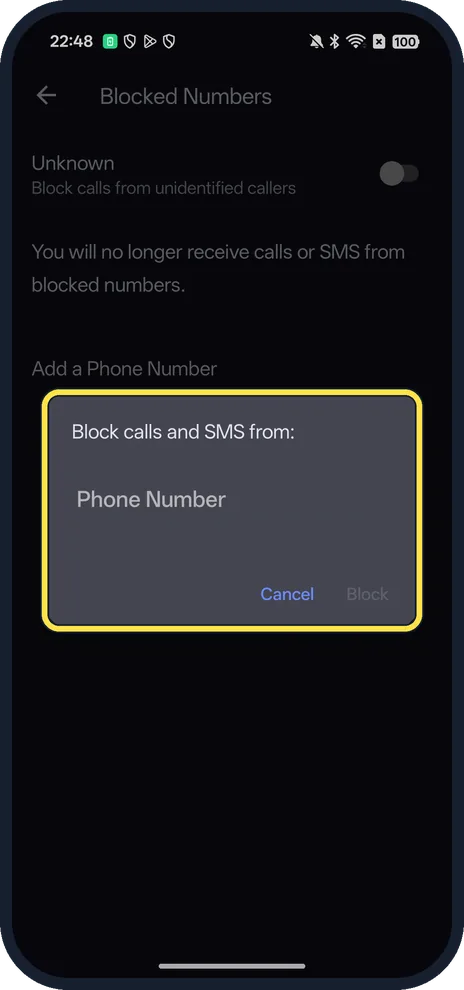
Type the number and tap Block
The box says Block calls and SMS from:. Block stays grey until you type a number.
If you do not see this option
- Three dots instead of a menu at the top left? OPPO's guide for Google Phone says to tap the three dots at the top right, then Settings, Blocked numbers. On ours the menu was at the top left; both lead to the same page. Source: How to Blacklist a Contact and Block Numbers on OPPO Phone
- Your phone uses OPPO's own dialer? OPPO says: on ColorOS 12 and 13, open Phone, tap the contact, tap Setting and choose Block numbers. On ColorOS 11, go to Settings, Privacy, Block & Filter, Block Calls. Source: How to Blacklist a Contact and Block Numbers on OPPO Phone
- Block someone who just called? OPPO says in Google Phone go to Recents, touch and hold the number, tap Block/report spam, then Block. Ours had no calls, so we couldn't show it. Source: How to Block Phone Numbers on OPPO Phone
- Block every unknown caller? Turn on Unknown at the top of Blocked numbers to block calls from unidentified callers. Source: How to Blacklist a Contact and Block Numbers on OPPO Phone
If this does not work
- Want to unblock someone? OPPO says in Google Phone go to Recents, touch and hold the number, tap Unblock and confirm. Source: How to Block Phone Numbers on OPPO Phone
- Missing calls from new numbers? OPPO warns that blocking all unknown numbers can make you miss important calls from new numbers. Turn Unknown off. Source: How to Blacklist a Contact and Block Numbers on OPPO Phone
- Still getting texts from a number? OPPO says that in OPPO's Messages app (ColorOS 12 and later) you open the three-dot menu, then Block & filter, and choose which messages to block. Source: How to Blacklist a Contact and Block Numbers on OPPO Phone
About this guide
Our Reno13 uses Google's Phone app as its dialer; some OPPO phones use OPPO's own dialer, covered below.
The screenshots are from our OPPO Reno13 5G, the European model CPH2689, with ColorOS 16.0.5 and Android 16 (build CPH2689_16.0.5.1001(EX01)), in Dark mode. We opened the Add dialog and tapped Cancel; nothing was blocked.
Good to know
To change how calls sound, change the ringtone on an OPPO phone.
On a OnePlus, see block a number on a OnePlus.
In short: Phone, menu, Settings, Blocked numbers, Add a Phone Number, Block.
- OPPO Support: How to Blacklist a Contact and Block Numbers on OPPO Phone
- OPPO Support: How to Block Phone Numbers on OPPO Phone
Links checked in October 2026. Menus and features can change after software updates. These steps match the version named at the top.
Did this guide work for you?
Sorry about that. What happened?