
howtosimply.com/guides/samsung-galaxy-says-no-sim-card-fixes/ · Checked October 2026 · Samsung Galaxy A57 5G (SM-A576B), One UI 8.5, Android 16
In this guide
Switch Airplane mode on and off, then restart the phone from the power icon in the quick panel. If it still says No SIM card, open Settings, Connections, SIM manager and check that the switch for your SIM is on.
5 of 5 steps with real screenshots · 3 official sources below
- Device
- Android
- Shown on
- Samsung Galaxy A57 5G (SM-A576B), One UI 8.5, Android 16
- Starts in
- Quick Settings
- Real screenshots
- 5 of 5 steps
- What we did
- Observed: looked at each screen, changed nothing
- Our phone
- Shown on Galaxy A57, One UI 8.5
- Checked
- October 2026
- Sources
- 3 official, linked below
Step by step
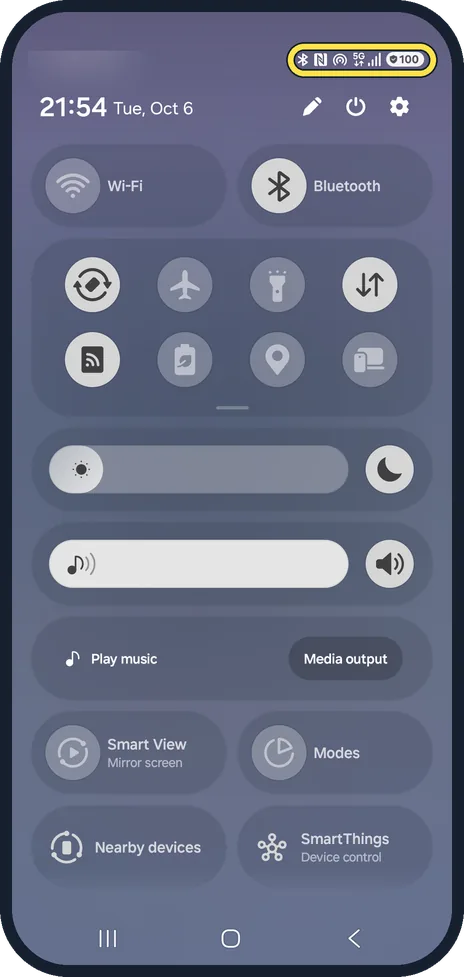
Check the status bar
Pull down the quick panel. With a working SIM, the signal bars show at top right and the carrier name at top left. We blurred our carrier.
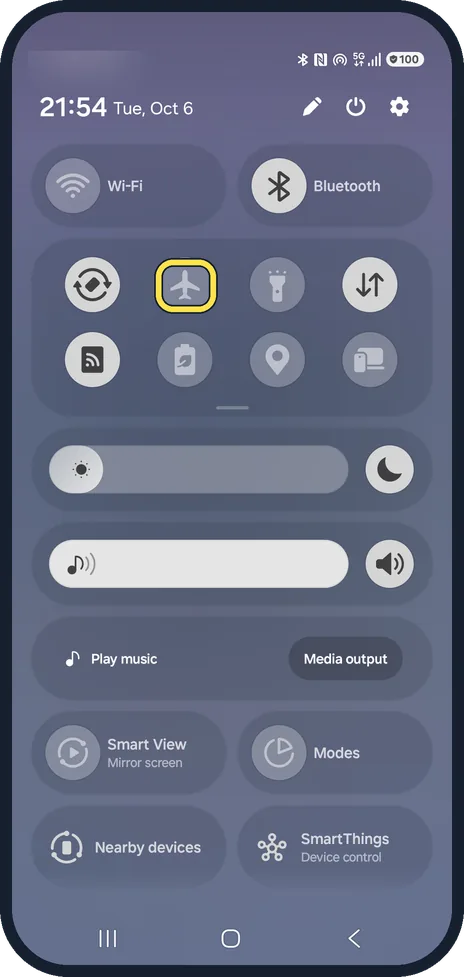
Switch Airplane mode on and off
Tap the plane button in the quick panel, wait a few seconds and tap it again. On our Galaxy, the expanded quick panel labels this button Airplane mode.
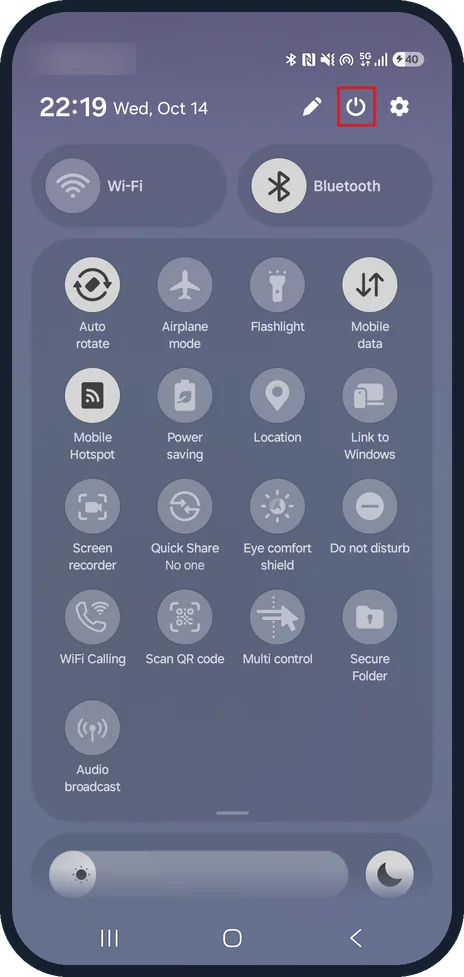
Tap the power icon
Tap the power icon at the top right of the quick panel, between the pencil and the settings cog.
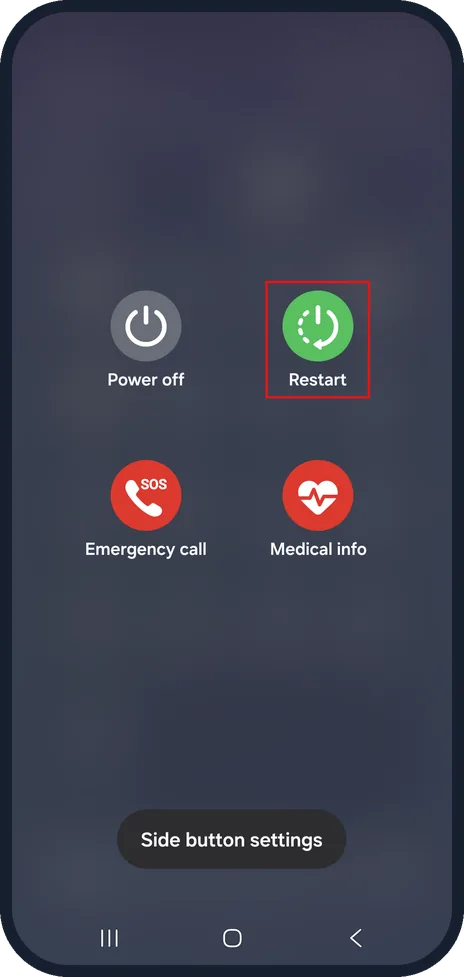
Tap Restart
Tap Restart and wait for the phone to start again. On our Galaxy, the power menu also shows Power off, Emergency call and Medical info.
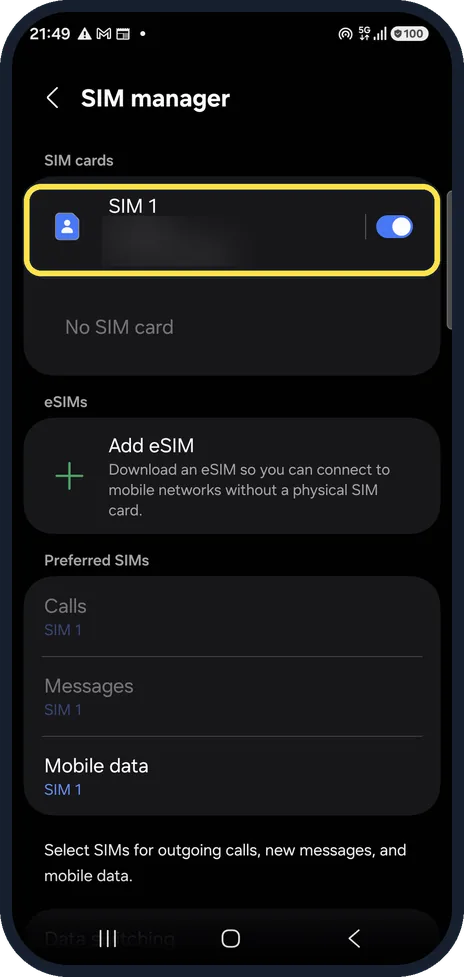
Check SIM manager
Open Settings, Connections, SIM manager and make sure the switch next to your SIM is on.
On our Galaxy, SIM 1 is switched on and the empty second slot says No SIM card. We blurred the number.
If you do not see this option
- No Airplane mode label The quick panel first opens in a compact view with icons only. Swipe down again to expand it; on our Galaxy the plane button is then labelled Airplane mode.
- No power icon It sits at the top right of the quick panel, next to the settings cog. On our Galaxy it shows in both the compact and the expanded panel.
- No SIM manager Open Settings, then Connections; SIM manager is listed there on One UI 8. On older One UI versions a few names and positions differ.
If this does not work
- The SIM switch is off Tap the switch next to the SIM in SIM manager. On our Galaxy the switch is blue when it is on.
- SIM manager still says No SIM card The phone is not reading a SIM in that slot. Samsung suggests Settings, General management, Reset, Reset mobile network settings. Sources: What to do when the SIM card is not detected on your Samsung Galaxy device, SIM card is not detected on your Samsung Galaxy device, How to fix the No SIM Card Detected error on Samsung Galaxy devices
- Signal bars show but there is no service The SIM is being read, so this is a network problem rather than a SIM problem. See our guide to Samsung Galaxy says No service. Sources: What to do when the SIM card is not detected on your Samsung Galaxy device, SIM card is not detected on your Samsung Galaxy device, How to fix the No SIM Card Detected error on Samsung Galaxy devices
About this guide
No SIM card means the phone cannot read the SIM at all, which is different from No service (SIM read, but no network). The fix is usually in the SIM manager, not in the network settings.
The quick panel is see-through, so it looks lighter over the home screen than the dark Settings pages.
Good to know
If the phone still restarts into No SIM card, Samsung suggests Settings, General management, Reset, Reset mobile network settings.
If the phone reads the SIM but has no signal, see Samsung Galaxy says No service. Moving to an eSIM avoids a worn tray: how to add an eSIM on a Samsung Galaxy.
In short: Airplane mode on and off, restart from the power menu, then check the SIM is switched on in SIM manager.
- Samsung Latin: What to do when the SIM card is not detected on your Samsung Galaxy device
- Samsung US: SIM card is not detected on your Samsung Galaxy device
- Samsung Latin: How to fix the No SIM Card Detected error on Samsung Galaxy devices
Links checked in October 2026. Menus and features can change after software updates. These steps match the version named at the top.
📷 See real photos from the Galaxy A57 in our Camera Lab, next to 10 other phones.
Did this guide work for you?
Sorry about that. What happened?