
What changed: new screenshots of the audio-access question and the sound picker with its Tracks, Albums, Artists and Folders tabs.
howtosimply.com/guides/how-to-set-a-custom-ringtone-or-notification-sound-on-a-samsung-galaxy/ · Checked October 2026 · Samsung Galaxy A57 5G (SM-A576B), One UI 8.5, Android 16
In this guide
Open Settings, Sounds and vibration, Ringtone and tap the + at the top right to choose a song or sound saved on the phone. Notification sound, on the same page, sets the sound for messages and apps. Streaming songs, for example from Spotify, cannot be used.
5 of 5 steps with real screenshots · 4 official sources below
- Device
- Android
- Shown on
- Samsung Galaxy A57 5G (SM-A576B), One UI 8.5, Android 16
- App
- Settings
- Path
- Settings › Sounds and vibration › Ringtone
- Real screenshots
- 5 of 5 steps
- Our phone
- Shown on Galaxy A57, One UI 8.5
- Checked
- October 2026
- Sources
- 4 official, linked below
Step by step
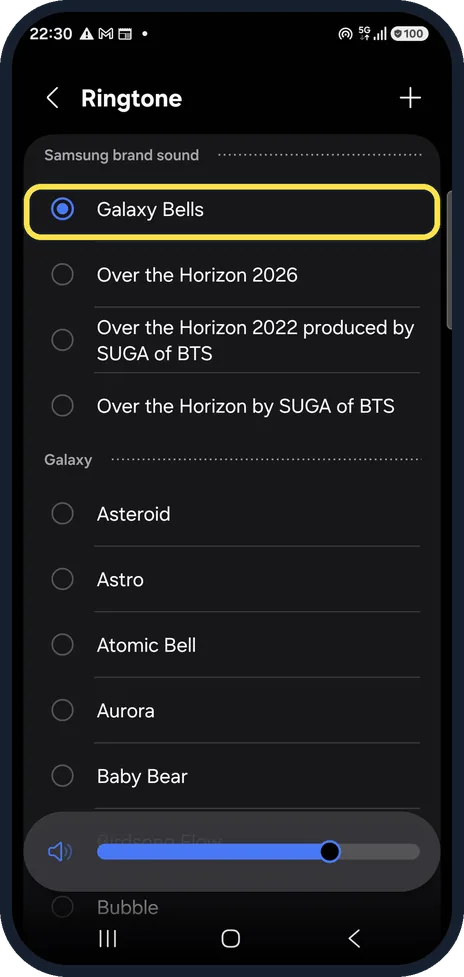
Open Ringtone
Open Settings, Sounds and vibration and tap Ringtone. Ours uses Galaxy Bells.
Watch these steps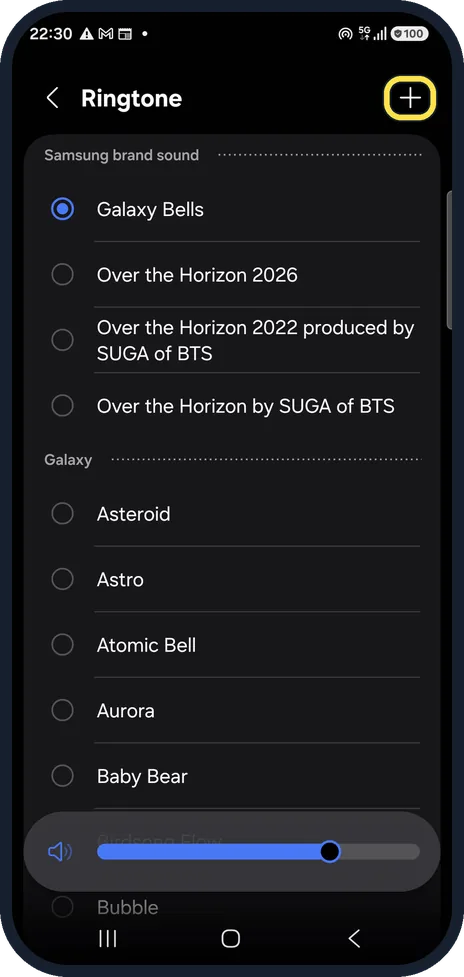
Tap + to add your own
The + at the top right opens the sound picker for your own audio files.
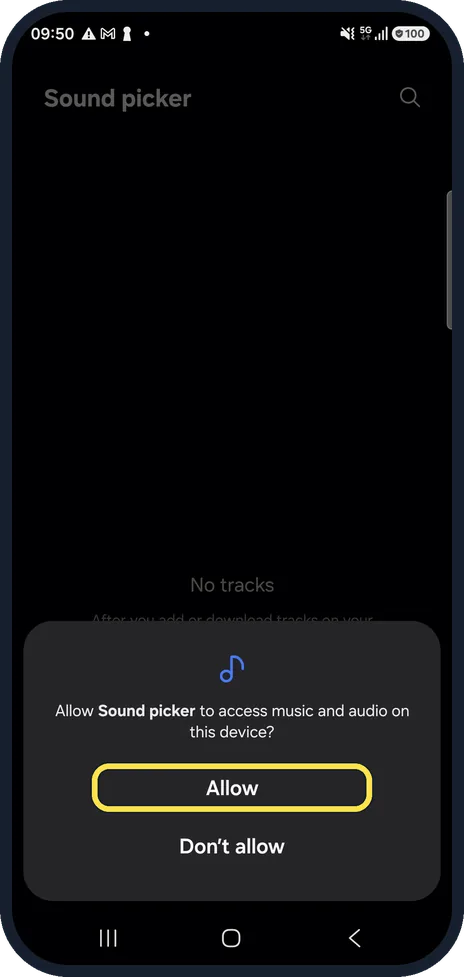
Allow access to audio
The first time, the phone asks whether Sound picker may access music and audio on this device. Tap Allow so the picker can list your audio files.
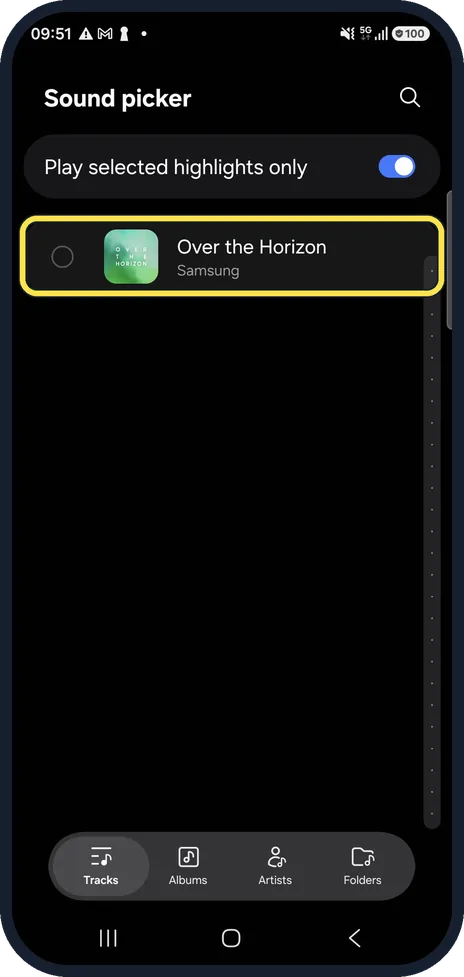
Pick the song
The sound picker lists the audio saved on the phone, sorted by Tracks, Albums, Artists or Folders at the bottom. Tap the circle next to a track. Ours only had Over the Horizon, Samsung's own song that comes with Galaxy phones.
Change the notification sound
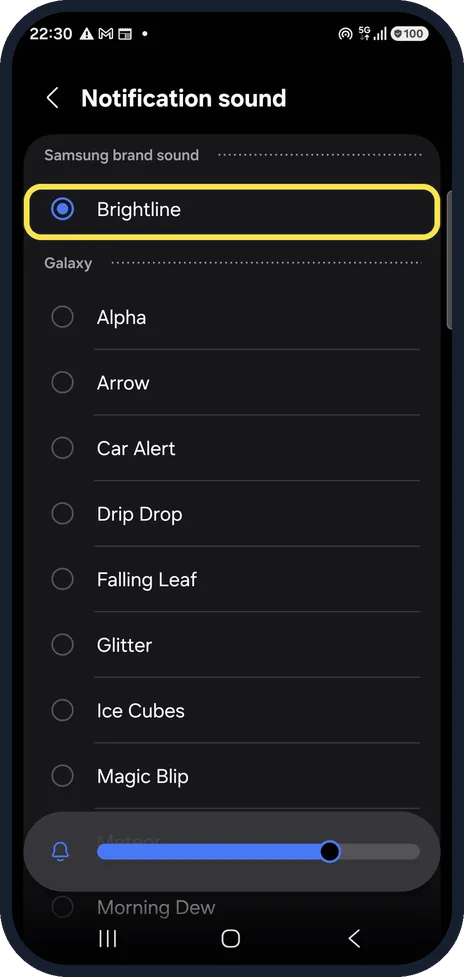
Back on Sounds and vibration, Notification sound lists the built-in sounds. Ours uses Brightline.
What changed: new screenshots of the audio-access question and the sound picker with its Tracks, Albums, Artists and Folders tabs.
Watch these steps
If you do not see this option
- Your song is not in the list Samsung says the file has to be saved on the phone itself, for example bought and downloaded. Tracks you play in a streaming app such as Spotify cannot be ringtones. Source: How to download or set up a custom ringtone on your Samsung phone
- The file is an M4A Samsung says its phones take MP3, WMA, AAC and FLAC files. Convert an M4A file to one of these first. Source: How to download or set up a custom ringtone on your Samsung phone
If this does not work
- Your sound is not under Notification sound Samsung says the file must be in the Notifications folder: in My Files, Audio, touch and hold the file, Copy, then Internal storage, Notifications and Copy here. Source: How to set a music file as a notification sound for apps on your Galaxy phone
- One app should sound different Samsung says to open Settings, Apps, the app, Notifications, then General notifications and Sound. Source: How to set a music file as a notification sound for apps on your Galaxy phone
About this guide
Any audio file saved on the phone can be a ringtone. For a notification sound, the file has to be in the Notifications folder first. We allowed the sound picker's access to audio on our phone and did not change the ringtone.
Good to know
A ringtone for one person: Contacts, the contact, Edit, View more, Ringtone, then Save.
For your own notification sound, Samsung says to copy the file in My Files into Internal storage, Notifications; it then appears in this list.
In short: Settings, Sounds and vibration, Ringtone, + for your own file; Notification sound for messages and apps.
- Samsung Latin: How to set an audio file saved on your Galaxy phone as a ringtone
- Samsung UK: How to download or set up a custom ringtone on your Samsung phone
- Samsung Latin: How to set a music file as a notification sound for apps on your Galaxy phone
- Samsung UK: How to set an audio file as a message notification or ringtone
Links checked in October 2026. Menus and features can change after software updates. These steps match the version named at the top.
📷 See real photos from the Galaxy A57 in our Camera Lab, next to 10 other phones.
Did this guide work for you?
Sorry about that. What happened?