XIAOMI REDMI
Xiaomi phone slow or lagging? 4 settings to check (HyperOS 3)
Close apps you are not using from Recents, free up storage with Deep clean, check Memory extension in Settings, Additional settings, and, if Developer options is on, set the three animation scales back to 1x.

4 of 4 steps show a real screenshot from our Redmi Note 15 Pro 5G. Each step was checked against the maker's own instructions, linked at the end.
Steps
- 1
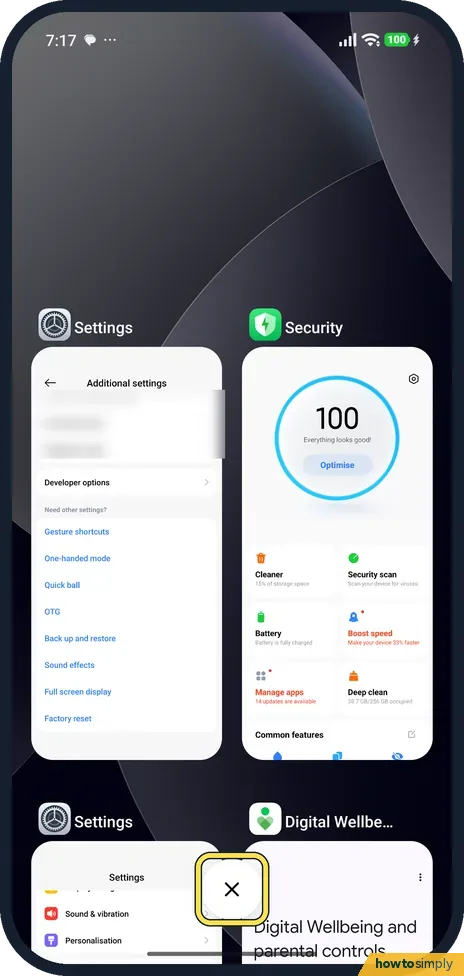
Close apps in Recents
Swipe up from the bottom and hold to open Recents. Swipe an app card away to close it, or tap X to close all. Close the apps you are done with.
- 2
Free up storage
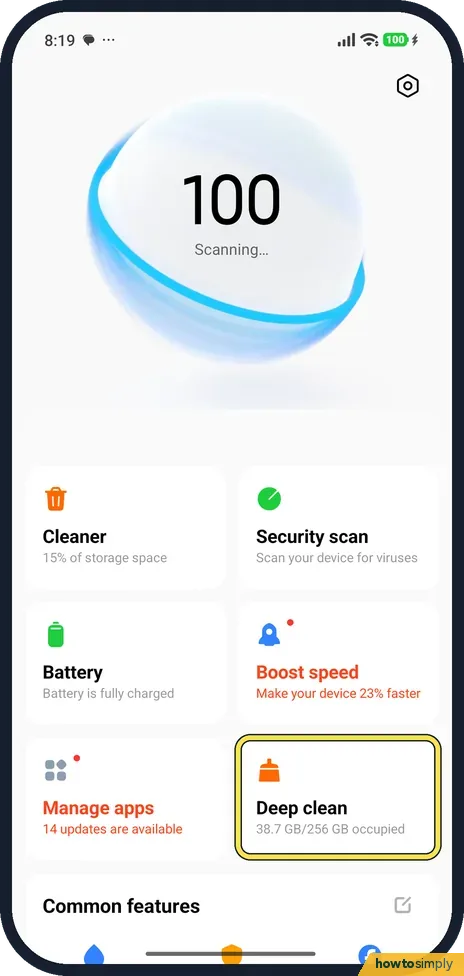
Open the Security app and tap Deep clean, one of the tiles under the big score (38.7 GB/256 GB occupied on ours). Uninstall apps and Clear app data show what can go. A nearly full phone slows down.
- 3
Check Memory extension
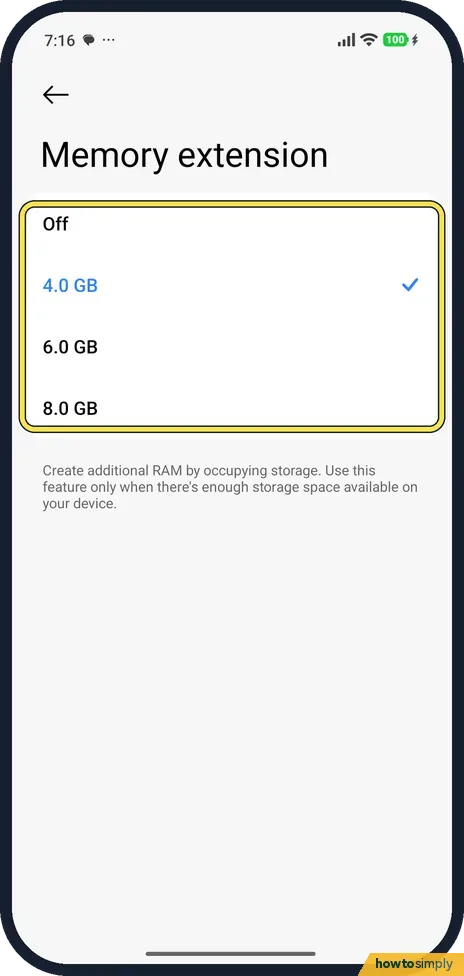
Go to Settings, Additional settings, Memory extension. It uses storage as extra RAM. Ours was set to 4.0 GB; the choices were Off, 4.0, 6.0 and 8.0 GB.
- 4
Check the animation scales
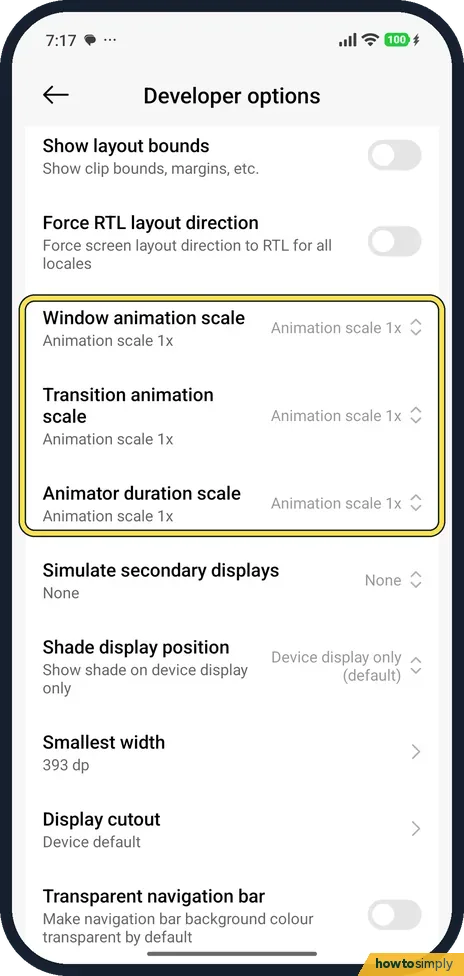
If Developer options is on, open it from Settings, Additional settings. Window animation scale, Transition animation scale and Animator duration scale should read Animation scale 1x, as on ours.
If you do not see this option
- No Developer options? It is hidden until you turn it on from OS version in About phone. If you never turned it on, the scales are at the default.
- No Memory extension in Additional settings? Xiaomi's guide gives the same route. Search Settings for Memory extension if your list differs. Source: Generic User Guide for HyperOS 3.0
- Short on storage? The page says to use Memory extension only when there is enough storage space available. Free space first. Source: Generic User Guide for HyperOS 3.0
If this does not work
- Apps reopen slowly after closing? A closed app starts from scratch next time, so keep the ones you use often open.
- Slow after an update? The update page says the phone optimises in the background for 1 to 3 days after an update.
- Still slow? Restart the phone: how to turn off or restart a Xiaomi phone.
- Slow only since you installed something? Google suggests restarting in safe mode to find a problem app. Xiaomi's REDMI Note 14 5G page says to power off, hold the power button until the startup animation appears, then hold Volume down until safe mode starts. If the phone runs well there, an app is likely the cause; remove recent apps one at a time, restarting normally after each. Safe mode can remove some Home screen widgets, so take a screenshot of your home screens first.
- Home screen feels sluggish? Xiaomi's user guide lists Animation speed under Settings, Home screen, with Relaxed, Balanced or Fast. Fast makes home screen movement feel quicker.
- Want the phone to look for problems itself? Xiaomi's guide describes Solve problems in the Security app, which scans for performance, network, settings and battery issues.
Good to know
Turn on Developer options: how to turn on Developer options. Apps closing on their own? Xiaomi closing apps in the background.
None of these checks deletes personal data, except anything you choose to remove in Deep clean. Closing apps, changing Memory extension and resetting the animation scales are all reversible.
Battery saver modes also slow the phone on purpose. Xiaomi's guide says Ultra battery saver decreases the device's performance, so check the battery mode if the phone suddenly feels slow. See change battery mode on a Xiaomi phone.
About this guide
- Device
- Android
- Shown on
- Xiaomi Redmi Note 15 Pro 5G (25080RABDG), HyperOS 3.0.308.0, Android 16
- Starts in
- Recents
- Real screenshots
- 4 of 4 steps
- Checked
- October 2026
- Sources
- 2 official, linked below
Sources
Links checked October 2026. Menus and features can change with updates.Spotted a mistake? Menus change with updates, and we want every step to match your screen. Email us about this page or use the contact form. We read every report, and fixes are listed on What changed.
Liked this guide?
Follow us for new guides and short how-to videos.
Did this guide work for you?
Sorry about that. What happened?