
howtosimply.com/guides/how-to-use-smart-sidebar-on-an-oppo-phone/ · Checked October 2026 · CPH2689, EEA), ColorOS 16.0.5, Android 16 (build CPH2689_16.0.5.1001(EX01) · OPPO Reno13 5G
In this guide
Turn on Smart Sidebar in Settings, Accessibility & convenience, Smart Sidebar. The page says to swipe in from the upper part of the screen to bring it up; from the sidebar you open apps in floating windows or Split View.
4 of 4 steps with real screenshots · 1 official source below
- Device
- Android
- Shown on
- OPPO Reno13 5G (CPH2689, EEA), ColorOS 16.0.5, Android 16 (build CPH2689_16.0.5.1001(EX01))
- App
- Settings
- Path
- Settings › Accessibility & convenience
- Real screenshots
- 4 of 4 steps
- Checked
- October 2026
- Sources
- 1 official, linked below
Step by step
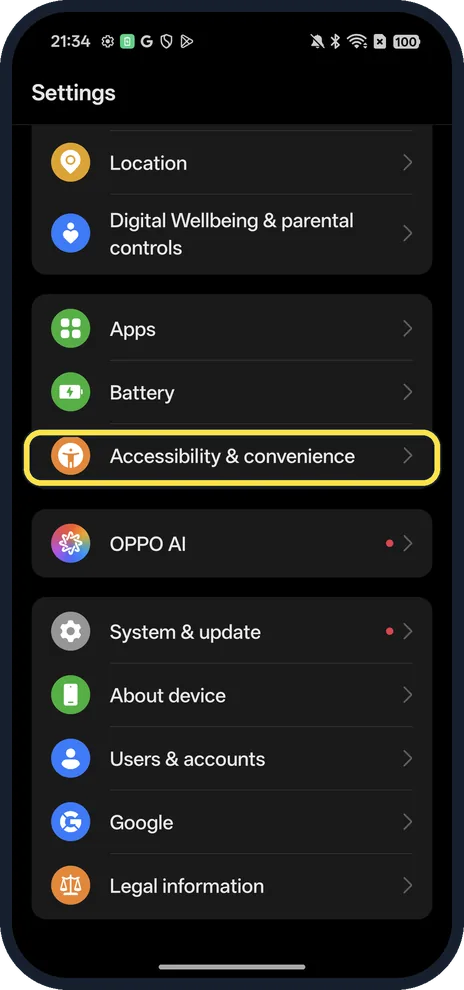
Open Accessibility & convenience
Open Settings and scroll down.
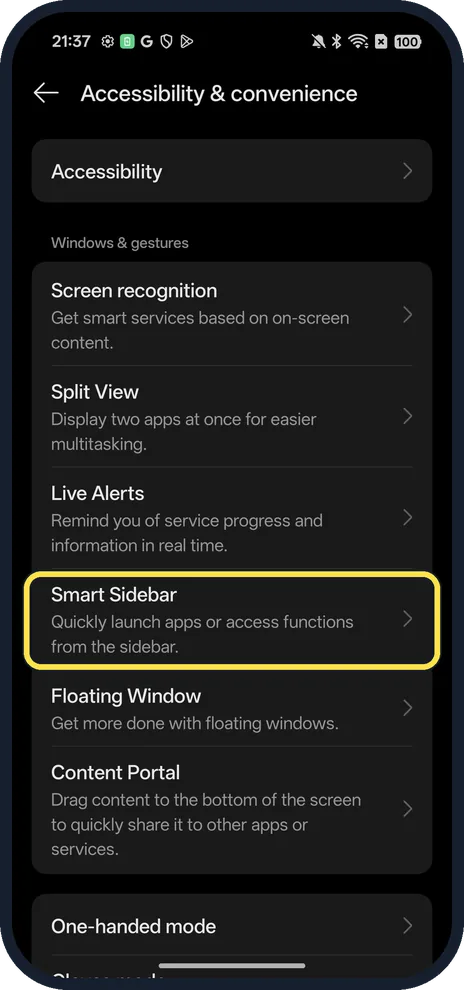
Tap Smart Sidebar
Under Windows & gestures.
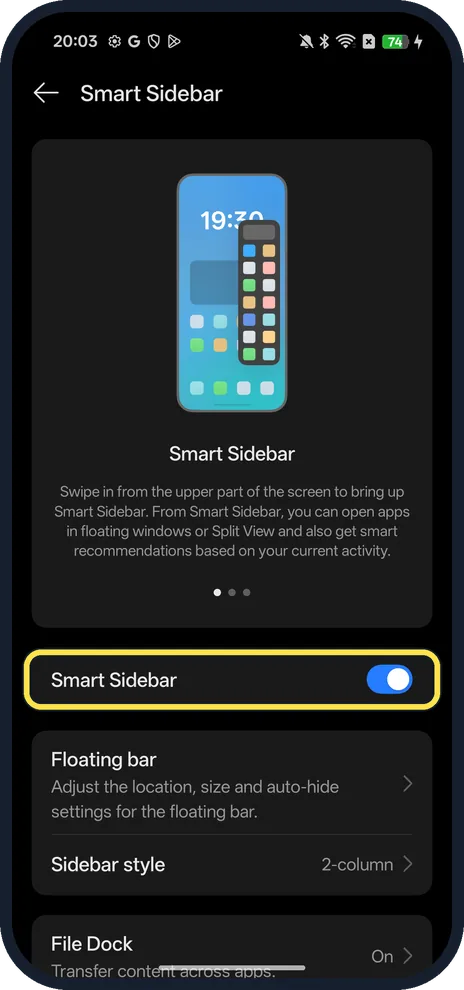
Turn on Smart Sidebar
The page says: swipe in from the upper part of the screen to bring it up.
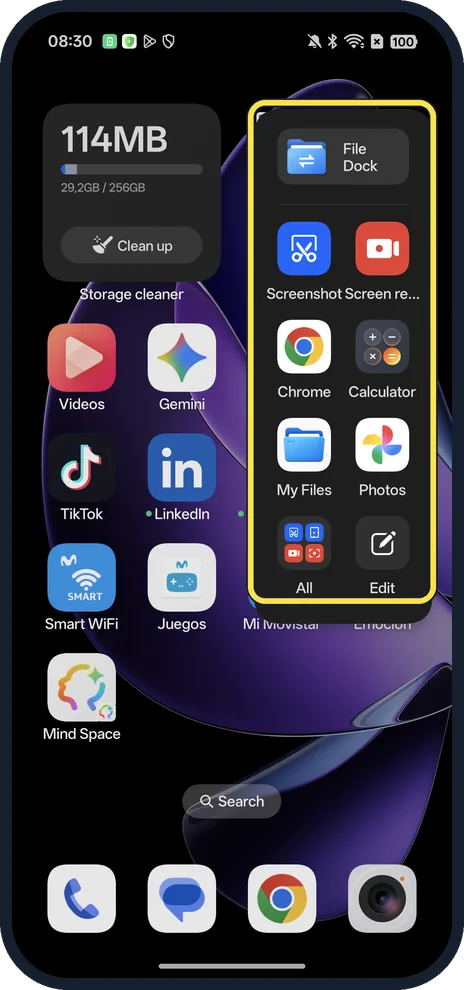
Swipe in to open it
Swipe left from the thin bar at the right edge, near the top. Ours showed File Dock, Screenshot, Screen recording and apps such as Chrome, Calculator, My Files and Photos, with All and Edit at the bottom. The first time, a Welcome to Smart Sidebar screen asks you to tap Get started.
If you do not see this option
- No Smart Sidebar under Accessibility & convenience? OPPO gives Settings, Special features or Accessibility & convenience, Smart Sidebar on ColorOS 12 to 15, and Settings, Convenience Tools, Smart Sidebar on ColorOS 6.0 to 11.3. Source: What Is Smart Sidebar and How to Use It on OPPO Phones
- Older phone with no Smart Sidebar at all? OPPO says Smart Sidebar needs ColorOS 5.2 or later; on ColorOS 5.0 and 5.1 the feature is called Full Screen Multitasking. Source: What Is Smart Sidebar and How to Use It on OPPO Phones
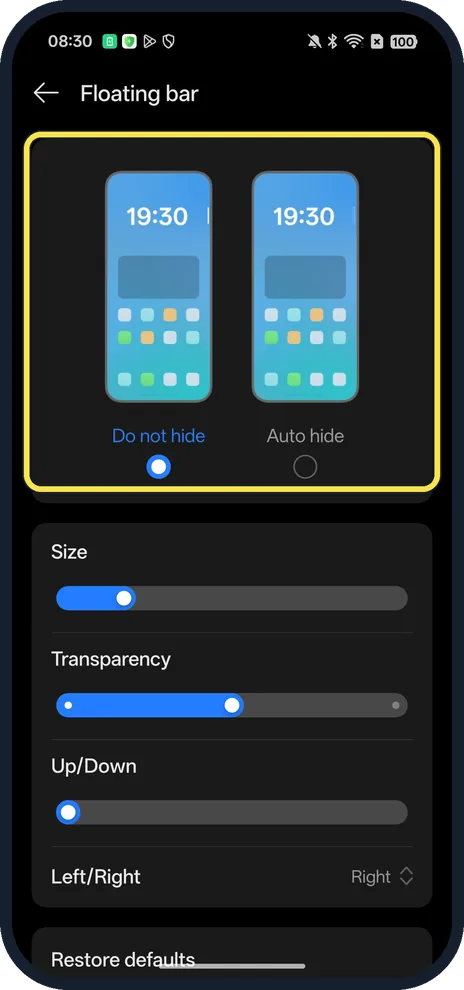
- Handle hidden? Floating bar has Do not hide and Auto hide, plus Size, Transparency, Up/Down and Left/Right. Ours: Do not hide, on the right.
If this does not work
- Can't find the handle? OPPO describes a white vertical line on the right edge that you swipe slightly left. On our ColorOS 16 phone the page says to swipe in from the upper part of the screen, and Floating bar was set to Do not hide, on the right. Source: What Is Smart Sidebar and How to Use It on OPPO Phones
- "Adding limit reached"? OPPO says Quick Apps holds 18 apps; remove one with the minus icon, then add the new one and tap Done. Source: What Is Smart Sidebar and How to Use It on OPPO Phones
- App won't open in a floating window? OPPO says only apps that support floating show among the floating apps; the rest open normally. Source: What Is Smart Sidebar and How to Use It on OPPO Phones
About this guide
The screenshots are from our OPPO Reno13 5G, the European model CPH2689, with ColorOS 16.0.5 and Android 16 (build CPH2689_16.0.5.1001(EX01)), in Dark mode. Smart Sidebar was on.
Good to know
To change how you go back and home, switch between gestures and buttons.
To keep some apps private, lock and hide apps on an OPPO phone.
In short: Settings, Accessibility & convenience, Smart Sidebar on; swipe in from the upper edge.
Links checked in October 2026. Menus and features can change after software updates. These steps match the version named at the top.
Did this guide work for you?
Sorry about that. What happened?