
howtosimply.com/guides/how-to-use-magic-sidebar-on-an-honor-phone/ · Checked October 2026 · BRP-NX1M, EEA), MagicOS 10.0, Android 16 (build 10.0.0.169(C430E7R2P1) · HONOR Magic7 Lite
In this guide
Open Settings, Honor AI, Magic Sidebar and turn on Magic Sidebar. Then swipe in from the edge of the screen and pause to open it, and tap an app to open it in a floating window or split screen. Launch mode switches between swiping from the screen edge and from a small sidebar handle.
3 of 3 steps with real screenshots · 2 official sources below
- Device
- Android
- Shown on
- HONOR Magic7 Lite (BRP-NX1M, EEA), MagicOS 10.0, Android 16 (build 10.0.0.169(C430E7R2P1))
- App
- Settings
- Path
- Settings › Honor AI
- Real screenshots
- 3 of 3 steps
- Checked
- October 2026
- Sources
- 2 official, linked below
Step by step
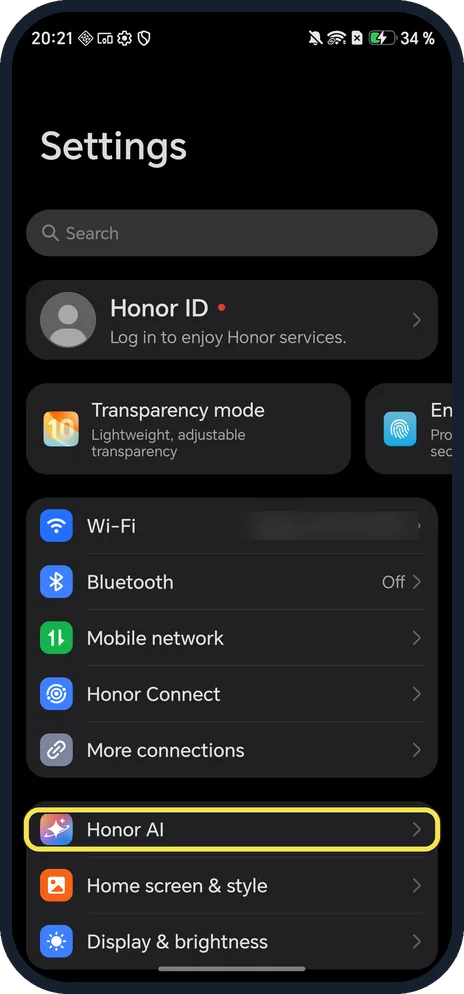
Open Honor AI
Open Settings and scroll down to Honor AI, below More connections.
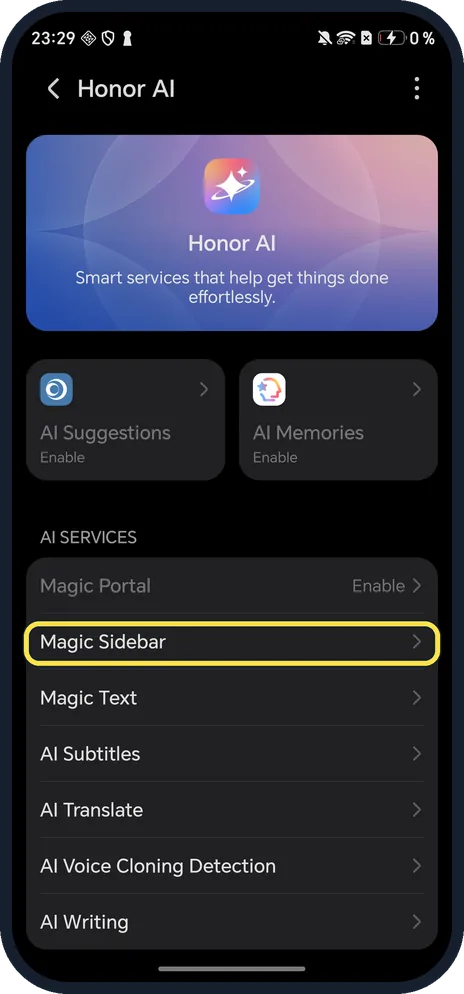
Tap Magic Sidebar
Under AI SERVICES, below Magic Portal.
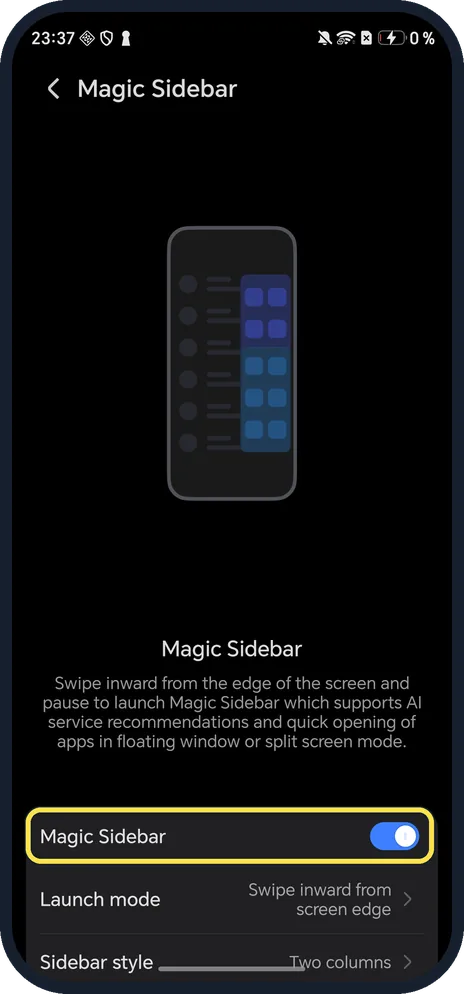
Turn on Magic Sidebar
The page says: swipe inward from the edge of the screen and pause to launch it; it recommends AI services and opens apps in floating window or split screen mode.
If you do not see this option
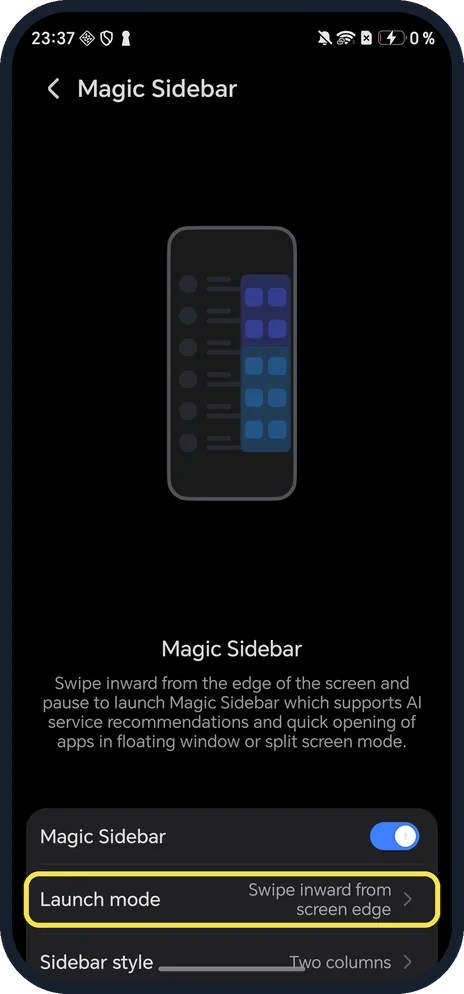
- Prefer a visible handle? Tap Launch mode below the switch. Ours was Swipe inward from screen edge; HONOR says Swipe inward from sidebar shows a small sidebar on the edge that you swipe in and can drag up and down. Source: Magic Sidebar
- No Magic Sidebar under Honor AI? Older MagicOS versions call the side dock Multi-Window: Settings, Accessibility features, Multi-Window. On ours that page only had split-screen and floating window options. Source: Multi-Window
- Want app suggestions in it? HONOR says to turn on AI recommendation on the Magic Sidebar page. Source: Magic Sidebar
If this does not work
- Swipe goes Back instead? Swipe in and pause with your finger still down; a quick swipe from the edge is the Back gesture. Source: Magic Sidebar
- Handle in the way? With Swipe inward from sidebar, HONOR says you can drag the handle up or down the edge. Source: Magic Sidebar
About this guide
The screenshots are from our HONOR Magic7 Lite, the European model BRP-NX1M, with MagicOS 10.0 and Android 16 (build 10.0.0.169(C430E7R2P1)), in Dark mode. Magic Sidebar was on. The open sidebar is not shown in our screenshots.
Good to know
For one floating app from Recents, open a floating window.
For drag-and-drop between apps, use Magic Portal.
In short: Settings, Honor AI, Magic Sidebar on; swipe in from the edge and pause.
Links checked in October 2026. Menus and features can change after software updates. These steps match the version named at the top.
Did this guide work for you?
Sorry about that. What happened?