
howtosimply.com/guides/how-to-turn-on-power-saving-mode-on-an-honor-phone/ · Checked October 2026 · BRP-NX1M, EEA), MagicOS 10.0, Android 16 (build 10.0.0.169(C430E7R2P1) · HONOR Magic7 Lite
In this guide
Open Settings, Battery, tap Battery mode and choose Power saving. On our Magic7 Lite it estimated 21 h 14 min left against 18 h 30 min on Balanced; Ultra power saving said 51 h but limits you to 9 apps.
3 of 3 steps with real screenshots · 5 official sources below
- Device
- Android
- Shown on
- HONOR Magic7 Lite (BRP-NX1M, EEA), MagicOS 10.0, Android 16 (build 10.0.0.169(C430E7R2P1))
- App
- Settings
- Path
- Settings › Battery › Battery mode › Power saving
- Real screenshots
- 3 of 3 steps
- Checked
- October 2026
- Sources
- 5 official, linked below
Step by step
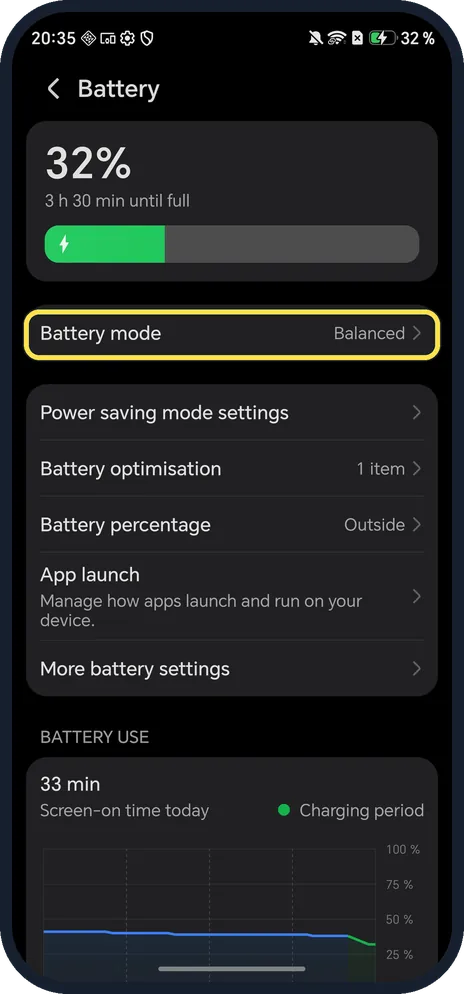
Tap Battery mode
Open Settings, Battery. Battery mode is the first row; ours said Balanced.
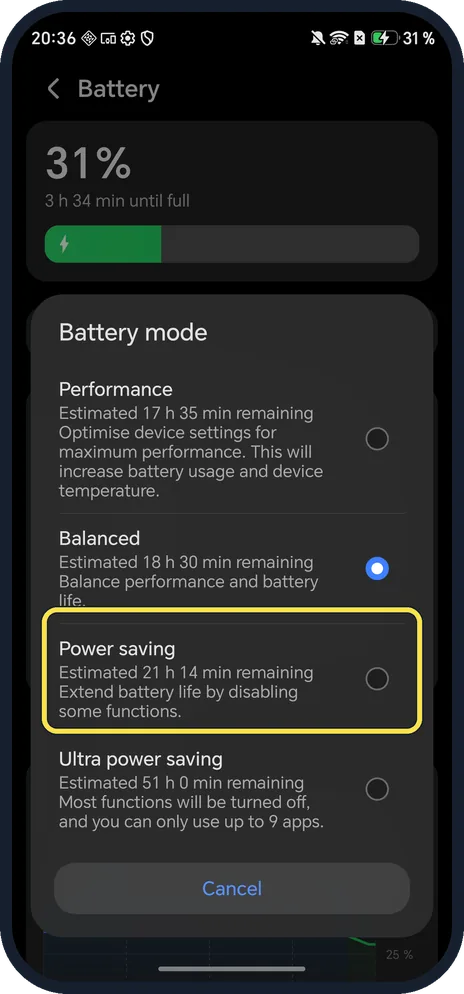
Choose Power saving
It extends battery life by disabling some functions. The estimate on ours went from 18 h 30 min (Balanced) to 21 h 14 min.
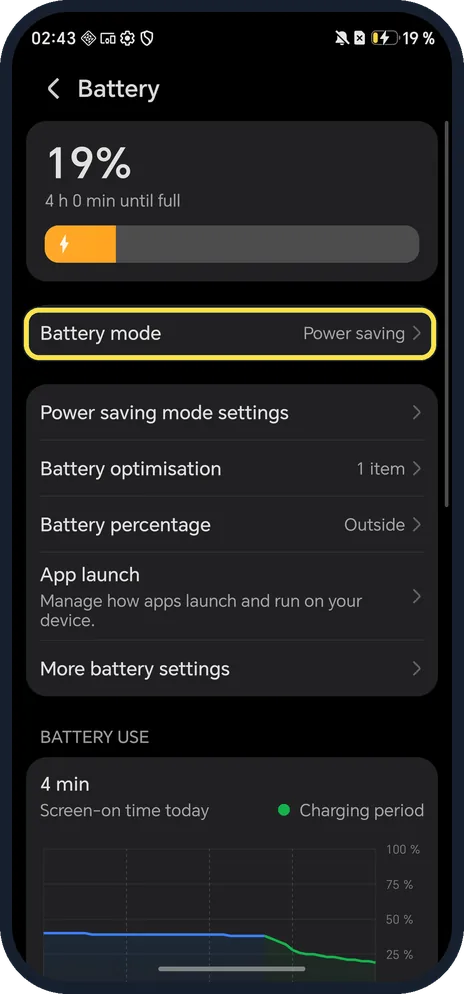
Check the Battery page
The Battery mode row now reads Power saving.
If you do not see this option
- No Battery mode row? HONOR's guides for other models show Power saving mode and Performance mode as switches on the Battery page instead of a Battery mode list. Source: Performance mode vs Battery saving mode · Source: The battery drains quickly and has a short standby time
- Called Battery Saver on your phone? HONOR's Performance mode guide names it Battery Saver, with Ultra Battery Saver for extreme saving, as switches under Settings, Battery. Ours calls them Power saving and Ultra power saving, in the Battery mode list. Source: Performance mode vs Battery saving mode
- Still can't find it? HONOR says to open Settings and search for Power saving mode. Source: Unable to configure the Sleep, Auto-sync data and Battery percentage options
- Want Balanced back? Tap Battery mode again and choose Balanced, which balances performance and battery life. We left ours on Balanced.
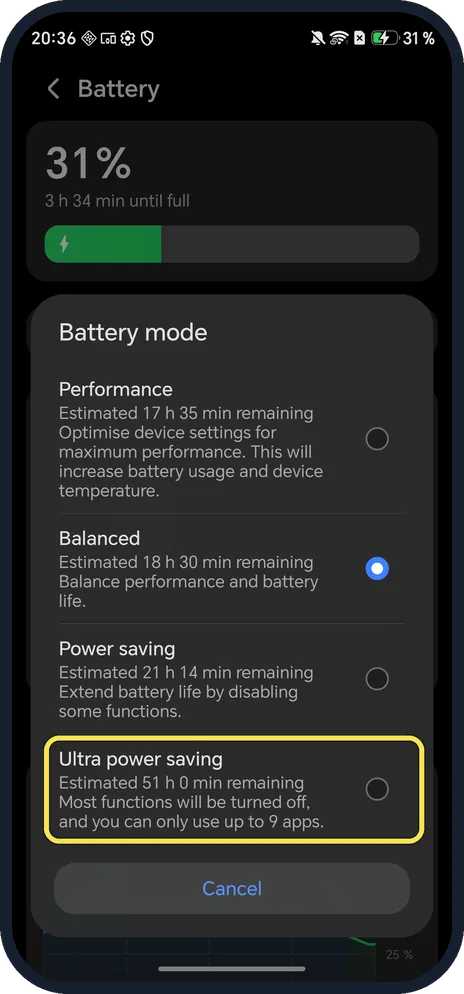
- Need the phone to last much longer? Ultra power saving estimated 51 h 0 min on ours: most functions are turned off and you can only use up to 9 apps.
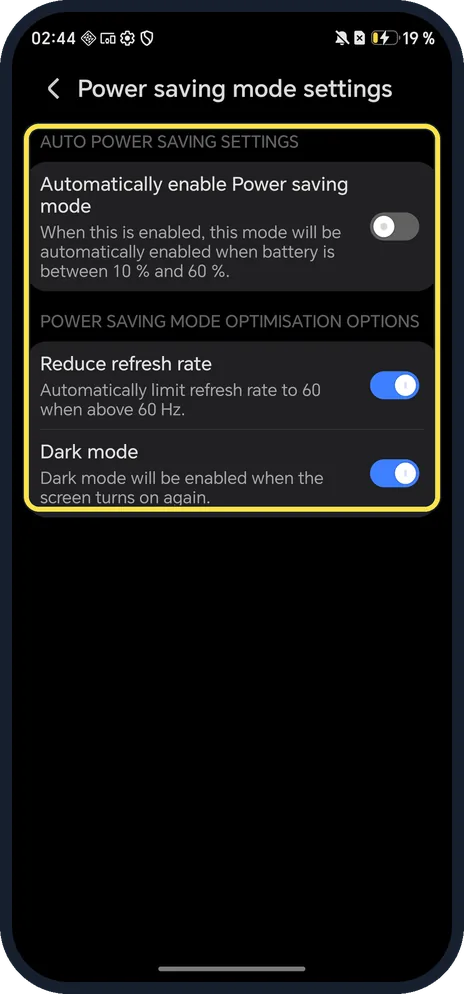
- Want it to switch on by itself? Power saving mode settings, on the Battery page, has Automatically enable Power saving mode for a level between 10 % and 60 % (off on ours). The same page limits the refresh rate to 60 Hz and turns on Dark mode in Power saving (both on, on ours).
If this does not work
- Screen went dark and less smooth? That is Power saving at work on ours: Dark mode and Reduce refresh rate are on in Power saving mode settings. Turn either off there.
- Can't change Sleep, Auto-sync or Battery percentage? HONOR says those options are dimmed while Power saving mode is on; the screen sleeps after 30 seconds. Switch back to Balanced to change them. Source: Unable to configure the Sleep, Auto-sync data and Battery percentage options
- Apps stop running in the background? HONOR lists Power saving and Ultra power saving among the causes of background apps closing; turn them off if an app must keep running. Source: Background apps are forced to close
- One app eats the battery? Scroll the Battery page to BATTERY USE. HONOR says to tap a power-hungry app and Force stop it if you don't need it now. Source: The battery drains quickly and has a short standby time · Source: How to check power usage details
About this guide
MagicOS has four battery modes in one list, each with an estimate of time remaining.
The screenshots are from our HONOR Magic7 Lite, the European model BRP-NX1M, with MagicOS 10.0 and Android 16 (build 10.0.0.169(C430E7R2P1)), in Dark mode. We opened the list and left it on Balanced.
Good to know
To check how worn the battery is, check battery health on an HONOR phone.
To see the exact level, show battery percentage on an HONOR phone.
In short: Settings, Battery, Battery mode, Power saving.
- HONOR Support (ZA): Performance mode vs Battery saving mode
- HONOR Support (MEA): The battery drains quickly and has a short standby time
- HONOR Support (SA): Unable to configure the Sleep, Auto-sync data and Battery percentage options
- HONOR Support (MY): How to check power usage details
- HONOR Support (ZA): Background apps are forced to close
Links checked in October 2026. Menus and features can change after software updates. These steps match the version named at the top.
Did this guide work for you?
Sorry about that. What happened?