
howtosimply.com/guides/samsung-galaxy-status-bar-icons-and-what-they-mean-one-ui-8-5/ · Checked October 2026 · Samsung Galaxy A57 5G (SM-A576B), One UI 8.5, Android 16
In this guide
- Look at the top right of the screen
- Speaker with a line through it and a wavy line: Vibrate
- Circle with two arcs: Mobile Hotspot is on
- 5G, two arrows and the bars: the mobile network
- Number with a shield: battery level and Battery protection
- Minus in a circle: Do not disturb
- Plane: Airplane mode
- If you do not see this option
- If this does not work
- Good to know
- Sources
The right of the status bar shows the phone's own state: sound mode, Mobile Hotspot, network, signal and battery. The left shows apps with notifications. When we tried it on One UI 8.5, Do not disturb and Airplane mode added an icon; Data saver, Power saving, NFC and alarms did not.
7 of 7 steps with real screenshots · 2 official sources below
- Device
- Android
- Shown on
- Samsung Galaxy A57 5G (SM-A576B), One UI 8.5, Android 16
- App
- Settings
- Real screenshots
- 7 of 7 steps
- What we did
- Performed: we made the change on our device and show the result
- Checked
- October 2026
- Sources
- 2 official, linked below
Step by step
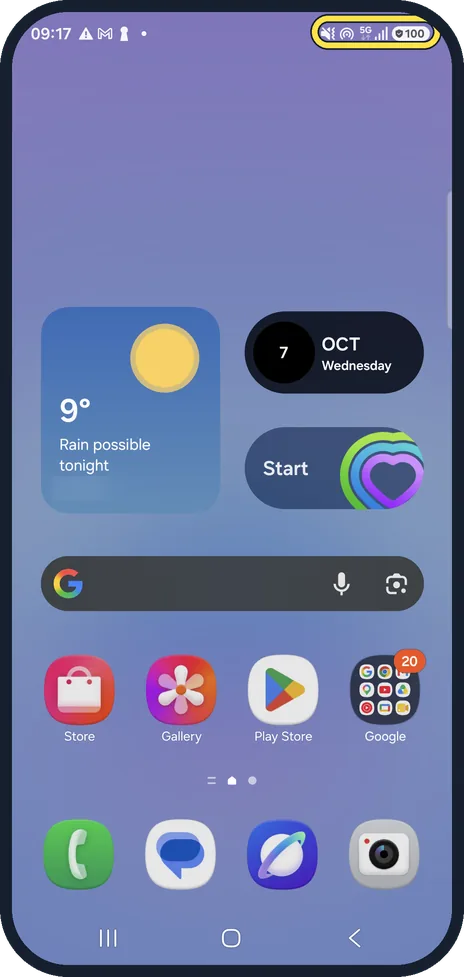
Look at the top right of the screen
The phone's own icons sit at the top right of every screen. The time and the icons of apps with notifications waiting are on the left. Tap any picture below to see it full size.
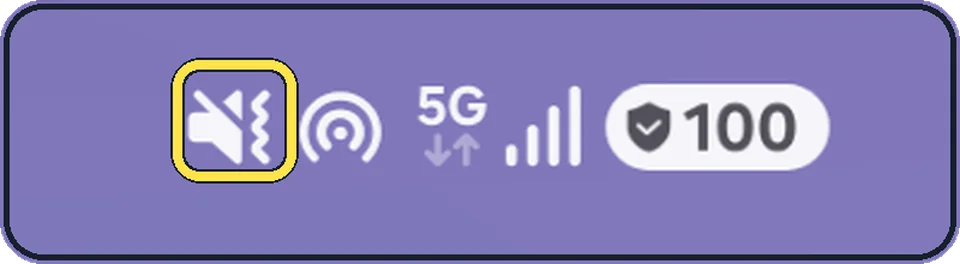
Zoomed in on the setting. Tap to see the whole screenTap the picture to see it full size Speaker with a line through it and a wavy line: Vibrate
Our phone was on Vibrate. Mute shows the same speaker without the wavy line, and Sound shows no icon at all. You change it in Settings, Sounds and vibration, or in the quick panel.
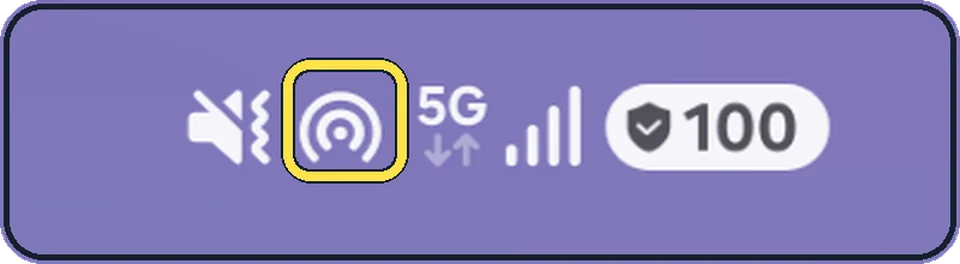
Zoomed in on the setting. Tap to see the whole screenTap the picture to see it full size Circle with two arcs: Mobile Hotspot is on
Other devices can use your phone's mobile data while this icon shows. It went away the moment Mobile Hotspot was switched off.
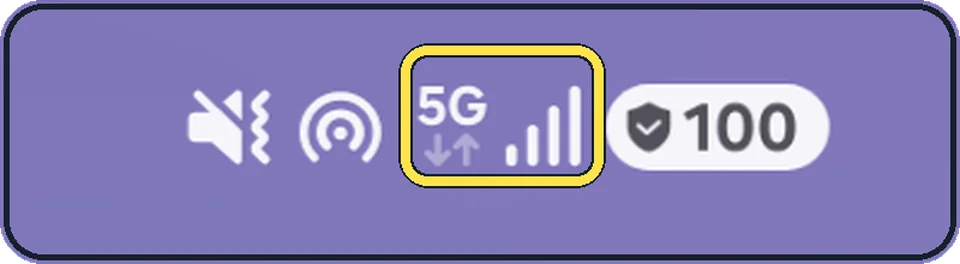
Zoomed in on the setting. Tap to see the whole screenTap the picture to see it full size 5G, two arrows and the bars: the mobile network
5G is the network type, the bars are the signal strength. The small arrows under 5G light up when data is going down or up at that moment.
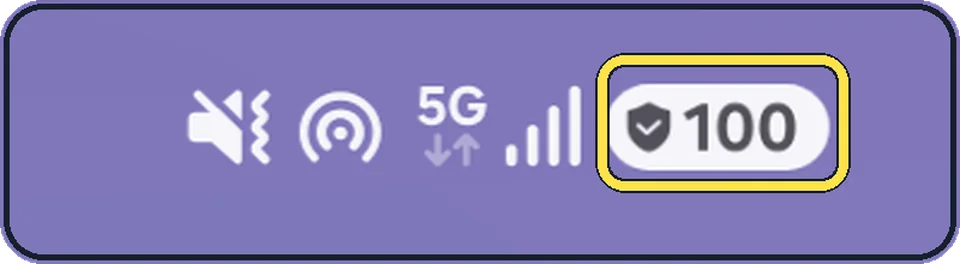
Zoomed in on the setting. Tap to see the whole screenTap the picture to see it full size Number with a shield: battery level and Battery protection
On One UI 8.5 the battery level is always a number inside the battery. The shield with a tick means a Battery protection option is on. Ours read 100 with the shield: on Basic the phone charges to 100% and starts again only when it drops to 95%. Maximum stops at the level you set.
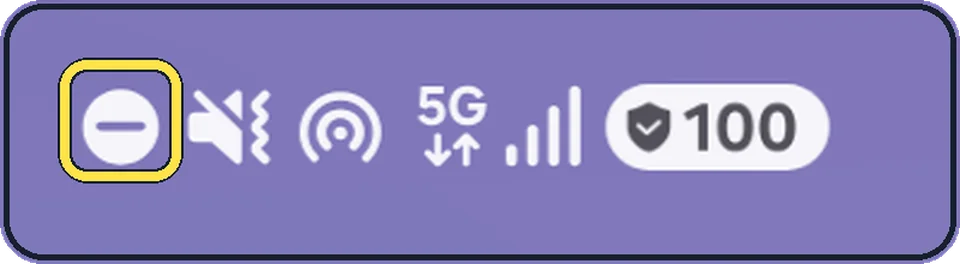
Zoomed in on the setting. Tap to see the whole screenTap the picture to see it full size Minus in a circle: Do not disturb
It appeared as soon as we turned on Do not disturb and went away when we turned it off.

Zoomed in on the setting. Tap to see the whole screenTap the picture to see it full size Plane: Airplane mode
With Airplane mode on, 5G and the signal bars disappear because the mobile network is off.
If you do not see this option
- Two signal icons sit on top of each other Samsung says the signal icons overlap with two SIMs, such as a physical SIM and an eSIM. This is the One UI 8.5 design; open the quick panel to see them separately. Source: Status bar issues on your Galaxy phone after the One UI 8.5 update
- The battery shows only a number in an oval Samsung says One UI 8.5 replaced Show battery percentage with Show battery background, under Settings, Notifications, Status bar. Source: Status bar issues on your Galaxy phone after the One UI 8.5 update
If this does not work
- The same app icon shows twice Samsung says this comes from Prioritize notifications: Settings, Notifications, Notification highlights, Prioritize notifications, then turn it off. Source: Status bar issues on your Galaxy phone after the One UI 8.5 update
- Icons look bigger or smaller than before Samsung says this can follow a change of screen resolution. Restart the phone and check Software update; Samsung expects a patch. Source: Status bar issues on your Galaxy phone after the One UI 8.5 update
About this guide
Samsung's help pages list status bar icons, but not which settings actually show one. So we switched the common quick settings on one at a time on our Galaxy and watched the status bar. Some settings that you might expect to show an icon showed nothing.
We switched each setting on, took a screenshot of the status bar and switched it back at once.
Good to know
No icon on our phone: Data saver, Power saving, Wi-Fi switched on but not connected to a network, Bluetooth switched on or off with nothing connected, NFC switched on or off, and an alarm set for the next morning. Samsung's Data saver page says it shows an icon while on; on our One UI 8.5 phone it did not, so check the setting itself: how to turn on Data saver.
Hotspot icon gone? Turning on Data saver switched off Mobile Hotspot on our phone, and its icon went with it. If your hotspot keeps turning off, see Samsung Galaxy hotspot not working.
Want fewer or more icons on the left? Settings, Notifications, Status bar sets whether app icons, a dot or nothing shows: how to show battery percentage on One UI 8.5 covers that page.
Why the shield is there: Battery protection explained. Do not disturb icon showing when you did not turn it on: Do not disturb turning on by itself.
In short: Right: sound mode, Hotspot, 5G and signal, battery with Battery protection shield. Minus in a circle: Do not disturb. Plane: Airplane mode. Data saver, Power saving, NFC, alarms: no icon on One UI 8.5.
- Samsung US: Status bar issues on your Galaxy phone after the One UI 8.5 update
- Samsung US: Manage data usage on your Galaxy phone
Links checked in October 2026. Menus and features can change after software updates. These steps match the version named at the top.
📷 See real photos from the Galaxy A57 in our Camera Lab, next to 10 other phones.
Did this guide work for you?
Sorry about that. What happened?