
howtosimply.com/guides/how-to-turn-on-dark-mode-on-an-honor-phone/ · Checked October 2026 · BRP-NX1M, EEA), MagicOS 10.0, Android 16 (build 10.0.0.169(C430E7R2P1) · HONOR Magic7 Lite
In this guide
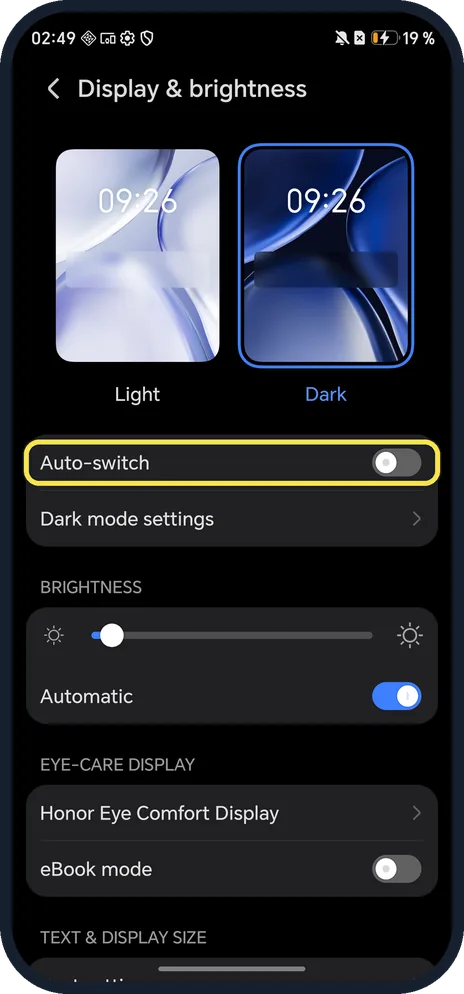
Open Settings, tap Display & brightness and tap the Dark picture at the top, or tap Dark mode in Control Center. Dark mode settings has one switch, Darken the wallpaper in Dark mode, which was on in ours.
4 of 4 steps with real screenshots · 2 official sources below
- Device
- Android
- Shown on
- HONOR Magic7 Lite (BRP-NX1M, EEA), MagicOS 10.0, Android 16 (build 10.0.0.169(C430E7R2P1))
- App
- Settings
- Path
- Settings › Display & brightness
- Real screenshots
- 4 of 4 steps
- Checked
- October 2026
- Sources
- 2 official, linked below
Step by step
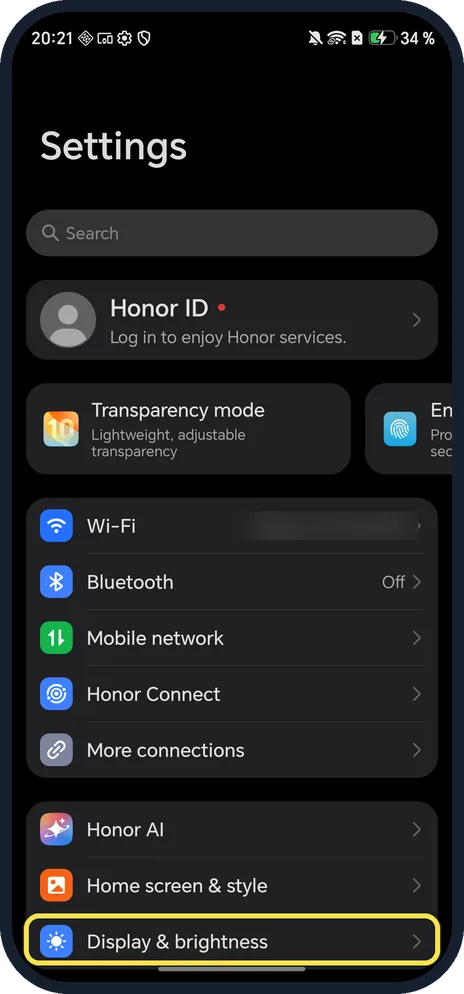
Open Display & brightness
Open Settings and scroll to Display & brightness.
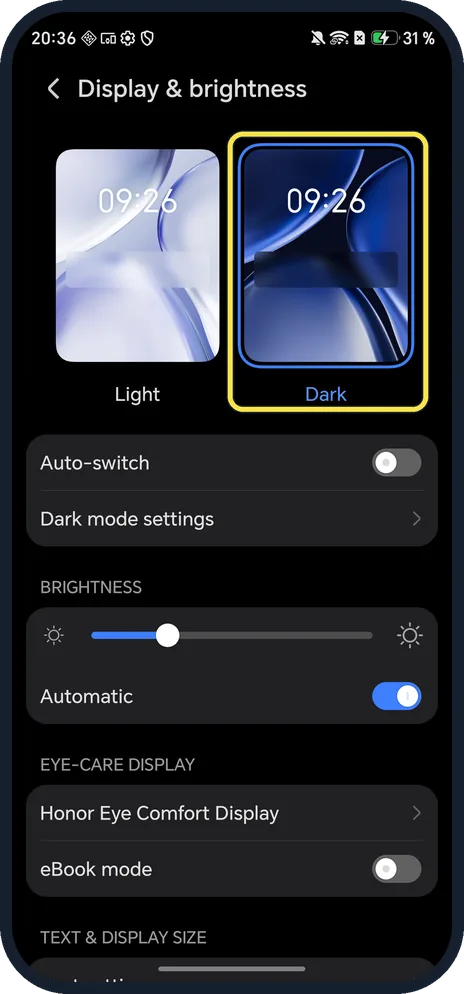
Tap Dark
Tap the Dark picture; it gets a blue outline.
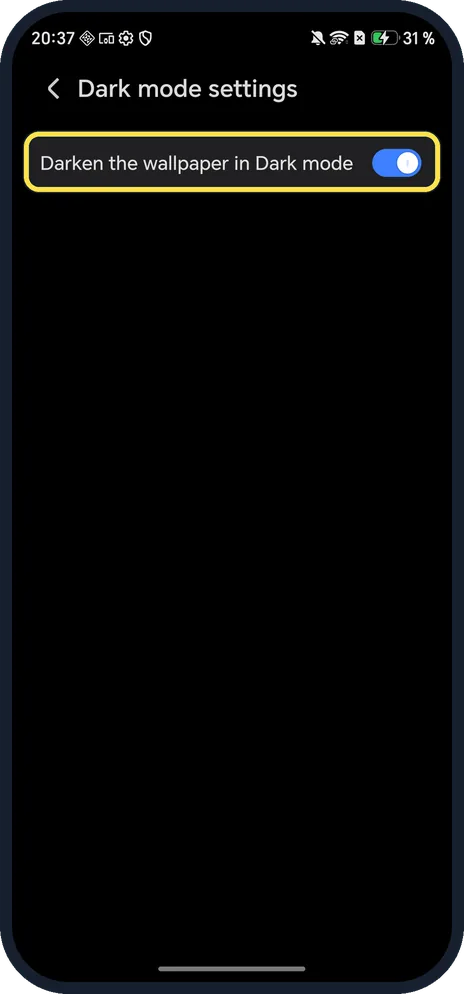
Darken the wallpaper too (optional)
Tap Dark mode settings. The only switch is Darken the wallpaper in Dark mode; it was already on in ours.
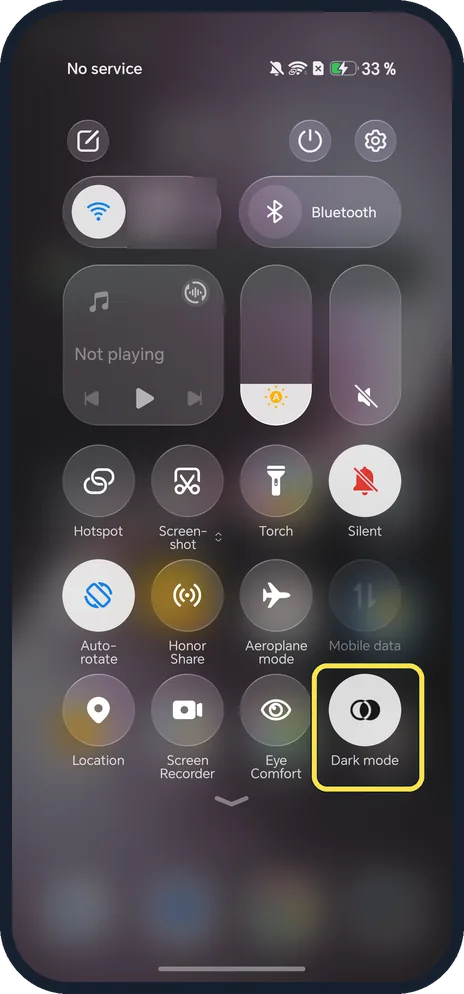
Check it is on
Swipe down from the top right: the Dark mode tile in Control Center is lit, and Settings and Control Center use dark backgrounds.
If you do not see this option
- Prefer a shortcut? HONOR says to swipe down from the top right to open Control Center and tap Dark mode; touch and hold it for its settings. Ours had the Dark mode tile on the first page. Source: Dark mode
- No Schedule for Auto-switch? HONOR's guide says to turn on Auto-switch and tap Schedule, for sunset to sunrise or a custom time. On our MagicOS 10 phone Auto-switch was only a switch (off), with no schedule page. Source: Dark mode
- No Dark mode settings row? HONOR says it only appears with Dark turned on. Source: Dark mode
If this does not work
- An app stays white? Google says some apps don't follow the system theme; set the app's own theme to dark or to follow the system. Source: Change dark theme and colour settings on Android
- Dark mode turns itself off? Check Auto-switch under the pictures; HONOR says it switches by time of day. Turn it off to stay dark. Source: Dark mode
- Wallpaper looks dim? HONOR says Darken the wallpaper in Dark mode changes its brightness with the surroundings. Turn it off in Dark mode settings. Source: Dark mode
About this guide
Our HONOR came in Light mode; we switched it to Dark for every screenshot.
The screenshots are from our HONOR Magic7 Lite, the European model BRP-NX1M, with MagicOS 10.0 and Android 16 (build 10.0.0.169(C430E7R2P1)), in Dark mode.
Good to know
To make motion smoother, change the refresh rate on an HONOR phone.
To see the time with the screen off, turn on Always On Display.
In short: Settings, Display & brightness, Dark (or the Dark mode tile in Control Center).
Links checked in October 2026. Menus and features can change after software updates. These steps match the version named at the top.
Did this guide work for you?
Sorry about that. What happened?