
howtosimply.com/guides/samsung-weather-showing-the-wrong-location-how-to-fix-it/ · Checked October 2026 · Samsung Galaxy A57 5G (One UI 8.5, Android 16) and Samsung Galaxy A57 (One UI 9, Android 17 (build A576BXXU6BZIE))
In this guide
Open the Weather app and tap Agree when it asks to use your precise location, then Turn on for Location Accuracy and Change to precise location. The place at the top of the location list is the one Weather uses. Device Location has to be on for it to follow you.
If you do not see this option
- Weather is not on the Apps screen On our phone Show Weather on Apps screen, in Weather settings, was off, so the app opens from its widget. Samsung says you can add the widget by touching and holding the Home screen, Widgets, Weather. Source: How to set the Weather widget location on your Galaxy phone
- The place you want is not in the list Samsung says to open Weather, tap the plus icon at the top right and search for the place. You may need to accept the terms with OK first. Source: How to set the Weather widget location on your Galaxy phone
6 of 6 steps with real screenshots · 1 official source below
- Device
- Android
- Shown on
- Samsung Galaxy A57 5G (SM-A576B), One UI 8.5, Android 16, Samsung Galaxy A57 (SM-A576B), One UI 9, Android 17 (build A576BXXU6BZIE)
- App
- Weather
- Real screenshots
- 6 of 6 steps
- Our phone
- Shown on Galaxy A57, One UI 8.5
- Checked
- October 2026
- Sources
- 1 official, linked below
Step by step
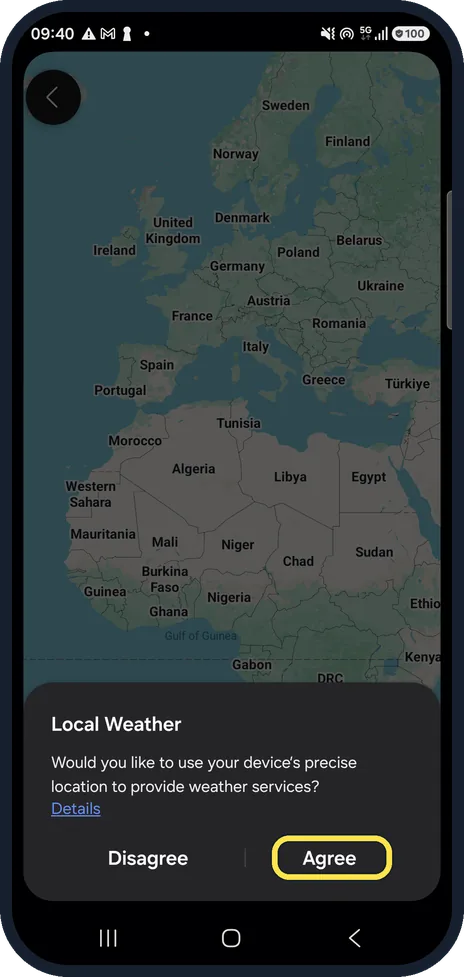
Tap Agree on Local Weather
Open the Weather app. The first time, it asks whether to use your device's precise location to provide weather services. Tap Agree.
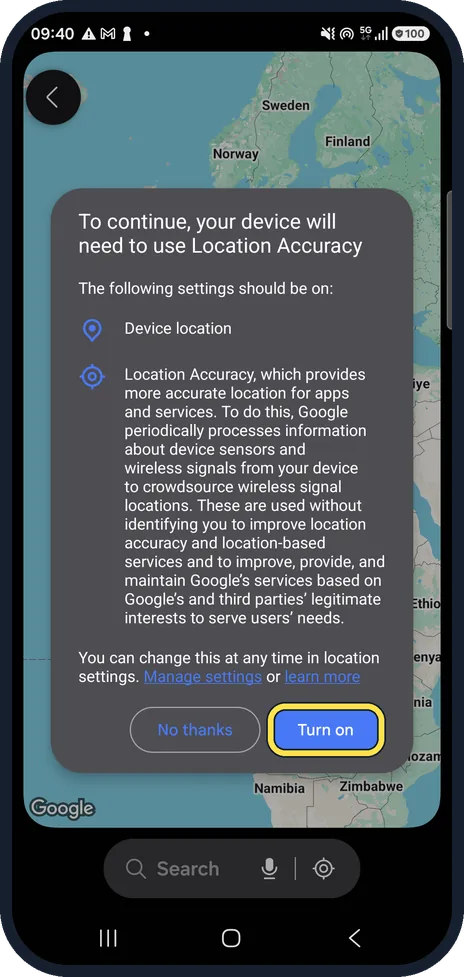
Turn on Location Accuracy
Next, Google asks to turn on Location Accuracy. It names the settings that should be on: Device location and Location Accuracy. Tap Turn on.
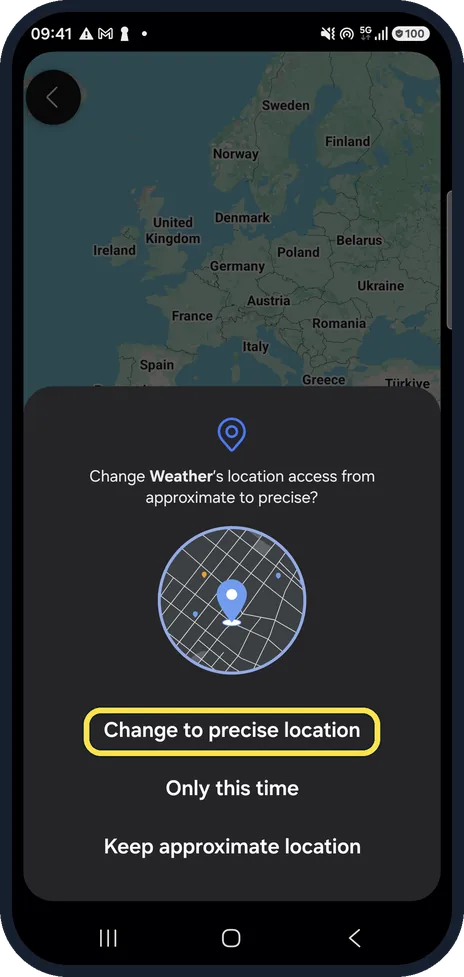
Choose precise location
Android then asks whether to change Weather's access from approximate to precise. Tap Change to precise location. Keep approximate location gives the app only a rough area.
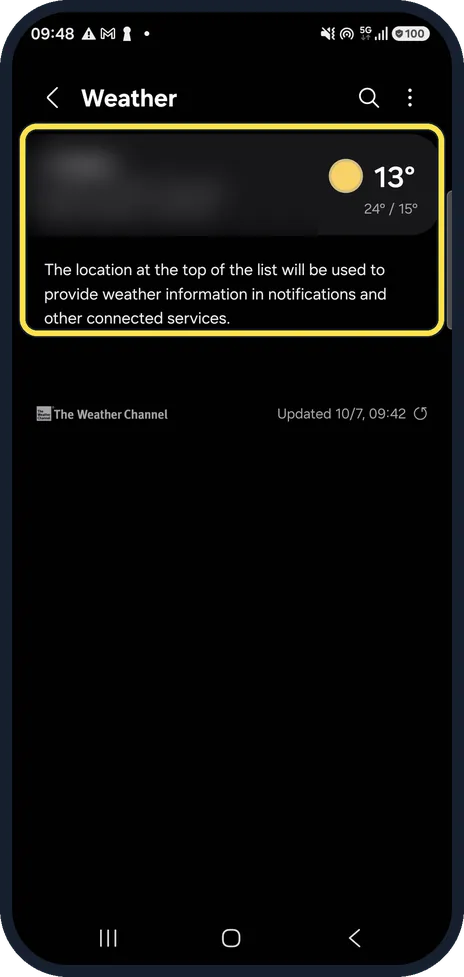
Check which place is at the top
Tap the menu at the top left of the Weather app to see your locations. The screen says it: the location at the top of the list is used for weather in notifications and other connected services.
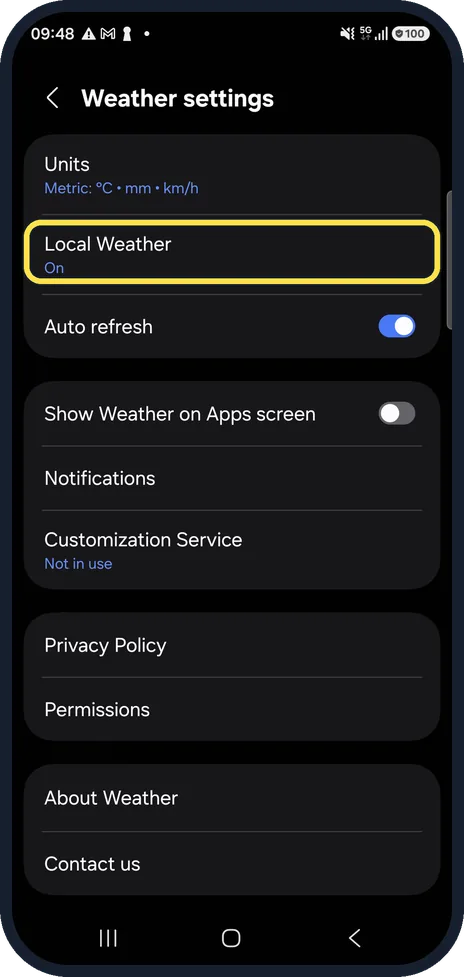
Make sure Local Weather is on
Tap the three dots, then Settings. Local Weather should say On. Auto refresh, below it, keeps the forecast updated; ours was on.
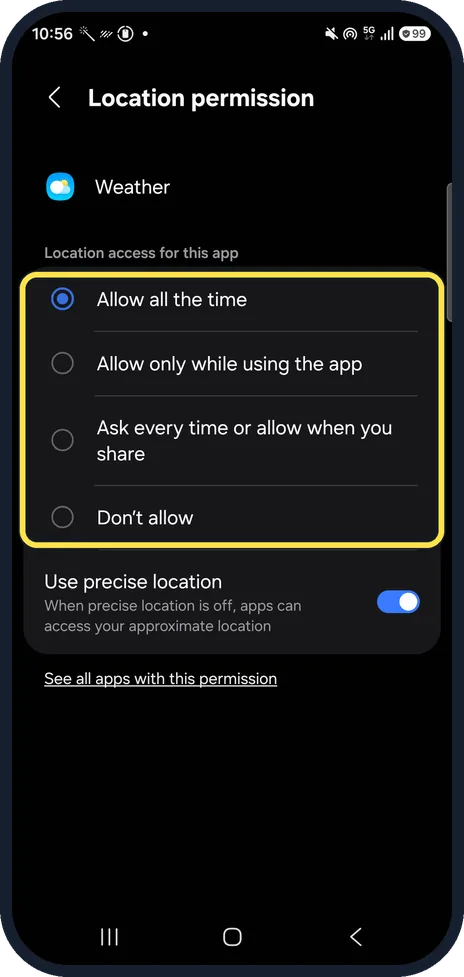
Check Weather's location permission
Settings, Apps, Weather, Permissions, Location. Ours was set to Allow all the time, with Use precise location on. If it says Don't allow, or precise location is off, Weather cannot use where you are and may show the wrong place.
About this guide
The Samsung Weather app and its widget show the place at the top of their location list. If that is a city you added, or the app only has your approximate location, the forecast can be for the wrong town. The first time you open Weather it asks three questions in a row; these are the answers that let it use where you are.
We blurred our place name on the Weather page. Step 6 is from the same phone after its One UI 9 update (Android 17).
Good to know
Still the wrong place? Samsung says the widget shows your current location only while the phone's location service is on. Swipe down and check that Location is on in the quick panel.
For a fixed place instead, touch and hold the Weather widget, tap Settings, then Change next to the location, pick one of your saved places and tap Save, as Samsung describes.
The forecast comes from The Weather Channel, as the location page shows. Some cards in the app open weather.com in the browser.
Location itself off target? Samsung Galaxy location not accurate? 5 settings to check. To change Weather's access later: how to change an app's location permission.
In short: Weather: Agree, Turn on (Location Accuracy), Change to precise location. Top of the location list is used. Three dots, Settings, Local Weather On. Location on in the quick panel.
Links checked in October 2026. Menus and features can change after software updates. These steps match the version named at the top.
📷 See real photos from the Galaxy A57 in our Camera Lab, next to 10 other phones.
Did this guide work for you?
Sorry about that. What happened?