
howtosimply.com/guides/samsung-galaxy-showing-the-wrong-time-or-date-fix/ · Checked October 2026 · Samsung Galaxy A57 5G (SM-A576B), One UI 8.5, Android 16
In this guide
Open Settings, General management, Date and time and turn on Automatic date and time and Automatic time zone. Samsung says the phone then sets the date, time and time zone from the network. If it is still wrong, switch both off and set the time zone, date and time yourself.
If you do not see this option
- Set date and Set time are not listed Samsung says the manual options do not appear while Automatic date and time is on. On our Galaxy A57 they appeared only after we switched it off. Source: Change the date and time on your Galaxy phone or tablet.
- Set time zone based on location is greyed out On our Galaxy A57 it said Turn on Location to use this feature with Automatic time zone on, and Not available when Automatic time zone is off with it off.
5 of 5 steps with real screenshots · 1 official source below
- Device
- Android
- Shown on
- Samsung Galaxy A57 5G (SM-A576B), One UI 8.5, Android 16
- App
- Settings
- Path
- Settings › General management
- Real screenshots
- 5 of 5 steps
- Checked
- October 2026
- Sources
- 1 official, linked below
Step by step
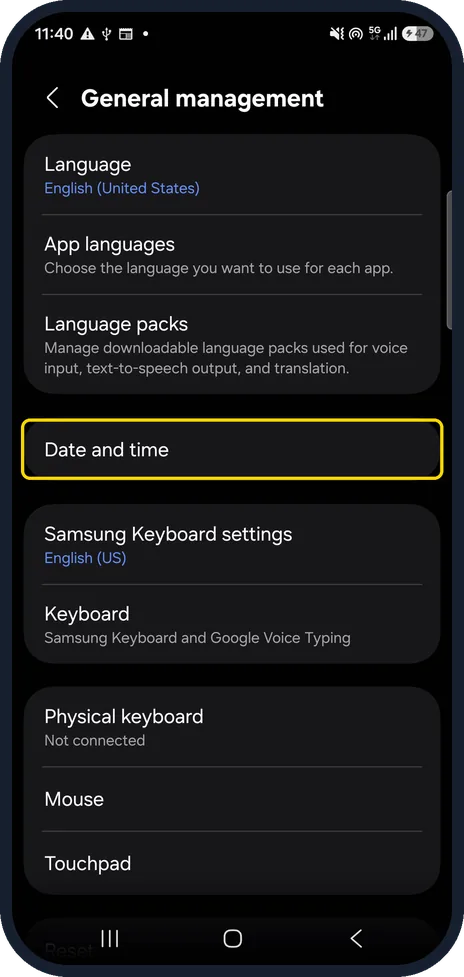
Open Date and time
Open Settings, General management, Date and time. On our Galaxy A57 it is below Language packs.
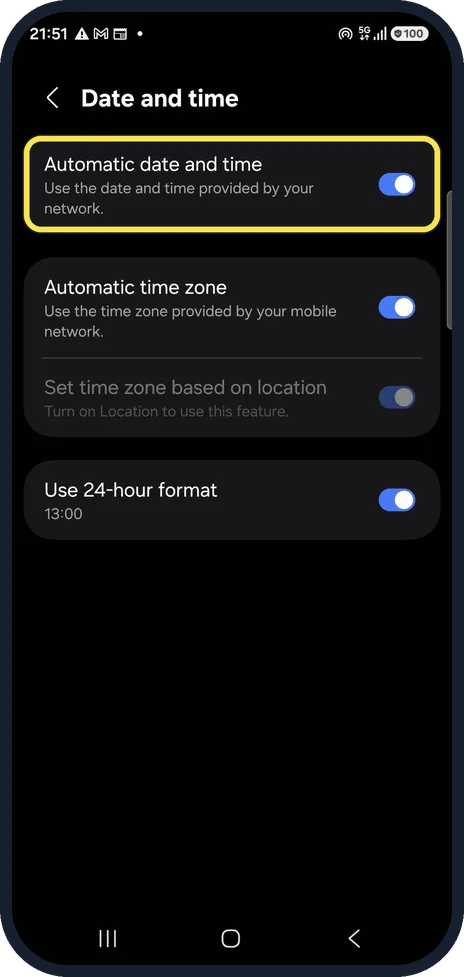
Turn on Automatic date and time
Samsung says the phone then uses the mobile network for the date and time. On our Galaxy A57 it was on.
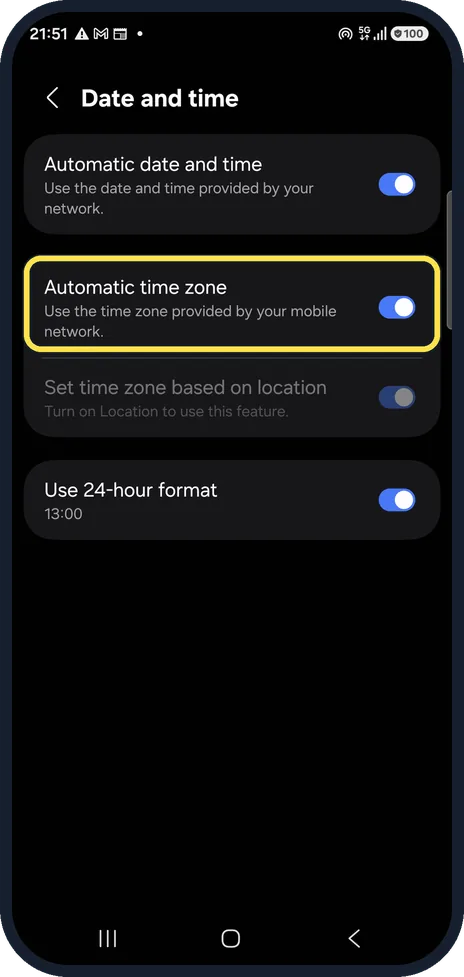
Turn on Automatic time zone
This sets the time zone from the network too. On our Galaxy A57 it was on.
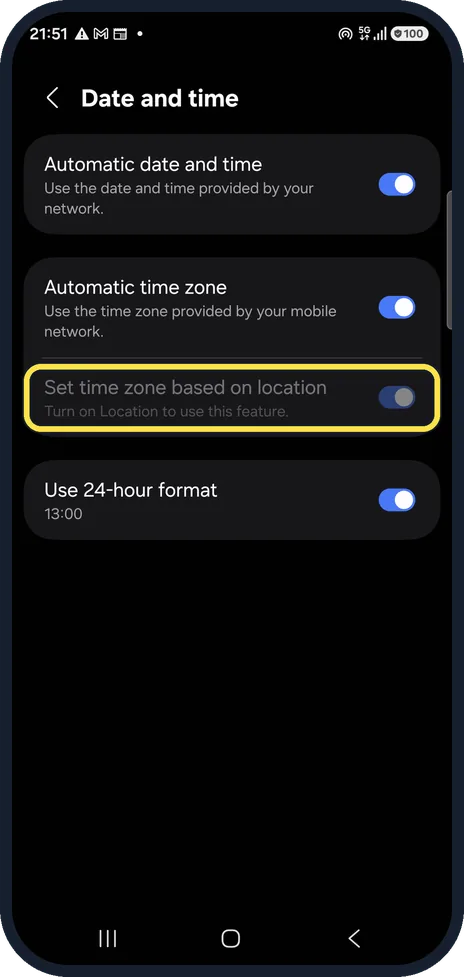
Use location for the time zone
Set time zone based on location uses your location instead of the network. On our Galaxy A57 it was greyed out, with the note Turn on Location to use this feature.
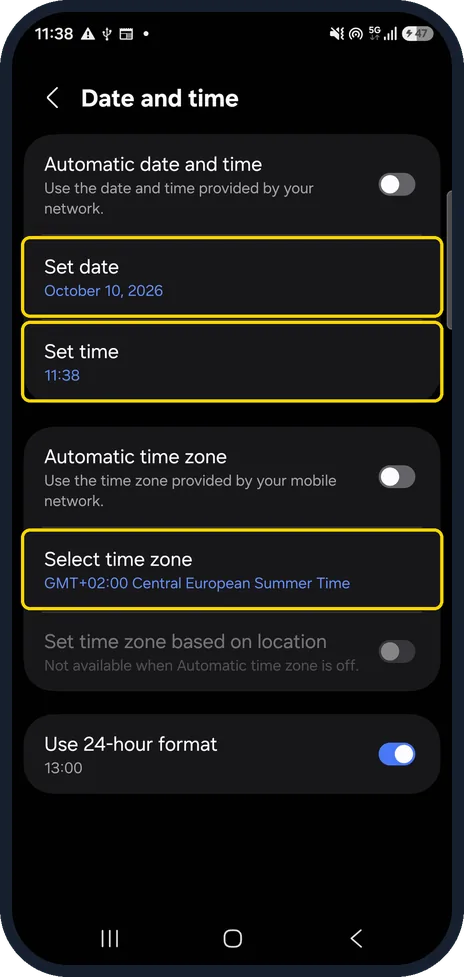
Set it by hand if needed
If the network gives the wrong time, switch both automatic options off. Set date, Set time and Select time zone then appear and can be changed. On our Galaxy A57, switching off Automatic date and time opened a date picker at once; we tapped Cancel and switched both back on afterwards.
If this does not work
- Still wrong with both switches on Samsung says the automatic settings follow the network's settings. Switch both off and choose the right region and time zone, then the date and time, as in the last step. Source: Change the date and time on your Galaxy phone or tablet.
- No mobile network Samsung says the date and time are set automatically as long as you are connected to a mobile network, and to check the connection under Settings, Connections. If you cannot connect, switch both automatic options off and set the date and time yourself. Source: Change the date and time on your Galaxy phone or tablet.
- A date picker pops up That happened on our Galaxy A57 as soon as Automatic date and time went off. Pick the date and tap Done, or tap Cancel to keep it.
About this guide
Samsung's date and time page has two automatic switches that take the date, time and time zone from the mobile network. We switched both off for a moment on our phone to show the manual rows, then back on.
Good to know
Use 24-hour format, the last switch on the page, only changes how the time looks. Samsung says it works whether the time is set automatically or by hand.
In short: Settings, General management, Date and time: Automatic date and time and Automatic time zone on; otherwise set them by hand.
Links checked in October 2026. Menus and features can change after software updates. These steps match the version named at the top.
📷 See real photos from the Galaxy A57 in our Camera Lab, next to 10 other phones.
Did this guide work for you?
Sorry about that. What happened?