
howtosimply.com/guides/how-to-turn-on-always-on-display-on-an-honor-phone/ · Checked October 2026 · BRP-NX1M, EEA), MagicOS 10.0, Android 16 (build 10.0.0.169(C430E7R2P1) · HONOR Magic7 Lite
In this guide
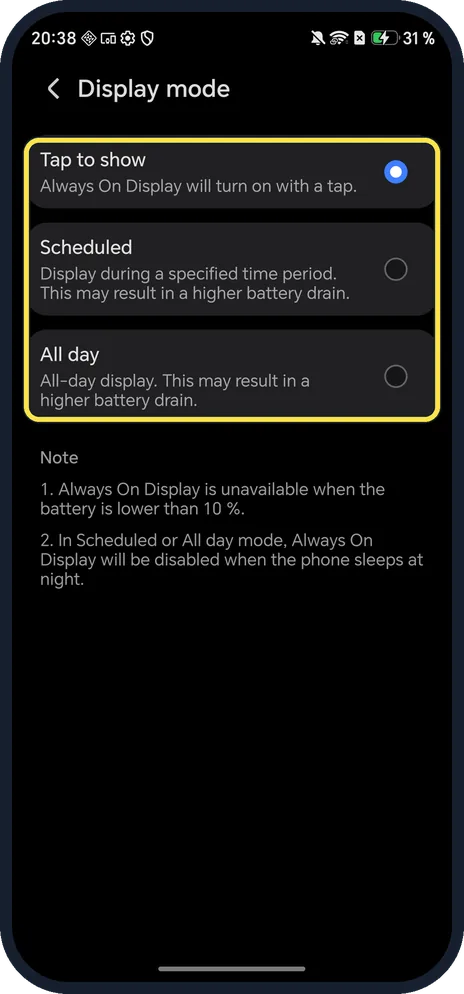
Open Settings, Home screen & style, Always On Display and turn it on. Then tap Display mode: Tap to show (ours), Scheduled or All day. The page on ours says it is unavailable below 10 % battery.
4 of 4 steps with real screenshots · 1 official source below
- Device
- Android
- Shown on
- HONOR Magic7 Lite (BRP-NX1M, EEA), MagicOS 10.0, Android 16 (build 10.0.0.169(C430E7R2P1))
- App
- Settings
- Path
- Settings › Home screen & style › Always On Display
- Real screenshots
- 4 of 4 steps
- Checked
- October 2026
- Sources
- 1 official, linked below
Step by step
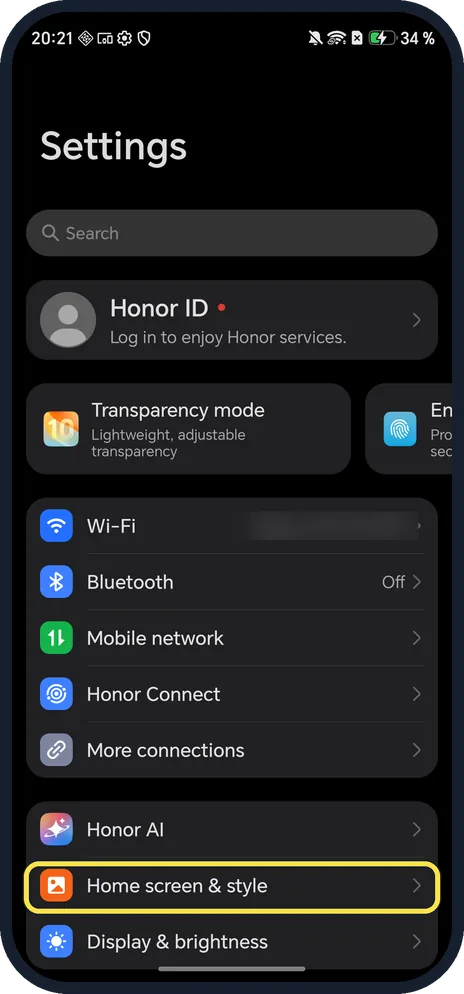
Open Home screen & style
Open Settings and tap Home screen & style.
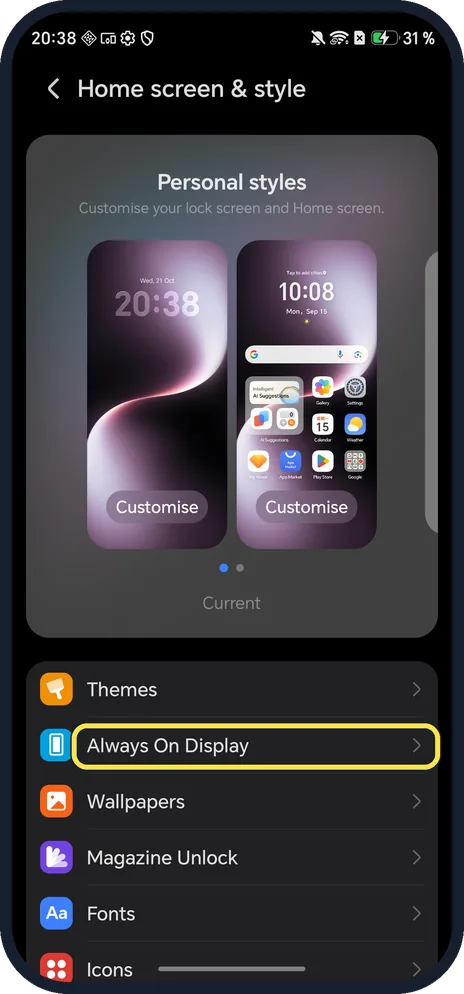
Tap Always On Display
It is under Themes.
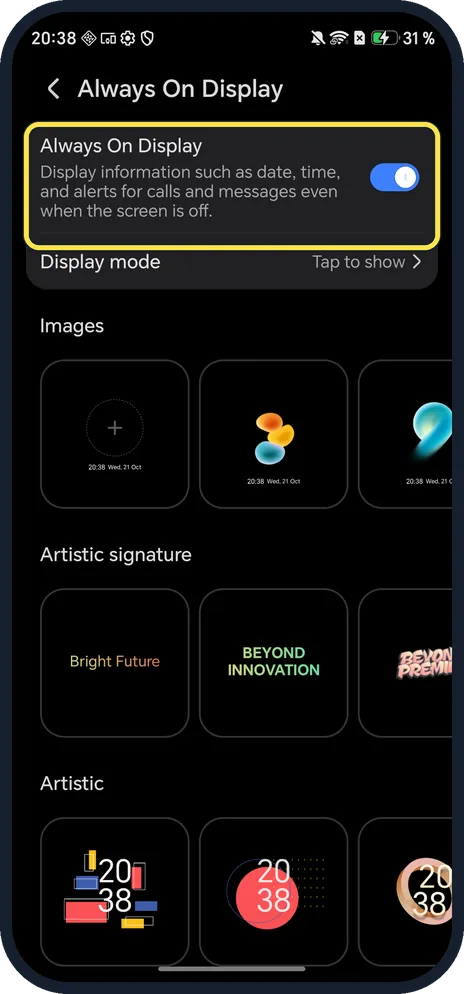
Turn it on
Tap the Always On Display switch. It shows the date, time and alerts for calls and messages while the screen is off.
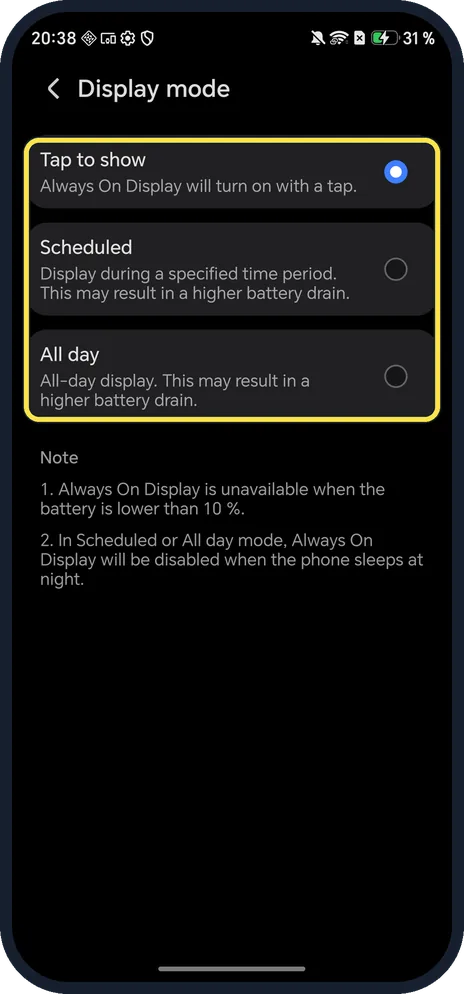
Choose when it shows
Tap Display mode. Tap to show waits for a tap; Scheduled shows during set hours; All day stays on. The page warns the last two drain more battery.
If you do not see this option
- No Always On Display under Home screen & style? HONOR's guide gives Settings, Home screen & wallpaper, Always On Display on other models. On our MagicOS 10 phone the page is Home screen & style. Source: Show Date and Time When the Screen Is Off
- No Display mode choices? HONOR says to set Display mode as prompted: Tap to show, Scheduled or All day. Ours showed all three. Source: Show Date and Time When the Screen Is Off
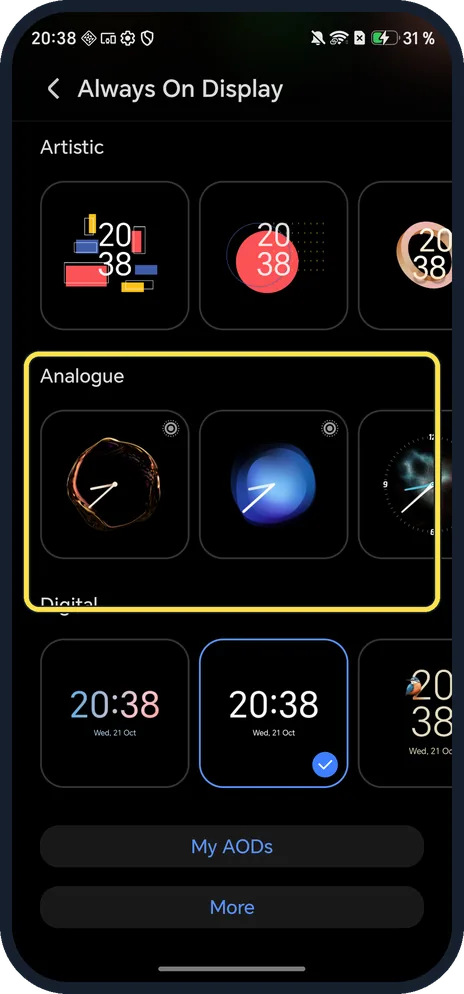
- Want a different clock? Scroll the Always On Display page: Images, Artistic signature, Artistic, Analogue and Digital styles. HONOR says to pick a style and tap APPLY. Source: Show Date and Time When the Screen Is Off
If this does not work
- It vanished? The note on our phone says it is unavailable below 10 % battery, and in Scheduled or All day mode it turns off while the phone sleeps at night.
- Nothing shows until you tap? That is Tap to show. Change Display mode to Scheduled or All day; the page warns both drain more battery.
- Phone unlocks instead of showing it? HONOR says face unlock can unlock the phone when you wake the screen, so you miss the Always On Display. Keep your face out of view of the camera. Source: Show Date and Time When the Screen Is Off
About this guide
On MagicOS, Always On Display is under Home screen & style, not under Display. On ours it was on, set to Tap to show.
The screenshots are from our HONOR Magic7 Lite, the European model BRP-NX1M, with MagicOS 10.0 and Android 16 (build 10.0.0.169(C430E7R2P1)), in Dark mode.
Good to know
To make the whole interface darker, turn on Dark mode on an HONOR phone.
To make a charge last longer, turn on Power saving mode.
In short: Settings, Home screen & style, Always On Display, then Display mode.
Links checked in October 2026. Menus and features can change after software updates. These steps match the version named at the top.
Did this guide work for you?
Sorry about that. What happened?