
howtosimply.com/guides/how-to-turn-on-ebook-mode-on-an-honor-phone/ · Checked October 2026 · BRP-NX1M, EEA), MagicOS 10.0, Android 16 (build 10.0.0.169(C430E7R2P1) · HONOR Magic7 Lite
In this guide
Open Settings, Display & brightness and turn on eBook mode under Eye-care display, then tap Enable. The screen turns greyscale for reading. Turn the same switch off to get colour back.
4 of 4 steps with real screenshots · 1 official source below
- Device
- Android
- Shown on
- HONOR Magic7 Lite (BRP-NX1M, EEA), MagicOS 10.0, Android 16 (build 10.0.0.169(C430E7R2P1))
- App
- Settings
- Path
- Settings › Display & brightness
- Real screenshots
- 4 of 4 steps
- Checked
- October 2026
- Sources
- 1 official, linked below
Step by step
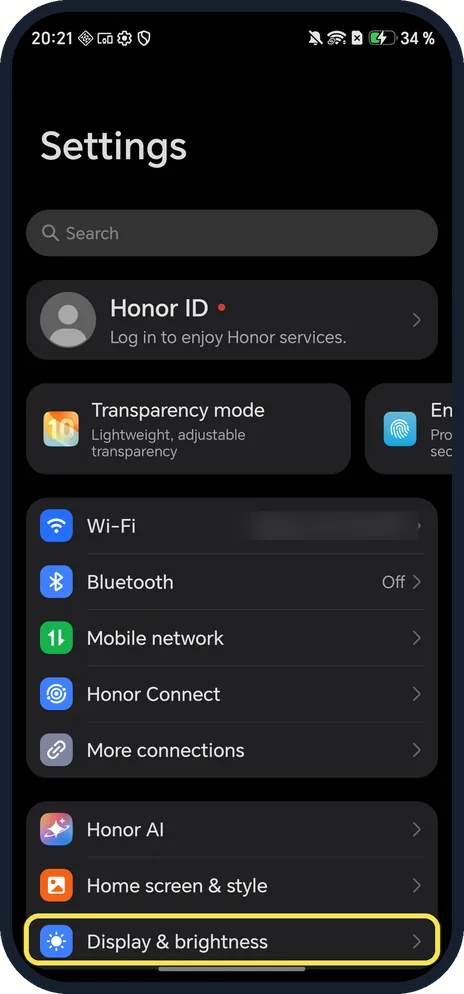
Open Display & brightness
Open Settings and scroll down to it.
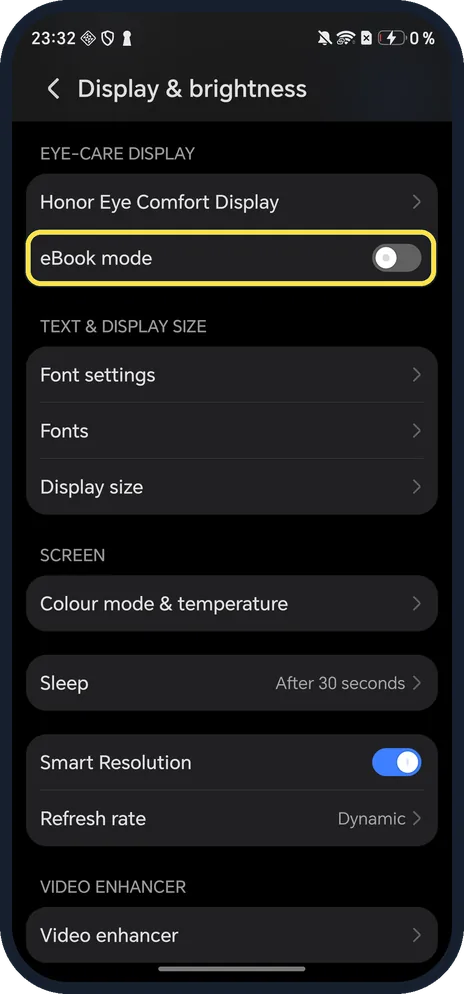
Turn on eBook mode
Under EYE-CARE DISPLAY, below Honor Eye Comfort Display.
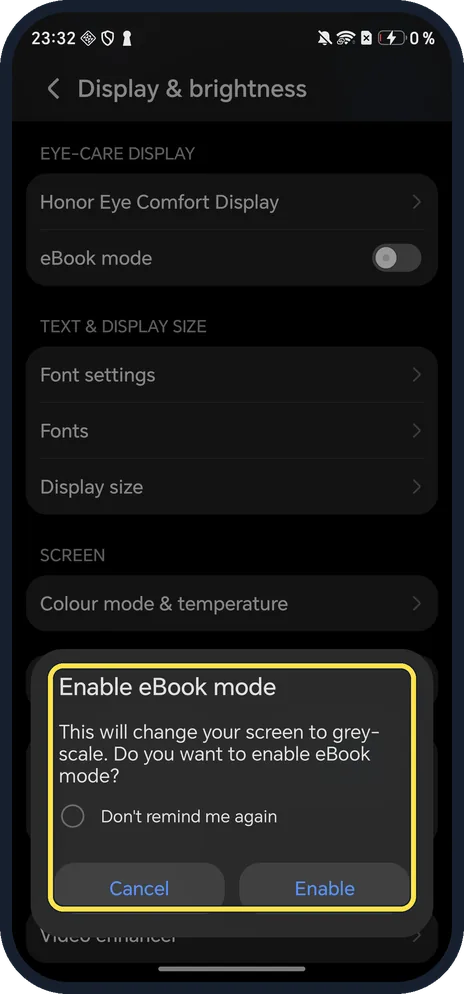
Tap Enable
The dialog says this will change your screen to greyscale. Don't remind me again skips it next time.
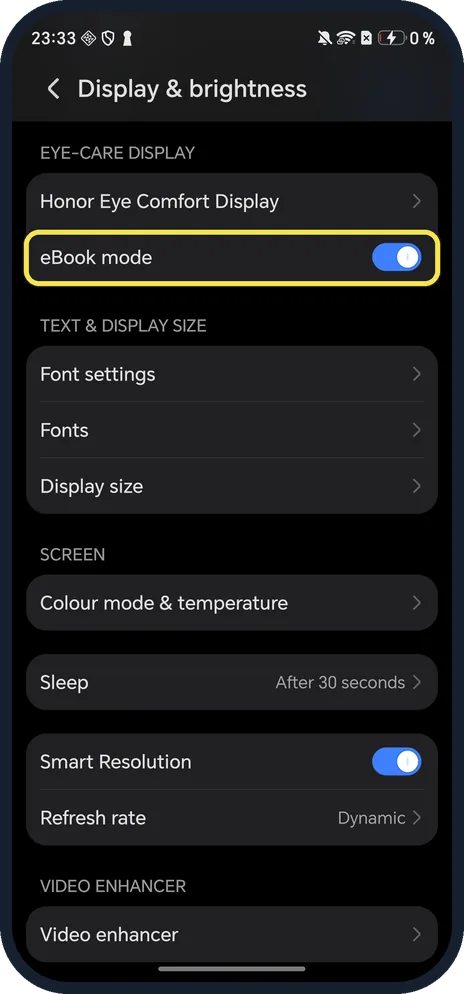
Check the switch
eBook mode is now on. The real screen turns grey; screenshots like this one still save in colour.
If you do not see this option
- Want a quicker switch? HONOR says eBook mode is also in Control Center (swipe down from the top right). If the tile is missing, tap Edit shortcut switch and add it. Source: Apply E-book Mode
- Want warmer colours instead of grey? Use Eye Comfort, which tints the screen yellow. See turn on Eye Comfort on an HONOR phone.
- No eBook mode switch? On our Magic7 Lite it sat on Display & brightness itself, with no page of its own; HONOR gives the same place, Settings, Display & brightness. Source: Apply E-book Mode
If this does not work
- Eye Comfort stopped working? HONOR says that with eBook mode and Eye Comfort both on, only eBook mode works. Turn eBook mode off to get the yellow tint back. Source: Apply E-book Mode
- White text on a dark background? HONOR says eBook mode with Dark mode on makes the background dark and the text white. Ours was in Dark mode. Source: Apply E-book Mode
- Screenshots or screen recordings still in colour? That happened on ours: the grey filter applies to the display only.
- Screen stuck in grey? Turn off eBook mode on Display & brightness.
About this guide
The screenshots are from our HONOR Magic7 Lite, the European model BRP-NX1M, with MagicOS 10.0 and Android 16 (build 10.0.0.169(C430E7R2P1)), in Dark mode. We turned eBook mode on for the screenshots and off again. Our screenshots stay in colour even with it on, so the grey effect shows only on the real screen.
Good to know
To filter blue light instead, turn on Eye Comfort.
To darken menus, turn on dark mode on an HONOR phone.
In short: Settings, Display & brightness, eBook mode on, Enable.
Links checked in October 2026. Menus and features can change after software updates. These steps match the version named at the top.
Did this guide work for you?
Sorry about that. What happened?