
howtosimply.com/guides/how-to-turn-on-rcs-chats-on-a-samsung-galaxy/ · Checked October 2026 · SM-A576B), One UI 9, Android 17 (build A576BXXU6BZIE · Samsung Galaxy A57
In this guide
Make sure Messages is your SMS app, then in Google Messages tap your profile icon, Messages settings, RCS chats, and turn on Turn on RCS chats. When it works, the page says RCS chat status: Connected.
4 of 4 steps with real screenshots · 1 official source below
- Device
- Android
- Shown on
- Samsung Galaxy A57 (SM-A576B), One UI 9, Android 17 (build A576BXXU6BZIE)
- App
- Settings
- Path
- Settings › Apps › Choose default apps › SMS app: Messages
- Real screenshots
- 4 of 4 steps
- Checked
- October 2026
- Sources
- 1 official, linked below
Step by step
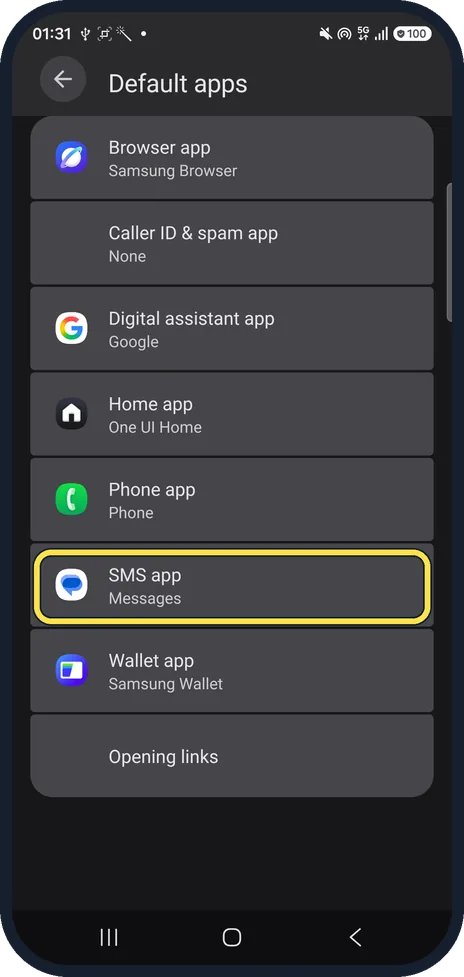
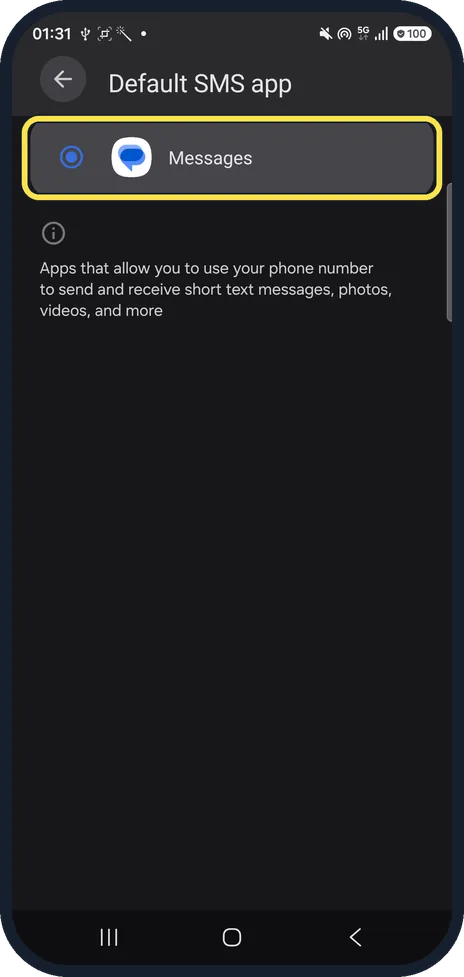
Check Messages is your SMS app
Open Settings, Apps, Choose default apps. SMS app should say Messages. On ours it was the only choice.
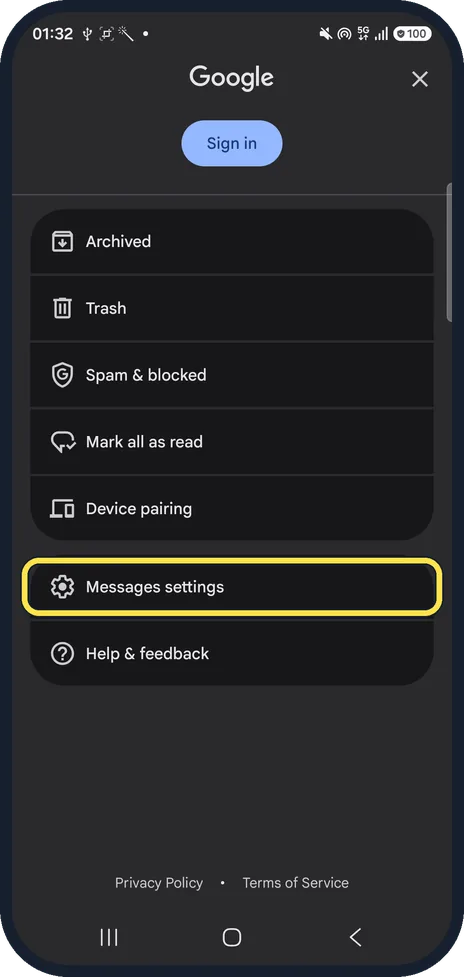
Open Messages settings
Open Messages and tap your profile icon at the top right. In the menu that opens, tap Messages settings. You don't need to be signed in; ours wasn't.
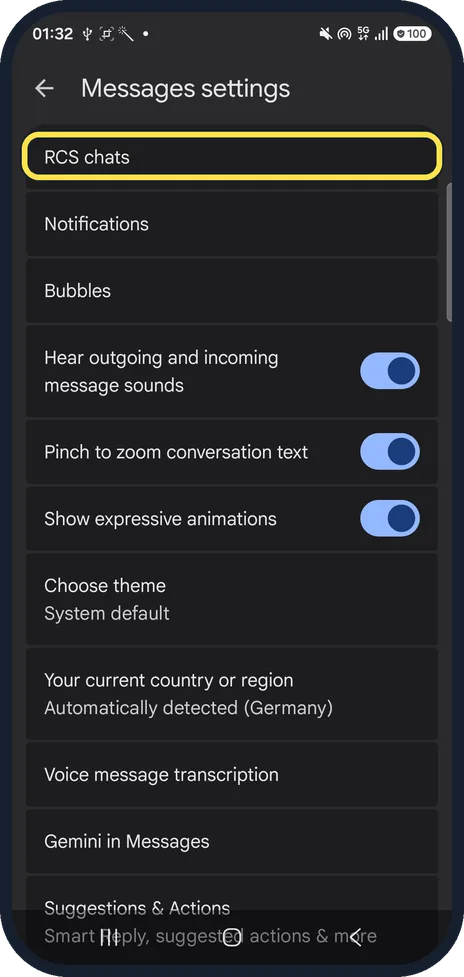
Tap RCS chats
It is the first row in Messages settings.
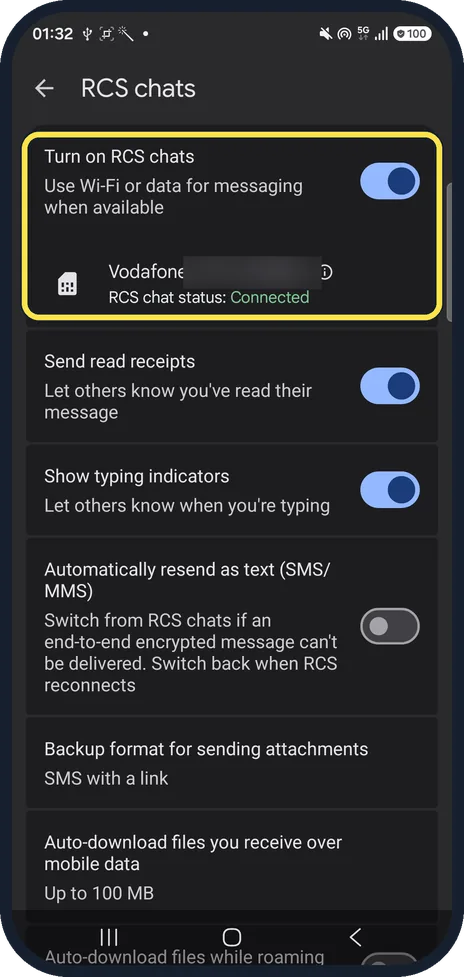
Turn it on and check the status
Turn on Turn on RCS chats. Under your SIM, RCS chat status should say Connected. Read receipts and typing indicators are on the same page.
If you do not see this option
- No RCS chats row? Google says to tap Chat features instead; it is the older name for the same page. Source: Turn on RCS chats in Google Messages
- Status says Not supported, or RCS chats are disabled by your carrier? Google says Not supported means you can't use RCS chats: check your internet connection. If the page says RCS chats are disabled by your carrier, contact your carrier. Source: Turn on RCS chats in Google Messages
- No Messages in the SMS app list? Install Google Messages from the Play Store, then choose it under Choose default apps, SMS app. Source: Turn on RCS chats in Google Messages
If this does not work
- Status stuck on Connecting or Trouble connecting? Google says your number is being verified: check that mobile data or Wi-Fi is on and wait. If Trouble connecting lasts more than 30 minutes, tap Details, then Submit feedback. Source: Turn on RCS chats in Google Messages
- Messages to someone fail over Wi-Fi or data? In RCS chats, tap Resend messages and choose how to resend. Google warns that SMS with a link can make your media reachable by a public link. Source: Turn on RCS chats in Google Messages
- Texts not sending at all? See texts not sending on a Samsung Galaxy (Google Messages)? 5 fixes.
About this guide
Newer Galaxy phones like our A57 come with Google Messages as the only texting app, so RCS (typing indicators, read receipts, chat over Wi-Fi) is set up in Google Messages, not a Samsung app.
The screenshots are from our Samsung Galaxy A57 with One UI 9 and Android 17, in Dark mode, taken on 24 October 2026. RCS chats was already on and connected on ours; we changed nothing.
Good to know
Change other default apps: how to change default apps on a Samsung Galaxy.
In short: Settings, Apps, Choose default apps, SMS app: Messages. Messages, profile icon, Messages settings, RCS chats on; status Connected.
Links checked in October 2026. Menus and features can change after software updates. These steps match the version named at the top.
Did this guide work for you?
Sorry about that. What happened?