ONEPLUS
How to change the language on a OnePlus, for the phone or one app

In short
Go to Settings, System & update, Language & region and tap Edit. Add a language and drag it to the top. For one app, use System & update, App languages, the app, and pick its language.
4 of 4 steps show a real screenshot from our Nord 5. Each step was checked against the maker's own instructions, linked at the end.
Steps
- 1
Open Language & region
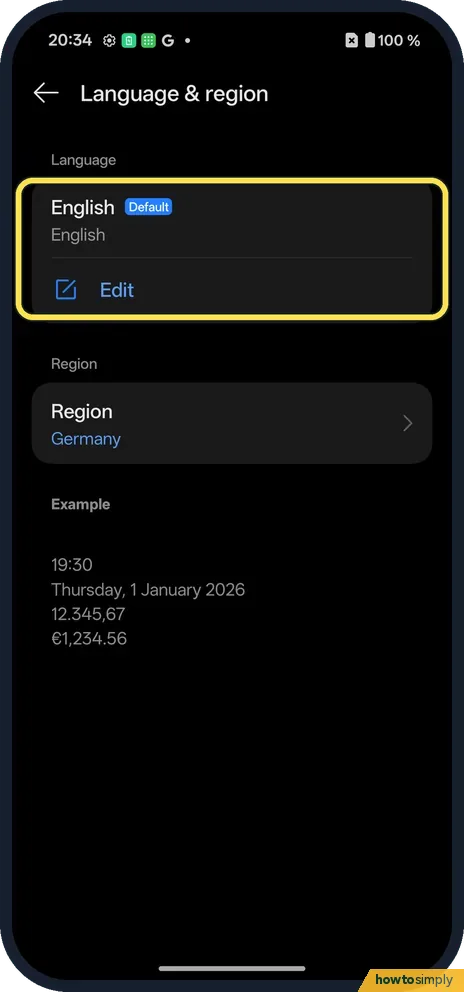
Open Settings, System & update, Language & region. Tap Edit under English.
- 2
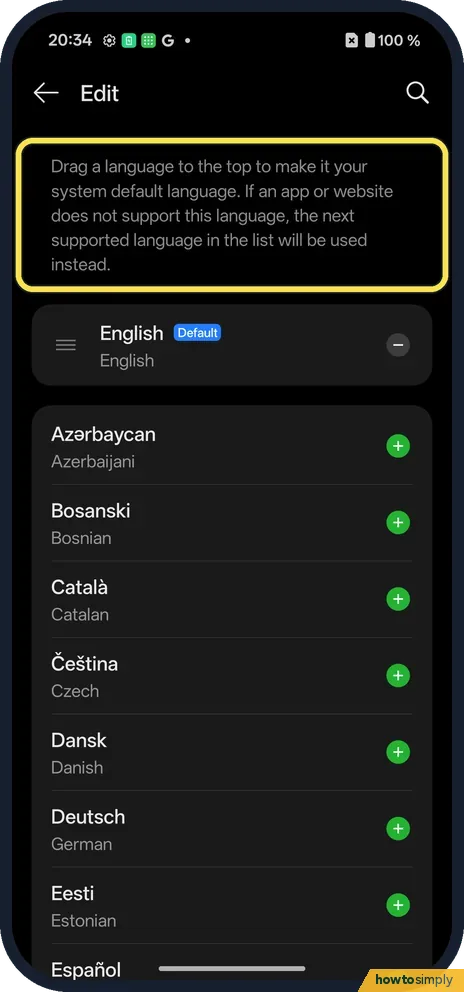
Add and drag to the top
Each language has a green add button. The page says to drag a language to the top to make it the system default.
- 3
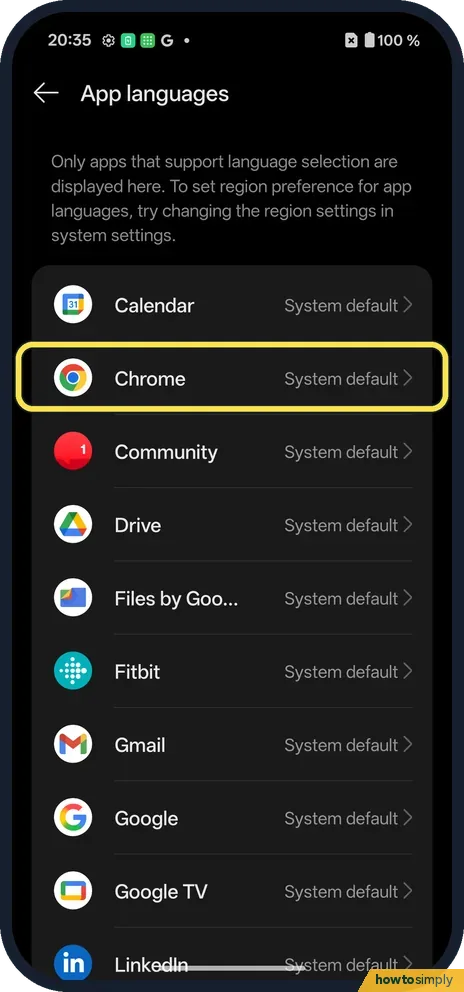
One app: tap the app
Back on System & update, tap App languages, then the app. Only apps that support it are listed; we tapped Chrome.
- 4
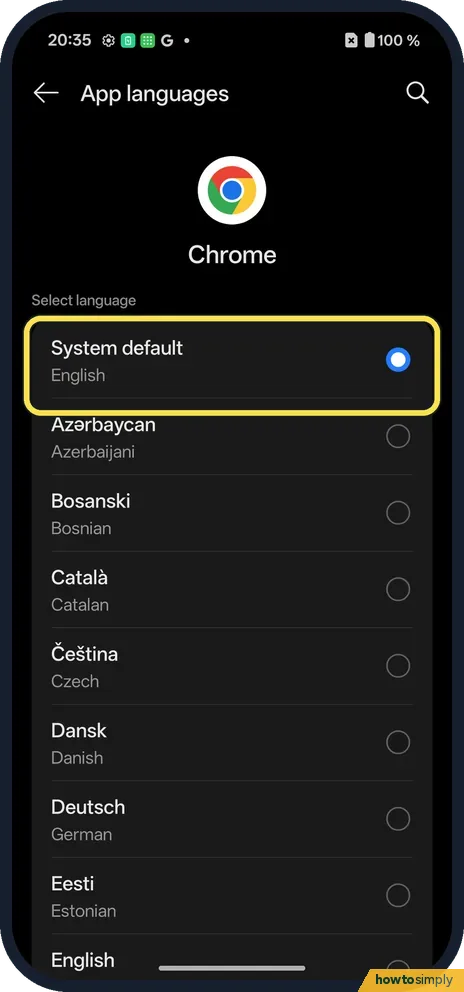
Pick the app's language
For Chrome: System default or any listed language.
If you do not see this option
- Older OxygenOS? OnePlus's OxygenOS 14 manual uses Settings, Additional settings, Language & region. Source: OxygenOS 14.0 User Manual
- App not in the list? It does not support its own language setting. Source: Change app language on your Android phone
- App only changes language inside itself? Google notes that some apps let you change the language only from within the app or from your account for that app. Look in the app's own settings. Source: Change app language on your Android phone
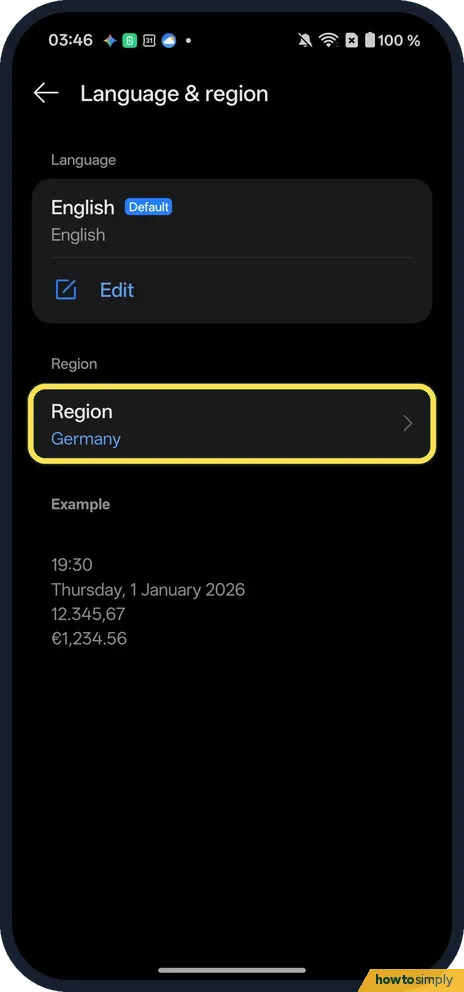
- Looking for regional preferences? Our Nord 5's Language & region page shows only Language and Region (Germany on ours), with an example of the time, date and number formats. A Settings search for regional found nothing about temperature units or the first day of the week.
If this does not work
- App ignores the language? The app must support it; Google says only apps that offer per-app languages are listed.
- Dates or numbers look odd? Region sets the format. Ours was Germany; the Example block under Region shows how dates and numbers will look.
- App language did not change? Google suggests closing and reopening the app and checking your internet connection, because a change made offline may not apply. If it still fails, make sure the app is up to date.
- App uses the wrong one of your languages? An app that follows the system default uses the first language in your list that it supports. Move your preferred language higher, or set that app's language directly under App languages.
- Can't read the menus after a mistake? The order of rows does not change with the language. Open Settings, System & update, Language & region by position, using the screenshots above, and drag your own language back to the top.
Good to know
Switch between 12-hour and 24-hour time on a OnePlus.
Changing the language only changes how text is shown; your files, messages and accounts are not touched. To undo, open Language & region again and drag the old language back to the top. A per-app language stays set for that app until you change it, and you can return it to System default at any time. On Android 14 and later, Google also describes regional preferences such as temperature units and the first day of the week, which take their defaults from your language settings.
About this guide
- Device
- Android
- Shown on
- OnePlus Nord 5 (CPH2709), OxygenOS 16.0.5.1201, Android 16
- App
- Settings
- Path
- Settings › System & update › Language & region
- Real screenshots
- 4 of 4 steps
- Checked
- October 2026
- Sources
- 2 official, linked below
Sources
Links checked October 2026. Menus and features can change with updates.Spotted a mistake? Menus change with updates, and we want every step to match your screen. Email us about this page or use the contact form. We read every report, and fixes are listed on What changed.
Liked this guide?
Follow us for new guides and short how-to videos.
Did this guide work for you?
Sorry about that. What happened?