GOOGLE PIXEL
How to change the language of one app on a Google Pixel (Android 17)

In short
Open Settings, System, Language and region and tap App languages. Tap the app, then pick a language under Suggested or All languages. The rest of the phone keeps its language. On ours every app was on System default.
5 of 5 steps show a real screenshot from our Pixel 10a. Each step was checked against the maker's own instructions, linked at the end.
Steps
- 1
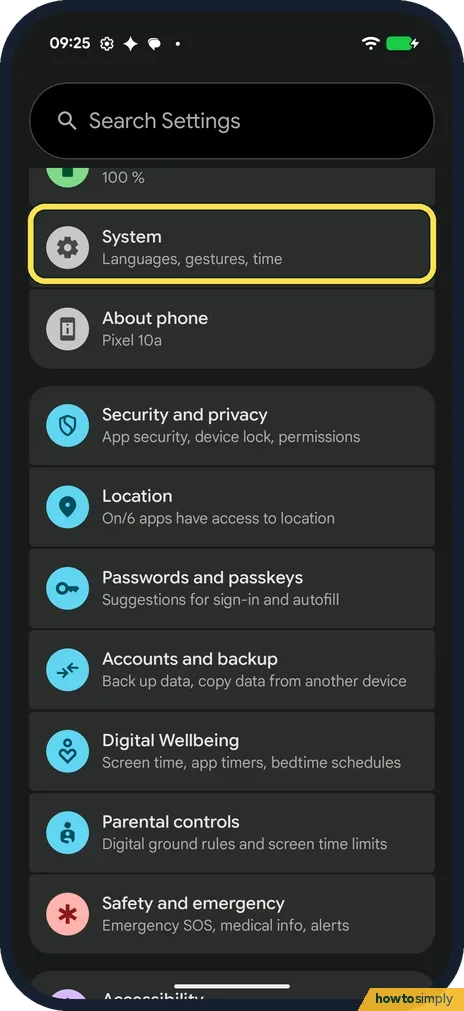
Open System
Open Settings and tap System (Languages, gestures, time). Then tap Language and region.
- 2
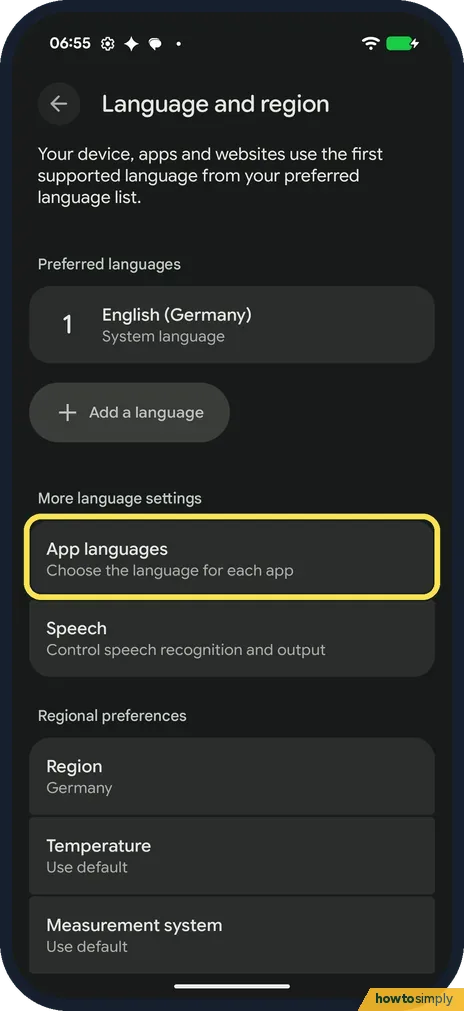
Tap App languages
On Language and region, tap App languages, under More language settings: Choose the language for each app.
- 3
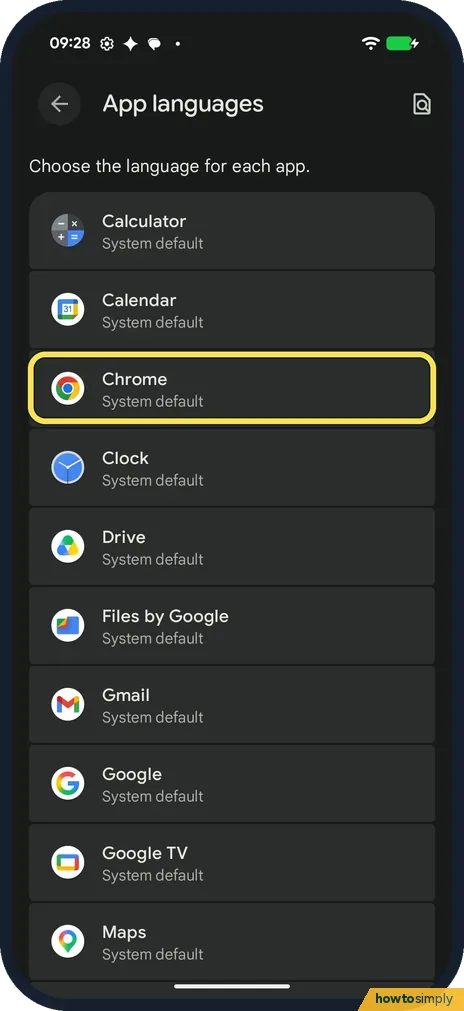
Tap the app
The page says Choose the language for each app. Ours listed Calculator, Calendar, Chrome, Clock, Drive and more, every one on System default. Tap the app; we tapped Chrome.
- 4
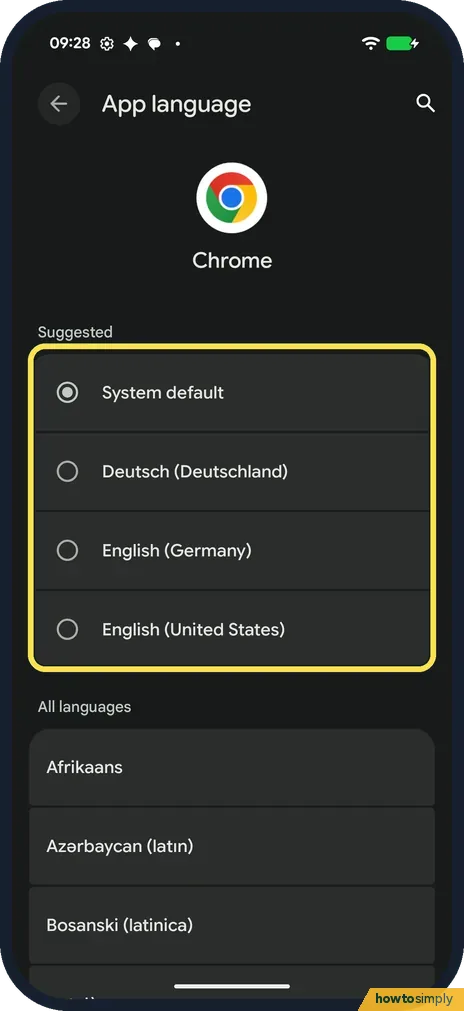
Pick a language
The App language page has Suggested at the top. For Chrome ours offered System default (ticked), Deutsch (Deutschland), English (Germany) and English (United States). All languages, below, lists the rest, and the magnifier at the top right searches. Tap one to use it.
- 5
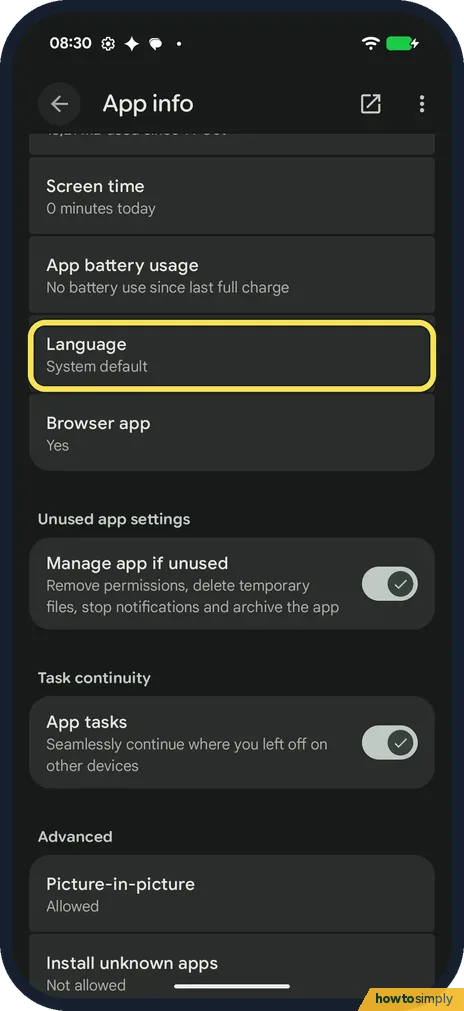
Or start from App info
The same setting is on the app's App info page (Settings, Apps, the app). Chrome's had a Language row that said System default.
If you do not see this option
- App not in the list? Google says only apps whose developers opt in show up in App languages. Some apps only let you change the language inside the app. Source: Change app language on your Android phone
- Path says Languages, not Language and region? Google's help gives Settings, System, Languages, App Languages, and says some steps only work on Android 14 and up. On our Android 17 Pixel the middle row was Language and region. Source: Change app language on your Android phone
- On a Samsung Galaxy? There the path is different: Settings, General management, App languages. See our guide on how to change the language of one app on a Samsung Galaxy.
If this does not work
- App still in the old language? Google suggests restarting the app and checking that the phone is online, as the language may not update without a connection.
- Still not changed? Google says to add the language as a second phone language, wait a few minutes, then pick it for the app again. See how to change the system language on a Google Pixel.
- Your language is missing for an app? All languages only lists what the app supports. Google says to update the app for the latest list: how to update a Google Pixel and its apps.
Good to know
Google says apps left on System default use the first language in your phone's list that they support.
To change the language of the whole phone instead, see how to change the system language.
The choice only affects that one app; the phone and every other app keep their language. To undo it, open the same App language page and pick System default, and the app goes back to following your phone's language list.
About this guide
- Device
- Android
- Shown on
- Google Pixel 10a, Android 17 (build CP3A.261005.005)
- App
- Settings
- Path
- Settings › System › Language and region › App languages
- Real screenshots
- 5 of 5 steps
- Checked
- October 2026
- Sources
- 2 official, linked below
Sources
Links checked October 2026. Menus and features can change with updates.Spotted a mistake? Menus change with updates, and we want every step to match your screen. Email us about this page or use the contact form. We read every report, and fixes are listed on What changed.
Liked this guide?
Follow us for new guides and short how-to videos.
Did this guide work for you?
Sorry about that. What happened?