
howtosimply.com/guides/how-to-turn-on-power-saving-mode-on-an-oppo-phone/ · Checked October 2026 · CPH2689, EEA), ColorOS 16.0.5, Android 16 (build CPH2689_16.0.5.1001(EX01) · OPPO Reno13 5G
In this guide
Open Settings, Battery and tap Power saving mode, between Balanced mode and High performance mode. For much longer, turn on Super Power Saving Mode below them. Each mode shows an estimate; at 100% ours said 24 h 26 min for Balanced mode and 26 h 23 min for Power saving mode.
3 of 3 steps with real screenshots · 2 official sources below
- Device
- Android
- Shown on
- OPPO Reno13 5G (CPH2689, EEA), ColorOS 16.0.5, Android 16 (build CPH2689_16.0.5.1001(EX01))
- App
- Settings
- Path
- Settings › Battery
- Real screenshots
- 3 of 3 steps
- Checked
- October 2026
- Sources
- 2 official, linked below
Step by step
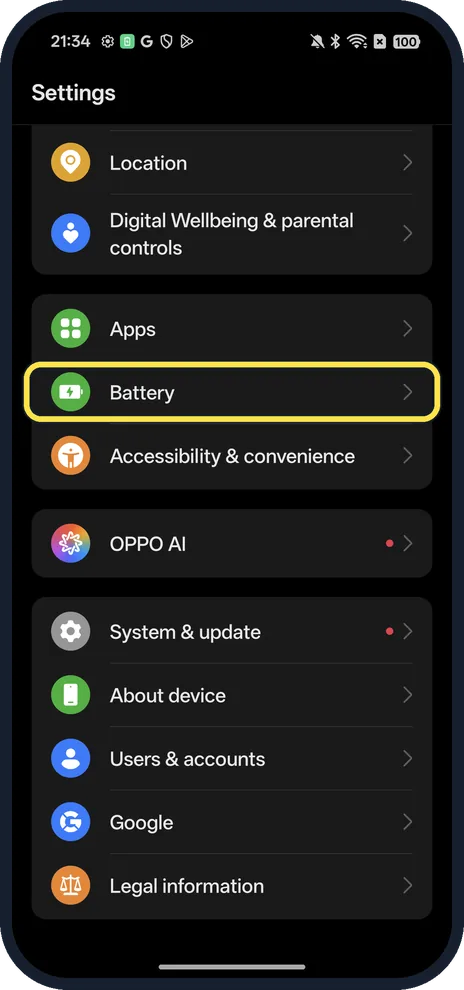
Open Battery
Open Settings and tap Battery.
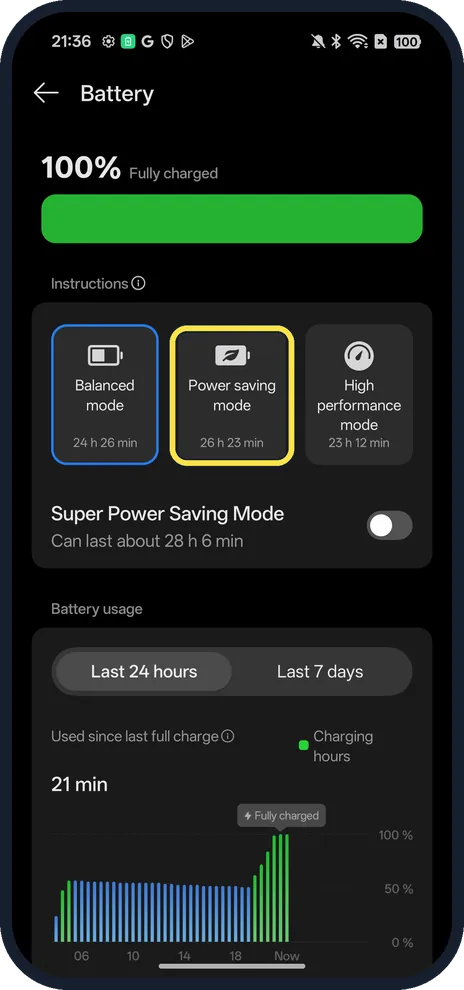
Tap Power saving mode
The three modes sit side by side with time estimates. For much longer, turn on the Super Power Saving Mode switch below them instead; ours said it could last about 28 h 6 min.
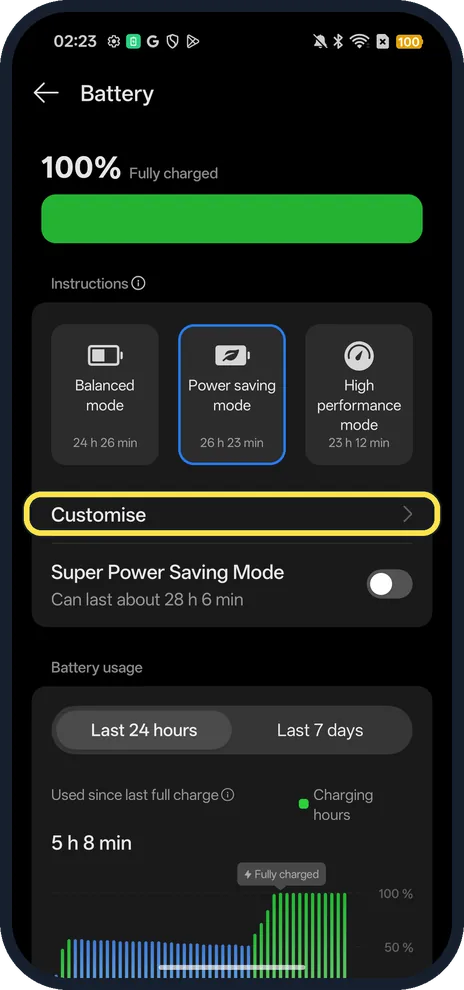
Check it is selected
The Power saving mode tile is highlighted and a Customise row appears under the modes. On ours the battery icon turned yellow; there was no separate power-saving icon.
If you do not see this option
- No mode tiles on your Battery page? OPPO lists different places by version: ColorOS 15 has Battery, Battery mode; ColorOS 13 and 14 have Battery, Power saving mode, with Super power saving mode as a switch inside it; ColorOS 7.2 to 12 have it as a switch on the Battery page. Source: What Is the Super Power Saving Mode on OPPO Phones
- Faster from Control Center? OPPO says you can tap the Super power saving mode icon in Control Center, or add it with Edit if it isn't there. On ColorOS 13 and later, press and hold the Power saving mode icon to jump to the setting. Source: What Is the Super Power Saving Mode on OPPO Phones
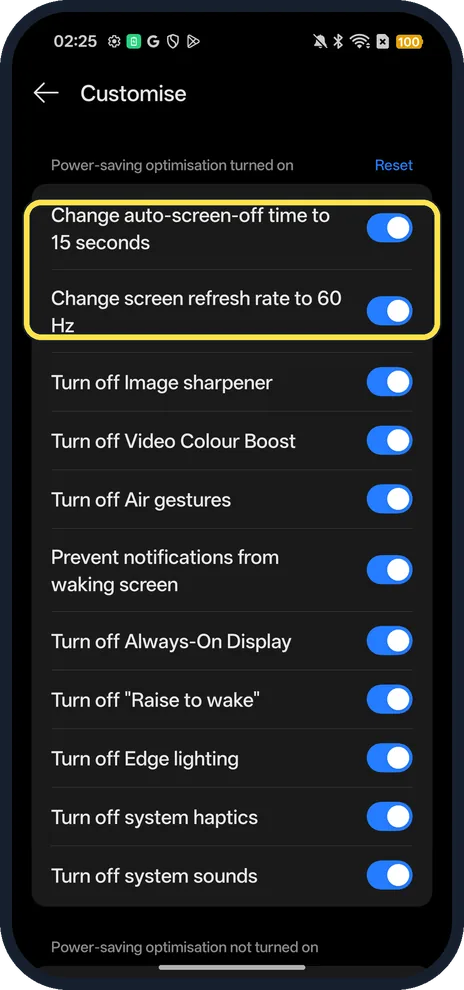
- What does it change? Tap Customise: on ours it changed the auto-screen-off time to 15 seconds and the refresh rate to 60 Hz, and turned off things like Always-On Display, Raise to wake and system sounds. Each has its own switch.
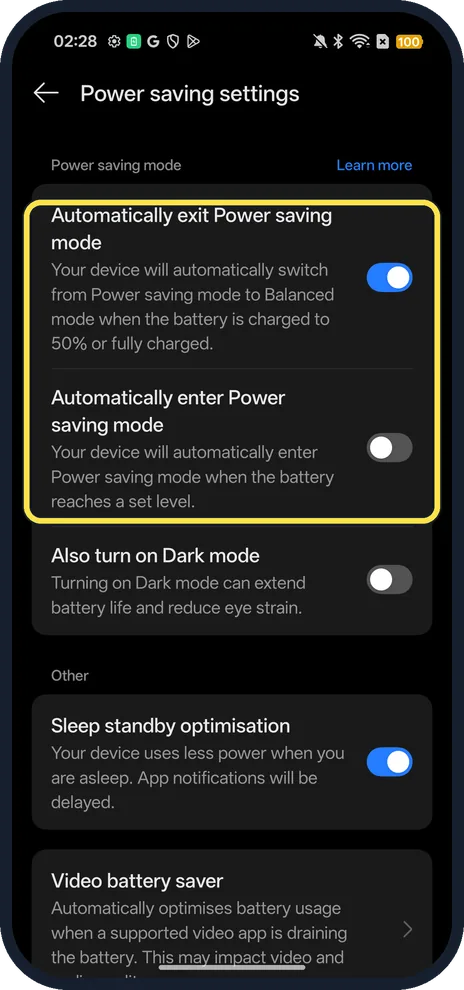
- Switch on automatically? Tap Power saving settings, lower on the Battery page. Automatically enter Power saving mode (at a set battery level) was off on ours; Automatically exit, back to Balanced at 50% or full, was on.
If this does not work
- Only a few apps in Super Power Saving Mode? That is by design: OPPO says it allows six apps, adds three suggested ones and turns Dark mode on. Tap Add to choose apps, and Exit at the top left to leave it. Source: What Is the Super Power Saving Mode on OPPO Phones
- Notifications late or missing? Power saving limits background activity. OPPO says to allow it per app: Settings, Battery, Power saving settings, App battery management, the app, Allow background activity. Source: No notification on the Status Bar
- Phone feels slow? Go back to Balanced mode, the tile on the left.
About this guide
The screenshots are from our OPPO Reno13 5G, the European model CPH2689, with ColorOS 16.0.5 and Android 16 (build CPH2689_16.0.5.1001(EX01)), in Dark mode. We set it back to Balanced afterwards.
Good to know
Check how worn the battery is: battery health on an OPPO phone.
Lower the screen refresh rate to save more: change the refresh rate.
In short: Settings, Battery, Power saving mode (or Super Power Saving Mode).
- OPPO Support: What Is the Super Power Saving Mode on OPPO Phones
- OPPO Support: No notification on the Status Bar
Links checked in October 2026. Menus and features can change after software updates. These steps match the version named at the top.
Did this guide work for you?
Sorry about that. What happened?