
What changed: new dark-mode screenshots of every Power saving page on One UI 8.5, what Standard and Maximum each limit, and which one to use.
howtosimply.com/guides/how-to-turn-on-power-saving-on-a-samsung-galaxy-phone/ · Checked October 2026 · Samsung Galaxy A57 5G (SM-A576B), One UI 8.5, Android 16
In this guide
Open Settings, Battery, Power saving and tap the switch so it shows On, then pick a mode. Standard limits CPU speed to 70% and dims the screen by 10%. Maximum limits all background activity and notifications except essential apps and apps you choose.
6 of 6 steps with real screenshots · 1 official source below
- Device
- Android
- Shown on
- Samsung Galaxy A57 5G (SM-A576B), One UI 8.5, Android 16
- App
- Settings
- Path
- Settings › Battery
- Real screenshots
- 6 of 6 steps
- Checked
- October 2026
- Sources
- 1 official, linked below
Step by step
Open Battery settings
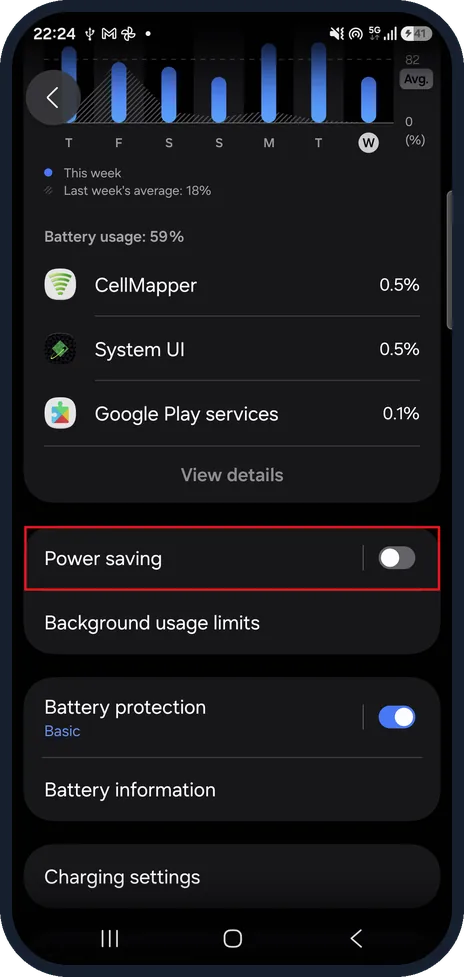
Open Settings and tap Battery.
Scroll down past the battery usage list and tap Power saving.
Check the estimates
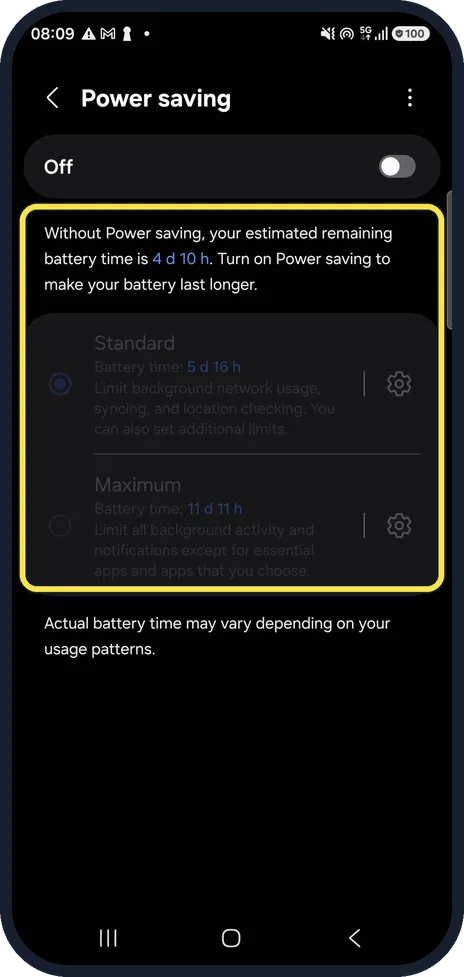
The page shows the estimated battery time without Power saving and with each mode. On our Galaxy it said 4 d 10 h without it, 5 d 16 h with Standard and 11 d 11 h with Maximum.
While the switch is Off, Standard and Maximum are greyed out.
Switch it on
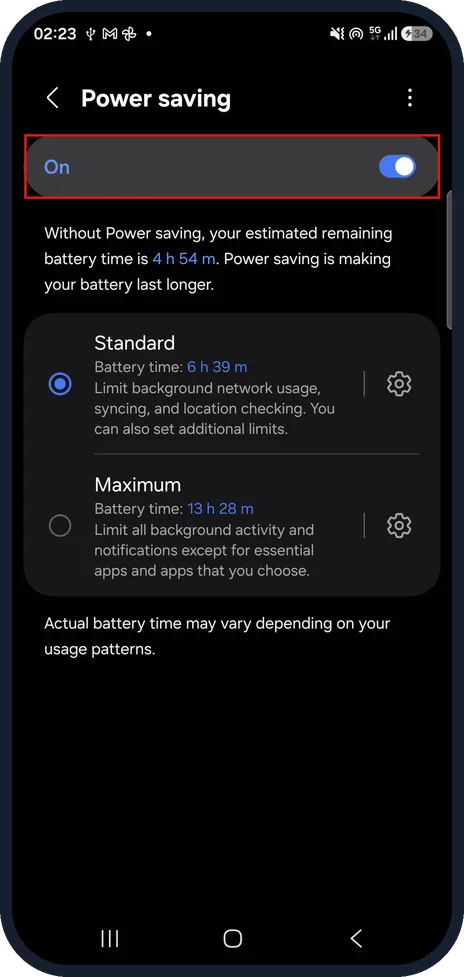
Tap the switch at the top of the page. It changes from Off to On and the modes can then be chosen.
Tap it again to turn Power saving off.
Pick Standard or Maximum
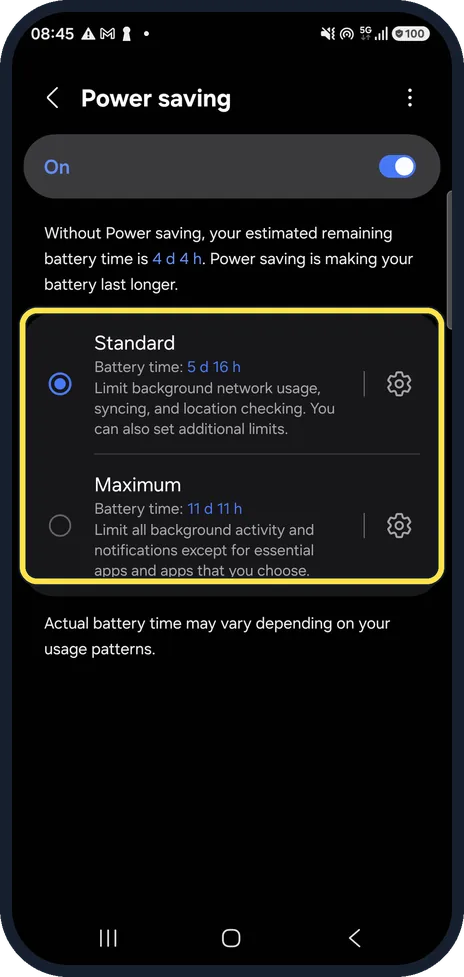
With Power saving on, tap Standard or Maximum.
The gear next to each mode opens its own limits.
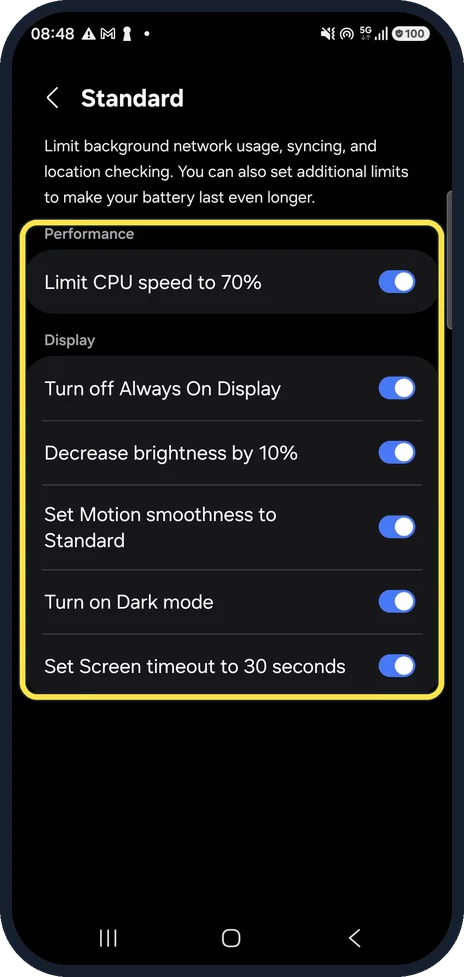
Check what Standard changes
Tap the gear next to Standard. On our Galaxy all six limits are on: Limit CPU speed to 70%, Turn off Always On Display, Decrease brightness by 10%, Set Motion smoothness to Standard, Turn on Dark mode and Set Screen timeout to 30 seconds.
Switch off any you do not want; the rest keep working.
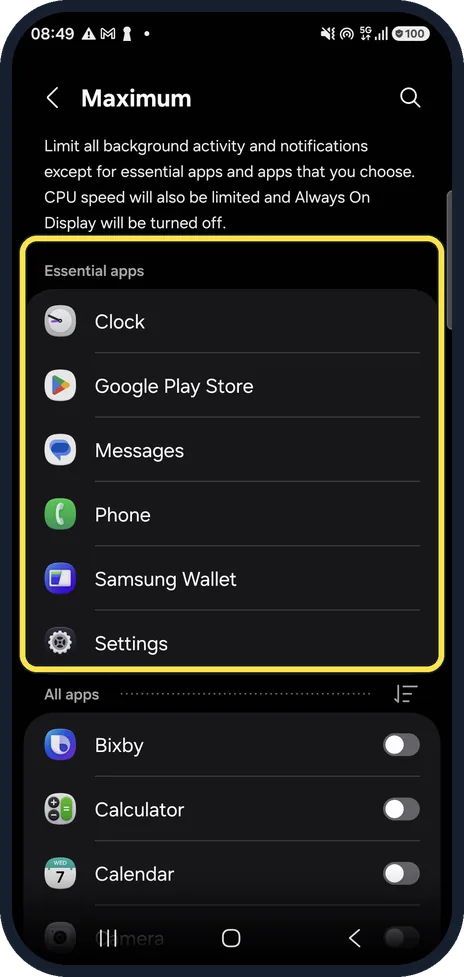
Check which apps still work in Maximum
Tap the gear next to Maximum. On our Galaxy the Essential apps are Clock, Google Play Store, Messages, Phone, Samsung Wallet and Settings.
Switch on any other app you need under All apps, such as WhatsApp, or its background activity and notifications are limited.
What changed: new dark-mode screenshots of every Power saving page on One UI 8.5, what Standard and Maximum each limit, and which one to use.
If you do not see this option
- Power saving is not on the Battery page Scroll down. On our Galaxy it sits below the battery usage list and View details, just above Background usage limits.
- Standard and Maximum are greyed out Power saving is still Off. Tap the switch at the top of the page so it shows On, then choose a mode.
- An app is not under Essential apps Scroll down to All apps on the Maximum page and switch that app on.
If this does not work
- Chat messages arrive late In Maximum only the essential apps and apps you choose keep background activity and notifications. Add the app under All apps, or use Standard instead.
- The screen looks dimmer or turns dark Standard can decrease brightness by 10%, turn on Dark mode and set Screen timeout to 30 seconds. Tap the gear next to Standard and switch off the limits you do not want.
- Your estimates look very different from ours The page notes that actual battery time may vary depending on your usage patterns. On our Galaxy the estimate without Power saving was 4 d 10 h one time, 10 h 13 m another and 4 h 54 m on 15 Oct (step 3).
About this guide
Power saving is the quickest way to stretch the last part of a charge. On One UI 8.5 the page also tells you how long the battery should last with and without it.
Our screenshots are in dark mode.
Good to know
Which one should you use? Standard for a long day when you still use the phone normally: you lose some speed and brightness, but your apps keep running. Maximum when the battery has to last until you reach a charger and calls and texts are enough. Check its app list first, because chat apps that are not on it stay silent.
For a lasting improvement rather than a quick fix, put rarely used apps to sleep: Samsung Galaxy battery draining fast? 6 fixes.
In short: Settings, Battery, Power saving: tap the switch to On, then pick Standard for a normal day or Maximum to reach a charger (check its app list first).
Links checked in October 2026. Menus and features can change after software updates. These steps match the version named at the top.
📷 See real photos from the Galaxy A57 in our Camera Lab, next to 10 other phones.
Did this guide work for you?
Sorry about that. What happened?