ONEPLUS
How to use power saving mode on a OnePlus (OxygenOS 16)

In short
Go to Settings, Battery and tap the Power saving mode card. Customise, below it, picks what it changes: 15-second screen timeout, 60 Hz, no Always-On Display and more. Tap Balanced mode to go back. Super Power Saving Mode is a separate switch.
4 of 4 steps show a real screenshot from our Nord 5. Each step was checked against the maker's own instructions, linked at the end.
Steps
- 1
Open Battery
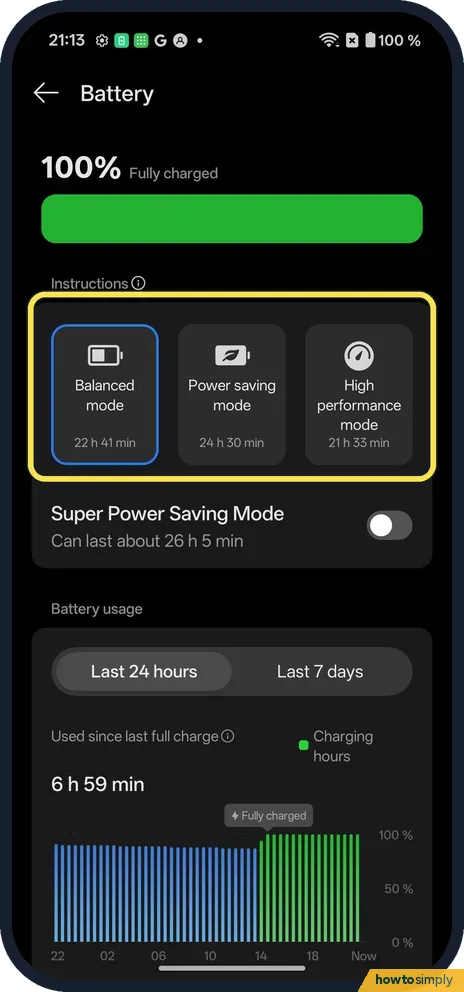
Open Settings, Battery. Balanced mode was picked, with an estimate under each card.
- 2
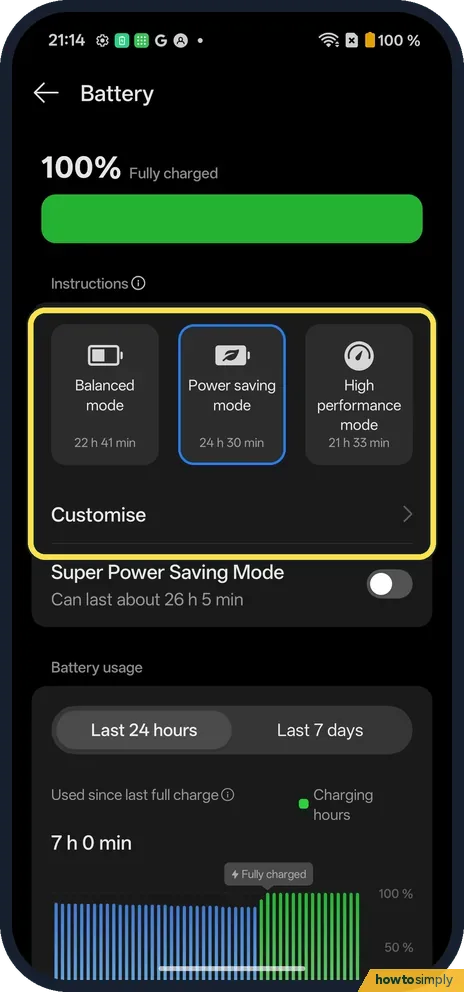
Tap Power saving mode
It switches on straight away. Customise appears below the cards.
- 3
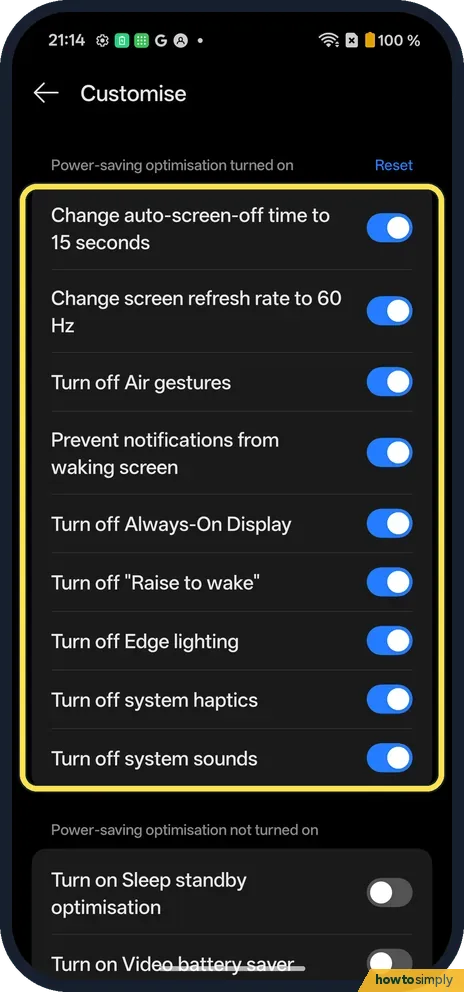
Choose what it changes
On ours: screen off after 15 seconds, 60 Hz, no Air gestures, Always-On Display, Raise to wake, Edge lighting, system haptics or sounds.
- 4
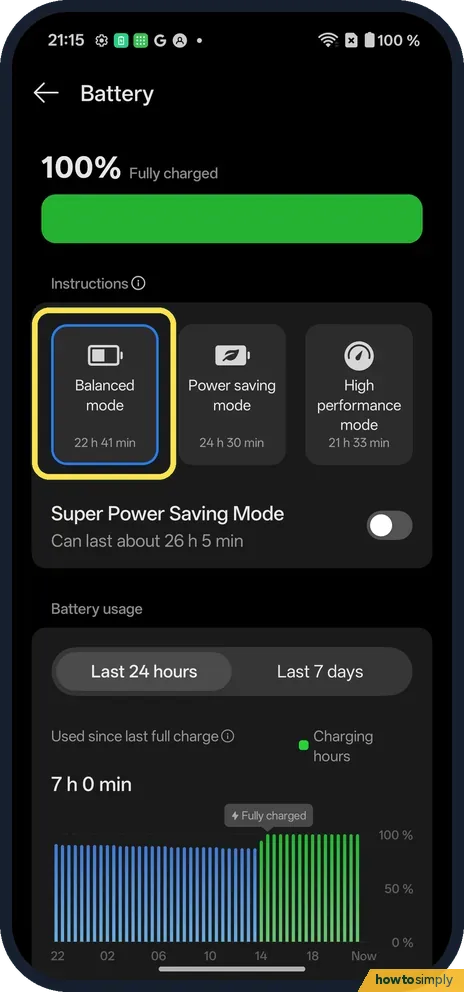
Switch back
Tap Balanced mode.
If you do not see this option
- Super Power Saving Mode? A separate switch below the cards: about 26 h 5 min on ours.
- Older OxygenOS? OnePlus's OxygenOS 14 manual uses Settings, Battery, Power saving mode, and can switch it on at a set battery level. Source: OxygenOS 14.0 User Manual
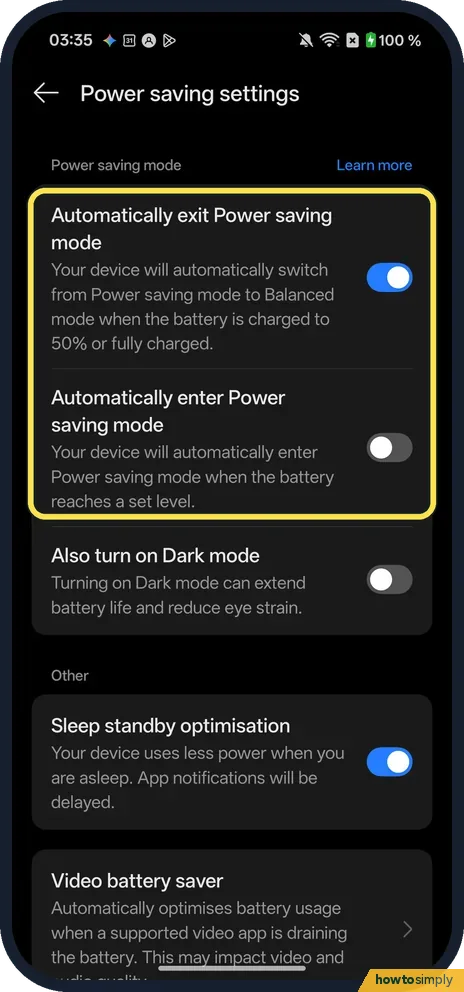
- Switch on or off by itself? Our OxygenOS 16 phone has Power saving settings under Battery. Automatically exit Power saving mode (on) switches back to Balanced mode when the battery is charged to 50% or fully charged; Automatically enter Power saving mode (off) turns it on when the battery reaches a set level. There was no option to switch off at 90%.
If this does not work
- Screen goes off too fast? Customise: switch off the 15-second screen timeout.
- Screen looks less smooth? Power saving drops the refresh rate to 60 Hz.
- Messages or emails arriving late? Google warns that in Battery Saver, apps, network connections and some features may be delayed, because background activity is limited. If one app must stay prompt, switch back to Balanced mode while you wait for it.
- Battery still draining fast? Power saving cuts background work, but a bright screen, long navigation, video streaming, a hotspot and heat still use a lot of power, according to Google. Check which app is responsible before blaming the mode.
- Always-On Display disappeared? That is one of the Customise items. Turn it off in Customise if you want to keep Always-On Display while saving power.
Good to know
See which apps use the most battery on a OnePlus.
When Power saving mode is on, the OxygenOS 14 manual says the battery icon at the top of the screen turns yellow, so you can tell at a glance.
Nothing is deleted or reset by power saving. Your apps, data and settings stay as they were, and tapping Balanced mode restores the normal refresh rate, screen timeout and the features listed in Customise. For a longer-term look at your battery, see check battery health on a OnePlus.
About this guide
- Device
- Android
- Shown on
- OnePlus Nord 5 (CPH2709), OxygenOS 16.0.5.1201, Android 16
- App
- Settings
- Path
- Settings › Battery
- Real screenshots
- 4 of 4 steps
- Checked
- October 2026
- Sources
- 2 official, linked below
Sources
Links checked October 2026. Menus and features can change with updates.Spotted a mistake? Menus change with updates, and we want every step to match your screen. Email us about this page or use the contact form. We read every report, and fixes are listed on What changed.
Liked this guide?
Follow us for new guides and short how-to videos.
Did this guide work for you?
Sorry about that. What happened?