
howtosimply.com/guides/how-to-change-the-refresh-rate-on-an-oppo-phone/ · Checked October 2026 · CPH2689, EEA), ColorOS 16.0.5, Android 16 (build CPH2689_16.0.5.1001(EX01) · OPPO Reno13 5G
In this guide
Open Settings, Display & brightness, Screen refresh rate and choose Auto-select, Standard (a maximum of 60 Hz) or High (up to 120 Hz, which may use more battery and warm the phone). Ours was on Auto-select.
3 of 3 steps with real screenshots · 1 official source below
- Device
- Android
- Shown on
- OPPO Reno13 5G (CPH2689, EEA), ColorOS 16.0.5, Android 16 (build CPH2689_16.0.5.1001(EX01))
- App
- Settings
- Path
- Settings › Display & brightness › Screen refresh rate
- Real screenshots
- 3 of 3 steps
- Checked
- October 2026
- Sources
- 1 official, linked below
Step by step
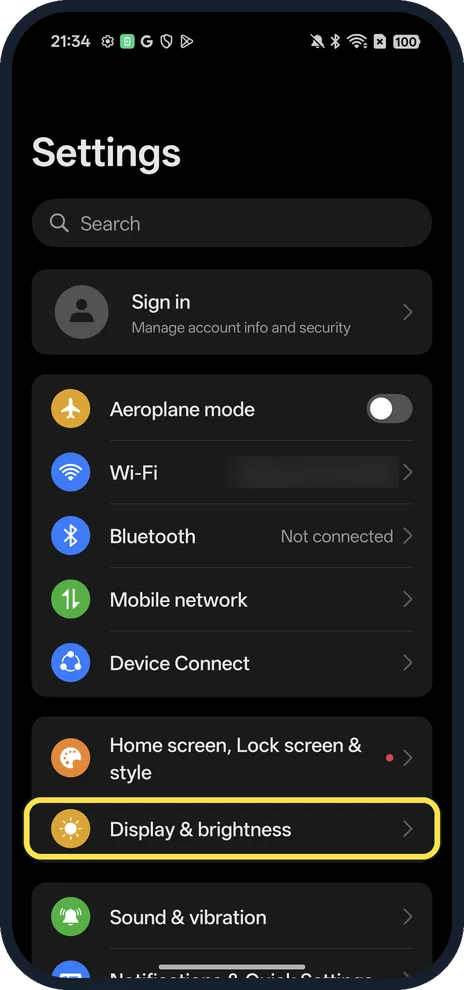
Open Display & brightness
Open Settings and tap Display & brightness.
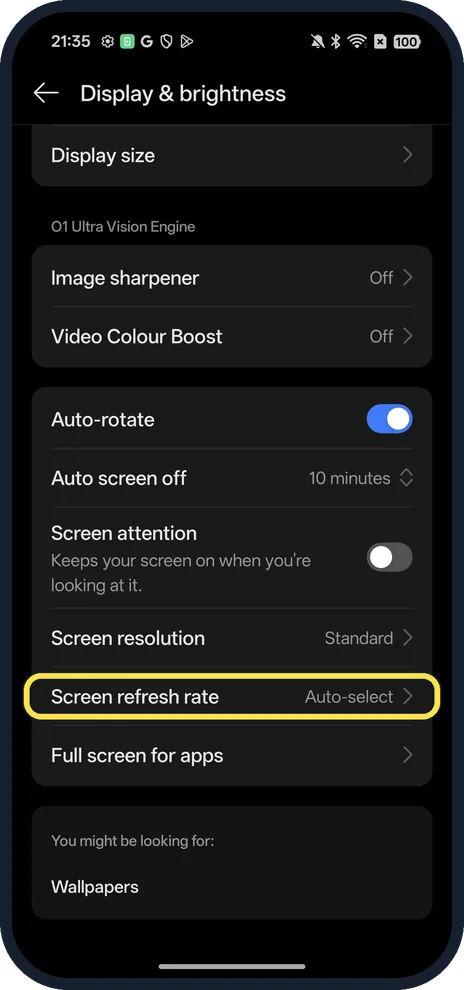
Tap Screen refresh rate
Near the bottom; ours said Auto-select.
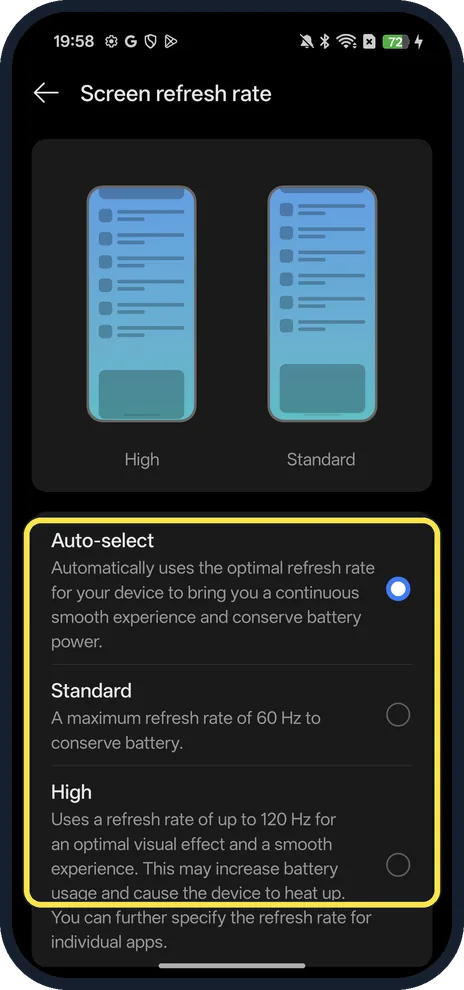
Pick a rate
Auto-select picks the optimal rate and saves power. Standard: up to 60 Hz. High: up to 120 Hz; OPPO warns it may increase battery use and heat.
If you do not see this option
- Not on the Display page? On our ColorOS 16.0.5 it is the Screen refresh rate row near the bottom of Display & brightness, below Screen resolution, and reads Auto-select. Search Settings for refresh rate if your build places it elsewhere.
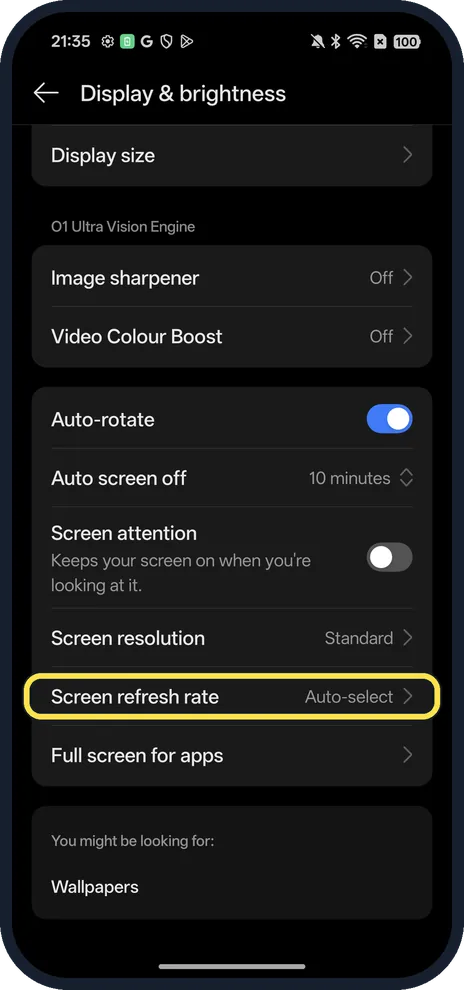
- Expecting a 90 Hz choice? OPPO's specifications list the Reno13 5G (CPH2689) panel as a maximum of 120 Hz, switching between 60, 90 and 120 Hz. Our screen offers High, Standard and Auto-select, with no fixed 90 Hz choice. Source: Reno13 Series specifications
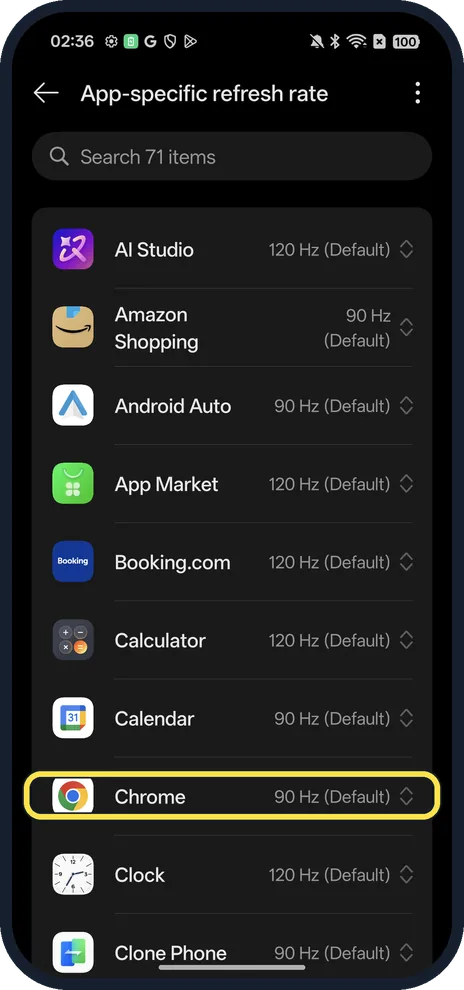
- Want it for one app only? Choose High first: App-specific refresh rate is greyed out under the other choices. Ours then listed 71 apps, each at 90 Hz or 120 Hz by default; Chrome was 90 Hz. We set the phone back to Auto-select.
If this does not work
- Battery worse or phone warm? Our phone warns that High may increase battery usage and cause the device to heat up. Go back to Auto-select, or Standard to conserve battery.
- Still choppy in a game? Auto-select picks the rate itself, so a game can run below 120 Hz. Choose High, or set the rate for that app under High.
About this guide
The screenshots are from our OPPO Reno13 5G, the European model CPH2689, with ColorOS 16.0.5 and Android 16 (build CPH2689_16.0.5.1001(EX01)), in Dark mode.
Good to know
Turn on dark colours too: Dark mode on an OPPO phone.
Save more battery with Power saving mode.
In short: Settings, Display & brightness, Screen refresh rate.
Links checked in October 2026. Menus and features can change after software updates. These steps match the version named at the top.
Did this guide work for you?
Sorry about that. What happened?