XIAOMI REDMI
How to change default apps on a Xiaomi phone (HyperOS 3)
Go to Settings, Apps, tap the three dots at the top right, then Other settings, Default apps. Tap a type, such as Browser, and pick the app. On our Redmi, Chrome was the default browser and Mi Browser the other choice.

4 of 4 steps show a real screenshot from our Redmi Note 15 Pro 5G. Each step was checked against the maker's own instructions, linked at the end.
Steps
- 1
Open the Apps menu
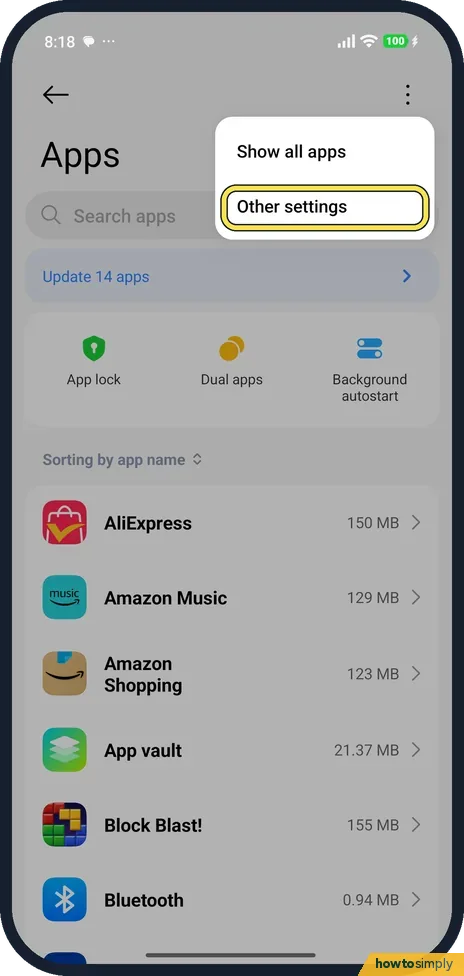
Go to Settings, Apps, and tap the three dots at the top right. The menu has Show all apps and Other settings. Tap Other settings.
- 2
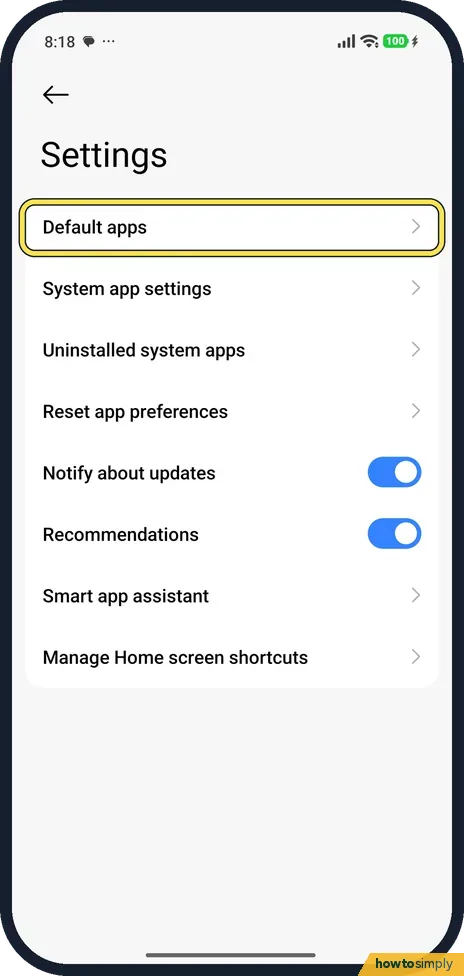
Tap Default apps
Default apps is the first row, above System app settings, Uninstalled system apps and Reset app preferences.
- 3
Pick what to change
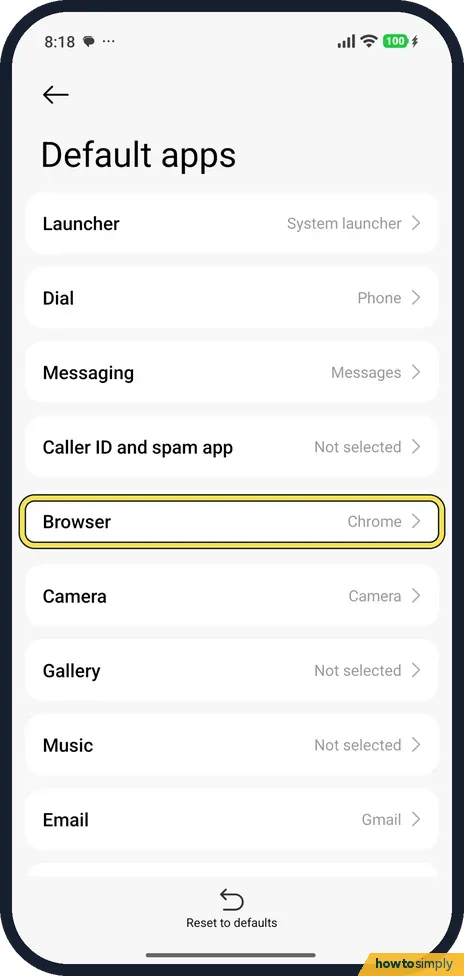
Ours listed Launcher (System launcher), Dial (Phone), Messaging (Messages), Caller ID and spam app (Not selected), Browser (Chrome), Camera, Gallery (Not selected), Music (Not selected) and Email (Gmail). Tap Browser.
- 4
Choose the app
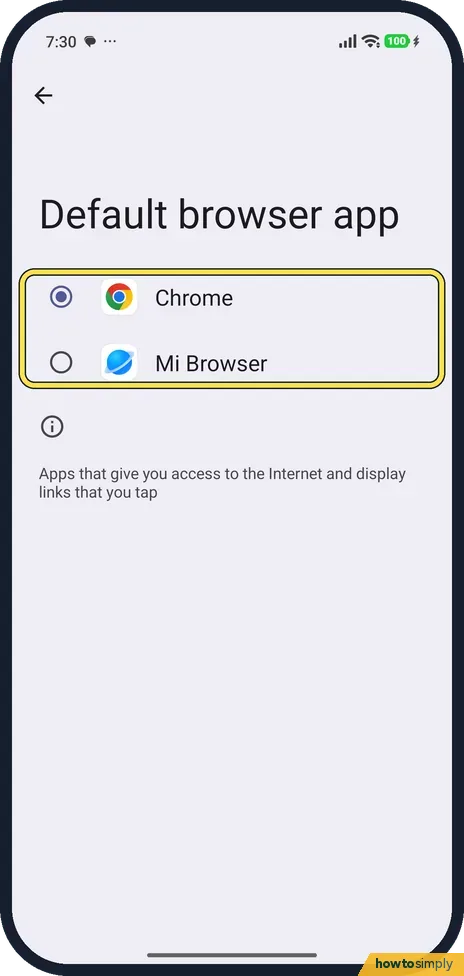
The browser picker listed Chrome, selected, and Mi Browser. Tap the one you want.
If you do not see this option
- No Default apps in Apps? Xiaomi's guide gives the same route: Settings, Apps, the menu at the top right, Other settings, Default apps. Source: Generic User Guide for HyperOS 3.0
- App not listed as a choice? Only apps that can do that job are listed. Mi Browser and Chrome were the only browsers on ours.
If this does not work
- Want Xiaomi's choices back? Reset to defaults is at the bottom of the Default apps page. We didn't tap it.
- Want the old launcher back? Launcher was System launcher on ours. Pick it again in Default apps.
- Gallery or Music says Not selected? Nothing is set yet, so the phone asks which app to use. Tap the row to pick one.
- Links still open in another app? The default browser handles links that no other app claims. Links to some services, such as YouTube or a shopping site, can open in that service's own app instead. That is set per app, not by the Browser choice. See how to clear an app's defaults.
- New browser not offered? Close Settings fully and open Default apps, Browser again so the list refreshes. Apps that cannot handle web links never appear in it.
- Phone keeps asking which app to use? That happens when no default is set for that action. Google's Pixel help says that after a default is cleared, the device asks you which app to use the next time. Pick one in Default apps and the question stops.
Good to know
Remove apps you don't use: how to uninstall or disable preinstalled apps.
Once you choose an app, Android opens it for that task everywhere: Google notes that setting a default browser makes the links you tap open in it automatically. Your old default stays installed and keeps its data, such as bookmarks or messages, so you can switch back at any time from the same page. Changing the Launcher replaces the Home screen, which also changes how widgets, folders and gestures behave, so try a new launcher for a day before deciding.
About this guide
- Device
- Android
- Shown on
- Xiaomi Redmi Note 15 Pro 5G (25080RABDG), HyperOS 3.0.308.0, Android 16
- App
- Settings
- Path
- Settings › Apps › Other settings › Default apps
- Real screenshots
- 4 of 4 steps
- Checked
- October 2026
- Sources
- 3 official, linked below
Sources
Links checked October 2026. Menus and features can change with updates.Spotted a mistake? Menus change with updates, and we want every step to match your screen. Email us about this page or use the contact form. We read every report, and fixes are listed on What changed.
Liked this guide?
Follow us for new guides and short how-to videos.
Did this guide work for you?
Sorry about that. What happened?