
howtosimply.com/guides/how-to-check-battery-health-on-an-oppo-phone/ · Checked October 2026 · CPH2689, EEA), ColorOS 16.0.5, Android 16 (build CPH2689_16.0.5.1001(EX01) · OPPO Reno13 5G
In this guide
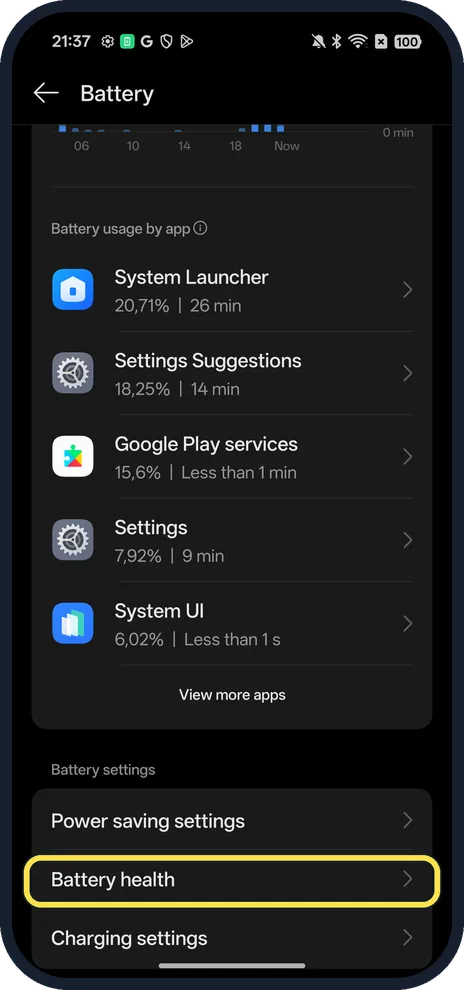
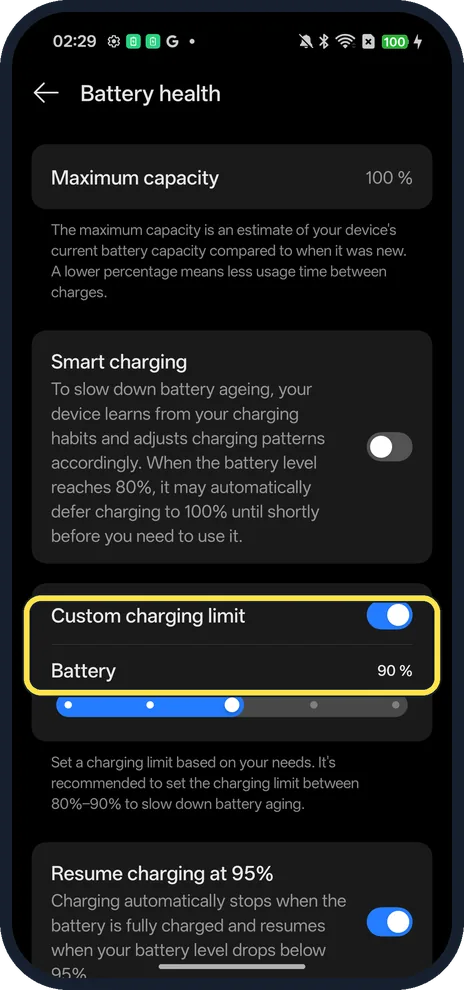
Open Settings, Battery, scroll down and tap Battery health. Maximum capacity shows how much of the original capacity is left (100 % on our Reno13). The same page has Smart charging, Custom charging limit and Resume charging at 95%.
4 of 4 steps with real screenshots · 4 official sources below
- Device
- Android
- Shown on
- OPPO Reno13 5G (CPH2689, EEA), ColorOS 16.0.5, Android 16 (build CPH2689_16.0.5.1001(EX01))
- App
- Settings
- Path
- Settings › Battery › Battery health
- Real screenshots
- 4 of 4 steps
- Checked
- October 2026
- Sources
- 4 official, linked below
Step by step
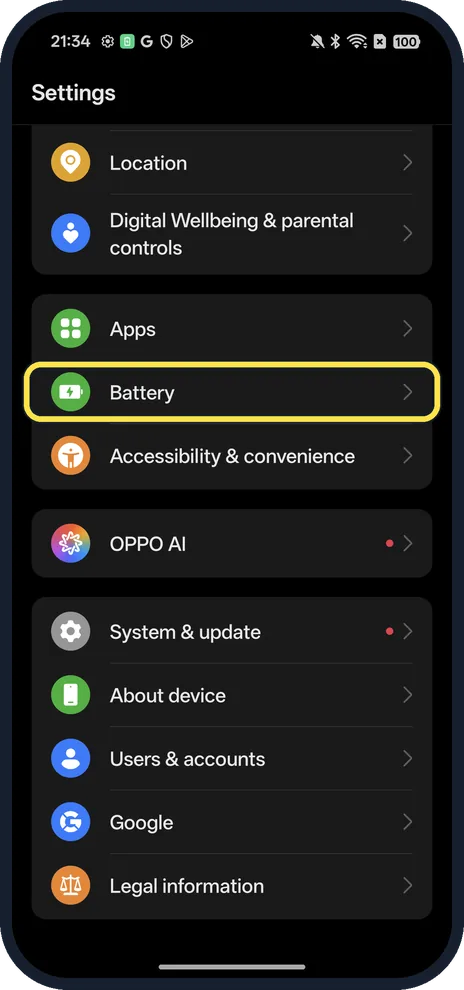
Open Battery
Open Settings and tap Battery.
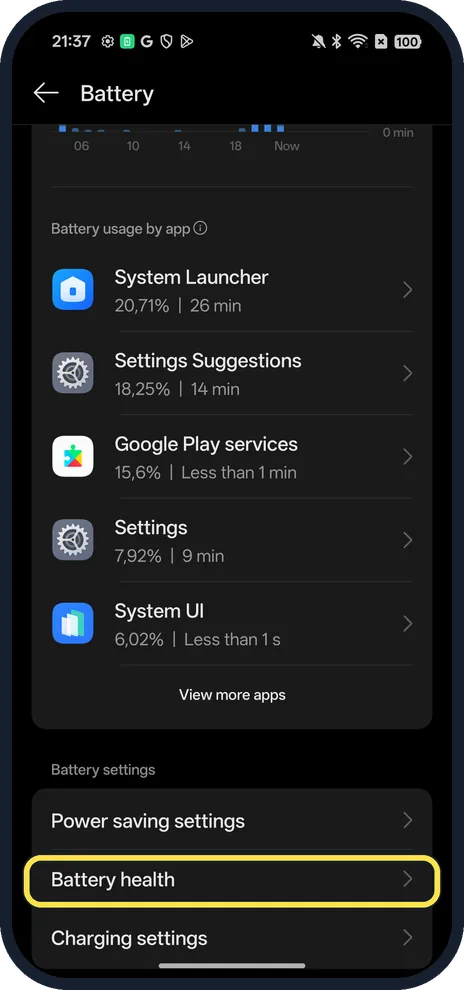
Tap Battery health
Scroll past Battery usage by app to Battery settings.
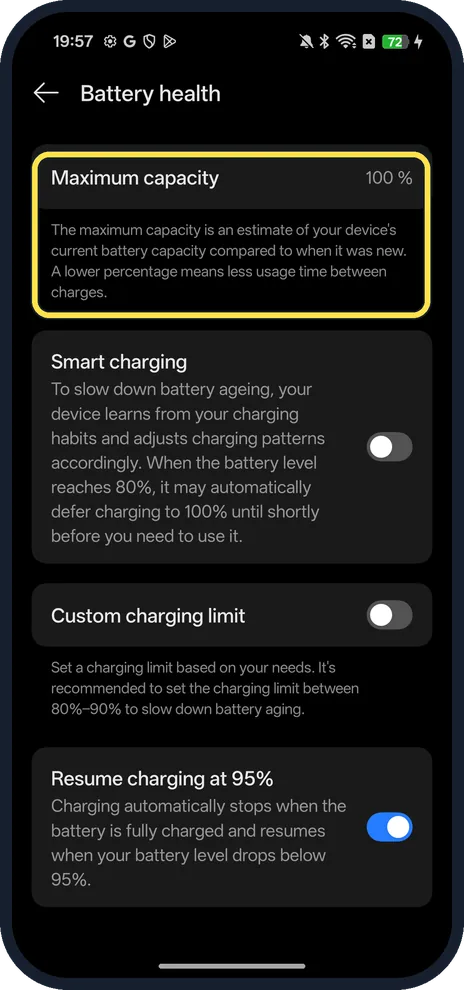
Read Maximum capacity
OPPO says it is an estimate compared to when the battery was new; a lower percentage means less use between charges.
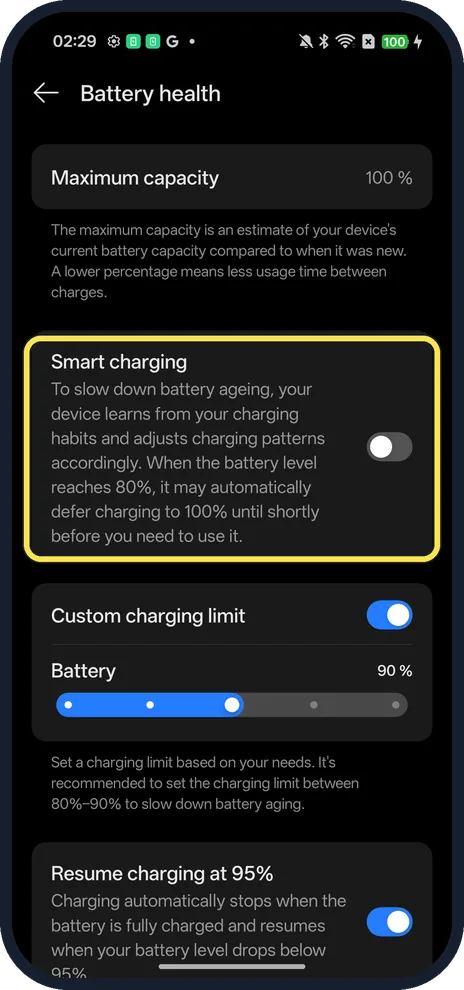
Turn on Smart charging (optional)
It learns your habits and may hold the battery at 80% until shortly before you need it. It was off in ours.
If you do not see this option
- No Battery health row? Use OPPO's battery check instead. OPPO gives it by version in its battery troubleshooting: ColorOS 14 and 15, Phone Manager, the three dots, Diagnostics, Battery & Charging, Run diagnostics; ColorOS 12 and 13, Phone Manager, Tools, Diagnostics; ColorOS 11, Phone Manager, Diagnostics, Continue, Battery & Charger. Source: What to Do if My Battery Percentage Is Stuck While Charging
- Not on the first screen of Battery? On our ColorOS 16.0.5 it is below Battery usage, under Battery settings, so scroll down. You can also search Settings for battery health.
- Want it to stop at 80-90%? Custom charging limit is a switch on the same page; the page recommends 80%-90% to slow battery ageing. Turned on, ours showed a Battery 90% slider, and a notification later said charging was complete at the set limit of 90%. We turned it back off.
If this does not work
- Stops at 100% and drops a bit? That is Resume charging at 95%, which was on on ours: charging stops when full and starts again below 95%.
- Won't charge fully, or warns about temperature? OPPO says the phone stops charging at extreme temperatures and shows Temperature is too low/high, the battery cannot be charged. Its ideal range is 16 to 25 °C. Source: About OPPO Smartphone Batteries
- Capacity low and the phone dies early? OPPO recommends having the battery replaced only at an authorised OPPO service centre, with your proof of purchase and a backup first. Source: When Should You Replace Your OPPO Phone Battery
About this guide
The screenshots are from our OPPO Reno13 5G, the European model CPH2689, with ColorOS 16.0.5 and Android 16 (build CPH2689_16.0.5.1001(EX01)), in Dark mode. Smart charging and Custom charging limit were off; Resume charging at 95% was on.
Good to know
Show the number in the status bar: battery percentage on an OPPO phone.
Make a charge last longer with Power saving mode.
In short: Settings, Battery, Battery health.
- OPPO Support: What to Do if My Battery Percentage Is Stuck While Charging
- OPPO Support: About OPPO Smartphone Batteries
- OPPO Support: When Should You Replace Your OPPO Phone Battery
- Google Android Help: Get the most life from your Android battery
Links checked in October 2026. Menus and features can change after software updates. These steps match the version named at the top.
Did this guide work for you?
Sorry about that. What happened?