ONEPLUS
How to change default apps on a OnePlus (OxygenOS 16)

In short
Go to Settings, Apps, Default apps. Tap Browser app, Home app, Phone app, SMS app, Digital assistant app or Wallet app and pick the one to use. Ours used Chrome for the browser, with Internet as the other choice.
3 of 3 steps show a real screenshot from our Nord 5. Each step was checked against the maker's own instructions, linked at the end.
Steps
- 1
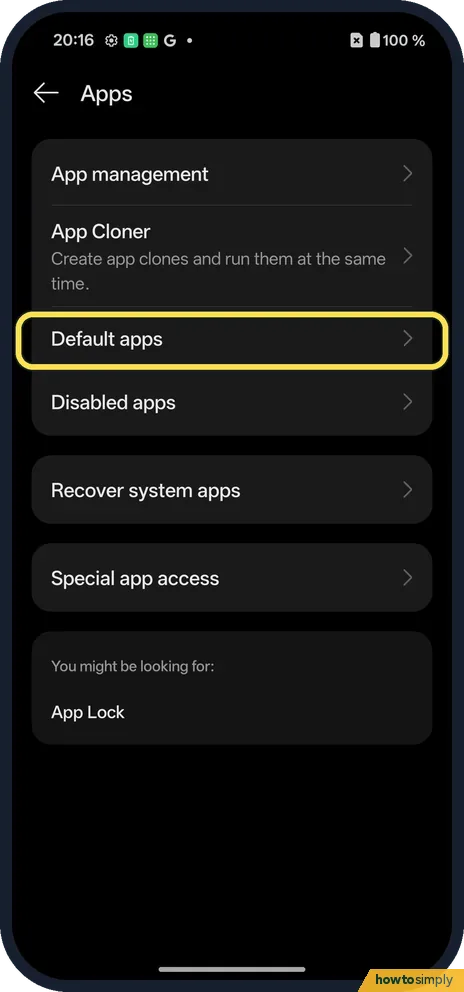
Open Default apps
Open Settings, tap Apps, then Default apps.
- 2
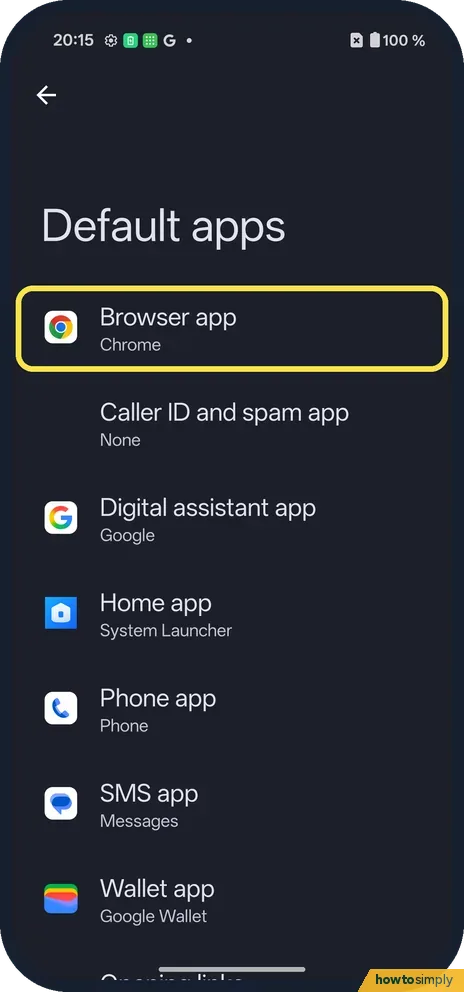
Choose a role
Browser app (Chrome), Caller ID and spam app (None), Digital assistant app (Google), Home app (System Launcher), Phone, SMS (Messages) and Wallet (Google Wallet).
- 3
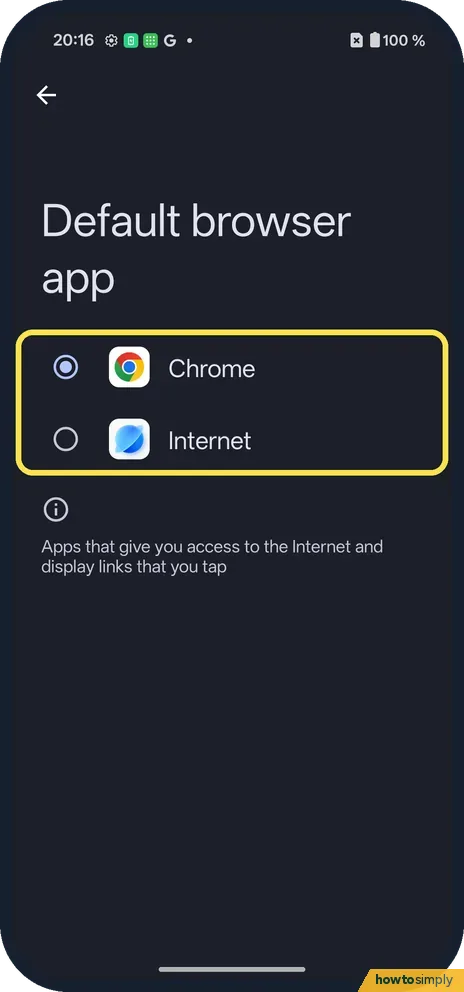
Pick the app
For Default browser app ours offered Chrome and Internet. Tap one.
If you do not see this option
- Older OxygenOS? OnePlus's OxygenOS 14 manual has the same path, Settings, Apps, Default apps, and also lists file types such as PDF there. Source: OxygenOS 14.0 User Manual
- App not offered? Only installed apps that can do that job are listed.
If this does not work
- Links still open in another app? Check Opening links, at the bottom of Default apps.
- Home screen changed? Set Home app back to System Launcher.
- Links open inside the app you tapped? Some apps, such as mail or chat apps, show links in their own built-in view instead of your browser. That is a setting inside each app, not a default app choice, so look in that app's settings.
- Your choice disappeared? If you uninstall or disable the app you picked, the phone hands that job to another installed app. Open Default apps again and choose the one you want.
- A new app keeps asking to be default? Some browsers and launchers show a prompt when you open them. You can say no. If you said yes by mistake, the change shows up in the same Default apps list and you can set it back there.
Good to know
Change app permissions on a OnePlus.
Changing a default only decides which app opens first. The other apps stay installed and keep their data, so bookmarks and saved passwords stay in the browser you used before. To undo, go back to Default apps and pick the old app again. Ours used Chrome, Google, System Launcher, Messages and Google Wallet, with Caller ID and spam set to None. For which websites open in apps instead of the browser, see stop an app opening links on a OnePlus.
A default Phone or SMS app gets access to your calls or messages to do its job. Check what else it can reach afterwards, and switch off anything it does not need.
About this guide
- Device
- Android
- Shown on
- OnePlus Nord 5 (CPH2709), OxygenOS 16.0.5.1201, Android 16
- App
- Settings
- Path
- Settings › Apps › Default apps
- Real screenshots
- 3 of 3 steps
- Checked
- October 2026
- Sources
- 2 official, linked below
Sources
Links checked October 2026. Menus and features can change with updates.Spotted a mistake? Menus change with updates, and we want every step to match your screen. Email us about this page or use the contact form. We read every report, and fixes are listed on What changed.
Liked this guide?
Follow us for new guides and short how-to videos.
Did this guide work for you?
Sorry about that. What happened?