XIAOMI REDMI
How to change brightness and automatic brightness on a Xiaomi phone (HyperOS 3)

In short
Go to Settings, Display & brightness. Under Brightness level, drag the Screen brightness bar left or right. The Automatic brightness switch below it lets the phone change the brightness to the light around you; it was on on ours.
3 of 3 steps show a real screenshot from our Redmi Note 15 Pro 5G. Each step was checked against the maker's own instructions, linked at the end.
Steps
- 1
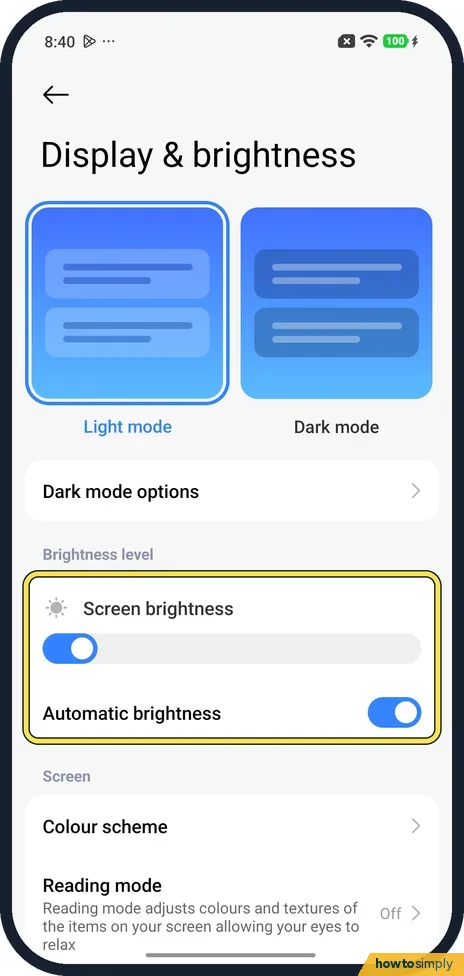
Open Display & brightness
Open Settings and tap Display & brightness. Brightness level is below Light mode, Dark mode and Dark mode options.
- 2
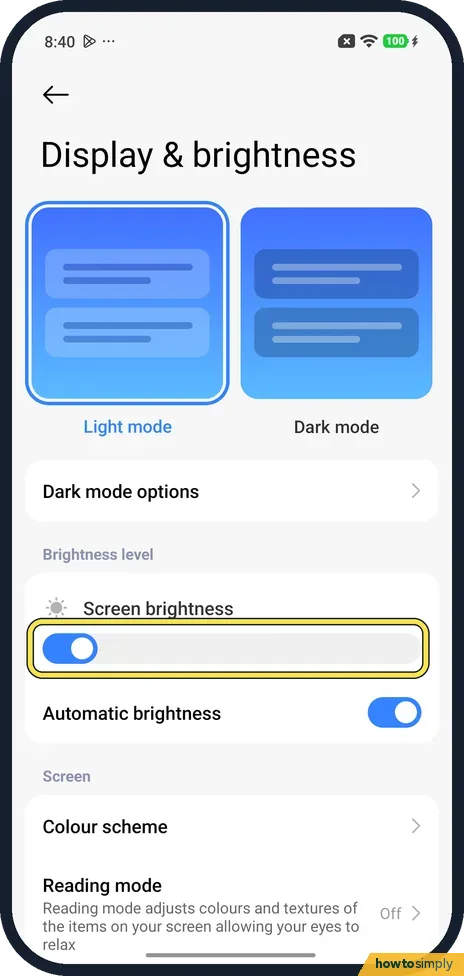
Drag Screen brightness
Screen brightness is a wide bar. Drag it right for a brighter screen, left for a dimmer one. Ours was set low, near the left.
- 3
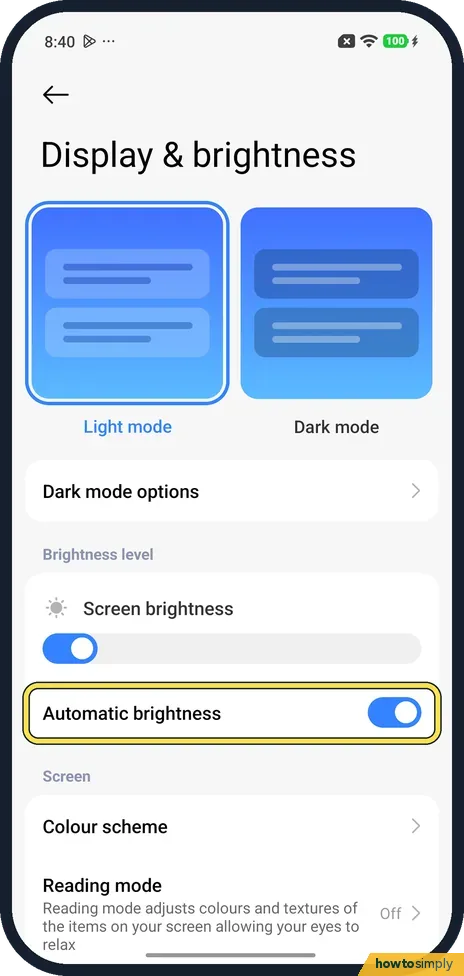
Automatic brightness
Turn Automatic brightness on to let the phone set the brightness, or off to keep it where you put it. It was on on ours.
If you do not see this option
- Called Auto brightness? Xiaomi's REDMI 13C 5G steps say Display & brightness, Auto brightness, and add a second way: swipe down from the top right to open Control centre and tap the Auto brightness icon. Ours was named Automatic brightness. Source: How to adjust the brightness on the Redmi 13C 5G automatically?
- Screen doesn't follow the light? Not every model does. Xiaomi says the REDMI A3's screen doesn't adapt to the light around it, so you set the brightness by hand. Source: Does the brightness of the REDMI A3 screen adapt to the environment?
If this does not work
- Hard to see outdoors? For the REDMI Note 13 Pro+ 5G, Xiaomi suggests raising the brightness by hand, or turning off Automatic brightness and setting a level yourself.
- Brightness keeps changing? That is Automatic brightness. Turn it off on this page. Xiaomi says you can also tap Auto brightness in Control centre to turn it off.
- Battery runs down fast? A bright screen uses more power. See how to change battery mode and see battery use.
- Automatic brightness keeps choosing a level you dislike? Leave it on and nudge the Screen brightness bar. Xiaomi's user guide says that with Automatic brightness on, brightness follows the light around you but you can still make minor adjustments by hand.
- Screen still too bright at night? Drag the bar fully left. If that is still too bright in a dark room, a dark theme can also help. See turn on Dark mode on a Xiaomi phone.
- Screen dims by itself when the phone is hot? Xiaomi says that when the phone heats up, the system lowers the brightness to help it cool down. Let it cool, then raise the brightness again.
Good to know
Add the brightness controls you use to Control centre.
The torch has its own brightness: how to change the torch brightness.
Changes take effect at once and stay after a restart. A higher manual level is easier to read but uses more battery; Automatic brightness usually saves power because it dims in darker places. To go back, turn Automatic brightness on again or move the bar.
The quickest way to change brightness day to day is Control Centre. Xiaomi says you can swipe down from the top right and slide the brightness level there, or tap Auto brightness to turn it on or off. For warmer colours in the evening, see use Reading mode on a Xiaomi phone.
About this guide
- Device
- Android
- Shown on
- Xiaomi Redmi Note 15 Pro 5G (25080RABDG), HyperOS 3.0.308.0, Android 16
- App
- Settings
- Real screenshots
- 3 of 3 steps
- Checked
- October 2026
- Sources
- 4 official, linked below
Sources
- Xiaomi Support: How to adjust the brightness on the Redmi 13C 5G automatically?
- Xiaomi Support: Why is the REDMI Note 13 Pro+ 5G brightness low and difficult to see, especially in outdoor situations?
- Xiaomi Support: Does the brightness of the REDMI A3 screen adapt to the environment?
- Xiaomi: Generic User Guide for HyperOS 3.0
Spotted a mistake? Menus change with updates, and we want every step to match your screen. Email us about this page or use the contact form. We read every report, and fixes are listed on What changed.
Liked this guide?
Follow us for new guides and short how-to videos.
Did this guide work for you?
Sorry about that. What happened?