ONEPLUS
How to turn on Developer options on a OnePlus (OxygenOS 16)

In short
Go to Settings, About device, Version, and tap Version No. seven times. Enter your screen lock if asked. On OxygenOS 16 the row is Version No., not Build number. Developer Options then shows in System & update.
5 of 5 steps show a real screenshot from our Nord 5. Each step was checked against the maker's own instructions, linked at the end.
Steps
- 1
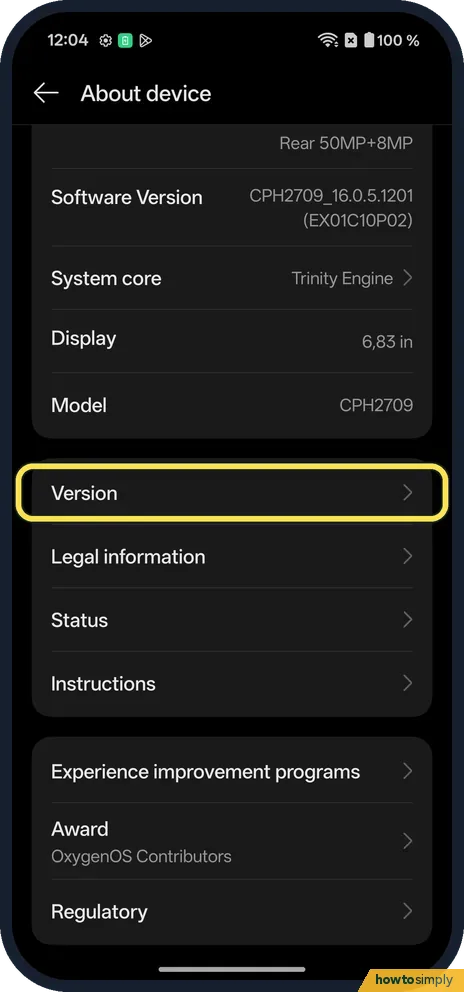
Open About device
Open Settings, About device and scroll down to Version.
- 2
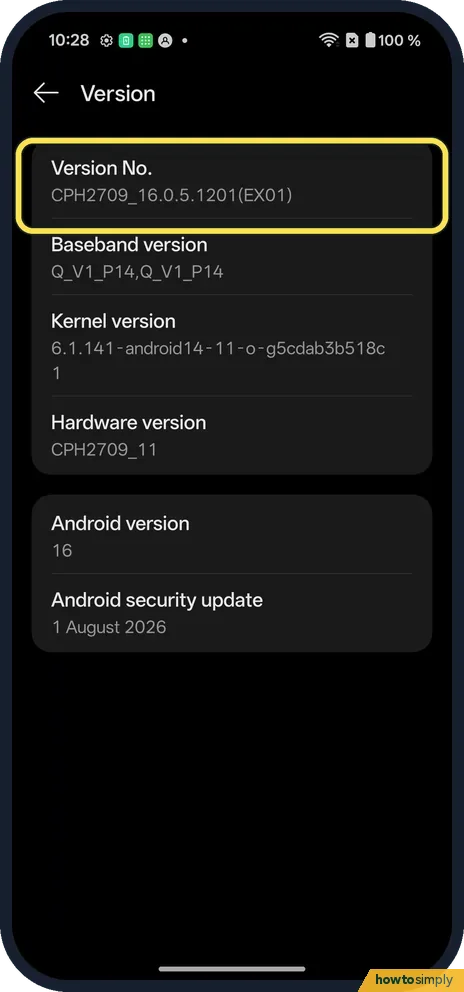
Find Version No.
It is the first row: CPH2709_16.0.5.1201(EX01) on ours before the 18 Oct patch.
- 3
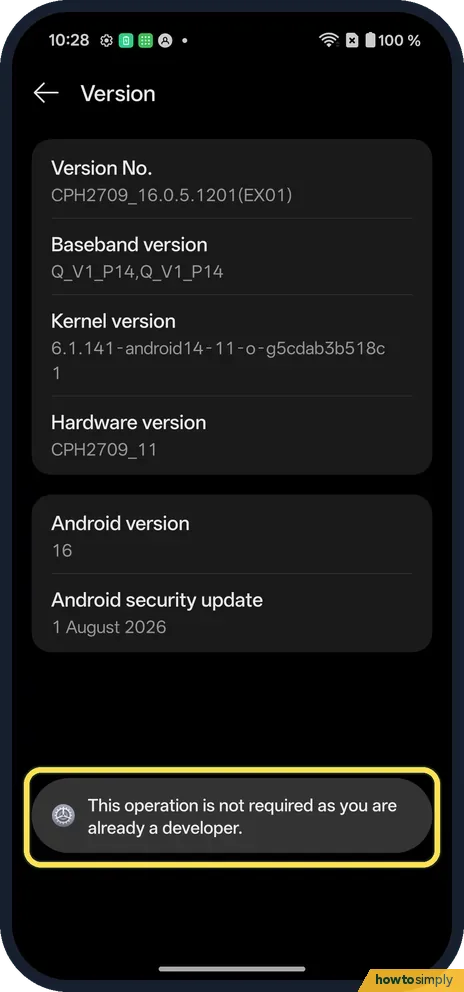
Tap Version No. seven times
Enter your screen lock if asked. Android then says You are now a developer. Ours was already on, so one tap said This operation is not required as you are already a developer.
- 4
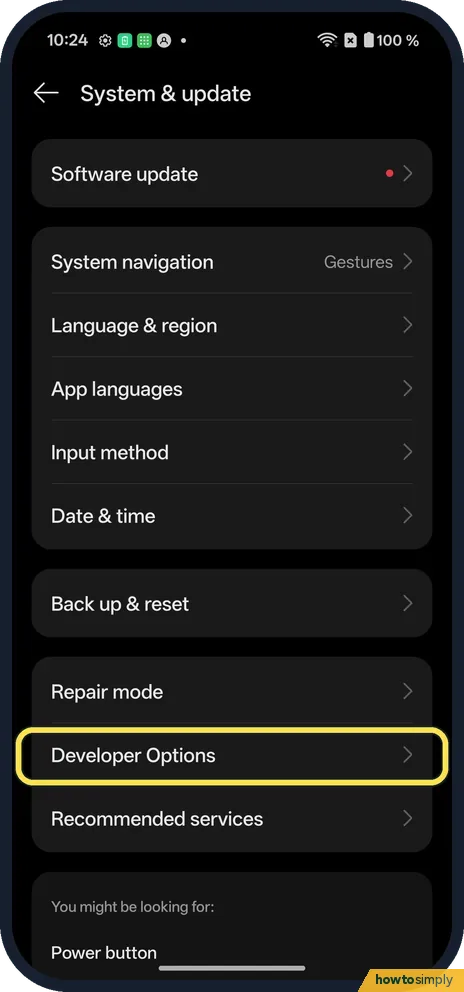
Find Developer Options
Open Settings, System & update. Developer Options is near the bottom.
- 5
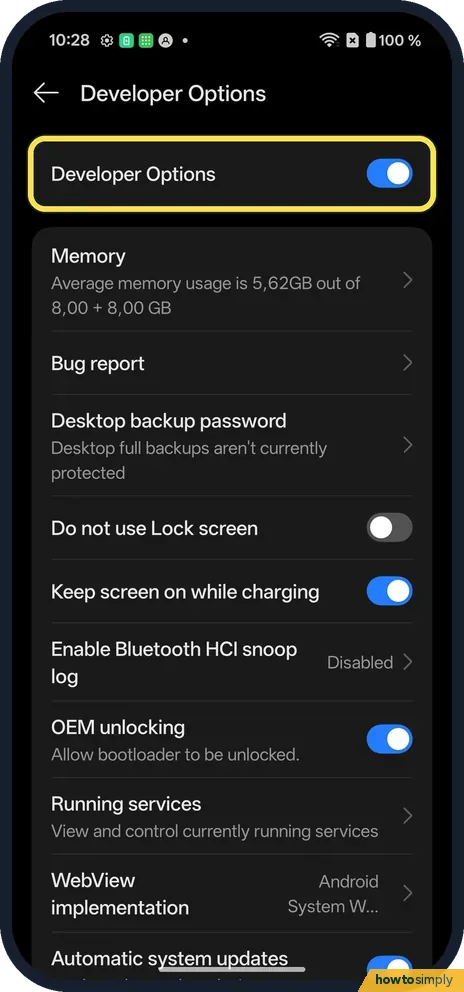
Check Developer Options is on
The switch at the top is on.
If you do not see this option
- No Build number? OxygenOS 16 calls it Version No., under About device, Version. More: IMEI, model and build number.
- Other Android phones? Most use Settings, About phone, Build number. Source: Configure on-device developer options
If this does not work
- Taps do nothing? Tap Version No. itself, quickly, seven times. Version only opens the page.
- Changed a setting by mistake? Developer settings can break things. Switch Developer Options off to stop using them.
- Apps closing or the phone feels odd? Check Don't keep activities and Background process limit in Developer options. Google describes the first as destroying every app screen as soon as you leave it, and the second as limiting how many processes run in the background. Both can make apps reload or lose your place.
- Screen never turns off while charging? Stay awake keeps the screen on while the phone is plugged in. Switch it off if you did not mean to turn it on.
- Computer cannot see the phone for debugging? USB debugging must be on so the phone can talk to the computer through Android Debug Bridge. Google notes the main switch at the top must stay on, because most options are disabled when it is off.
Good to know
Use them to remove animations on a OnePlus.
Turning Developer options on does not change anything by itself; it only adds the menu. Your apps and data are not affected by the menu being visible. When you are done, switch off the main switch at the top of Developer Options; Google says most options are disabled while it is off. For the most common reason people come here, slower or no animations, the accessibility switch is safer than the developer animation scales: remove animations on a OnePlus. Google also notes that on some phones these screens are placed or named differently; on OnePlus the row to tap is Version No., not Build number.
About this guide
- Device
- Android
- Shown on
- OnePlus Nord 5 (CPH2709), OxygenOS 16.0.5.1201, Android 16
- App
- Settings
- Path
- Settings › About device › Version › Version No.
- Real screenshots
- 5 of 5 steps
- Checked
- October 2026
- Sources
- 2 official, linked below
Sources
Links checked October 2026. Menus and features can change with updates.Spotted a mistake? Menus change with updates, and we want every step to match your screen. Email us about this page or use the contact form. We read every report, and fixes are listed on What changed.
Liked this guide?
Follow us for new guides and short how-to videos.
Did this guide work for you?
Sorry about that. What happened?