GOOGLE PIXEL
How to turn on Developer options on a Google Pixel (Android 17)

In short
Go to Settings, About phone and tap Build number seven times. Then go to Settings, System, Developer options. Use developer options at the top turns it all off again.
3 of 3 steps show a real screenshot from our Pixel 10a. Each step was checked against the maker's own instructions, linked at the end.
Steps
- 1
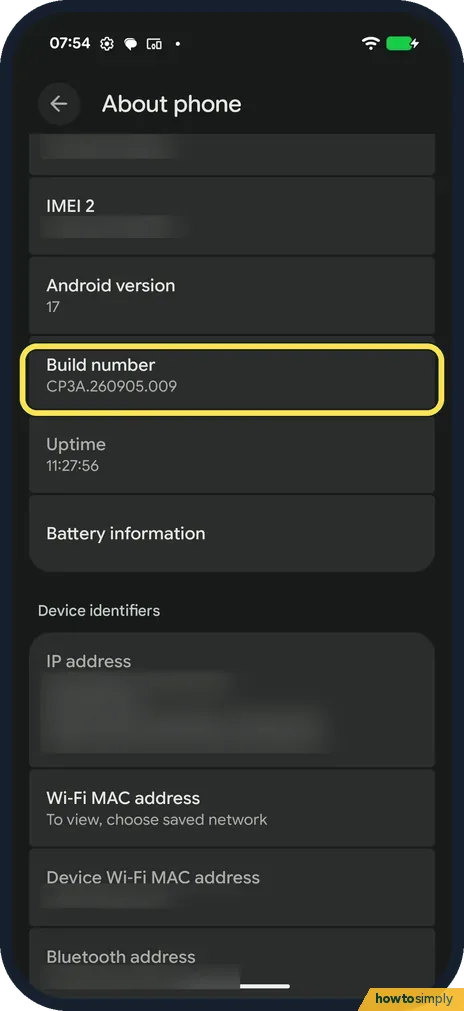
Tap Build number seven times
Go to Settings, About phone. Build number (CP3A.260905.009 on ours) is below Android version, part-way down. Android's instructions say to tap it seven times.
- 2
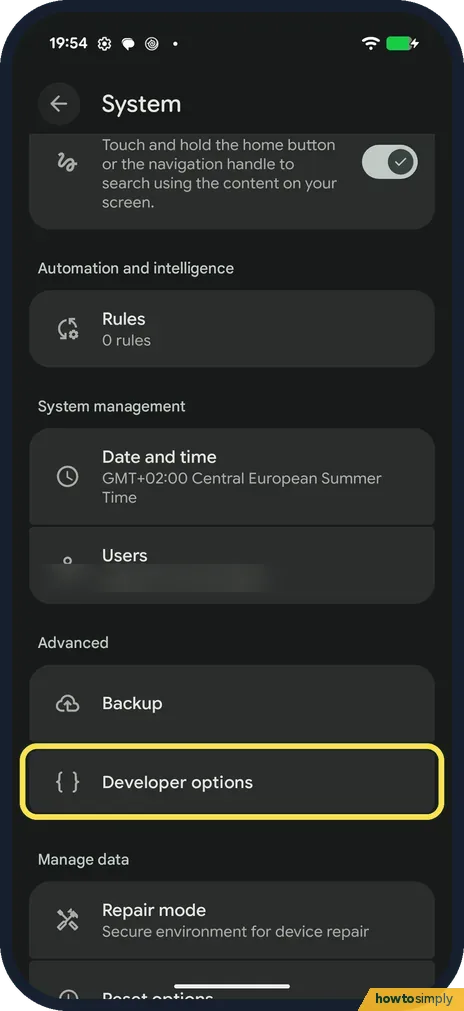
Find it in System
Go back to Settings, System. Developer options is under Advanced, below Backup. Tap it.
- 3
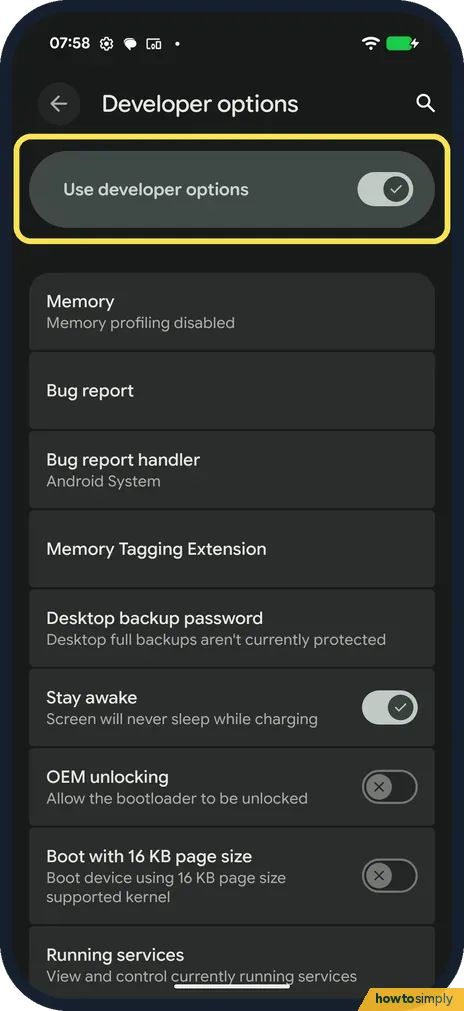
Check the switch
Use developer options is the switch at the top. It was on on ours. Turn it off to hide the settings again.
If you do not see this option
- No Developer options in System? Tap Build number again until the phone says you are a developer, then go back to System. Source: Configure on-device developer options
- Not under Advanced? On ours, Advanced held Backup and Developer options. Search Settings for Developer options if yours differs.
- Developer options greyed out? On a work phone or a child's phone, the organisation or parent can block them. Ask whoever manages the phone.
If this does not work
- Looking for RAM usage? Memory in Developer options said Memory profiling disabled on ours. Enable memory usage profiling was off, so it showed no figures.
- Want to hide it again? Turn off Use developer options at the top of the page.
- No message after seven taps? Android's developer page says you should see You are now a developer. If you don't, keep tapping Build number until the message appears, then go back to the previous screen.
- Phone feels faster or slower after changes? Window animation scale and Transition animation scale change how fast animations run; Android says a lower scale gives a faster speed. Put both back to their default if menus start to look odd.
- Apps keep losing your place? Don't keep activities closes every screen as soon as you leave it, so apps start that screen again instead of returning to where you were. Turn it off unless you are testing an app.
- Screen stays on while charging? Stay awake keeps the screen on while the phone is plugged in. Turn it off if you didn't mean to switch it on.
Good to know
Battery and memory checks: Pixel battery draining fast.
Turning on developer options does not change how the phone works by itself. It only shows the extra page. The phone behaves differently only when you change one of the settings on it.
To put everything back, turn off Use developer options at the top of the page. Android's developer page says that with the switch off, most options are disabled, except those that don't need a computer connected.
If you only wanted to speed up animations or make the phone feel calmer, a simpler route is how to remove animations on a Google Pixel.
About this guide
- Device
- Android
- Shown on
- Google Pixel 10a, Android 17 (build CP3A.260905.009)
- App
- Settings
- Path
- Settings › About phone › Build number
- Real screenshots
- 3 of 3 steps
- Checked
- October 2026
- Sources
- 1 official, linked below
Sources
Links checked October 2026. Menus and features can change with updates.Spotted a mistake? Menus change with updates, and we want every step to match your screen. Email us about this page or use the contact form. We read every report, and fixes are listed on What changed.
Liked this guide?
Follow us for new guides and short how-to videos.
Did this guide work for you?
Sorry about that. What happened?