
howtosimply.com/guides/how-to-turn-on-developer-options-on-an-oppo-phone/ · Checked October 2026 · CPH2689, EEA), ColorOS 16.0.5, Android 16 (build CPH2689_16.0.5.1001(EX01) · OPPO Reno13 5G
In this guide
Open Settings, About device, Version and tap Version No. seven times. Developer Options then shows in Settings, System & update.
6 of 6 steps with real screenshots · 3 official sources below
- Device
- Android
- Shown on
- OPPO Reno13 5G (CPH2689, EEA), ColorOS 16.0.5, Android 16 (build CPH2689_16.0.5.1001(EX01))
- App
- Settings
- Path
- Settings › About device › Version
- Real screenshots
- 6 of 6 steps
- Checked
- October 2026
- Sources
- 3 official, linked below
Step by step
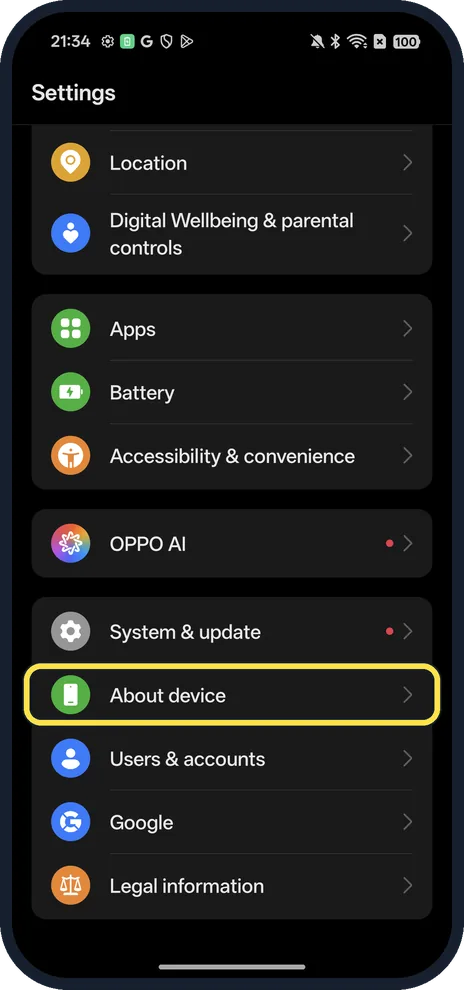
Open About device
Open Settings and scroll near the bottom.
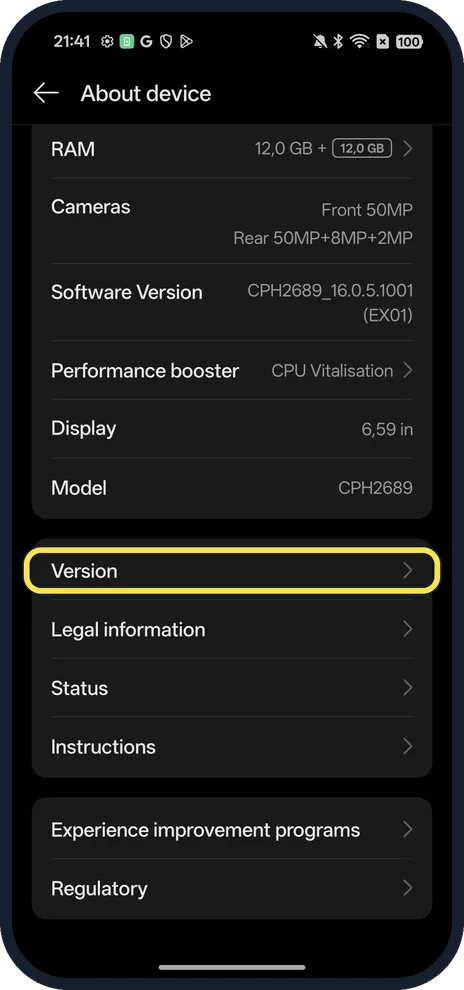
Tap Version
Scroll below the device card.
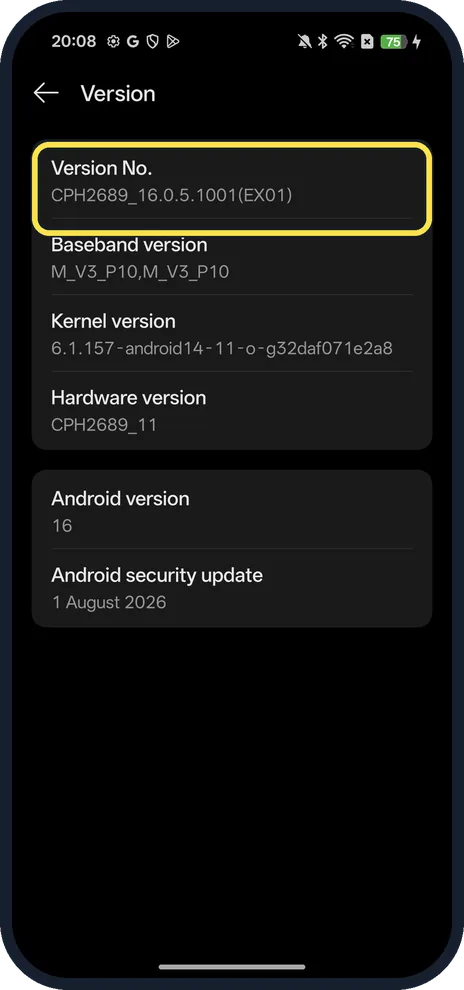
Tap Version No. 7 times
Ours: CPH2689_16.0.5.1001(EX01). Enter your screen lock if asked.
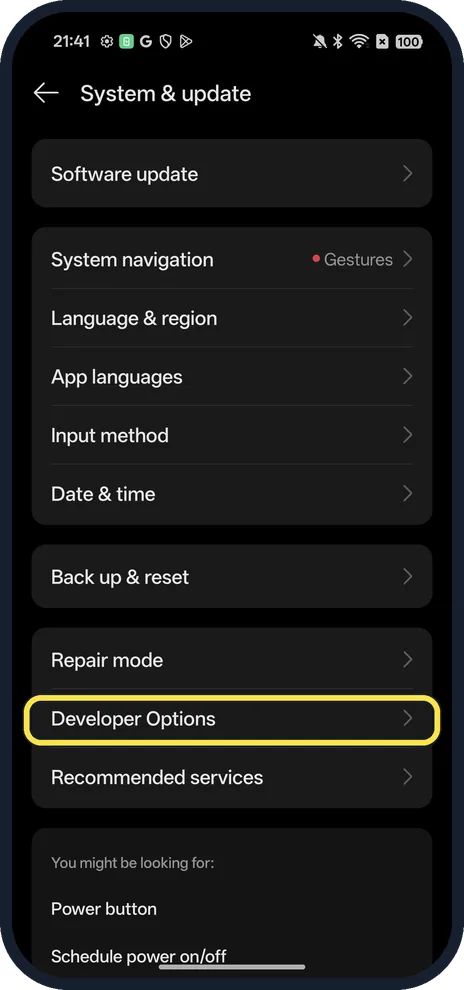
Open System & update, Developer Options
Near the bottom of System & update.
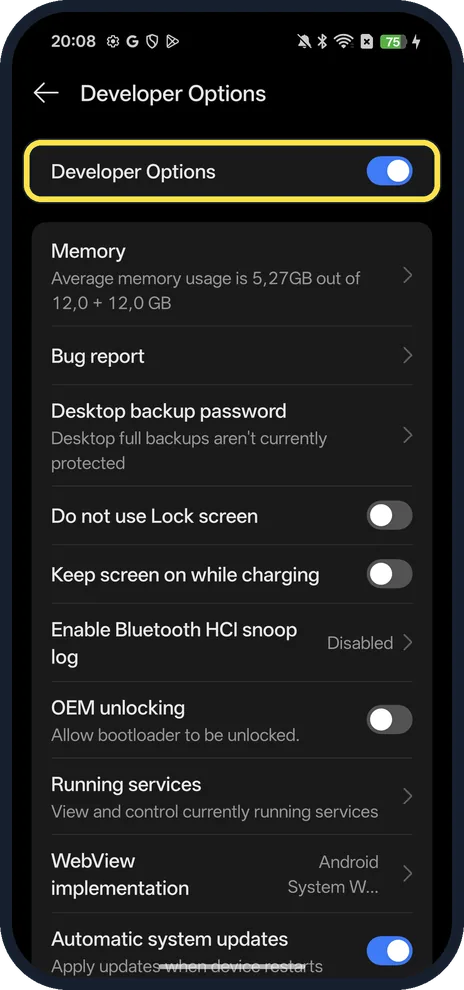
Check the main switch
The Developer Options switch is at the top of the page. USB debugging, the switch most people come for, is further down the list.
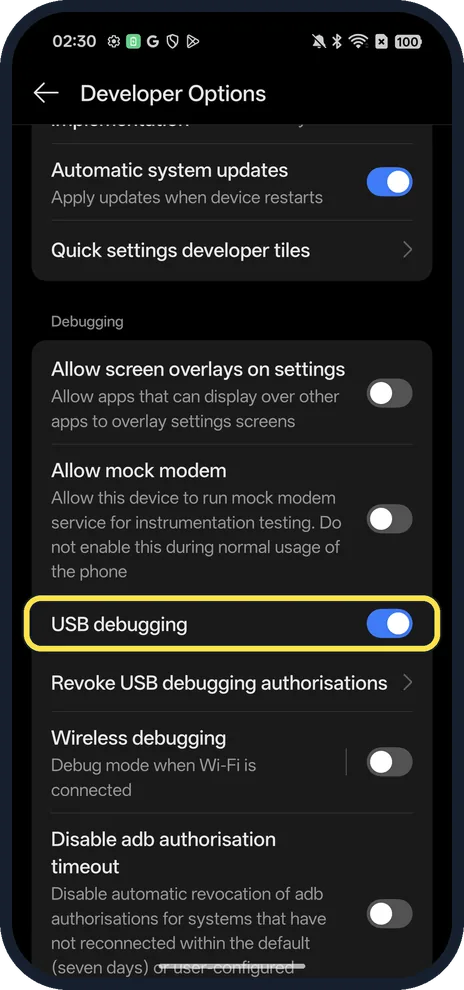
Turn on USB debugging (optional)
Scroll to Debugging. It lets a computer talk to the phone over adb; it was on in ours.
If you do not see this option
- Not under System & update? OPPO says ColorOS 7 to 14 put it under Settings, System settings or Additional settings, Developer options. ColorOS 14.1 and later use System & update, as on our ColorOS 16.0.5. Source: How to Enable Developer Options
- No Version No. row? OPPO's older steps (ColorOS 3.0 to 6.1) tap Version itself 7 times in About phone. Google notes the Build number location varies by maker. Source: How to Enable Developer Options · Source: Configure on-device developer options
If this does not work
- Asked for a password after the taps? OPPO says you must enter your lock screen password before Developer mode turns on. Source: How to Enable Developer Options
- Developer Options switched itself off? OPPO says it turns off automatically when Phone Manager optimises the phone, because it counts as a risk. Check Phone Manager's self-check settings. Source: How to Enable Developer Options
- USB debugging not connecting to a computer? Turn on USB debugging in Developer Options, connect the cable and pick File Transfer on the phone, OPPO says; it also advises turning USB debugging off after use. Source: How to Enable Developer Options · Source: How to Back Up Your OPPO Phone
About this guide
The screenshots are from our OPPO Reno13 5G, the European model CPH2689, with ColorOS 16.0.5 and Android 16 (build CPH2689_16.0.5.1001(EX01)), in Dark mode. Developer Options was already on; we changed nothing in it.
Good to know
Leave OEM unlocking alone: it lets the bootloader be unlocked and is not needed for USB debugging.
Check which build you have: find your OPPO model and ColorOS version.
In short: Settings, About device, Version, tap Version No. 7 times; then System & update, Developer Options.
- OPPO Support: How to Enable Developer Options
- OPPO Support: How to Back Up Your OPPO Phone
- Android Developers: Configure on-device developer options
Links checked in October 2026. Menus and features can change after software updates. These steps match the version named at the top.
Did this guide work for you?
Sorry about that. What happened?