
howtosimply.com/guides/how-to-turn-off-notifications-for-one-app-on-an-honor-phone/ · Checked October 2026 · BRP-NX1M, EEA), MagicOS 10.0, Android 16 (build 10.0.0.169(C430E7R2P1) · HONOR Magic7 Lite
In this guide
Open Settings, Notifications & status bar, scroll to the app under Notifications and turn off Allow notifications.
4 of 4 steps with real screenshots · 4 official sources below
- Device
- Android
- Shown on
- HONOR Magic7 Lite (BRP-NX1M, EEA), MagicOS 10.0, Android 16 (build 10.0.0.169(C430E7R2P1))
- App
- Settings
- Path
- Settings › Notifications & status bar
- Real screenshots
- 4 of 4 steps
- Checked
- October 2026
- Sources
- 4 official, linked below
Step by step
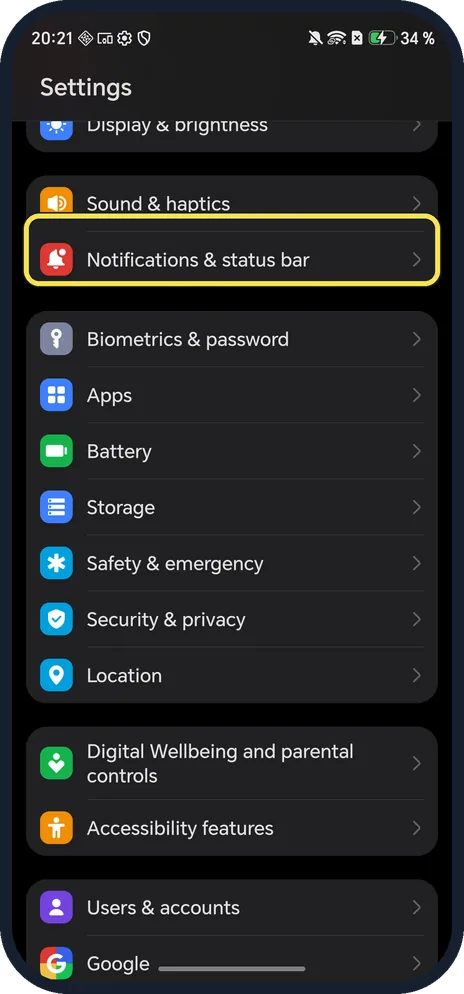
Open Notifications & status bar
Open Settings and tap Notifications & status bar; it is below Sound & haptics.
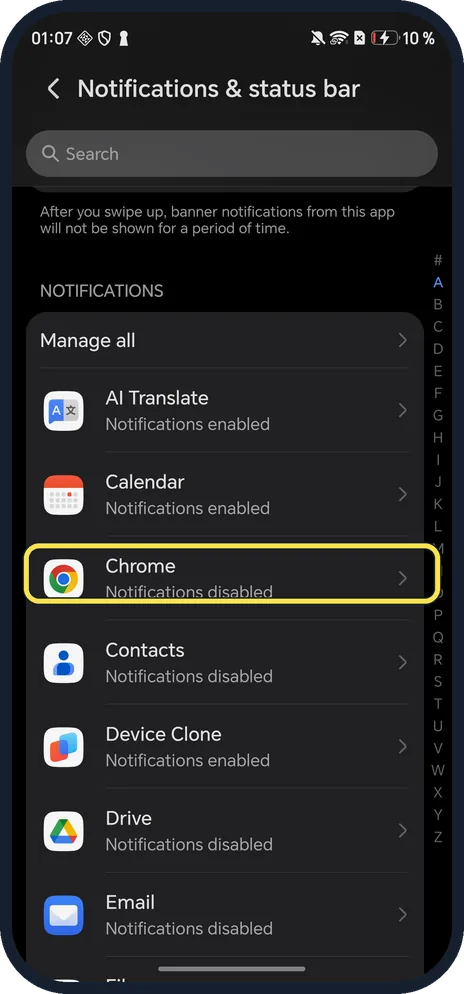
Tap the app
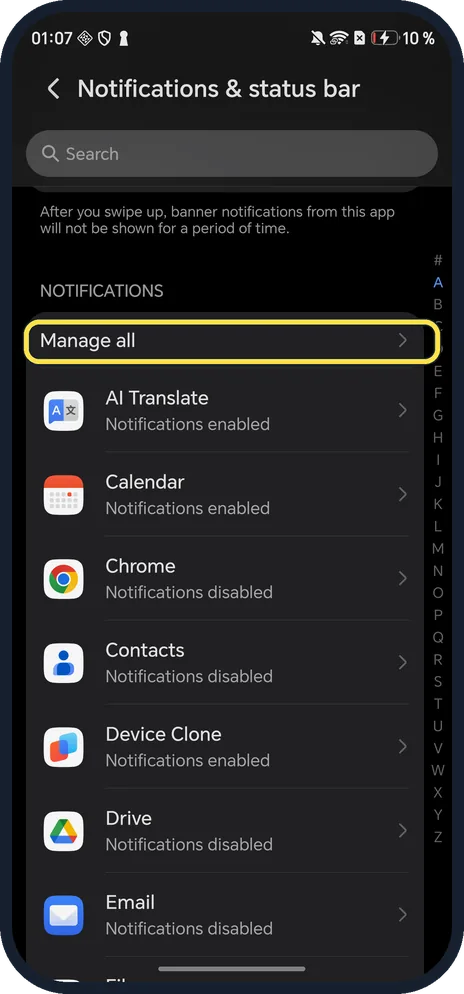
Scroll to Notifications. Each app says Notifications enabled or disabled.
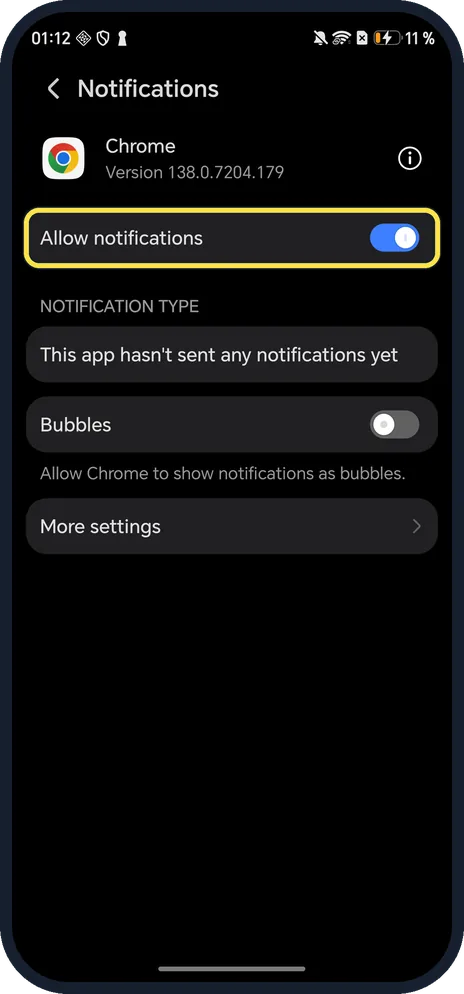
Turn off Allow notifications
The switch at the top. Ours, here turned on, shows Bubbles and More settings below.
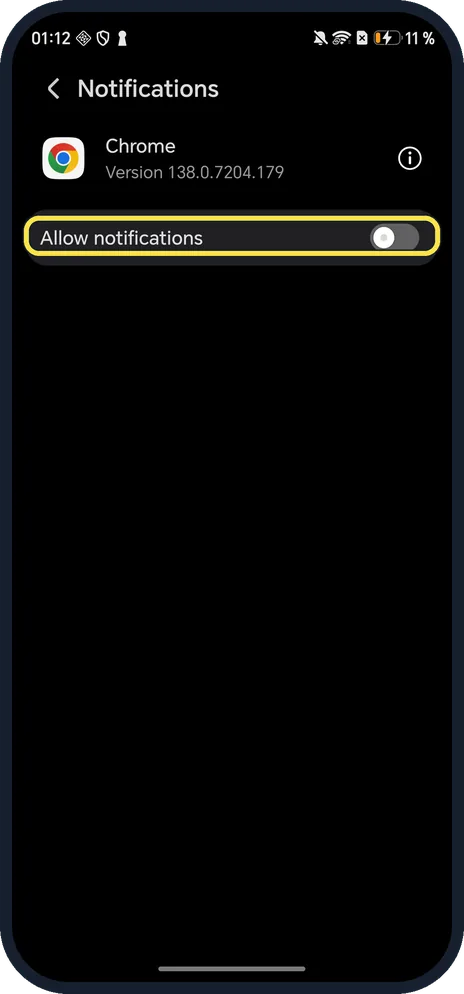
Check it is off
The other options disappear.
If you do not see this option
- Menu called Notifications instead? HONOR's own page for older MagicOS versions uses Settings, Notifications, then the app and Allow notifications. Ours calls the menu Notifications & status bar. Source: Disable App Notifications
- Turn it off from the notification itself? HONOR says you can swipe left on a notification from the app in the notification panel and turn notifications off from there. Source: Disable App Notifications
- Switch won't turn off? HONOR says turning off notifications is unavailable in some apps. For many apps at once, use Manage all at the top of the list. Source: Disable App Notifications
If this does not work
- Still getting alerts from the app? Many apps also have their own notification switch in their settings; HONOR points to it too. Turn it off there as well. Source: Unable to receive notifications from third-party apps
- Alerts still show on your HONOR watch or band? HONOR controls those in the HONOR Health app: Device, Connected devices, Notifications. Source: How to enable and disable notifications (HONOR Health)
- Banners stop for a while after a swipe? The page explains: after you swipe up, banner notifications from that app aren't shown for a period of time.
About this guide
The screenshots are from our HONOR Magic7 Lite, the European model BRP-NX1M, with MagicOS 10.0 and Android 16 (build 10.0.0.169(C430E7R2P1)), in Dark mode. Chrome's notifications were already off on ours; we turned them on for the screenshot and off again.
Good to know
To silence everything, turn on Do Not Disturb.
For live timers at the top, use Magic Capsule.
In short: Settings, Notifications & status bar, app, Allow notifications off.
- HONOR Support (ZA): Disable App Notifications
- HONOR Support (MEA): Unable to receive notifications from third-party apps
- HONOR Support: How to enable and disable notifications (HONOR Health)
- Google Android Help: Control notifications on Android
Links checked in October 2026. Menus and features can change after software updates. These steps match the version named at the top.
Did this guide work for you?
Sorry about that. What happened?