ONEPLUS
How to turn off notifications for one app on a OnePlus

In short
Go to Settings, Notifications & Quick Settings, scroll to App notifications and tap Manage all. Switch off the app. Tap the app instead to keep it on but silent, or to choose Lock screen, Banner and badges.
3 of 3 steps show a real screenshot from our Nord 5. Each step was checked against the maker's own instructions, linked at the end.
Steps
- 1
Open App notifications
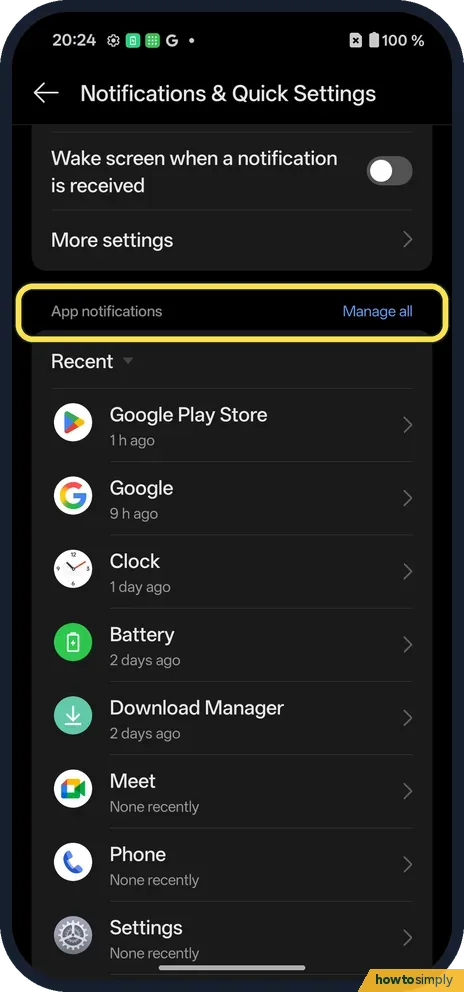
Open Settings, Notifications & Quick Settings and scroll to App notifications. Tap Manage all.
- 2
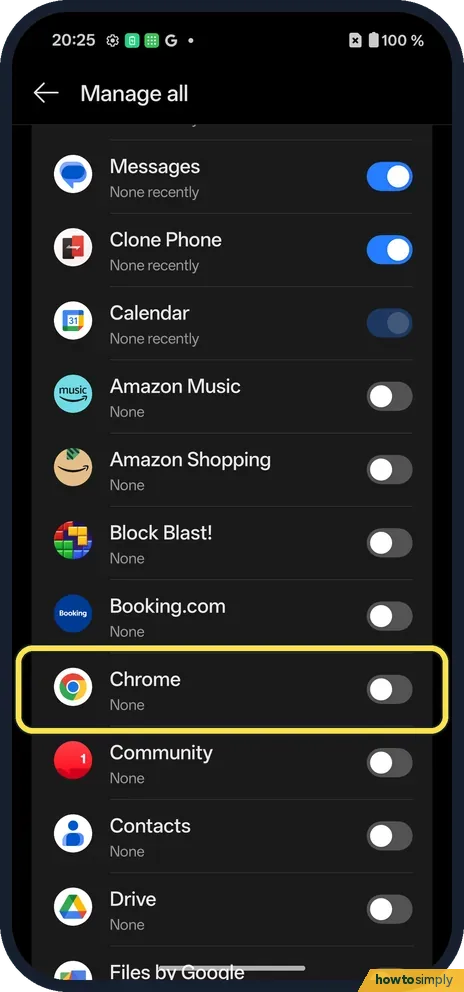
Switch off the app
Each app has a switch. Off means no notifications.
- 3
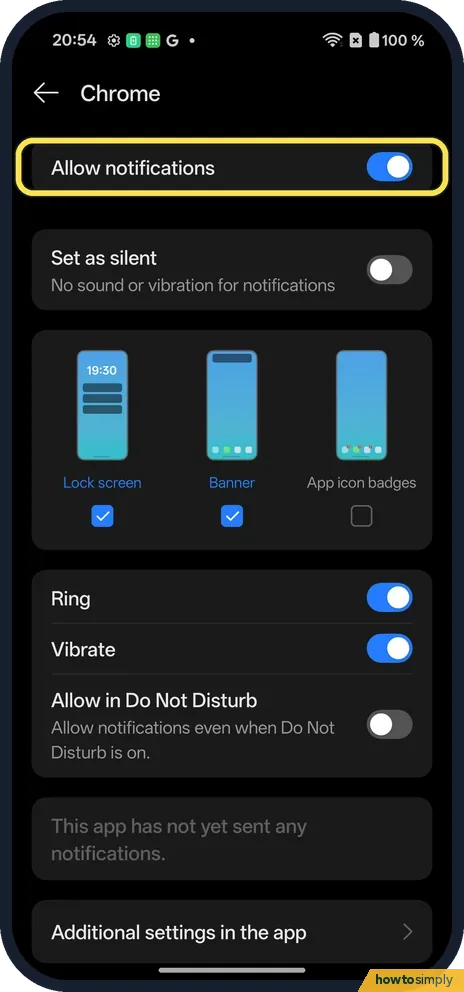
Or tap the app for more
Allow notifications, Set as silent, Lock screen, Banner, App icon badges, Ring, Vibrate and Allow in Do Not Disturb.
If you do not see this option
- Categories? Some apps list types of notification. Chrome had none yet on ours: it said the app has not yet sent any notifications. Source: Control notifications on Android
- Older OxygenOS? OnePlus's OxygenOS 14 manual reaches it from App info, Manage notifications. Source: OxygenOS 14.0 User Manual
If this does not work
- Still getting them? Check Allow notifications is off on the app's page.
- Want them back? Turn the switch on again.
- Noisy app not in the list? The first screen only shows a few apps. Manage all opens the full list. Scroll or search the full list for the app.
- Messages still arrive inside the app? Turning off notifications only stops the alerts. The app still receives messages and shows them when you open it. Many apps also have their own notification switches in their in-app settings, which are worth checking too.
- A notification will not swipe away? Google says some notifications, such as a music player's, can only be cleared once the activity is done. Stop the music or close the task first.
- Do not know which app sent it? Google's Android Help says you can touch and hold a notification in the shade and tap the Settings icon. That opens the settings of the app that sent it.
Good to know
Silence everything for a while: Do Not Disturb.
Force stop an app on a OnePlus.
A switched-off app keeps working in the background and keeps all its data. You simply stop seeing banners, lock screen alerts, badges and sounds from it. Set as silent is the middle ground: Google describes silent notifications as having no sound or vibration while still appearing when you swipe down. To undo either, return to the app in Manage all and turn the switch on or set it back. For a privacy step instead, see hide notifications on the lock screen on a OnePlus.
Fewer alerts can also mean fewer wake-ups for the screen, which helps a little with battery if the app sent many notifications a day.
About this guide
- Device
- Android
- Shown on
- OnePlus Nord 5 (CPH2709), OxygenOS 16.0.5.1201, Android 16
- App
- Settings
- Path
- Settings › Notifications & Quick Settings › App notifications › Manage all
- Real screenshots
- 3 of 3 steps
- Checked
- October 2026
- Sources
- 2 official, linked below
Sources
Links checked October 2026. Menus and features can change with updates.Spotted a mistake? Menus change with updates, and we want every step to match your screen. Email us about this page or use the contact form. We read every report, and fixes are listed on What changed.
Liked this guide?
Follow us for new guides and short how-to videos.
Did this guide work for you?
Sorry about that. What happened?