
What changed: rewritten for One UI 8.5 with our own screenshots. Lock screen notifications moved to a link at the bottom of Lock screen and AOD.
howtosimply.com/guides/samsung-lock-screen-notifications-gone-on-one-ui-8-5-fix/ · Checked October 2026 · Samsung Galaxy A57 5G (SM-A576B), One UI 8.5, Android 16
In this guide
On One UI 8.5 the Lock screen and AOD page has no Notifications row. Tap Lock screen notifications at the bottom of that page, keep Show notifications on, and switch off Show alerting notifications only if silent notifications should appear too.
5 of 5 steps with real screenshots · 2 official sources below
- Device
- Android
- Shown on
- Samsung Galaxy A57 5G (SM-A576B), One UI 8.5, Android 16
- App
- Settings
- Path
- Settings › Lock screen and AOD
- Real screenshots
- 5 of 5 steps
- What we did
- Observed: looked at each screen, changed nothing
- Our phone
- Shown on Galaxy A57, One UI 8.5
- Checked
- October 2026
- Sources
- 2 official, linked below
Step by step
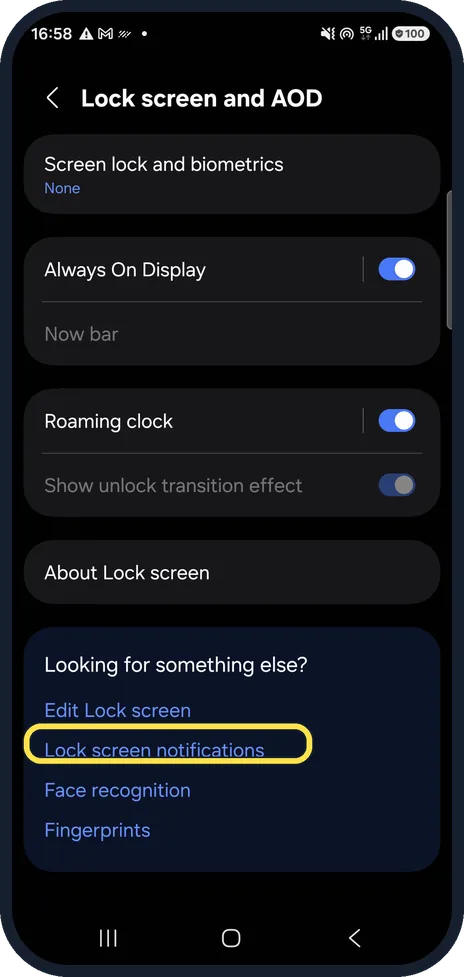
Open Lock screen and AOD
Settings, Lock screen and AOD. There is no Notifications row on this page on One UI 8.5. Scroll to the bottom and tap Lock screen notifications under Looking for something else?.
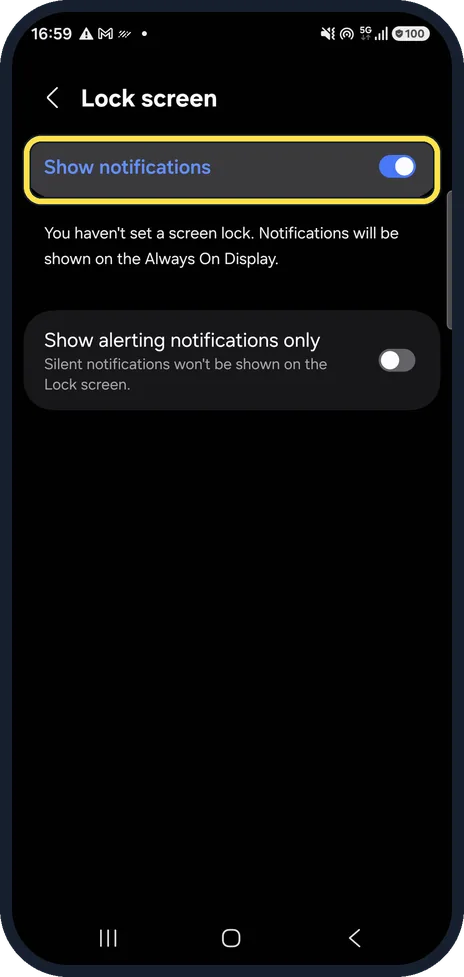
Check Show notifications
This switch decides whether notifications appear on the lock screen at all. It was on on ours.
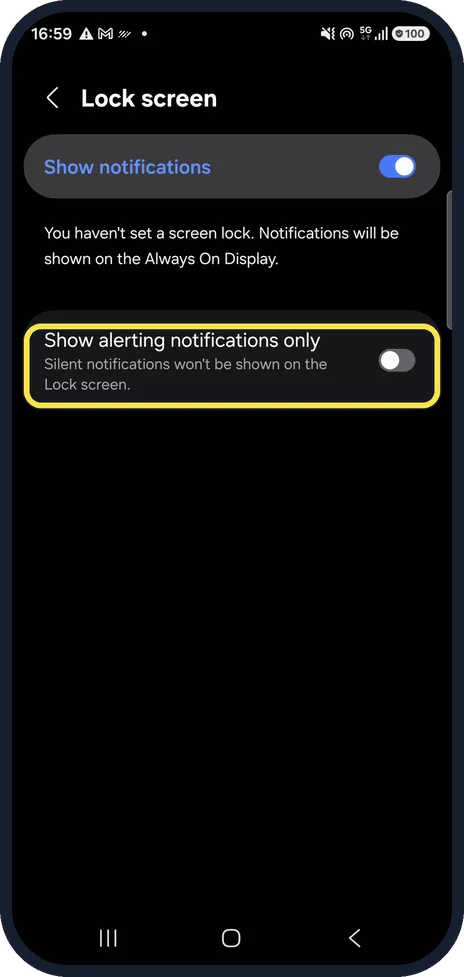
Check Show alerting notifications only
The note under it says it: with this on, silent notifications are not shown on the lock screen. Switch it off if those are the ones you miss. It was off on ours.
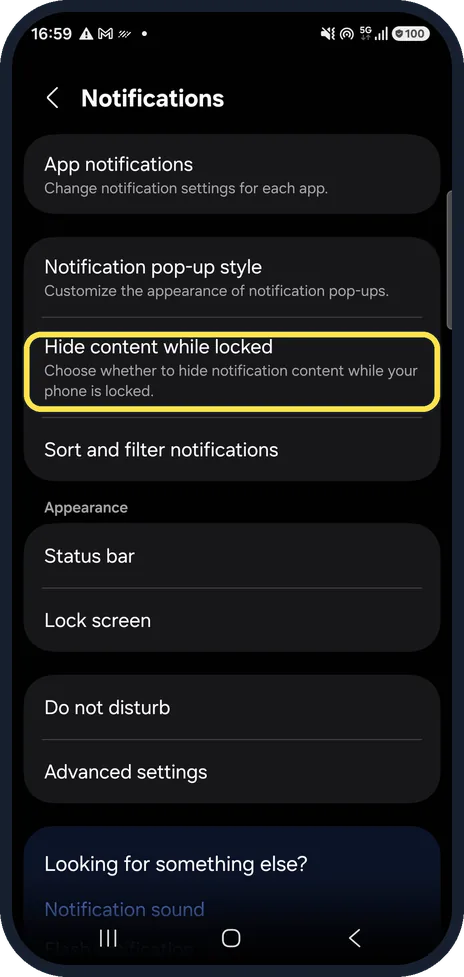
Decide about Hide content while locked
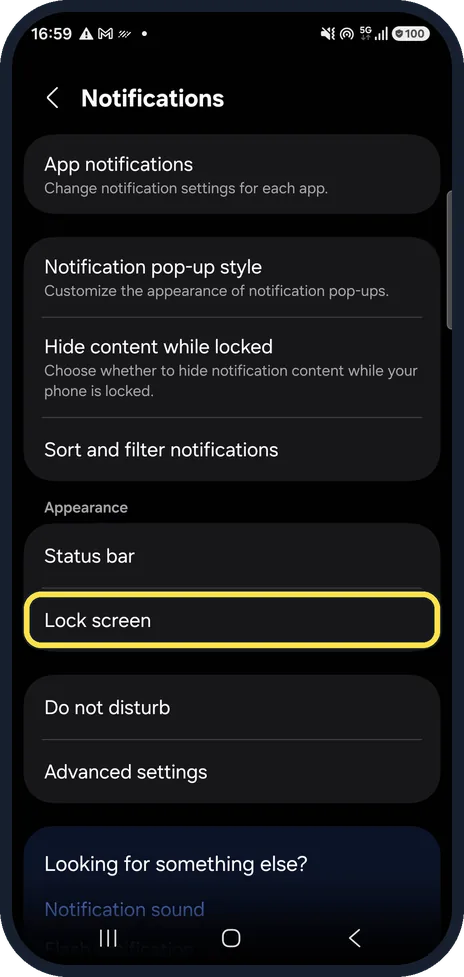
Settings, Notifications. This option chooses whether the content of a notification is hidden while the phone is locked, which keeps message text and codes private.
Know the other way in
Samsung's own guide for One UI 7 gives the path Settings, Notifications, Lock screen notifications. On our One UI 8.5 phone the row on the Notifications page is called Lock screen, under Appearance.
What changed: rewritten for One UI 8.5 with our own screenshots. Lock screen notifications moved to a link at the bottom of Lock screen and AOD.
If you do not see this option
- Your phone is on One UI 7 Samsung's One UI 7 guide gives Settings, Notifications, Lock screen notifications. On our One UI 8.5 phone that row is called Lock screen, under Appearance. Source: Where can I find the lock screen notification settings in One UI 7?
- The page says notifications go to the Always On Display On our phone, with no screen lock set, the Lock screen notifications page said: You haven't set a screen lock. Notifications will be shown on the Always On Display. Set a screen lock to see them on the lock screen.
If this does not work
- Only one app is missing Samsung says that if notifications for an app are turned off, you will not get them. Check Settings, Notifications, App notifications and turn the app back on. Source: Galaxy phone vibration not working when receiving calls or notifications
- Nothing shows at night Samsung says Do not disturb, and modes such as Sleep, can stop notifications. Check Settings, Notifications, Do not disturb, and Settings, Modes and Routines. Source: Galaxy phone vibration not working when receiving calls or notifications
About this guide
After the update, many people look for lock screen notifications where they used to be and do not find them. The settings still exist; the way in changed.
Good to know
Notifications missing everywhere, not only on the lock screen? Samsung Galaxy notifications not showing? 5 settings to check.
Coming late instead? Samsung Galaxy notifications delayed? 6 fixes.
In short: Settings, Lock screen and AOD, Lock screen notifications (bottom link): Show notifications on, Show alerting notifications only off. Hide content: Settings, Notifications.
- Samsung AE: Where can I find the lock screen notification settings in One UI 7?
- Samsung UK: Galaxy phone vibration not working when receiving calls or notifications
Links checked in October 2026. Menus and features can change after software updates. These steps match the version named at the top.
📷 See real photos from the Galaxy A57 in our Camera Lab, next to 10 other phones.
Did this guide work for you?
Sorry about that. What happened?