ONEPLUS
How to turn auto-rotate on or off on a OnePlus (OxygenOS 16)

In short
Swipe down from the top right and tap the Auto-rotate tile. When it is on, the screen turns with the phone. When off, the screen stays upright.
4 of 4 steps show a real screenshot from our Nord 5. Each step was checked against the maker's own instructions, linked at the end.
Steps
- 1
Find the tile
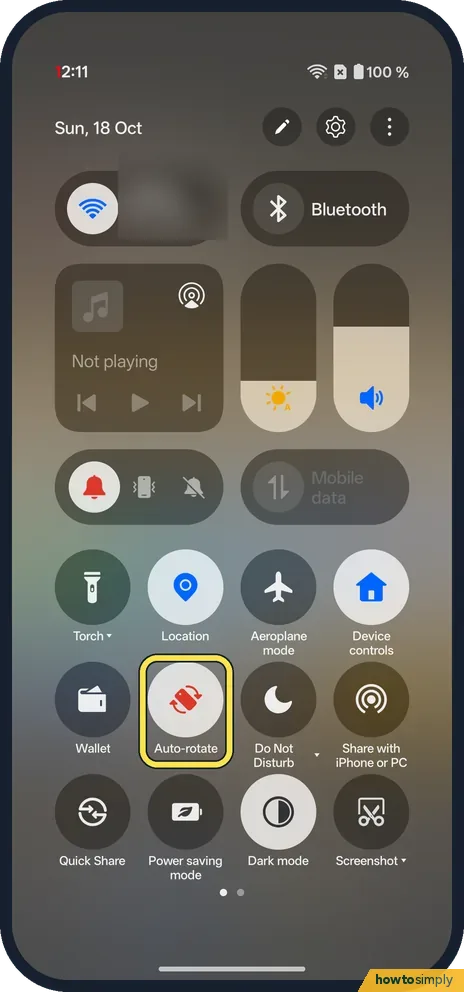
Swipe down from the top right. Auto-rotate is on the second row of round tiles on ours.
- 2
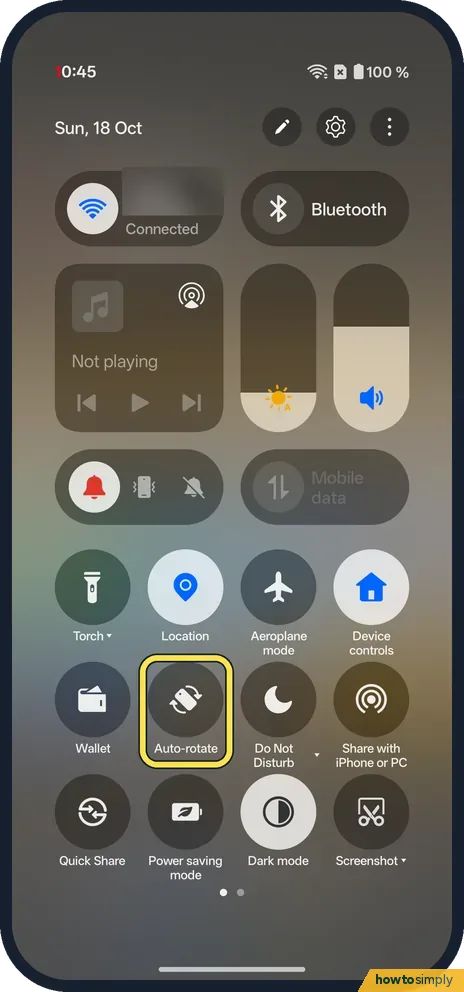
Tap Auto-rotate to turn it off
The tile goes grey. The screen stays upright.
- 3
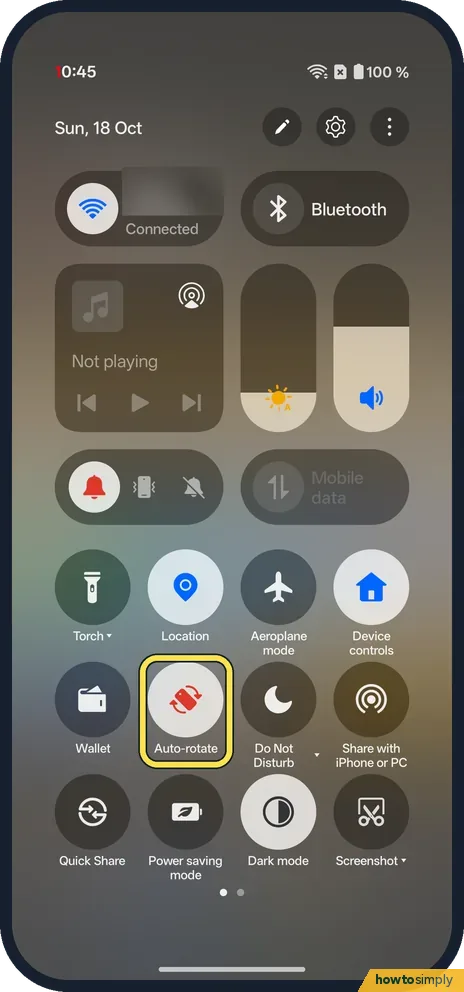
Tap Auto-rotate to turn it on
The tile lights up again.
- 4
Or use Settings
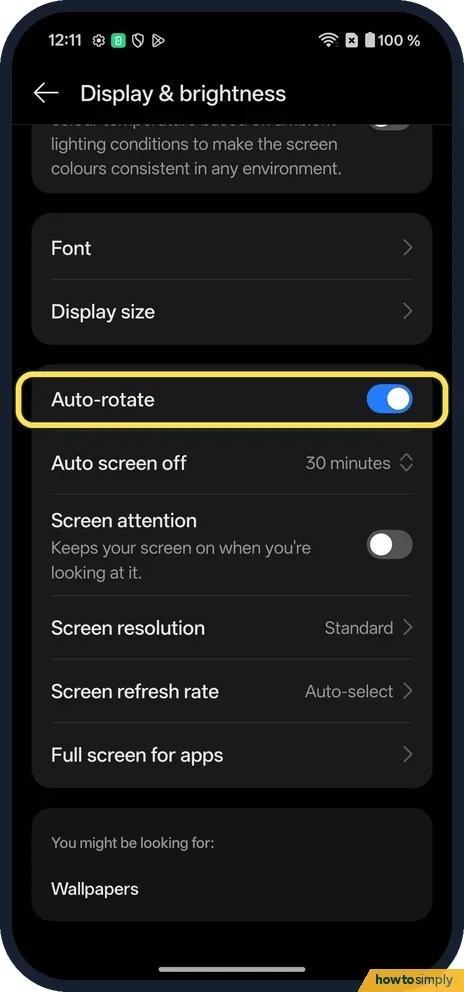
Touch and hold the tile, or open Settings, Display & brightness. The Auto-rotate switch is below Display size.
If you do not see this option
- No tile? Use the switch in Settings, Display & brightness, or add the tile: Quick Settings.
- Search finds it? Searching Settings for rotate found only Auto-rotate under Display & brightness on ours.
If this does not work
- Games still rotate? The OnePlus manual says some apps can still rotate with Auto rotate off. Lock the orientation in Game Assistant.
- Won't turn sideways? Some apps and the home screen stay upright.
- Using TalkBack? Google advises turning auto-rotate off if you use TalkBack, because rotating the screen can interrupt spoken feedback.
- Screen rotates the wrong way or lags? The phone decides orientation from its motion sensors. Hold it upright for a second, then turn it clearly; small tilts are ignored on purpose. If rotation has stopped working in every app, restart the phone before assuming a sensor fault.
- Video turns sideways with the tile off? Like games, many video apps rotate when you tap their own full-screen button, because the app asks for landscape itself. Exit full screen in the app to return to portrait.
Good to know
Change the brightness on a OnePlus.
The change is instant and stays after a restart. With Auto-rotate off, the phone keeps the screen in portrait in most apps, which many people prefer for scrolling and reading. With it on, photos, maps and videos fill a sideways screen when you turn the phone. Neither choice has a noticeable effect on battery. To undo, simply tap the tile again.
The tile is the quickest way to switch, so it is worth keeping it near the start of your Quick Settings if you change it often. The same Display & brightness page also holds settings that affect how a sideways screen looks, such as font size and display size.
About this guide
- Device
- Android
- Shown on
- OnePlus Nord 5 (CPH2709), OxygenOS 16.0.5.1201, Android 16
- Starts in
- Quick Settings
- Real screenshots
- 4 of 4 steps
- Checked
- October 2026
- Sources
- 2 official, linked below
Sources
Links checked October 2026. Menus and features can change with updates.Spotted a mistake? Menus change with updates, and we want every step to match your screen. Email us about this page or use the contact form. We read every report, and fixes are listed on What changed.
Liked this guide?
Follow us for new guides and short how-to videos.
Did this guide work for you?
Sorry about that. What happened?