ONEPLUS
How to turn on Eye Comfort on a OnePlus (OxygenOS 16)

In short
Go to Settings, Display & brightness, Eye Care and turn on Eye Comfort. Smart gives the screen a warm yellow tint; Custom adds a Low to High slider and a Schedule. Bedtime mode, on the same page, warms the screen after sunset.
6 of 6 steps show a real screenshot from our Nord 5. Each step was checked against the maker's own instructions, linked at the end.
Steps
- 1
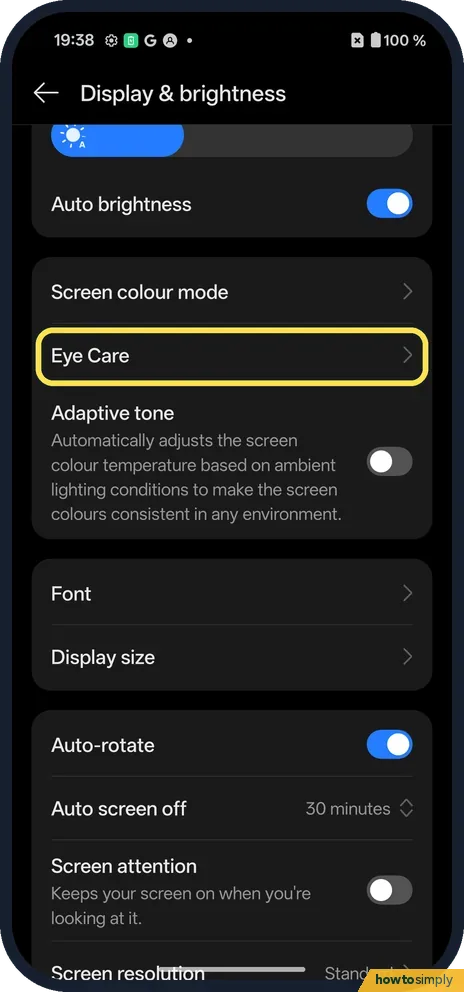
Open Eye Care
Open Settings, tap Display & brightness and scroll down to Eye Care. Tap it.
- 2
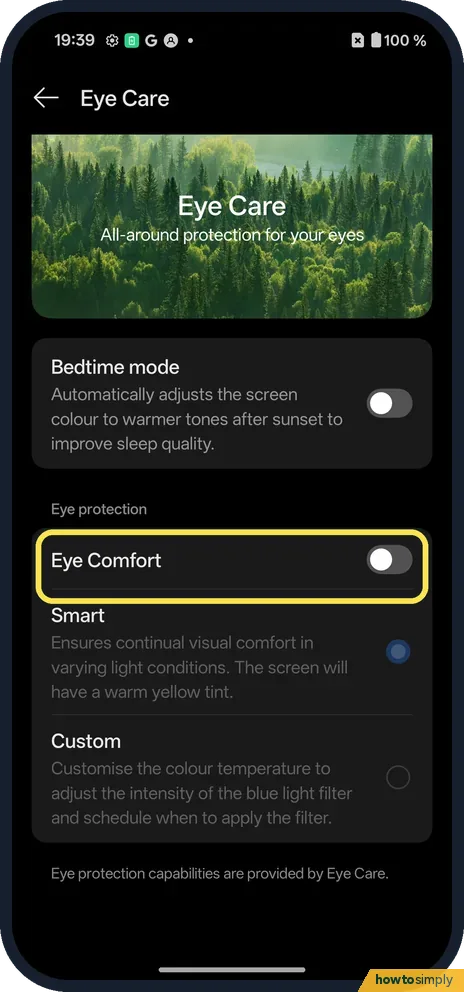
Turn on Eye Comfort
Under Eye protection, tap the Eye Comfort switch. It was off on ours.
- 3
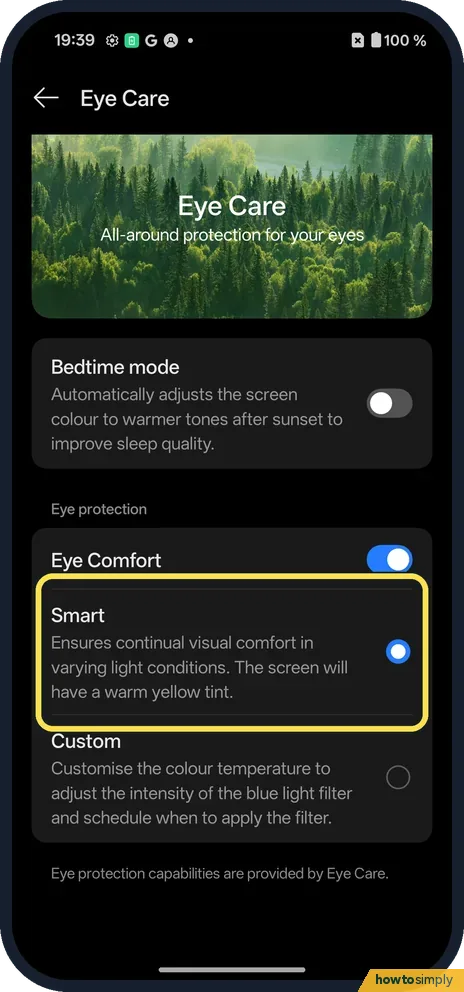
Smart or Custom
Smart was picked on ours: it ensures continual visual comfort, and the screen has a warm yellow tint.
- 4
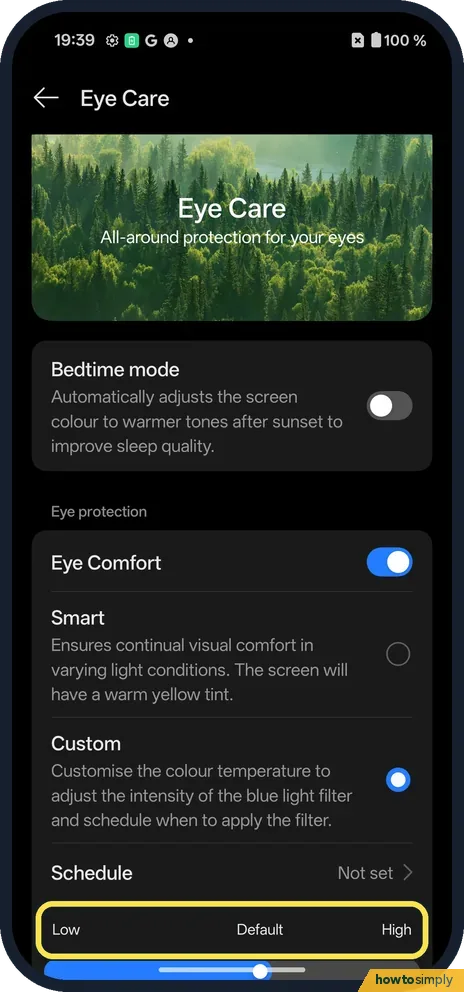
Custom: set the strength
Tap Custom to get a slider from Low to High. It sets the colour temperature and the strength of the blue light filter.
- 5
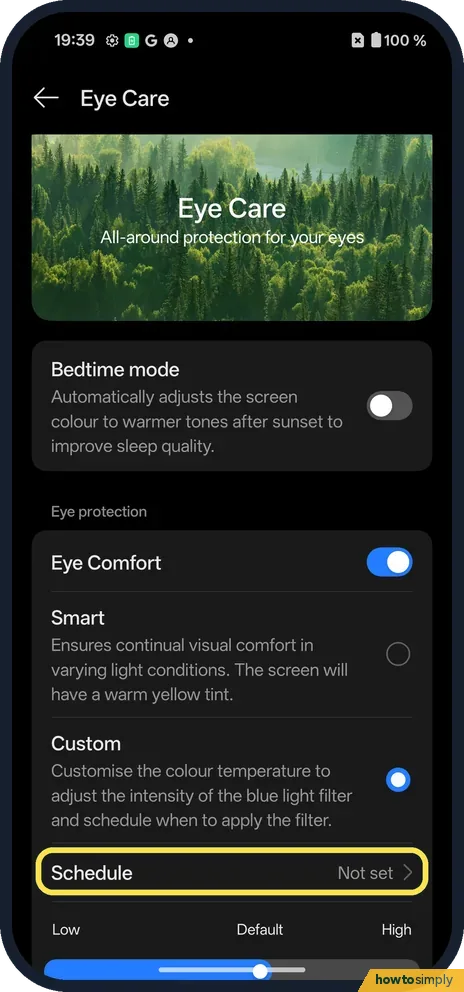
Custom: Schedule
Custom also adds Schedule, which said Not set on ours. Tap it.
- 6
Turn on Scheduled
The Schedule page has one switch, Scheduled. Turn it on to pick the times. We left it off.

If you do not see this option
- Quick on and off? OnePlus says you can tap the Eye Comfort icon in Quick Settings. Swipe down from the top twice to see all the tiles. Source: OxygenOS 14.0 User Manual
- Older OxygenOS? OnePlus's OxygenOS 14 manual puts it at Settings, Display & brightness, Eye Comfort. On our OxygenOS 16 phone, Eye Comfort is a switch on the Eye Care page. Source: OxygenOS 14.0 User Manual
- Can't find Eye Care? Search Settings for Eye and tap the Eye Comfort result.
If this does not work
- Screen looks too yellow? Choose Custom and move the slider towards Low.
- Schedule missing? It only shows with Custom picked, not Smart.
- Only want it at night? Bedtime mode, at the top of Eye Care, adjusts the screen colour to warmer tones after sunset. It was off on ours.
- Prefer a darker screen too? Dark mode is separate: Dark mode and its styles.
- Want the slider without opening Settings? OnePlus's manual says touching and holding an icon in Quick Settings opens that feature's settings. Touch and hold the Eye Comfort tile to jump straight to its page.
- Schedule set but nothing happens? Check that Custom is still picked, the Scheduled switch is on and the start and end times are right. Picking Smart again hides the schedule.
Good to know
Change screen colours: screen colour and refresh rate.
On a Pixel: Night Light.
OnePlus's manual says Eye Comfort reduces the blue light from the screen to help prevent eye strain during long use. It only changes the colour of the display. Apps, notifications and brightness work as before, and turning the switch off restores the normal colours at once. To get back to how ours started, set Smart and turn Eye Comfort off.
Eye Comfort and Dark mode do different jobs and can be on together: one warms the colours, the other turns light backgrounds dark. Bedtime mode on the same page is a third option that only warms the screen after sunset. For other colour settings, see turn on colour correction or greyscale on a OnePlus.
About this guide
- Device
- Android
- Shown on
- OnePlus Nord 5 (CPH2709), OxygenOS 16.0.5.1201, Android 16
- App
- Settings
- Path
- Settings › Display & brightness › Eye Care
- Real screenshots
- 6 of 6 steps
- Checked
- October 2026
- Sources
- 1 official, linked below
Sources
Links checked October 2026. Menus and features can change with updates.Spotted a mistake? Menus change with updates, and we want every step to match your screen. Email us about this page or use the contact form. We read every report, and fixes are listed on What changed.
Liked this guide?
Follow us for new guides and short how-to videos.
Did this guide work for you?
Sorry about that. What happened?